Search  for anything...

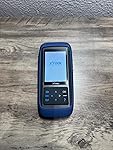
XTOOL TP150 TPMS Programming Tool, Universal TPMS Relearn/Reset/Activate Tool(315/433MHz), Tire Sensor Programmer for XTOOL TS100 Only, Tire Pressure Monitoring System Diagnostic Tool

  • Based on 0 reviews
Condition: New
Checking for the best price...
$126.64 Why this price?
New Year Deal · 20% off was $159.00

Buy Now, Pay Later


As low as $21.11 / mo
  • – 6-month term
  • – No impact on credit
  • – Instant approval decision
  • – Secure and straightforward checkout

Ready to go? Add this product to your cart and select a plan during checkout.

Payment plans are offered through our trusted finance partners Klarna, Affirm, Afterpay, Apple Pay, and PayTomorrow. No-credit-needed leasing options through Acima may also be available at checkout.

Learn more about financing & leasing here.

Free shipping on this product

FREE 30-day refund/replacement

To qualify for a full refund, items must be returned in their original, unused condition. If an item is returned in a used, damaged, or materially different state, you may be granted a partial refund.

To initiate a return, please visit our Returns Center.

View our full returns policy here.


Availability: In Stock.
Fulfilled by Amazon

Arrives Saturday, Jan 31
Order within 6 hours and 35 minutes
Available payment plans shown during checkout

Protection Plan Protect Your Purchase
Checking for protection plans...

Features

  • Warm Note: 1.TP150 tpms tool is not for all sensors, but only works for pre-programmed sensors or XTOOL TS100/ TS100 PRO sensors. 2. Need to update the TP150 tire pressure sensor reset tool but shows system configuration error? Please follow the user maual first install "TP200 software" from xtooltech, and connect TP150 with Windows PC(ios cannot be supported), go "settings About" to check the SN and pasword required, and click the TP150 disk and the mouse right button to format it and then upload the software again. Any issue you can find XTOOL for help
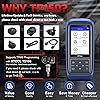
  • Why Should You Choose XTOOL TP150: Are you considering which one is better? Undoubtedly, XTOOL TP150 is your ideal choice especially those serve for multiple cars or families! It's the most cost-effective & easy to use with ALL TPMS Services for both DIYers or Tire shops, (some others do not support OBD Relearn/Programming), save your time, effort, and money from mechanics! With high-quality and broad vehicles coverage, solves tire issues in minutes, replaces winter/summer sensors, ensures the safety and efficiency of TPMS system, which makes it a must-have TPMS Tire Pressure Monitor System Tool. Please check compatibility before purchase
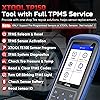
  • Professional One-stop TPMS Scan Tool with Top Full Services: Please note that it ONLY Works for programmed OE/aftermarket sensors or XTOOL Sensors. XTOOL TP150 is an affordable and portable TPMS relearn tool/activate tool, XTOOL TS100 PRO tps sensor programmer for almost all global vehicles. It also packs TPMS health diagnose, read real-time sensor info: sensor ID/tire pressure/temperature/battery status/frequency; check OE part number, diagnoses to read/clear DTCs and turn off annoying TPMS warning light after specific repairing, and also a cost-effective way to replace broken OE/aftermarket sensors, ensure a safe driving. Any issue, check with XTOOL for help
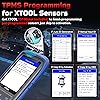
  • TPMS Programming for XTOOL Sensor Only: NOTE: TP150 TPMS sensor programmer cannot program other brand sensors. Please get XTOOL TS100 Pro together or pre-programmed sensors. XTOOL TP150 tmps tire pressure sensor programming tool can replace broken sensors by programming XTOOL sensors into your car in 4 methods:1-Auto ID Generation, 2-Manual Input ID, 3-Copy ID by Activation, 4-Copy ID by OBD. Enables you to get the tire sensors programmed and avoid the hassle from dealership or repair shops, save time and money. What a perfect OE sensor replacement solution tool in better price
  • TPMS Sensor Activation Tool for 99% Cars: XTOOL TP150 can trigger almost all programmed 315/433MHz sensors in market with right OE part number, provides you the instructions after selecting the correct make, model and year. Allow you to retrieve the info accurately and quickly: sensor ID, pressure, temperature, battery status(only normal or abnormal), frequency while activating. No need to purchase separate activation tool. Please check compatibility with VIN and sensor number
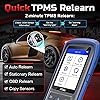
  • TPMS Reset Tool for All Cars: Works as a professional Tire sensor reset tool, XTOOL TP150 offers 4 ways to relearn 99% TPMS sensors: OBD Relearn, Stationary Relearn, Manual Relearn, Copy Relearn, provides online relearning procedure for most American, Asian and European vehicles equipped with TPMS. Help to save money for drivers who owns multiple cars and get a tire issue fast solved for tire shops. Note: Some vehicles can automatically relearn after driving 20 minutes, please check from vehicle manual. If sensors have issues. it will be not reset successfully
  • Complete TPMS System Diagnostics & Turn off TPMS Light: Note: Please activate the sensors before reading info, otherwise it cannot work. XTOOL TP150 tpms sensor tool & tpms sensor reader will read real-time sensor data, diagnose TPMS system for comprehensive TPMS health check in minutes, and read/clear TPMS DTCs to quickly locate the problems, deflation in the tires; Scan TPMS sensor ID, check sensor position, frequency, battery status to determine when it should be replaced and ensure the tire health, helps to turn off blinking TPMS light; Works as your TPMS scanner/tps doctor
  • Broad Vehicle Coverage with 13 Languages: XTOOL TP150 TPSM tire sensor Tool covers for American cars including for GMC/for Buick/for Chevy/for Cadillac/for Buick/for Ford/for Lincoln/for Dodge/for Jeep/for Chrysler, etc; European cars including for Bentley/for VW/for Skoda/for Porsche/for Opel/for Vauxhall/for Fiat/for Peugeot/for Citroen/for Volvo/for BMW/for Mini/for Land Rover/for Renault, etc; Asian cars including for Mazda/for Toyota/for Lexus/for Nissan/for Acura/for Subaru/for Honda/for Mitsubishi/for Infinity, etc. NOTE: ONLY works for 12V OBD2 vehicles, please check compatibility from "Supports-Function Lists-TPMS"on xtooltech webs!te before purchase
  • TPMS Relearn Tool for GM from 1996-2024: for Buick Allure 2006-2015, for Cascada 2016-2020, for Century 1999-2005, for Enclave/for Equinox 2007-2024, for Encore 2013-2024, etc. for Chevrolet Avalanche 2004-2013, for Camaro 2009-2024, for Silverado 2000-2024, etc. for GMC/for Opel/for Cadillac, etc. TPMS Relearn Tool for Ford from 1996-2024: for E-Series 2007-2024, for F-Series 2006-2024, for F150, for F250, for Edge, for Escape, for Focus, for Mustang, for Fusion, for Expedition, for Explorer, for Transit, for Lincoln, for Mercury, for Mazda, etc. Sensors should be original OEM sensors which well programmed or choose XTOOL Sensors
  • TPMS Relearn Tool for Toyota from 1996-2024: for 4 Runner 2003-2024, for 86 2012-2023, for Allion 2019-2024, for Alphard 2015-2024, for Avalon 2006-2024, for Toyota Camry 2004-2024, for Toyota Corolla 2002-2024, for FJ Cruiser, for FR-S, for GR 86, for Highlander, for Tacoma, for Tundra, for Prius, for Sienna, etc. Sensors should be original OEM sensors which well programmed or choose XTOOL Sensors

Brand: XTOOL


Power Source: Battery Powered


Screen Size: 4 Inches


Automotive Fit Type: Universal Fit


UPC:


Product Dimensions: ‎12.6 x 8.66 x 4.33 inches


Item Weight: ‎2.25 pounds


Manufacturer: ‎XTOOL


Item model number: ‎TP150


Batteries: ‎1 Lithium Polymer batteries required. (included)


Date First Available: ‎December 14, 2022


Frequently asked questions

If you place your order now, the estimated arrival date for this product is: Saturday, Jan 31

Yes, absolutely! You may return this product for a full refund within 30 days of receiving it.

To initiate a return, please visit our Returns Center.

View our full returns policy here.

  • Klarna Financing
  • Affirm Pay in 4
  • Affirm Financing
  • Afterpay Financing
  • PayTomorrow Financing
  • Financing through Apple Pay
Leasing options through Acima may also be available during checkout.

Learn more about financing & leasing here.

Top Amazon Reviews


  • After a lot of research, I found this to be the best bang for the buck!
I currently have 4 cars in our family, all of which I provide maintenance and repair on, among many others that belong to friends and family. The one thing that I have not messed with up until now, were the TPMS sensors. The most I could do was to test the sensors with a scan tool and attempt to reset them. However, once they have failed, there is no resetting. More than likely, the battery is dead and all you can do is replace the sensors. I decided to eventually take on this job myself as I have access to tire changing equipment. But my primary concern at this time is to purchase a reasonably priced tool that would provide the ability to access TMPS data and provide additional functionality moving forward. When I purchase diagnostic equipment, I like to be somewhat future proof as much as possible. I also wanted a product that I could use in conjunction with my high-end scanner, which happens to be an Xtool (D9). Although I have had excellent experiences with Xtool products and customer service, I am completely open to purchasing from another company if it would best meet my needs, without a doubt. It just so happens that the Xtool product line continues to offer the best balance in value, customer service and capabilities, so I decided to try this product as well. I knew, based on experience, that if I had a problem, or any questions they would work with me to resolve them! So, as indicated, I as always, did a lot of research and found The Xtool TP-150 to be hands-down the most affordable and functional TPMS scanner/programmer in its class. I didn’t want to spend a lot of money on a TPMS scan tool, so I decided to purchase the Xtool product. The TP-150 comes in a compact cardboard storage box. It has a solid rubber case for protection that is also removable. This is a great feature that is robust enough to prevent damage if you were to accidentally drop the unit. The first step each time you use the device in my opinion, is to check for and complete any software updates. You can do this either by connecting the device to a computer through a USB port, or via wifi. It is much easier and more convenient to connect to wifi for any current and future updates that may be available. One of the features that attracted me to this Xtool device is that it offers lifetime (COST-FREE) updates! Some companies charge a fee. The TP-150 supports several regions and multiple car brands both domestic U.S. and other countries along with multiple languages. It has an audible beeper that is optional and can be deactivated. I chose to keep mine activated as it helps with testing to hear the noise prompts throughout the process. It also has an optional auto-power setting that can be deactivated or set at ranges from 3, 5, and 10 (minutes), or to not automatically shut off. I found the no shut off option to be more feasible for my usage. I’ll just need to remember to turn it off manually after I’m finished! Here is a rundown of the device’s features. Xtool TP-150 supports (5) different functions: Check: Allows you to check each tire by prompting you to walk around the vehicle and point the device at each valve stem, which is where the TMPS sensor is mounted. It provides a visual display of each tire location which makes the process fun and easy. The results display the sensor’s data, current tire pressure and the current battery life which is extremely helpful information to know. Diagnosis: This feature allows the device to connect to the vehicle through the OBD-2 port and scan the ECU (car’s computer) for any error codes. It provides the sensor ID, tire pressure reading, temperature and power to the sensors. You can also clear the TPMS error code that appears on your dashboard. Programming: Is a feature that allows you to clone your current sensors that need to be replaced and write the data to Xtool’s (TS-100) sensors. It will not allow you to program any other manufacturer’s sensor, however I found that the Xtool sensors are among the lowest priced dual frequency sensors available on the market. I was happy to find that this feature has (4) programming methods that cover every possible scenario. Relearning: Is only used for vehicles that require it and when you are needing to replace multiple sensors, or during tire rotation. Once the sensors are installed on the rims and mounted on the car, the Relearn function captures the data for all sensors as you walk around the vehicle, and stores this information based on the tire location. You can then connect to the vehicles OBD2 port and write the new sensor data to the vehicle’s ECU. Activating: This feature is very helpful if you choose to use universal aftermarket sensors, or OEM sensors that require a (relearning) process. It allows the TP-150 to capture the original sensor’s data and transfer it to the new sensor. This seems to work best if the tire locations have not changed. Sensor Information: Is a very useful feature that allows you to view the the sensor specification that are specific to your vehicle. This includes both OEM and Xtool (TP-100) sensor information. There is also a Recent Test feature that stores any vehicles that you have recently tested. This prevents you from having to conduct another vehicle search. In testing my various vehicles, I decided to compare the results with what I received with the Xtool D9 scanner, and the information was in alignment with the scanners diagnostic report as expected. In addition, the TP-150 provides the current tire pressure reading, and level of battery life available. I found that for my son’s Honda Accord, it showed that the right-side front TPMS sensor was at the end of its lifespan and will need to be replaced in the near future, although the other (3) were still good. With the late model Mercedes, I found that all sensors were functioning and that the battery life was optimal as well.. One of the features that I/you would likely use most often, would be having the ability to use this device to quicky check the tire pressure on each wheel. It is much easier than using a tire pressure gauge! I also found that you are not required to use the Xtool TP-100 sensors unless you are (programming) new sensors. You can still use universal and (OEM) sensors by using the device’s Activation feature. I would certainly recommend this product to do it yourself, as well as professional technicians. I have found it to be of high quality, and very useful. ... show more
Reviewed in the United States on October 5, 2024 by Nick

  • Must Have!!!
The TP150, is a great tool to have, very accurate, easy to use and understand, small manageable design, excellent compatibility, and easy to update software when needed. I replace a TMPS Sensor and needed to do the relearn process, at this point I did not have the TP150, I call around to several tire shops, and they wanted 180 dollars, are these guys crazy? I Purchase the TP150 and perform the relearn process perfectly, Excellent Tool. ... show more
Reviewed in the United States on December 23, 2025 by Tron

  • Professional Mechanic Approved – A Solid TPMS Tool That Delivers
The media could not be loaded. As a professional mechanic, I’ve worked with many TPMS tools over the years, from basic handheld trigger tools to expensive OEM scanners. The XTOOL TP150 stands out as a compact, reliable, and cost-effective solution that still delivers professional-grade results. In the shop, I’ve used it to program XTOOL TS100 sensors, but it also works perfectly with OEM and other pre-programmed aftermarket sensors as long as the part number matches the vehicle’s original spec. It handles activation, programming, and relearns (OBD, stationary, manual, or copy) quickly and without fuss. The sensor readings ID, pressure, temperature, and battery life come up instantly, which makes it easy to confirm sensor health before installation. One of my favorite features is the built-in Wi-Fi paired with free lifetime updates. Keeping tools up to date is critical in this industry, and the TP150 makes it effortless just connect to Wi-Fi and update directly from the device. No cables, no extra software, and no subscription fees. Coverage is excellent, with support for a wide range of American, European, and Asian vehicles. The menu is simple to navigate, and the included relearn procedures are accurate and save time compared to searching manuals. It’s small enough to carry around the shop, yet powerful enough to handle daily professional use. For the price, you’re getting a TPMS tool that’s fast, versatile, and always up to date. Whether you’re in a professional shop or doing your own maintenance, the TP150 is a smart investment that will save you time, reduce headaches, and keep your tire pressure systems working exactly as they should. ... show more
Reviewed in the United States on August 10, 2025 by David Turner David Turner

  • Good inexpensive TPMS tool
I bought this tool to figure out why the TPMS light on my tacoma would not reset. I was able to activate and query 3 of the 4 TPMS sensors which told me which needed replacing. I ordered an OE sensor because I felt safer sticking with the original manufacturer. I built a tire lever rig to unseat the tire and replaced the sensor. So I cannot speak to the function of programming an XTool sensor. I'm sure it would work. My Tacoma would not relearn the new sensor with the TPMS button in the truck, but I knew it was working because I could query it with the tool. I'm guessing the Tacoma TPMS relearn button will just relearn sensor position after a tire rotation, but won't learn a new sensor (?). I just connected the the TP150 to the OBD connector and reprogrammed the TPMS on my truck with the tool - no problems. I hate paying a shop to do simple diagnostics, so I figure I've saved 1/2 the tool cost already. One gripe I have with the TP150 is that when you query the TPMS sensors, it does not indicate battery strength in volts. It just says "OK". Not very helpful to determine how much life is left on the sensor. The manual I downloaded from XTool website says it should display sensor voltage by pressing OK button after reading all sensors. Didn't work for me. I tried several times on multiple cars. I have updated the firmware twice, which is pretty easy to do. Still can't display sensor voltage. Since my truck is 8 yrs old, I'd really like to know what the sensor voltages are before I replace any tires. Much easier to replace TPMS sensor when the tires are off the wheel. Other than that, the TP150 works well. ... show more
Reviewed in the United States on April 6, 2025 by Amazon Customer

Can't find a product?

Find it on Amazon first, then paste the link below.
Checking for best price...