Search  for anything...

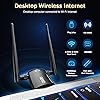
WiFi Adapter for Desktop PC, QGOO Wireless AC1300Mbps USB 3.0 Network Dongle with 5dBi High Gain Dual Antennas, 2.4GHz/5GHz Dual Band for Laptop Computer Compatible Windows11/10/8/7

  • Based on 5,430 reviews
Condition: New
Checking for the best price...
$9.99 Why this price?
Labor Day Deal · 50% off was $19.98

Buy Now, Pay Later


As low as $2 / mo
  • – 4-month term
  • – No impact on credit to apply
  • – Instant approval decision
  • – Secure and straightforward checkout

Ready to go? Add this product to your cart and select a plan during checkout.

Payment plans are offered through our trusted finance partners Klarna, Affirm, Afterpay, Zip, Apple Pay, and Google Pay. No-credit-needed leasing options through Acima may also be available at checkout.

Learn more about financing & leasing here.

Selected Option

Free shipping on this product

FREE 30-day refund/replacement

To qualify for a full refund, items must be returned in their original, unused condition. If an item is returned in a used, damaged, or materially different state, you may be granted a partial refund.

To initiate a return, please visit our Returns Center.

View our full returns policy here.


Availability: Only 5 left in stock, order soon!
Fulfilled by Amazon

Arrives Tuesday, Sep 8
Order within 7 hours and 20 minutes
Available payment plans shown during checkout

Protection Plan Protect Your Purchase
Checking for protection plans...

Color: black


Size: AC-1300


Features

  • Dual band High Speed: Support dual frequency seamless switching, as far as possible in the process of use has been in high speed state. the WiFi speed can be up to 867Mbps on 5GHz band or 400Mbps on 2.4GHz band for online gaming and HD video.
  • Plug and Play: This WiFi adapter is driver free for Windows 11/10. Just need to plug it into your computer, and enjoy a high-speed wireless network. Other systems can easily install the driver through driver.
  • Super-Fast 1300Mbps USB WiFi Adapter - wifi adapter provides long-range and lag-free and stable wifi connections,Upgrade your PCs or laptops to 802.11ac standards which are there times fast than Built-in wireless adapter speeds.
  • High Gain Dual 5dBi Antennas: High Gain 5dBi Antennas provide good signal receiving capabilities and beam-forming technology smartly focuses Wi-Fi signals towards connected devices, optional Dual Bands with beam-forming offer flexible connectivity.
  • Technical Support:Compatible with windows 11/10/8.1/8/7, Standards IEEE 802.11 ax/ac/a/b/g/n ( not recommended for Linux Mac system), support Multiple languages.

Brand: QGOO


Hardware Interface: 802.11 ac/b/g/n, USB 3.0


Color: black


Compatible Devices: Desktop, Laptop


Product Dimensions: 4.45"L x 0.67"W x 7.6"H


Data Link Protocol: IEEE 802.11ac


Data Transfer Rate: 867 megabits_per_second


Unit Count: 1 Count


Compatible Operating System Family: Windows


Minimum Required Operating System Version: Windows 10


Brand: QGOO


Unit Count: 1 Count


Number of Items: 1


Manufacturer: SHEN ZHEN XIN HUA TIAN TECHNOLOGY CO., LTD


Built-In Media: User Manual, wifi adapter


Warranty Description: 2 Year Manufacturer


Hardware Interface: 802.11 ac/b/g/n, USB 3.0


Compatible Devices: Desktop, Laptop


Data Link Protocol: IEEE 802.11ac


Data Transfer Rate: 867 megabits_per_second


Compatible Operating System Family: Windows


Minimum Required Operating System Version: Windows 10


Item Dimensions L x W x H: 4.45"L x 0.67"W x 7.6"H


Color: black


Frequently asked questions

If you place your order now, the estimated arrival date for this product is: Tuesday, Sep 8

Yes, absolutely! You may return this product for a full refund within 30 days of receiving it.

To initiate a return, please visit our Returns Center.

View our full returns policy here.

  • Klarna Financing
  • Affirm Pay in 4
  • Affirm Financing
  • Afterpay Financing
  • Zip Pay in 4
  • Financing through Apple Pay
  • Financing through Google Pay
Leasing options through Acima may also be available during checkout.

Learn more about financing & leasing here.

Top Amazon Reviews


  • WiFi Adapter
Color: black Size: AC-1300
This WiFi adapter is perfect for a desktop setup. The installation was quick and easy, and the connection is stable with fast speeds. I noticed a big improvement compared to my old adapter, especially for streaming and online work. It’s compact, doesn’t take up much space, and works exactly as expected. Great value for the price highly recommend ... show more
Reviewed in the United States on August 6, 2026 by Mary Lopez

  • Good signal and easy to install
Color: black Size: AC-1300
I bought it to improve the Wi-Fi connection on my daughter's PC, and it has worked very well so far. Installation was simple, and the signal is quite stable, even when she is a bit far from the router. The two antennas really help, and I like that it is compatible with both 2.4GHz and 5GHz. For the price, I think it's a great option ... show more
Reviewed in the United States on August 9, 2026 by Nayamí Anet

  • Easy install. straightforward. clear. working immediately.
Very simple and clear to install and set up. Really appreciated this. Connection is strong with a full signal. (20 feet away with a wall and a few pieces of furniture in the way.) Came with small installation manual with 3 instructions made clearly visible and super basic to calm those who are anxiety prone:3 sentences, less than 10 words each. Basically: 1. install software. 2. plug in adapter. 3. scan for available networks to complete setup. note: I opted to download the software for this device using the provided link rather than install from the cd it came with. The link they provided was actually to a dropbox folder... which might seem odd and low-end -ish if you are expecting a full on website... But this was fine. Just needed to click "DOWNLOAD" at the top right, which zipped up the folder and its contents, downloading to my computer. (there were some unfortunate comments in dropbox from frustrated people who didn't understand the "download" button. and there were some gracious comments from others telling people what to do, e.g., "click "download," people, gosh...") anyways, got my zip file. unzipped it. went inside the unzipped files. saw windows folder. double clicked the setup.exe file in there. And bam, it was installed ready for the final step. After the install finished, I plugged the wifi adapter device into my usb3 port. Then checked the manual to see what was next. It said I should see an icon in my system tray to click on - which basically lead to scanning available networks. it was there. The software interface was just as described. I clicked on available networks...Found my router. clicked on it. entered my password. And boom, all done. Straightforward and fast. It really is easy to install if you aren't stunned by using your browser and dropbox to download the folder. I imagine the installation cd is just as easy or easier. I think ... show more
Reviewed in the United States on October 3, 2019 by david

  • Good product
Color: black Size: AXE-5400
It’s a good product. It does exactly what I need it to do. I’m so used to a hard wire line that I felt this was slow. But it’s actually good for what you pay for.
Reviewed in the United States on June 11, 2026 by Howard Bias

  • saved my desktop
Color: black Size: AC-1300
worked well. Was plug and play
Reviewed in the United States on July 8, 2026 by Keith R Blose

  • super easy to install
Color: black Size: AC-1300
great value
Reviewed in the United States on July 18, 2026 by Kindle Customer

  • It truly works! (review includes my troubleshooting steps)
I rarely write reviews, but wanted to share my experience with this one. I have an old Toshiba Satellite laptop, and the internal wifi card that came with the laptop finally died. Rather than buy a new laptop, and re-install all my software, I wanted something cheap that would restore my wifi. Well, I'm writing this review using this wifi adapter. That's the good thing! Once it connects, it keeps the connection. But a lot of times, it says No Network Found. It seems like some folks are having this problem. My Workaround Solution: Usually, I have to turn my laptop's WIFI switch off and on a few times until it finds my home WIFI connection name. Then I click and connect on that name really fast, before it disappears and I'm good. I know this is a haphazard way to get it to work, but I'm fine with it. It beats replacing a laptop. Internet Speed: It actually seems faster than before. Addendum 1: If it says No Network Found, and continues to say that after several attempts of turning the laptop wifi switch off and on, I restart the laptop and all the connections show up. Addendum 2: I noticed something interesting ... Sometimes, I'm able to connect via a network named "WIFI" as if my laptop wifi card is still working, but I think it's the adapter doing the work. When this happens, a blue light inside the adapter does NOT flash. Other times, I connect via "WIFI 2" which is directly through the adapter and a blue light flashes. Without the adapter, I can not connect at all. I'm not sure what's causing it to pick up WIFI vs. WIFI 2. With the adapter, I've always been able to connect with my workaround solution above. 90% of the time, I see my main wifi connection right away and connect to that. Addendum 3: I downloaded a free PC/laptop utility (Glary utilities) which fixed a host of issues with my laptop (i.e. registry issues, broken links, etc.). Now, this wifi adapter works fine when I turn on my laptop the first time, every time. I've left my previous entries above as a reference for troubleshooting. For the record, I have no affiliation with Glary utilities. ... show more
Reviewed in the United States on February 18, 2019 by G. Eng

  • Powerful Little USB Wu-Fi Adapter
Plug'n'Play worked on both Windows 10 machines that I tested, the USB was detected almost immediately and showed up as an option in both my laptop (with an existing internal wireless card, so was named Wi-Fi 2) and my desktop (without an existing Wi-Fi connection). On both these devices, I found that doesn't default to the best connection speed and radio band, but I also found the same behavior on my laptop with it's integrated Wi-Fi chipset, so It seems to be an issue with Windows' networking choices. The issue that I found was that on a dual-band 802.11ac router, my computers were choosing to connect via 2.4GHz 802.11n with a speed of <20Mbps instead of the 5GHz 802.11ac with a download speed of 120Mbps. In order to prevent this poor performing speed, I changed the the following to force it to have better performance: Device Manager > Network Adapters > Realtek 8812BU Wireless LAN 802.11ac USB NIC (Right Click) > Properties > Advanced > Wireless Mode: IEEE 802.11ac Even when on the suboptimal network, I found that the USB antenna was able to transmit/recieve better, at least when being on the other side of the house from the router and separated by several walls/doors. The download speed gain was roughly 25-50% in these cases I have not gotten a chance to test it on a MacOS/OSX, Linux, or other operating systems. I have personally found it very useful to add pretty good wireless capabilities to my desktop. While the 802.11ac is above my internet speed, there are enough times when I need to transfer multi-gigabyte files for work between computers that it's nice to have a higher transfer rate. This device seems to be a good balance between price, range, and performance. Depending on your use case, internet speeds, and home networking equipment, a cheaper model may suffice, but the performance of this device seems worth it in most cases (since it is USB, it is easy to switch it around to other devices) ... show more
Reviewed in the United States on April 28, 2020 by D.C.

Can't find a product?

Find it on Amazon first, then paste the link below.
Checking for best price...