Search  for anything...

Webaround Big Shot 56" | Green | Portable Collapsible Webcam Backdrop | Attaches to Any Chair | Wrinkle-Resistant Fabric | Ultra-Quick Setup and Takedown | Perfect for Zoom, Webex, Teams, etc.

  • Based on 3,296 reviews
Condition: New
Checking for the best price...
$47.99 Why this price?
Save $2.00 was $49.99

Buy Now, Pay Later


As low as $8.00 / mo
  • – 6-month term
  • – No impact on credit to apply
  • – Instant approval decision
  • – Secure and straightforward checkout

Ready to go? Add this product to your cart and select a plan during checkout.

Payment plans are offered through our trusted finance partners Klarna, Affirm, Afterpay, Zip, Apple Pay, and Google Pay. No-credit-needed leasing options through Acima may also be available at checkout.

Learn more about financing & leasing here.

Selected Option

Free shipping on this product

30-day refund/replacement

To qualify for a full refund, items must be returned in their original, unused condition. If an item is returned in a used, damaged, or materially different state, you may be granted a partial refund.

To initiate a return, please visit our Returns Center.

View our full returns policy here.


Availability: In Stock.
Fulfilled by Webaround

Arrives Saturday, Sep 26
Order within 9 hours and 48 minutes
Available payment plans shown during checkout

Protection Plan Protect Your Purchase
Checking for protection plans...

Color: Chroma-key Green


Features

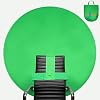
  • Tested Chroma-Key Green Color: Simple, green screen that was created for chroma keying in Zoom, OBS, Teams, Google Meet, Webex, GoToMeeting, Skype, and more. You may need additional software integration like OBS to get an optimal chroma-key image.
  • Speedy set up: Backdrop open up and attaches to the back of almost any chair or around your waist in seconds. Measure your office space before picking a size to confirm it is compatible with your setup.
  • Storeable design: Folds into the included storage bag when finished, which can be stored away and out of sight.
  • Invented for anyone with a webcam for video conferencing, gaming, virtual school, telehealth (HIPAA Compliant), content creation and more. Video frame coverage varies depending on distance between your chair and camera.
  • Integrated stabilizer ensures that the backdrop is pushed forward on the chair, providing more overall coverage.

Description

Webaround was founded over a decade ago by a Detroit area ICU nurse. During the midnight shift in the ICU, one of the doctors used a robot to interact with a patient remotely from his home. In the background was a messy kitchen. It wasn't professional and the message he was discussing was lost from that distraction. After many tweaks and changes, the Webaround you see today was born. It has everything you need for a professional background replacement. The Webaround is the easiest webcam backdrop available for video calls, content creation, and more. The Big Shot is Webaround's second largest backdrop available, sized at 56" (diameter). The Big Shot webcam backdrop attaches directly to your chair and provides a clean and professional background. The Big Shot works with any video conferencing and content creation software. The Chroma-Key Green version of the Big Shot can be used as a green screen for virtual backgrounds and chroma keying. Using the Big Shot webcam backdrop is a breeze. Setup and takedown takes less than 10 seconds. Open up the unit, place it around the chair, adjust the integrated stabilizer and webcam to cover your background, and you are good go. When you are done, fold up the unit and place it in the included storage bag. The needs of a background differ from everyone. You might want to chroma key your background with virtual backgrounds or you might need a backdrop to simply cover up distractions behind you. With colors in Chroma Key Green, Blue and Grey, there is a Webaround that will fit your setup and needs perfectly. Don't worry about the Big Shot fitting onto your chair. The Integrated Stabilizer and adjustable horizontal and vertical straps ensure that the Big Shot can be attached to almost any chair on the market. The Big Shot webcam backdrop was created to provide a clean and professional webcam backdrop, wherever you are. Whether you are work-from-home, on-the-go, or a little bit of both, know that you'll always have a great looking background that attaches right to your chair, just seconds away!

Color: Chroma-key Green


Size: 56 inches diameter


Brand: Webaround


Item Weight: 816 g


Product Care Instructions: Spot Wash


Brand: Webaround


Unit Count: 1 Count


UPC: 892261002097


Number of Items: 1


Built-In Media: Item


Manufacturer: Webaround


Model Name: Big Shot


Model Number:


Manufacturer Part Number:


Color: Chroma-key Green


Occasion: Work, Office, videoconference, video-conference


Size: 56 inches diameter


Item Weight: 816 g


Item Dimensions L x W: 56"L x 56"W


Product Care Instructions: Spot Wash


Aspect Ratio: 11


Audio Output Type: internal


Screen Size: 56 inches


Compatible Devices: Webcam, Laptop, Computer


Image stabilization: True


File Format: Jpeg


Media Type: ProductImage


Water Resistance Level: Not Water Resistant


Video Capture Format: MP4


Frequently asked questions

If you place your order now, the estimated arrival date for this product is: Saturday, Sep 26

Yes, absolutely! You may return this product for a full refund within 30 days of receiving it.

To initiate a return, please visit our Returns Center.

View our full returns policy here.

  • Klarna Financing
  • Affirm Pay in 4
  • Affirm Financing
  • Afterpay Financing
  • Zip Pay in 4
  • Financing through Apple Pay
  • Financing through Google Pay
Leasing options through Acima may also be available during checkout.

Learn more about financing & leasing here.

Top Amazon Reviews


  • suitable for just about any chair
Color: Chroma-key Green
BLUF: In my initial use with MIcrosoft Teams, the screen works very well. And, there is very little if any ghosting when used with a background. The screen is much larger than I expected which is a good point. I spent a couple of hours reading all the comments on various portable/movable screens that were available on amazon.com. Consistently, the reviews complained about quality of the screen material, setup, and take down issues. The screen material is what I would call heavy duty. Please note, that there is not a window behind my chair. And, with any truly non-opaque material bright back lighting will be a problem. First time setup will pose some challenges because of the size of the screen as one needs to see how everything works. It is definitely worthwhile to view the seller's video as it is well done. Because of its size, the screen blocks out everything behind me easily. The screen itself is very taught due to the 1/4 inch wide ribbon which gives the screen is tautness. It's this same ribbon which can make the folding of the screen up a challenge at times. The storage bag is made of the same material as the screen. ... show more
Reviewed in the United States on June 14, 2021 by GU

  • It works, it has it's flaws, but most reviews are USER issues
Color: Chroma-key Green
Other reviews: "It's too big." Dimensions are literally in the product title. If you can't be bothered to take a measuring tape and visualize a how big a 56'' circle will be, that is no one's fault but your own. "It doesn't work." You don't know how to set up a green screen. Common mistakes, not enough lighting on the subject, not enough lighting on the screen, not enough lighting behind the screen, not selecting the right color to key. One of the flaws of this screen is that light can shine through it, so if you have uneven lighting front/back you will have trouble keying the screen out. If your subject isn't brightly lit, you will have a hard time getting the screen to key out, because all the diffused light bouncing off the screen will make the subject partially keyed out with the screen once you actually get the screen keyed out. You need no bright spots shining through, you need to cast no shadows on the screen, straight on, even lighting across the screen and subject. When keying the screen out, I had to actually take a screen shot of the camera feed into a image editor and determine the "average" green of the screen and set that as the color to key out. After a lot of tweaking I was able to key out the screen perfectly. First I used a color adjustment to blow out the saturation to make all the colors more intense, so the screen became *very* green. Then I keyed out the screen. Then I used a second color correction to bring the saturation back down to normal levels, after the screen had been keyed out. With another camera I just selected default green and that worked fine, go figure. This is a compromise, it is attached to your chair, it is a circle. This will limit its usefulness, but if all you need is a green screen for video conferencing, this is it. No green screen is going to give you a "plug and play" experience. If you don't know how to set up a green screen, you will have a bad time, try looking up some tutorials. ... show more
Reviewed in the United States on August 4, 2021 by f0rced

  • Durable, Easy-to-Use Green Screen—Great for Streaming or Remote Work
Color: Chroma-key Green
I picked up the Webaround Big Shot 56" green screen because I needed a portable backdrop for streaming and didn’t want people seeing my room in the background. This thing served me really well for several years. The quality is legit, it held up to repeated use and didn’t show much wear even after years of setting up, breaking down, and moving around. It’s super easy to collapse and transport, and the fabric doesn’t wrinkle easily, which is a big deal for clean chroma keying. The material isn’t too thick or too thin, just right for blocking out whatever’s behind you. Installing it is simple; it fits over most office chairs and stays in place while you’re streaming, in Zoom calls, or doing conference calls. I used it on multiple different chairs over the years and never had an issue with it sliding off. It is pretty big, so if you’re in a small room or move your chair a lot, just watch out, you can bump into your desk or walls. But the larger size actually helps cover more background, which is perfect for wide camera angles. Eventually, I upgraded and ended up donating it to a thrift store, but it was still in great shape even after years of use, a testament to its durability. For the price, you really get your money’s worth. If you’re a streamer, remote worker, or just want a solid green screen for any kind of video call or creative project, this is a solid investment. Just keep the size in mind, but overall it’s one of the best and easiest green screens I’ve used. ... show more
Reviewed in the United States on February 13, 2026 by Paulryanp

  • Not a bad product, but not good for YouTube or streaming
Color: Chroma-key Green
First, the good: - packaging was nice and arrived quickly - was able to be unfolded and collapsed fairly easily - fit my chair well and seemed relatively stable once attached Now, the bad: - translucent material; must be used in a well lit area and, for me, required the use of an LED to even out the light across the material. Even so, there was light bleed and my video editing software often left streaks when the chroma key was applied where the green was now “lighter green” from the light. - Even at 56”, it was not wide enough to be used in a real-time gaming environment. Would work great for still video where the subject isn’t moving, but for gamers, we tend to turn our chairs and move and shift while playing. Even when zoomed and cropped, the corners regularly appeared in the frame and had to be removed in post, which added A LOT of extra time into the already lengthy editing process. Overall, I think this is a great choice for very specific types of videos and video conferencing. However, in my opinion, its practicality really starts and ends there. I returned mine and picked up a Valera Creator 95 instead. More expensive, but it’s really aimed for more of what I personally need it for. ... show more
Reviewed in the United States on June 13, 2020 by A.M.

  • Looks silly - works great
Color: Chroma-key Green
This is not a super high end studio quality green screen, but for your Zoom meetings, or for those who need to take their livestreams on the road, it's great. It's easy to open and install (I was lucky that there were few wrinkles in mine, and they were gone just keeping it deployed for a day - but I'm sure that if yours is wrinkled, just use a light steaming and be patient as they fall out). It's easy to put back into the carry case (watch the videos - they help - "fold it like a taco") I have a logitech webcam (720p), but it worked great for a Zoom meeting. You'll want to dial in the lighting - I use small ring lights, and a back light. When in Zoom, when you're in the "use green screen" section, be sure to use the dropper to select the shade of green nearest your face. Hover over the color picker, hold the left mouse button down, and move the dropper over the video image to select. If you have a dedicated area for your video recordings, you'll be able to play with the positioning and lighting and find the perfect configuration. Be patient, and don't expect weatherman studio quality right out of the box, but I find that it meets my needs for recording digital courses. ... show more
Reviewed in the United States on April 23, 2020 by C. B. Neff

  • Flimsy, flips backwards, too short, does not fit an Aeron chair
Color: Chroma-key Green
I really wanted this to work out, but it just doesn't do the trick. There are several problems with this product, I'll try to be as specific as possible. 1) It's too short to cover the whole viewing area, so the background is visible at the top of my screen 2) it's flimsy, so it keeps wobbling around and tilting backward-- it comes with an "integrated stabilizer" but no instructions on how that stabilizer is supposed to work. I'll list word-for-word all the instructions it gives on using the stabilizer bar: "Iif the Webaround is tilting backward, remove from the chair and then fold the integrated stabilizer into place." No pictures of a properly deployed "integrated stabilizer", no obvious way the piece of cardboard is supposed to stabilize the screen. 3) It doesn't fit properly on the back of my Aeron chair 4) The material is a kind of nylon, which becomes shiny in the sunlight, defeating chromakey sofware and causing white blotches to appear in your background 5) The bright green color is reflected back at your face, giving you a sickly green glow In summary, it's a nice concept, but fails to deliver in any meaningful way. ... show more
Reviewed in the United States on October 25, 2019 by James

  • Doesn't quite cover the camera range of an iMac unless you sit kinda close, but ...
Color: Chroma-key Green
... I've heard that if you download a certain app, it will work better. I'll give it a try. It took a while to be delivered, but it eventually was. Communication from this company was excellent and fast. I would definitely do business again. The strap that goes around the chair is elasticized, kind of like an Ace bandage, so it fits any kind of chair. It sits tight against the back of the chair, so I didnt need to use the stabalizer, or even the top strap that goes over the top of the chair. It wasn't very wrinkly, which is good, and worked will right out of the package. I like the carrying case. Everything is pretty solid and well constructed. It's a bit expensive, especially the shipping, but overall it was the least expensive choice for my situation. Great company. I like that it is family owned and operated. ... show more
Reviewed in the United States on May 9, 2020 by W. Greely

  • Not worth it.
Color: Chroma-key Green
It still shows a faint white outline around me when I'm on Zoom. Better than without it, but not as smooth as it should be. Also, most infuriatingly, after the 2nd or 3rd time using it, it will not fold back up. I've watch numerous videos, thinking oh I've forgotten something, but no, it simply will not fold up correctly. One side of the frame has somehow twisted itself around so when I go to "fold it like a taco" as the first step; instead of folding up, it simply smushes in. So I had to force it into an uneven oval & stuff it in the bag. Which I'm sure will make it look even worse when I unfold it again. I regret buying it. ... show more
Reviewed in the United States on May 13, 2024 by The Mysterious Woman

Can't find a product?

Find it on Amazon first, then paste the link below.
Checking for best price...