Search  for anything...

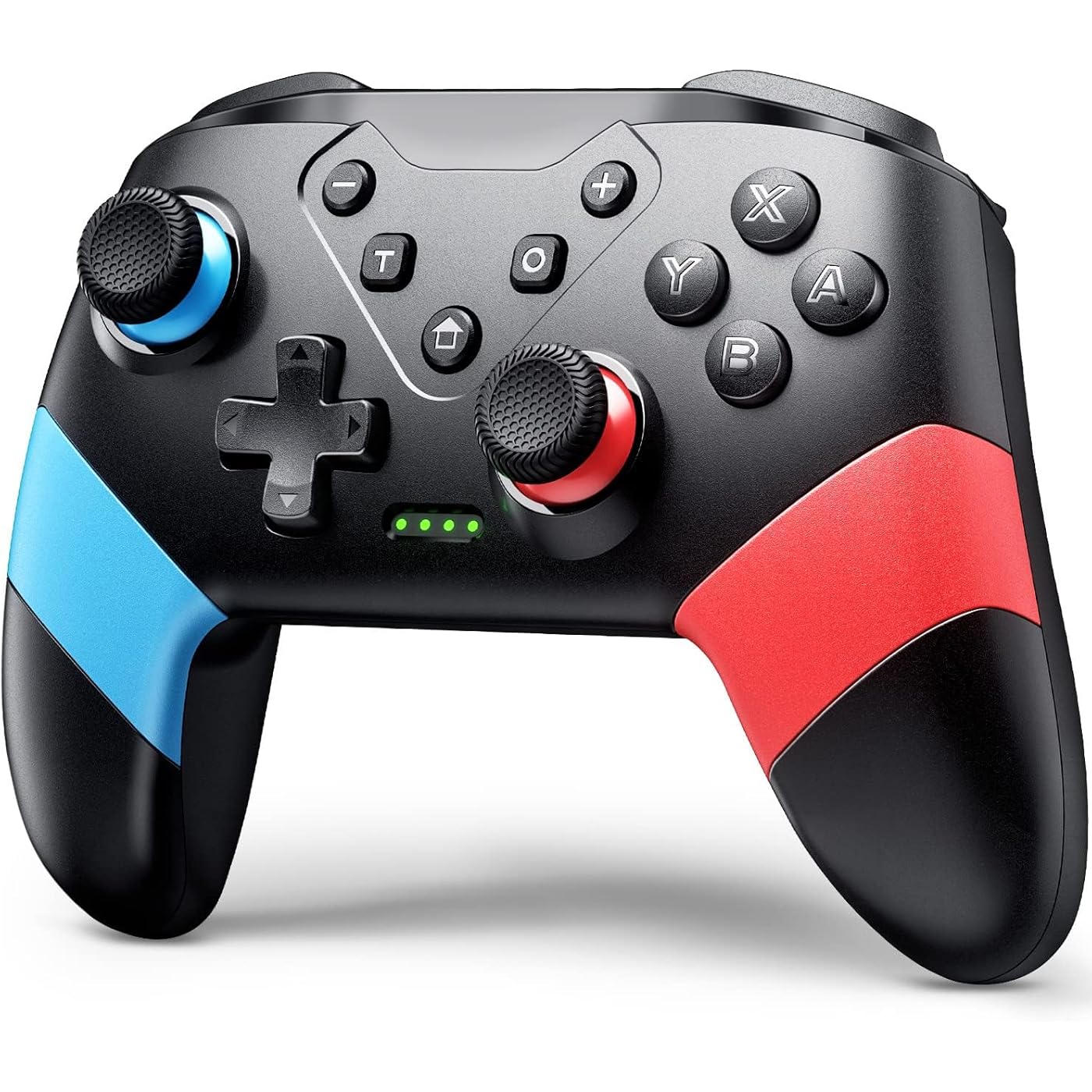
VOYEE Switch Controller for Switch/Lite/OLED, Pro Controller Red-Blue

Based on 4,734 reviews
Condition: New
Checking for the best price...
$16.98
Holiday Deal · 11% off was $18.98

Buy Now, Pay Later


As low as $4 / mo
  • – 4-month term
  • – No impact on credit to apply
  • – Instant approval decision
  • – Secure and straightforward checkout

Ready to go? Add this product to your cart and select a plan during checkout.

Payment plans are offered through our trusted finance partners Klarna, Affirm, Afterpay, Zip, Apple Pay, and Google Pay. No-credit-needed leasing options through Acima may also be available at checkout.

Learn more about financing & leasing here.

Selected Option

Free shipping on this product

FREE 30-day refund/replacement

To qualify for a full refund, items must be returned in their original, unused condition. If an item is returned in a used, damaged, or materially different state, you may be granted a partial refund.

To initiate a return, please visit our Returns Center.

View our full returns policy here.


Availability: In Stock.
Fulfilled by Amazon

Arrives Monday, Nov 9
Order within 11 hours and 46 minutes

Available payment plans shown during checkout

Protect Your Purchase

Easy claims online, fast replacements, no fees

Checking for protection plans...

At a glance

Condition
New
Color
Red-Blue
Model
S03
Dimensions
5.9 x 2.59 x 4.17 in
Weight
6.88 oz
Controller Type
Gamepad
Additional Features
Ergonomic, Rumble, Turbo
Works with
Nintendo Switch, Switch Lite, OLED, PC

Features 5

  • Compatible with Switch System: The switch controller is compatible with switch/lite/oled/PC windows (wired mode), works for 4 gamer; Switch pro controller is ideal for family fun, parties and nice gift for swtich game lovers (No amiibo)
  • Programming Custom Buttons: 2 mappable buttons on the switch controllers are designed to map up to 16 keys to M1/M2 key, you can click one key and get ultimate skill, extending buttons life; 3 burst speed enhances your experience in action and arcade game
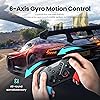
  • Rumble Control & Gyro Sensor: Wireless switch controller has 4-level vibration; Enhanced dual motors provide you great game immersion; 6-axis gyro sensor makes the pro controller switch quickly detect the actions and help you make a quick response
  • Ergonomic & Long Time Play: Thousands of tests obtained scientific shape and weight to make the switch wireless controller suitable for long-term and comfortable holding; Large capacity battery last up to 15 hours of uninterrupted gaming

Description

About the Extra Mappable Trigger M1/M2: 1. The back button on the controller is easy to program and adjust. 2. This controller can map up to 16 buttons. 3. You can map the M1/M2 button one by one. 4. Press M1/M2 and "—": map only one button 5. Press M1/M2 and "+": map the key combination 6. When you want to use the ultimate skill with one key in the games, you can set key combination. 7. The speed at which a key is mapped affects how quickly it reacts in-game. Set: (assuming you want to map the Y+B+A+L+R buttons on M1 button) 1. Press "M1" and "+" at the same time, and the lights on the controller will flash slowly; 2. Press the Y/B/A/L/R button on the controller one by one, and the indicator light will flash quickly 3. Finally press the M1 button, the indicator light will be on, indicating that the mapping is completed. Cancel: If you don't want to use the mapping function of the M1/M2 buttons, your hands may habitually touch these two buttons, which will affect the game. Steps: Press and hold the "—" and "T" buttons for 3s, and after the wireless controller vibrates for 1s, the function is closed. Sync to Console: 1. In the N-SL main menu, click on 'Controller'一'Change grip/sequence', and enter the Controller pairing mode; 2. Press and hold the "Y"+HOME button for 4s to enter the pairing state. The LED flashes frequently. The controller is automatically paired with the console. After the connection is successful, the LED been on; 3. When the connection is successful, you can press the HOME button, and the LED will flash slowly in the form of a marquee and automatically reconnect. Sync to PC with A USB Cable: 1. Use the USB cable to connect the gamepad and the computer. After connection, LED1 and LED4 of the gamepad flash slowly at the same time. Successfully connected, the gamepad can be normally used. 2. The controller defaults to Xinput mode on the PC side, and the keys are XBOX 360 key layout, non-standard PC key layout. 3. In XINPUT mode, hold down the screenshot button for 3 seconds to convert to DINPUT mode. Who Are We? VOYEE was established in 2018 and is affiliated to a high-tech enterprise integrating R&D, design, production and sales, and is committed to providing users with a full range of game solutions. At present, VOYEE has provided users with a series of high-quality game controller and accessories compatible with Microsoft, Sony and sold in many countries and regions in the North America and Europe. We strive to offer diverse, video game accessories at a great value to bring you and your family more fun. We truly believe that help you live an easier, happier life through our products to get more family interaction and better gaming experience. As a customer, you are our top priority. So, we aim to offer you the best shopping experience possible by improving everything we do, from product research and development to quality control.

Specs 16

Controller Type Gamepad
Connectivity Technology Bluetooth, USB A
Additional Features Ergonomic, Rumble, Turbo
Button Quantity 10
Hardware Platform PC
Power Source Battery Powered
Compatible Video Game Console Models Nintendo Switch, Nintendo Switch Lite
Item Weight 6.88 ounces

Frequently asked questions

If you place your order now, the estimated arrival date for this product is: Monday, Nov 9

Yes, absolutely! You may return this product for a full refund within 30 days of receiving it.

To initiate a return, please visit our Returns Center.

View our full returns policy here.

  • Klarna Financing
  • Affirm Pay in 4
  • Affirm Financing
  • Afterpay Financing
  • Zip Pay in 4
  • Financing through Apple Pay
  • Financing through Google Pay
Leasing options through Acima may also be available during checkout.

Learn more about financing & leasing here.

Top Amazon Reviews


Great Quality and Inexpensive
Color: Red-Blue
I recently purchased the VOYEE Wireless Pro Controller, and I must say, it has been an impressive addition to my gaming setup. This controller comes packed with a range of features that elevate the gaming experience to a whole new level. One standout feature is the Programming Buttons & Adjustable Burst Function. The ability to customize buttons according to my gaming preferences allowed for a more personalized and intuitive gameplay experience. Additionally, the Adjustable Burst Function added an extra layer of control, especially in fast-paced games, giving me a competitive edge. The Rumble Control & Gyro Sensor in the VOYEE Wireless Pro Controller provided immersive feedback, enhancing the overall gaming sensation. It heightened my sense of immersion in the virtual world, making every action feel more lifelike and engaging. One of the highlights of this controller is its Large Capacity Battery, boasting up to 15 hours of uninterrupted gaming. I was pleasantly surprised by the extended battery life, which allowed for long gaming sessions without the need to frequently recharge. This convenience is particularly beneficial for those extended gaming marathons. The 33ft Wireless Control Range was also a game-changer. I experienced seamless connectivity even at a considerable distance from the gaming console. It gave me the freedom to move around without worrying about signal loss, making gaming more comfortable and enjoyable. Overall, the VOYEE Wireless Pro Controller has exceeded my expectations. Its advanced features, such as the Programming Buttons, Rumble Control, and Extended Battery Life, make it a top-notch choice for gamers seeking a versatile and high-performance controller. Whether you're a casual gamer or a hardcore enthusiast, this controller is sure to enhance your gaming experience. Highly recommended! ... show more
Reviewed in the United States on July 17, 2023 by Jribby

Pretty great controller
Color: Pink-Green
Got this for my daughter so she can play on my switch without messing up the joy cons. Absolutely durable. Great grip, for a toddler it’s big but for a controller it’s an average size. Looks just like the picture and the colors are just as vibrant. Connected super easy, did have to look up how to connect it though. Super durable. I have a 2.5 year old and 14 month old and they play with it all the time and it still works fine ... show more
Reviewed in the United States on May 20, 2026 by Kourtney Emerson

This controller is great!
Color: Red-Blue
Good grip. It connected easily which makes me happy. The buttons and joy stick are good and not cheap.
Reviewed in the United States on July 17, 2026 by Shawn

🎮
Color: Red-Blue
Good
Reviewed in the United States on August 16, 2026 by India

Guide on How to Use the VOYEE Switch Controller (Console Pairing, Turbo, Button Mapping)
Color: Gray
Yes, the turbo works for the bench method in Pokemon Legends ZA for shiny hunting if you have a rubber band or something to press down on your control stick for you IRL. But no, it will not run macros for you. Here is a general guide on how to use this controller! ********How to pair the controller to your Switch or Switch 2:******** (Note: I was unable to do this while the controller was plugged in.) 1. Turn on your console. 2. On the home screen, click the Controllers icon at the bottom. (Looks like a joycon.) 3. Select 'Change Grip/Order' 4. On your controller, press the 'Home' and 'Y' buttons simultaneously. You do not need to hold. 5. Wait a moment. Green dots should move on the bottom of your controller. Once they have stopped moving and you see a controller has been connected, you can press A, then Home and leave that menu. Your controller is now paired! (If your controller goes to sleep due to inactivity, pressing the Home button again will wake it.) ********How to use the Turbo function on this controller:******** 1. Press the 'T' button on your controller and the button you wish to be repetitively input into your game simultaneously. For example, if you want to press 'A' over and over again, press 'T' and 'A' at the same time. (You don't have to hold--but you might have to try twice.) 2. To change the speed of your input, press the 'T' button and the up or down button of your D-Pad simultaneously. 'T' and the up on your D-Pad will increase the speed. 'T' and the down on your D-Pad will decrease the speed. 3. To turn off turbo inputs, press the 'T' button as well as the button that you originally selected for the input. For example, if you chose to have the 'A' button on turbo mode, then to turn this off you would need to press 'T' and 'A' simultaneously again. You can have turbo running for multiple buttons at once (A, B, Y, X, ZL, L, ZR, R). But it will not function for the M1, M2, +, -, D-pad buttons, or control stick clicks/directions. D-pad up and D-pad down are exclusively used to control the speed of Turbo. If you want to use turbo on one of the buttons in the category that is ineligible for Turbo, such as the + button, then you are able to circumvent the limitations by changing your button mapping. ********How to change your button mapping:******** 1. Go to the home page of your console. 2. Select 'System Settings' at the bottom (looks like a gear) 3. Find the 'Accessibility' section 4. Select 'Button Mapping' and 'Edit Controller Mapping' for your controller 5. Change the mapping for one of the Turbo-eligible buttons (like R) to an ineligible Turbo-button output (like +) then save. This makes it so that if you use 'T' and 'R', instead of the R button output, you will get + as your turbo output. Buttons that turbo works on without any mapping needed: A B Y X ZL L ZR R Buttons that would require button mapping for turbo to work: D-Pad buttons Control stick presses - and + buttons (Note that the 'Button Mapping in Quick Settings' toggle in System Settings allows you to access this menu by holding your Home button. Selecting 'Reset Controller Mapping' restores default settings for button mapping.) ... show more
Reviewed in the United States on December 29, 2025 by Amazon Customer

Awesome controller
Color: Pink-Green
4th one of these we bought for the kids switches. Thr controllers are great n thr batteries seem to last forever before needing charging
Reviewed in the United States on July 12, 2026 by Amazon Customer

Finally found a switch pro alternative..
Color: Red-Blue
I've been looking a long time for a switch pro controller alternative that's affordable and, well, basically WORKS. It's quite a bit lighter than a switch pro controller, but it feels good in the hand. The back buttons are nice, although a little too 'light'. I actually wanted a controller with back buttons...and these buttons are in a great spot for your middle fingers to rest on. I'm not complaining about accidentally pressing them because of their placement, I'm just saying that I wish they had a touch more resistance, with a tighter click....but they do work, and work well. A pleasantly surprising aspect is thumbstick accuracy/sensitivity, and this controller doesn't disappoint. I've tried so many third party controllers that have WAY too sensitive thumbsticks, resulting in erratic movements when trying to make small, precise inputs...such as gently moving Mario (in Odyssey) over a ledge or something, vs. having him run wildly after barely touching the stick. The joystick calibration shows the sticks in an accurate, controlled position relative to the stick, as it should be, vs tiny movements resulting in full tilt directional inputs. The buttons, dpad, and bumpers feel good...not ultra premium but not bad at all. The triggers are analog style, but have a short throw allowing for quick repetitive actions (I know the switch registers trigger inputs as on or off, so the shorter throw is welcome). The controller is supposedly Android compatible too, so maybe that's where the analog trigger action comes in, registering analog position along it's throw/travel. All in all, I'm happy with this purchase, and can't believe it was the price it was for a controller that actually works, and doesn't have hap-hazard control over the game's character like so many other cheap offerings. ... show more
Reviewed in the United States on April 23, 2023 by EJ

Good Controller, but should not be your Primary
Color: Red-Blue
This wireless controller is a decent controller for the price. 
 The quality of the controller is not great but not terrible.
It is very light weight and you can feel it has a lot of empty space under the plastic grips.
 The buttons are responsive and we have not had any issues with lag or buttons not working.
 We it them for a Nintendo Switch console and the pairing is easy by simply holding the "House" button in the middle of the controller. 
After a few seconds you should see the lights on the controller flash and it will lock into whatever player the controller was assigned. 1 light for 1st player, 2 lights for 2nd player, all the way up to 4 lights for 4th player.

 The controller is a bit noisy, in the sense that every time you press a button you can hear a rather loud plastic clacking sound. The size of the controller is on the larger side and the buttons are also big. The battery life has been great and last several days without needing to charge.
Charging is quick and uses a standard USB C port. Overall, this is a good controller to have so that others can play together but you will probably not want to use this as your primary controller LIKES: Affordable Great Battery Life Bigger size Great Battery Life DISLIKES: Not the best quality Loud Clacking sounds when you press buttons ... show more
Reviewed in the United States on July 25, 2025 by koolkingdomtv
Checking for best price...