




USB Switch, USB 3.0 Switch, Aluminum KM Switch 2 Computers Sharing 4 USB Devices KM Switches 5V USB-C Powered for PC Printer Scanner Mouse Keyboard with 2 Pack USB 3.0 Cable, One Button Switch
Condition: New




Notify me when this product is back in stock
$19.99
Buy Now, Pay Later
As low as
$4
/ mo
Learn more
- – 4-month term
- – No impact on credit to apply
- – Instant approval decision
- – Secure and straightforward checkout
Payment plans are offered through our trusted finance partners Klarna, Affirm, Afterpay, Zip, Apple Pay, and Google Pay. No-credit-needed leasing options through Acima may also be available at checkout.
Learn more about financing & leasing here.
Free shipping on this product
30-day returns
Learn more
This item is eligible for return within 30 days of receipt
To qualify for a full refund, items must be returned in their original, unused condition. If an item is returned in a used, damaged, or materially different state, you may be granted a partial refund.
To initiate a return, please visit our Returns Center.
View our full returns policy here.
Availability:
Unavailable


At a glance
- Condition
- New
- Model
- KS01
- Operation Mode
- Automatically
- Operating Voltage
- 5 Volts
- Connector Type
- Usb,usb-c
- Terminal
- Button
- Mounting Type
- Plug-In Mount
Features 5
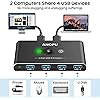
- USB 3.0 Switch: This aluminum USB 3.0 switch supports sharing 4 USB 3.0 peripheral devices between 2 computers, such as a mouse, keyboard, printer, scanner, card reader, flash drives, and more. It frees you from constantly plugging and unplugging USB cables, improving productivity and saving space.
- USB 3.0 SuperSpeed Data: Enjoy data transfer rates of up to 5Gbpsfast enough to transfer a movie in seconds. The switch is backward compatible with USB 2.0 and 1.1. Its aluminum alloy housing efficiently dissipates heat to ensure durability and safe usage.
- Easy to use: Plug and play with no installation of drivers required. Simply connect the cables and use the switch. It can automatically switch to the currently powered-on device, or you can press a button to switch signals. An indicator light clearly shows the active port.
- High Power Devices Supported: The USB switch comes with a 5V USB-C port for optional power, offering compatibility with more devices, such as SSD, HDD, USB cameras, headphones, and more.
- What you get: 1x USB 3.0 Switch, 2x USB 3.0 Cable, 1x USB-C to A cable, 1x User Manual, 1-year worry-free warranty, and 24-hour friendly customer service.
Specs 13
| Operation Mode | Automatically |
|---|---|
| Operating Voltage | 5 Volts |
| Connector Type | Usb,usb-c |
| Brand | ANOPU |
| Terminal | Button |
| Mounting Type | Plug-In Mount |
| International Protection Rating | IP20 |
| Number of Positions | 2 |
| Controller Type | Push Button |
| Connectivity Protocol | Usb |
| Package Dimensions | 7.36 x 4.84 x 0.94 inches; 1.6 Ounces |
| Item model number | KS01 |
| Manufacturer | ANOPU |
No specs match.
Frequently asked questions
This product is currently out of stock. Please check back later for shipping info.
Yes, absolutely! You may return this product for a full refund within 30 days of receiving it.
To initiate a return, please visit our Returns Center.
View our full returns policy here.
To initiate a return, please visit our Returns Center.
View our full returns policy here.
- Klarna Financing
- Affirm Pay in 4
- Affirm Financing
- Afterpay Financing
- Zip Pay in 4
- Financing through Apple Pay
- Financing through Google Pay
Learn more about financing & leasing here.
Similar Products


Top Amazon Reviews
Great switch to manage keyboard and mouse between devices
Works perfectly. I have an LED, multicolor backlit keyboard and mouse both Red Dragon and they work perfectly on this switch. No issues with there not being enough power to support these peripherals. I plugged the peripherals into the switch and the switch into my docking station and my work laptop plugs into the docking station. The other computer is a desktop I use for gaming. Again no issues whatsoever. Wish I had gotten it sooner.
...
show more
Reviewed in the United States on October 30, 2023 by G. Roskos
Works fine, but proprietary USB cables

Seems to work fine with my two MacBook Pro's to share my Schiit DACs on my desk. Just a few small nits that keep this from being a 5-star product: 1. No rubber feet to keep it from sliding around. 2. The USB ports on the back seem very loose for some reason. Definitely will have to be careful when moving the unit around that they don't fall out. 3. Proprietary USB cables??? Sure USB-A male-to-male cables are a bit wonky, but I figured a USB-C to USB-A cable from my MacBook Pro to the unit would work fine. I tried 3 different cables I have and none of them work. Ended up using a USB-A extension cable + USB-A to USB-C adapter. Super lame but it works. 4. The cables for the two computers are pretty short. Definitely wish they were like 6ft so I wouldn't need that extension cable.
...
show more
Reviewed in the United States on July 24, 2023 by Aaron Turner Aaron Turner
simple and serving it's purpose
Switching is almost immediate, connecting usb headphones to this not giving that much smooth switching experience and made me buy another 3.5 switch device and hence 4 stars, otherwise it's very good.
Reviewed in the United States on September 25, 2023 by Jo
Perfect switch
This switch is very compact easy to setup and looks great on a desk. It can be easily hidden because of its small size. It automatically selects the pc that is on or can switch between them. It works seamlessly with my system and looks great.
Reviewed in the United States on September 23, 2023 by G Mihalyi
Good, but could be better
The switch is nice, it does handle automatically switching well and clearly indicates which one is connected. However some of the USB ports are loose, and I don't mean just the connectors, I mean in the way they are attached internally. This causes some issues where you have to wiggle things to connect them sometimes.
...
show more
Reviewed in the United States on August 3, 2023 by Dejan
Almost great
The aluminum case and switch button are great. The product works well about 98% of the time and is very simple to use. I have my keyboard, wireless mouse receiver, and microphone plugged in. My only gripe is that the usb ports are very poor quality. My wireless mouse receiver in particular looses connection frequently. If I squeeze the dongle to the port the connection is restored. This hasn't been an issue using the motherboard or case (or even docking station) usb ports. Would be an easy 5 star if the USB ports themselves were better quality.
...
show more
Reviewed in the United States on October 18, 2023 by bluelight_mike
Great Little Device for Work and Personal Use
I'm using this product for my home office and personal use to switch between using one keyboard and mouse. Love that I'm able to just click the button and use the same keyboard and mouse for work and for personal use.
Reviewed in the United States on August 25, 2023 by Peter
Works great
Kinda like the button and lights on top signifying which computer you're on. Only thing is that I wish there was an aux input but i guess you could just get an aux to usb converter or something if that exists.
Reviewed in the United States on August 25, 2023 by Alex