Search  for anything...

CORSAIR 7000D Airflow Full-Tower ATX PC Case – High-Airflow Front Panel – Spacious Interior – Easy Cable Management – 3X 140mm AirGuide Fans with PWM Repeater Included – Black

  • Based on 1,844 reviews
Condition: New
Checking for the best price...
$269.99 Why this price?
Save $20.00 was $289.99

Buy Now, Pay Later


As low as $45.00 / mo
  • – 6-month term
  • – No impact on credit to apply
  • – Instant approval decision
  • – Secure and straightforward checkout

Ready to go? Add this product to your cart and select a plan during checkout.

Payment plans are offered through our trusted finance partners Klarna, Affirm, Afterpay, Apple Pay, and PayTomorrow. No-credit-needed leasing options through Acima may also be available at checkout.

Learn more about financing & leasing here.

Selected Option

Free shipping on this product

FREE 30-day refund/replacement

To qualify for a full refund, items must be returned in their original, unused condition. If an item is returned in a used, damaged, or materially different state, you may be granted a partial refund.

To initiate a return, please visit our Returns Center.

View our full returns policy here.


Availability: Only 5 left in stock, order soon!
Fulfilled by Amazon

Arrives Tuesday, Jun 23
Order within 18 hours and 42 minutes
Available payment plans shown during checkout

Protection Plan Protect Your Purchase
Checking for protection plans...

Color: Black


Pattern: PC Case


Features

  • Build your legacy with the 7000D AIRFLOW, a full-tower case for your most ambitious PC builds offering easy cable management, a spacious interior, and massive cooling potential with room for up to three simultaneous 360mm radiators.
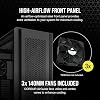
  • A high-airflow optimized steel front panel delivers massive airflow to your system for maximum cooling.
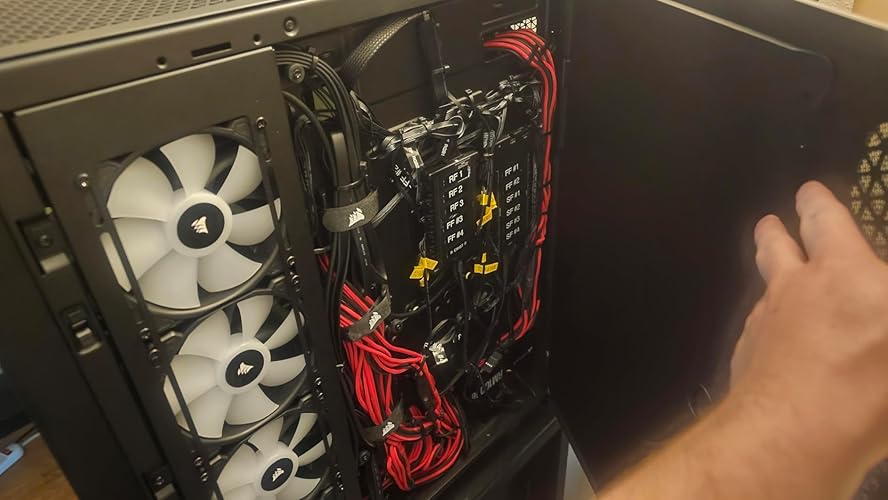
  • The CORSAIR RapidRoute cable management system makes it simple and fast to route your major cables through a single hidden channel, with an easy-access hinged door and a roomy 30mm of space behind the motherboard for all of your cables.
  • Includes three CORSAIR 140mm AirGuide fans and PWM fan repeater, utilizing anti-vortex vanes to concentrate airflow and enhance cooling.
  • A massive interior accommodates up to 12x 120mm or 7x 140mm cooling fans, and makes it possible to install multiple radiators including 3x simultaneous 360mm or 2x simultaneous 420mm for extreme cooling.

Description

The CORSAIR 7000D AIRFLOW is a full-tower ATX case for the most ambitious builds, with an airflow-optimized steel front panel for maximum air intake. CORSAIR RapidRoute cable management easily keeps your cables hidden from sight, while a massive interior enables a multitude of cooling options, including up to 12x 120mm fans or up to three simultaneous 360mm radiators. Three included 140mm CORSAIR AirGuide fans deliver concentrated airflow for enhanced cooling, and customizable side fan mounts hold up to a 420mm radiator. Show off your components behind a tool-free tempered glass panel and add your own personal touch with a customizable windowed PSU shroud complete with a three-slot vertical GPU mount. With room for up to ten storage drives, a front I/O panel including a USB Type-C port and four USB 3.0 ports, and easy-access hinged side doors, you can build your legacy in the 7000D AIRFLOW.

Brand: Corsair


Motherboard Compatability: ATX


Case Type: Full Tower


Recommended Uses For Product: Gaming


Color: Black


Material: Tempered Glass


Power Supply Mounting Type: Bottom Mount


Cooling Method: Air


Model Name: 7000D AIRFLOW


Fan Size: 140 Millimeters


Supported Motherboard: ATX


Case Type: Full Tower


Power Supply Mounting Type: Bottom Mount


Cooling Method: Air


Fan Size: 140 Millimeters


Total Expansion Slots Quantity: 11


Total USB 2.0 Ports: 4


Total USB 3.0 Ports: 4


Total Usb Ports: 4


Other Special Features of the Product: High-airflow steel construction front and roof panel


Hard Disk Form Factor: 2.5 Inches


Internal Bays Quantity: 10


Compatible Devices: ATX-compatible devices


Number of Fans: 3


Light Color: black


Antenna Location: Gaming


Item Weight: 41.23 Pounds


Item Dimensions D x W x H: 21.65"D x 9.76"W x 23.62"H


Brand: Corsair


Model Name: 7000D AIRFLOW


Manufacturer: Corsair


UPC: 840006636427


Global Trade Identification Number: 27


Mfr Part Number: CC-9011218-WW


Model Number: CC-9011218-WW


Warranty Description: 2 year manufacturer


Unit Count: 1.0 Count


Built-In Media: Item


Color: Black


Enclosure Material: Tempered Glass


Frequently asked questions

If you place your order now, the estimated arrival date for this product is: Tuesday, Jun 23

Yes, absolutely! You may return this product for a full refund within 30 days of receiving it.

To initiate a return, please visit our Returns Center.

View our full returns policy here.

  • Klarna Financing
  • Affirm Pay in 4
  • Affirm Financing
  • Afterpay Financing
  • PayTomorrow Financing
  • Financing through Apple Pay
Leasing options through Acima may also be available during checkout.

Learn more about financing & leasing here.

Top Amazon Reviews


  • This case is yet another Corsair Grade A+ product This case is yet another Corsair Grade A+ product
Color: Black Pattern Name: PC Case
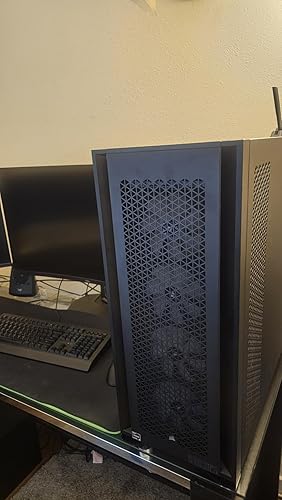
This case is a GEM. I have built a few computers so far in my life, and I think this was the easiest case to build in yet. Though it is a Full-Tower case, so with all the real-estate, it better be easy! The case is Big, it weighs in at a whopping 49 Lbs. empty. However, with my whole build it easily tips the scale at 85-90 lbs. The pictures do not do this case justice, it is BIG, and has a large footprint. Standing at around 2.5 Feet tall, almost 2.5 feet long, and 10 inches wide, you need to make sure you have the space for this case! The chassis is made of thick gauge steel, and feels and looks durable. The metal panels are also thick, and quite hefty, requiring two hands to comfortably handle and maneuver. However the panels are easy to remove on both the sides, front, and top. The removable racks for fans is a very nice touch that made installing the Rad, and fans a breeze. I only used one tray for my LTS 3.5" HDD and the rest of my storage is done through NVMe SSD's. however if you plan on using all 6 trays you will have to be meticulous in cable management because it doesn't leave much room for extra cables let alone using 2.5" SATA drives, so I recommend getting a modular PSU for this case. If you fill your fan slots with corsair fans (I had 12 in total) the cable management bay is a tad bit on the cramped side for the size of the case, but it is workable if you have enough time and patience. I will list my build below to show what I have living comfortably in this tech mansion. The amount of cutouts for the cable routing is very nice in such a large case, there are a couple things I wish I'd done differently. If you like the RGB features like I do, I recommend spending the extra money on Corsair Link systems. It alone would cut the amount of cable routing by nearly 75% and you wont wind up with a rats nest of cables. The commander series of fans have short cables and required some ingenuity to route them to reach the Commander Core and Commander Core XT Modules for all the effects. (mine are still not in order and I spent the greater part of 8 hours on cable routing and management and I'm not 100% happy with where I wound up). However, I'm willing to admit that I went haywire with the RGB fans and went for the less expensive Non-LINK fans so it is mostly my fault. If corsair Were to supply or Offer a kit of a few extension cables for your front fans for the RGB and PWM cables this would work out just fine and It would have saved me a few hours of Cable Routing, however I am not attempting to say this is their fault by any means. Their cable management system provides 2 channels to route cables with Velcro straps to fasten the cables to the chassis. These Channels are small, however, and tend to give troubles for high end power hungry motherboards as their custom cables have the capacitors that eat precious room in these channels. Other than the options for cable management, this is a very nice looking, functional case that is built very well and seems to carry the expected Corsair quality. I 100% recommend this case if you are in the Market for a sleek Modern case to house your large components and give plenty of airflow to keep your expensive parts cool. My Build affectionately named Nightingale: - Corsair 7000D Airflow Black - ASUS ROG Crosshair X670E Hero - AMD Ryzen 9 7900x (AM5) - Corsair Dominator Titanium DDR5 32Gb x 2 - Sapphire Nitro+ AMD Radeon RX 7900 XTX Vapor-X - Corsair RM1000e Modular PSU w/ Corsair Pro Type 4 custom sleeved cable kit - Corsair H170i Elite XT LCD 420mm RGB Liquid CPU Cooler (Top Exhst) - 8 x CORSAIR iCUE SP120 RGB ELITE (4 x on the front panel & 4 x on the side panel) - 1 x CORSAIR iCUE SP140 RGB ELITE (rear Exhst) - Micron 3400 512 GB M.2 NVMe SSD - Crucial T700 2TB Gen5 NVMe M.2 SSD ... show more
Reviewed in the United States on April 8, 2024 Reviewed in the United States on April 8, 2024 by Zachary

  • Great and big case
Color: Black Pattern Name: PC Case
it has a very robust material and a lot of space inside with tons of different options that i didnt get to discover them all yet after a week it has an insane amount of airflow and at the same time you cant hear anything that comes from the PC ive installed 14 noctua fans and the case is around 60cm away from me and i cant hear anything from it I compared this to my older case (H500P mesh) the difference on noise and temps is too much on my opinion theres few advices that id like corsair to add or change into this case: add a bit more of room for a 4th 120mm fan at the top of the case, the front and side panel can have 4 but not the top and this could make it "match" the whole case (this may make the case overall length bigger so i understand they didnt made it for 4 120mm fans) add a support for the GPU on normal mount (im not sure if its needed for riser mounting) add a screw for the PSU and motherboard door,sometimes the cables need to be pressed a bit to fit and with a magnetic door that isnt possible, this is solved by just taking it off and using the side panel to close it but then this door loses its purpose this case still has more potential to become even better than it is right now and i hope corsair doesnt forget the full-tower designs because this one is GREAT note: you can connect the fan hub that comes with this case as long as the fans you want to install doesnt go over 12w without using the sata connector, if you do you must connect the sata connector (check how much power each of your fans requires and add them all) this is a rule in general for all fan connectors except for some premium motherboards that allow more w in one or two connectors but the rest will still support only 12w note2: if you want to install a 6 fans radiator on the front you have to change the direction of the rails or whatever it is called for it to fit, i didnt try this for the top mount but it should be the same note3: i couldnt find a good position for the SSD's on the HDD's storage without bothering the fan at the bottom located at the side door, i think it was just me not doing a good cable management to fix it and i wasnt expecting it to happen so to anyone that wants to mount a 4th fan for the HDDs/SSDs be careful on the way you set the cables the only "bad" thing in this case is its weight, way too heavy but thats because of the good quality of the case, best way is to take off the side doors and then it will be a bit lighter to carry then put them back after if they make a better version of this it will be on my wish list for sure ... show more
Reviewed in the United States on December 14, 2021 by asdewq

  • Don't waste your time or money on the 4000D or 5000D, this is the one you want
Color: Black Pattern Name: PC Case
I (probably like many others) agonized over the decision on which case to get. It was between the 7000D, 5000D, and the Phankteks Enthoo Pro 2. I ordered a 5000D, and while it is a great case, it is IMO a little cramped for a EATX setup, and likely even a regular ATX and/or Mini/Micro ATX (agian IMO). While the 5000D is a decent sized case, the basement area is pretty cramped when you are trying to shove a bunch of cables, a power supply, and hard drives down there. I ended up returning it and getting the 7000D (considered the Phanteks, but decided on the 7000D for a few reasons (more room in basement, and I wanted to top mount my 420mm AIO). Pros: - There is SO MUCH MORE USABLE SPACE in this case for being just slightly bigger than the 5000D. Plenty of clearance for rad/fans on top, I could probably do a push/pull without interference with memory. - There is space for six 3.5" HDDs and UP TO six 2.5” HDDs and/or SSDs which is great!! If you wanted to you could probably shove those six 3.5" HDDS, as well as six 2.5 HDDs or SSDs in this case (would need three additional 2.5" brackets, that's a lot of storage!! - Lots of room for cable management, not only down below, but on the backside of the motherboard tray as well. I did end up not putting on the interior door (it just gets in my way lol), the cable routing on the "front" side of this area does not block the mounting screws for the side fan bracket (something I really disliked about the 5000D). - Has 140mm rear fan, this was a huge plus for me as well, when your pushing 8x fans of air into the front and side of the case, you want to be able to get that air out, so having the rear 140mm in combination with the 420mm AIO on top set to exhaust makes for pretty decent airflow. - Top mount up to 420mm radiator on top and 480mm on front (though I don’t use the latter, and not 100% sure you could do both at the same time, but you can do 2x 420mm) means BIG cooling potential. Also the top radiator mount is removable via two thumb screws, such a nice feature!! - Four USB 3.0 ports on front panel as well as one USB 3.1 Type C, its always nice to have extra accessible USB ports. Just make sure your motherboard can support them (need two USB 3.0 headers, which most EATX boards have). - The cable pass through is all one opening. On the 5000D it is two openings and the grommets inside them do not stay in place well. While the grommet still has a bit of issue (comes out of place, but easier to re-install than on 5000D) on the 7000D, it is a lot easier to work with one opening instead of two. - Hinged (removable) door panels. I did not think I would like this at first, that was until I got the case and started building in it. Having the ability to remove them is great when you are doing the initial build. The ability to just swing them open after it is built helps to have quick(er than thumbscrews) access to things when needed such as motherboard switchs, jumpers, etc - There is room (once fan hub/stand offs are removed makes it better) to mount at least two Corsair Commander fan/LED controllers on the back side of the motherboard tray. Neutral/Good to know info: - Area under top panel will not allow install of 120mm fans on top of the frame like on the 5000D. This might seem like it should be a negative. However, there is plenty of room inside the case for fans, and like I mentioned earlier, you could probably put a push/pull setup above the motherboard with no issues inside the case. - Window on PSU area is cool, I didn't really need it, but it is cool it is there. - The included fans are pretty decent, though I did not use them, I am sure they would do a good job of cooling. - The area for routing the cables is pretty tight near the hard drive bays, it is manageable with both installed, but would be a lot easier with the most rearward one removed. - The glass is tinted darker on the black case, it is clear on the white case. This did not matter to me, in fact I prefer the tint as it knocks down the harshness on exposed LED Strips - The location of the rear exhaust fan on the back side of the case (using a 140mm) makes it difficult to install LED strips in that location. It is doable (I loosened the fan and put them behind it), but I do wish there was little more space there… of course this could be overcome by using a 120mm fan, but who wants to do that. - While there is space for three 140mm fans on the front, I believe it is more optimal (and looks better) to have 4x 120mm fans there as you have more airflow (dependent on fan type of course) but it also takes up the whole space (three 140mm leaves some space), which means when running LEDs it looks better. - I saw someone mention you have to remove the air deflector to have 120mm fans on the side of the case, which I found to not be required, so you can use the air deflector and 120mm fans together, reducing turbulence and directing more air toward the motherboard din the process. - The air deflector is two pieces, I had to remove the smaller (closest to motherboard) piece in order to have room for my EATX connections to fit. I tried doing a stand-off mod to it, but then my GPU was in the way, so I left it off. - The fan hub is a splitter, it will not allow for individual control of fan speeds - The vertical GPU mount is to close to the side panel (especially for 3+ slot GPUs), it does include a bracket to move it back farther though, so there is that. Negatives: - The area for routing cables from the front into the rear area is very small with sharp edges. - They really should have put grommets on all the cable pass throughs, for a case of this caliber to not have those is kind of sad. Though I found some edge trim ASIN: B00M8MAOLI that worked great for making my own. - No lights on the front I/O, I am almost certain Corsair omitted this to sway people towards the 1000D (which is way to big for practical purposes), it would have been great to have some light (did not even have to be RGB) around them, to assist when inserting in the dark. I may try to come up with a solution myself, or throw a USB book light in one port for now at least. - Mic/Headphone I/O not separate, come on, there was room for it, the jacks are pennies on the dollar, and all that had to be done is make another hole (less plastic) - Not a fan of the securing method for the door “latches” mostly because I have had a case where the “ball” has came loose. It works good, and is convenient, but it would be good to have the option to install a more secure method to keep the doors closed more permanently if needed. - ... show more
Reviewed in the United States on January 26, 2023 by technicalnoodler

  • Awesome Case
Color: Black Pattern Name: PC Case
I purchased this case to build a new top-of-the-line gaming system. The case is large, roomy, and sturdy, which what I wanted. I just find it too difficult to use smaller cases. Be warned, though, it is heavy. I went for the extra airflow of this model rather than RGB of the other models. Not a fan of RGB and have no need for it. Between air flow and RGB, the air flow wins for me. The case is large enough to handle the largest GPU's and CPU coolers with space for about anything you need to add. Top panel connections is a plus. In case anyone wonders, the "ARCTIC Liquid Freezer II 420 AIO Water Cooler" fits just fine, so anything as large as that cooler (which is pretty large) should work. I wanted a powerful AIO cooler and needed the room for a large one. The case price is on the high side, but you get plenty of value and better value than the cases twice the cost. Been running my system for several weeks now and no complaints for the case. Airflow is exceptional and all my components are staying cool. I recommend the case. ... show more
Reviewed in the United States on March 7, 2023 by Bill

  • It's both beauty and beast! It's both beauty and beast!
Color: Black Pattern Name: PC Case
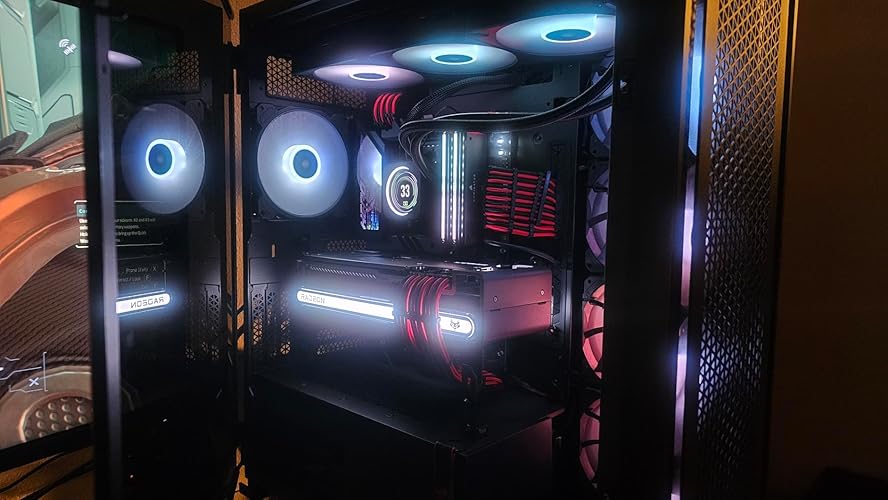
Definitely a five star case! - Solid! This thing has heft! Even with the inner cover-of-cabling-shame removed, this thing is solid. - Room! This thing has so much room. You can put in all the radiators or all the fans or a little bit of both. - Reliable! I think that given the room and the heft it could probably be used as an impromptu bomb shelter a la Indiana Jones refrigerator style. This has been my favorite case ever to build in. It's just ... easy. Cables are truly manageable. The hinged sides are great. The ability to customize is beautiful. You can add so many drives or remove the bays entirely. Tons of options for cooling. Lots of room for airflow. I've been using it for a few weeks now and things stay cool. I will be adding more fans in to keep it even cooler but I'm waiting for replacements for the three 120mm that arrived as a single used hair tie instead of fans. So you can enjoy the bit of crazy RGB that is has for now in the photo. Any complaints I have are too minor to mention, in my opinion. While nothing may be perfect, this is close as it gets. I have it paired up with Corsair cooling, hosting and ASUS mainboard and GPU, and G.Skill RAM. When I get the rest of the fans and the second lighting controller installed, will add pics (if Amazon lets me edit like that?) As it is, it's going great and I can't wait to add those finishing touches and report back on changes in cooling and coolness. Honestly, this case *ahem* probably won't change your life in a three wolf moon shirt kind of way, but it may be your next true love. The only reason my wife isn't jealous is because I got her the 5000D. She now games with a smile and a glint in her eye that belies true joy and she might love her computer more than me. It's OK. I did this to myself. ... show more
Reviewed in the United States on June 26, 2022 Reviewed in the United States on June 26, 2022 by Zero

  • This case is a monster! You are gonna need a bigger boat! This case is a monster! You are gonna need a bigger boat!
Color: Black Pattern Name: PC Case
I absolutely love this case! Coming from the Asus Hyperion gr701 and this case just crushes it for airflow. I would give it 5 stars buttt ( yea I know it’s older ) I had to do some modifications especially for the power cable for the gpu so it had a better run to the gpu. Also I installed 3 140mm fans on the side and the bracket only supports 120mm so had to do a little drilling. Still absolutely beast of a case and I love the size. ... show more
Reviewed in the United States on May 10, 2026 Reviewed in the United States on May 10, 2026 by Blueshirtfan

  • If you can afford it, solid choice!
Color: Black Pattern Name: PC Case
Huge Case! I absolutely love it. I slapped a 360mm AIO fan on top, so much space. Case fans are super quiet, and the little holes for cable management is clutch. Glass panel is nice to look at your RGB's if you have it. GPU brackets are nice and tight, too. So much so, you might not need the brace to dodge GPU sag. Price tag is a bit steep, but I found it more than worth it. This is especially true with the newer GPU's being so huge. ... show more
Reviewed in the United States on October 30, 2025 by Preston

  • Spacious, Well-Designed Case with Excellent Airflow
Color: Black Pattern Name: PC Case
This is a case built for serious builders who value both cooling and cable management. The high-airflow front panel and fans keep temperatures under control even with demanding hardware, while the spacious interior makes installation straightforward for large GPUs and custom cooling setups. Cable routing is one of its strongest points—the dedicated channels and PWM repeater make it easy to keep builds clean and efficient. The build quality feels solid, with a premium finish that matches the price point. It’s not the smallest footprint, but that’s the trade-off for flexibility and airflow. Overall, this case delivers on its promise: excellent thermals, room to grow, and a design that makes building less of a hassle. A reliable choice for anyone planning a high-performance system. ... show more
Reviewed in the United States on November 25, 2025 by Solo wing

Can't find a product?

Find it on Amazon first, then paste the link below.
Checking for best price...