Search  for anything...

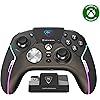
Turtle Beach Stealth Ultra Wireless RGB Gaming Controller, Xbox Series X|S | Also works with PC, Xbox One, Android, Bluetooth, Customizable Display Screen, Rapid Charging Dock, 30-Hr Battery, Black

  • Based on 2,771 reviews
Condition: New
Checking for the best price...
$144.94 Why this price?
Save $75.05 was $219.99

Buy Now, Pay Later


As low as $24.16 / mo
  • – 6-month term
  • – No impact on credit to apply
  • – Instant approval decision
  • – Secure and straightforward checkout

Ready to go? Add this product to your cart and select a plan during checkout.

Payment plans are offered through our trusted finance partners Klarna, Affirm, Afterpay, Zip, Apple Pay, and Google Pay. No-credit-needed leasing options through Acima may also be available at checkout.

Learn more about financing & leasing here.

Selected Option

Free shipping on this product

FREE 30-day refund/replacement

To qualify for a full refund, items must be returned in their original, unused condition. If an item is returned in a used, damaged, or materially different state, you may be granted a partial refund.

To initiate a return, please visit our Returns Center.

View our full returns policy here.


Availability: Only 1 left in stock, order soon!
Fulfilled by NAZMAK

Arrives Aug 7 – Aug 9
Order within 22 hours and 45 seconds
Available payment plans shown during checkout

Protection Plan Protect Your Purchase
Checking for protection plans...

Color: Black


Edition: Stealth Ultra Wireless


Features

  • Keep your controller and wireless transmitter updated with the latest firmware, available in the Control Center 2 app for Xbox and PC
  • Patented, On-Board Social Media Notifications
  • Hall-Effect Thumbsticks for Long-Lasting, Smooth Control
  • Tactile Microswitch Buttons & Adjustable Trigger Stops for Faster, More Reliable Response
  • Delivers 8-10 hours of Battery Life Out of the Box & Up to 20-hours with Eco Power Mode
  • Four Mappable Quick-Action Buttons plus Pro-Aim Focus Mode
  • Bluetooth Connectivity with Companion App
  • Advanced Audio Tuning with Superhuman Hearing
  • Intelligent RGB Lighting System
  • Durable, Hard-Shell Case with Charge-Through Capability

Description

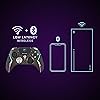
Lag-Free Wireless & BluetoothThe Turtle Beach Stealth Ultra wireless smart game controller with charge dock delivers premium performance through the best possible components and customization options for gamers who demand the best. Lag-free wireless connection lets you reliably connect to Xbox Series X|S & Xbox One consoles, Windows 10 & 11 PCs and built-in Bluetooth connectivity gives you even more flexibility for direct connection to PC, Mobiles Devices & Smart TVs with Bluetooth.Advanced CustomizationThe innovative full-color Connected Command Display dashboard keeps you connected while you’re gaming and offers extensive settings adjustments accessible right on the dashboard. A patented feature, only available on Stealth Ultra, you can receive social media notifications from your phone directly on the Command Display That means no more glancing away from the game to pick up your phone to check notifications, Stealth Ultra keeps them all front and center so you don’t miss a moment of action. Also available in the Command Display dashboard, you can access on-the-fly adjustment for 10 on-board profiles for different game genres or character loadouts. Additionally, you can adjust key controller performance aspects, like button mapping, thumbstick response, dead zones, and vibration intensity. Make the Stealth Ultra your own, with 16.8 million different RGB colors, so you can set your preference for aesthetics, notifications, and low battery warnings. And for added convenience, these features and more are all adjustable in the Control Center 2 companion app for Xbox, Windows PC, Android & iOS devices.Faster, More Reliable ControlsDesigned for longevity and reliable performance, the Stealth Ultra features premium materials throughout. Tactile microswitches rated at a 5 million click life cycle are used in the D-Pad, ABXY cluster, mappable buttons, and bumper buttons for reliable, faster response with every click. The AntiDrift thumbsticks use non-contact hall effect sensors to enhance accuracy and improve durability, and two additional sets of thumbcaps are included for added customization & tactile preference. The trigger stops are adjustable for short hair triggers in action or FPS games, to full travel distance for fine adjustment of throttle and brake in racing games. Plus, four mappable quick- action buttons let you configure your exact control preferences depending on the types of games you play.Long-Lasting Battery & Quick RechargingThe low- profile charge dock gives your controller a convenient place to rest and charge when it’s not in use. Select between Full, Balanced & Eco power modes, plus a custom mode to toggle certain features or aesthetics on/off based on your preferences. To maximum battery life, select Eco mode, turn off vibration and without a connected headset you can play up to 20 hours. If you’re looking for a full-featured experience with audio features, or if you play in short sessions, switch over to full power mode for 8-10 hours of battery life. Plus, with high-speed charging over USB 3.0, you can get back to 100% charge in under 2 hours. The dock also has a built-in USB port so you can plug the wireless transmitter into the dock and only take up one USB port on your Xbox or PC. Designed for wireless use on Xbox consoles, Windows 10 & 11 PCs, and Smart TVs, the Stealth Ultra also comes with a 10ft / 3m USB cable so you have the option to play-and-charge.High-Performance, Lag-Free Wireless TechnologyOur proprietary, lag-free 2.4 GHz wireless connection and built-in Bluetooth technology gives you the freedom to play without a wired connection.Rechargeable Battery Enjoy 8–10 hours of playtime out of the box and extend it to up to 20-hours by enabling Eco-friendly power modes. The low‑profile charge dock fully recharges the battery in just two hours using USB 3.0 high-speed charging. The dock also includes a USB port, allowing you to plug the wireless transmitter directly into the dock so you only use one USB port on your Xbox or PC.Connected Command DisplayOur full-color Connected Command Display dashboard keeps you connected while you’re gaming with social media notifications, and settings adjustments available right on the dashboard.Patented, On-Board Social NotificationsReceive social notifications from your phone for all your favorite social media platforms on the Command Display dashboard to keep you in the loop while gaming.AntiDrift ThumbsticksContactless, hall effect thumbsticks use internal magnets instead of full contact analog-style sticks to provide high-resolution, smooth control without drift. Plus, two sets of additional Thumbcaps are included for tactile preference.Precise, Microswitch ButtonsShort travel tactile microswitches, rated at 5 million clicks are used for the D-Pad, ABXY cluster, mappable buttons and bumper buttons for faster, more reliable response and longer life.Adjustable Trigger StopsModify the throw distance of the triggers on-the- fly to suit the games you play. Shorter hair trigger locks provide a faster return profile for FPS games or set to full travel for precise throttle and brake control when racing.Four Mappable Quick-Action ButtonsFour mappable microswitch buttons on the back of the controller allow you to set up the Stealth Ultra to your exact preferences depending on the types of games you play.Pro-Aim Focus ModeSelectable as one of the preset profiles for any of the four mappable buttons, Pro-Aim tunes thumbstick sensitivity for enhanced long- range accuracy.Customization with Control Center 2 Companion AppOpen the Control Center 2 app on your Xbox console, PC, iOS, or Android smartphone to adjust controller settings and make product updates.Advanced Audio TuningEnhance any 3.5mm connected headset with exclusive audio features from Turtle Beach including EQ presets & Superhuman Hearing, game & chat volume mix, and more.Intelligent RGB LightingThe intelligent RGB LED lighting system allows you to personalize your controller with 16.8 million distinct colors for aesthetics, notification alerts and low battery warnings.Immersive Vibration FeedbackDual rumble motors in the handles and triggers provide immersive vibration feedback and are fully adjustable via the Command Display dashboard.Premium MaterialsDesigned for longevity and comfort, the Stealth Ultra has soft touch finishes, long-lasting microswitches, and comfortable, ergonomic grips.Charge-Through CaseStow away your controller, charge dock, cables and two sets of additional thumbcaps in the hardshell travel case, plus a built-in slot lets you charge your Stealth Ultra while in its case.

Compatible Devices: Android, Windows, Xbox One, Xbox Series X


Controller Type: Gamepad


Connectivity Technology: Bluetooth


Additional Features: Wireless


Button Quantity: 10


Hardware Platform: PC, Xbox, Xbox One, Xbox Series S, Xbox Series X


Power Source: Battery Powered


Compatible Video Game Console Models: Microsoft Xbox One, Microsoft Xbox One S, Microsoft Xbox One X, Microsoft Xbox SERIES S, Microsoft Xbox SERIES X


Item Weight: 13.28 ounces


Package Quantity: 1


Item Dimensions: 6.3 x 2.53 x 4.72 inches


Color: Black


Brand Name: Turtle Beach


Model Name: Stealth Ultra (TBS-0710-05)


Manufacturer: Turtle Beach


Global Trade Identification Number: 03


UPC: 731855007103


Included Components: Item


Model Number: TBS-0710-05


Manufacturer Part Number: TBS-0710-05


Frequently asked questions

If you place your order now, the estimated arrival date for this product is: Aug 7 – Aug 9

Yes, absolutely! You may return this product for a full refund within 30 days of receiving it.

To initiate a return, please visit our Returns Center.

View our full returns policy here.

  • Klarna Financing
  • Affirm Pay in 4
  • Affirm Financing
  • Afterpay Financing
  • Zip Pay in 4
  • Financing through Apple Pay
  • Financing through Google Pay
Leasing options through Acima may also be available during checkout.

Learn more about financing & leasing here.

Top Amazon Reviews


  • Worth it
Color: Black Edition: Stealth Ultra Wireless
I’ve had this controller for 9 months and have put some serious usage on it and I have to say that from the reviews I was worried about it holding up but that has not been the case. First off, what’s in the box. It comes with the controller itself, two different pairs of thumb grips that slide over the existing thumb sticks, braided USB-C cord, charging mount, wireless dongle, and a carrying case. The carrying case is nice, is a durable cloth exterior with a velvety interior, haven’t needed to use it so it’s holding up fine. The charging mount is interesting. You plug it into the device that you’ll be using the controller with and you’ll have wireless gaming on that device as the USB dongle has a spot on it to plug into. I ultimately decided to not use the mount for now, I use the braided cable it came with, which is 10 feet, to keep the controller plugged into my pc as that’s where it’s used most frequently. The dongle I took out of the mount (ended up having to wedge something in between the mount and the usb to get some leverage the first time to actually remove it) and I have that plugged into my Xbox series x in the living room so if I want to use it I just unplug the controller and walk out of the room. Works out because I don’t have to resync or move the long cord with the mount around the house. The thumb grips are nice, they’re not needed but I use them anyway so the original grip on the thumbsticks themselves are still in good condition and I can’t see any wear on the ones I decided to use. I opted for this controller for one big reason, that being the built in volume controls. Since the launch of the Xbox One I’ve been using the controllers that ship with the consoles because they just work. I didn’t like that weird headset that came with the One so I picked up a pair of XO7’s and it came with an adapter that plugs into the bottom of the controller (the weird rectangle looking port with two squares around it that I always see people asking what it is) and it always gave me freedom to increase the volume of everything going through it along with having the audio being split between console sounds(games, YouTube, Netflix) and party chat so I would be able to turn people down in those intense search and destroy matches on CoD and such if needed. I still have that adapter and still works great, so does my controller that came with my Series X, but I wanted something new. While the built in volume controls are what was the final deciding factor, what drew me to this over say, the official Xbox Elite 2, was the bottoms themselves. I was curious about the mouse click feedback and got me thinking about all the times I’ve had to take a controller apart to clean them because of a button getting stuck. These buttons don’t seem to have that issue at all and while it feels weird at first it in my option feels so much better. Yeah you’re getting mouse clicks every time you press A B X Y RB LB D-pad or any of the rear mounted buttons but if you’re using to mouse clicks then it shouldn’t be a problem. Remapping the rear buttons is easy and takes less than a minute to do, no extra apps or anything for that, with the built in screen it has its own menu to do everything you want. *There is an app you can download though if you want the notifications from your phone to show up on the screen, I used it a few times and mainly if my fiancé is out and she needs to get ahold of me it’ll pop up in the screen and the controller lights will change letting me know I got it* the controller also has trigger stops which I pretty much keep on unless I’m playing a shooter and you don’t have multiple options like the Xbox Elite 2, it’s just on and the triggers act as button presses or full on trigger. Overall the performance of this controller has been overwhelmingly positive from me and I do implore anyone wanting to change it up a bit for something new to get this controller, as long as you take care of your things I don’t see durability being an issue. I wouldn’t let younger teens or children use this, or any controller that has a bunch of functionality at that, just for the fact that they could get upset at a game and throw the controller and damage it and I’m sure it’s not as durable as the stock Xbox controller, especially with a built in screen. Oh and battery life is about 8 hours continuous play ... show more
Reviewed in the United States on March 30, 2025 by Ryan

  • Buggy and Unpolished. Update: Broke after a couple months of use, replacement broke too
Color: Black Edition: Stealth Ultra Wireless
Update 2: the replacement had the same failure in exactly 60 days. Yesterday I was playing marvel rivals and the right trigger started feeling unresponsive and would randomly stop firing. Then it started firing nonstop. After the match ended, I inspected the trigger and found it was crooked and has the same "slop" as last time. This is definitely a design flaw. I never felt or heard anything crack or snap, it seems the hinge is just weak/soft plastic. I've owned dozens of controllers in my life and used them for thousands of hours, and these are the only two I've ever had experience a failure. Update: I stopped using this controller after forgetting to return it. But unfortunately a couple months ago my Elite 2 controller had some issues and I had to send it in, so I figured I'd give this a shot again. I can say the software updates helped, though occasionally it does have issues with the thumbsticks going in the wrong direction or button clicks not registering. But it was tolerable for casual gaming. However, last week I was playing Halo and all of a sudden my right trigger stopped firing correctly. I noticed any gun I pulled out would fire full auto, and eventually the trigger stopped working all together. I also noticed the right bumper was very difficult to push. After the match I took a look and noticed the trigger was just flopping around inside the controller. I thought maybe it was just knocked out of place so I attempted to see if I could re-seat it. But it just fell out of the controller, where I could see the trigger had just snapped off right at the hinge. I was able to fill out an RMA, but unfortunately Turtle Beach will not send out a replacement until they receive my controller, and then they say it will take 10-14 business days to send a replacement. But I'm back to using my Elite 2, and although it does have minor strict drift, the back paddles are much better than the TB, and it doesn't require an external transmitter like the TB. The E2 triggers and buttons also feel dramatically better, and overall configuring the buttons is much simpler. And in general the TB feels so much cheaper, especially for the insane price tag. For 79$ it'd probably be a good buy, but at its current price it's still an absolute scam. On paper it's the ideal controller. At least currently it's the only wireless controller with hall effect sticks, back buttons/paddles, and adjustable triggers. However in reality it's just not ready for primetime. It feels like something you'd expect from a Kickstarter where it was the company's first project. My 1st main issue I came across was the absolutely atrocious app they use on Xbox to configure the controller. Just setting up a profile is incredibly clunky and intuitive compared to say the Elite 2. In app there's controller input lags, doesn't register, or registers too much (aka nonstop button clicks). I got into a game after setting everything up in my profile and the settings didn't save even though they show as saved in the app. I ended up using my standard controller to setup the turtle beach since the inputs were so inconsistent in the app it was unusable. Aside from that, I've noticed the controller will miss button clicks, even though I fully depress the trigger/button and can hear the audible click. The sticks also sometimes randomly keep moving after being recentered and you have to bump it to get it to stop. I'm not sure if this is a hardware or software issue, but it's on the latest firmware so if it's the firmware there's no fix currently. The screen is definitely a cool idea, but for me it's not something I needed, and likely a large contributor to the high cost. Also is kind of annoying you have to use a dongle and it can't connect in the same way a normal controller does. I got this controller because I had stick issues with my Elite 2 out of the box, and figured I'd try it while it was out for repairs. This will tide me over, but I'd definitely never consider keeping it at $200 with how unreliable it is. I'm sure the next batch/generation of this controller will be great, but until then I'm sticking with the Elite 2. There are other companies making hall effect controllers now, so it's just a matter of time until someone comes out with a competitor that checks all my boxes. ... show more
Reviewed in the United States on February 18, 2024 by Octavius

  • I've tried them all and this one wins
Color: Black Edition: Stealth Ultra Wireless
I've tried literally all of the high-end "pro" Xbox controllers over the years and this one wins by a mile for one major reason; the joysticks on this are next-level. This is one of the only pro controllers using hall effect joysticks on the market today and if you don't know what that means, Google it before you buy a pro controller. The deadzone, responsiveness, and low resistance of the joysticks on this controller are so much better than anything else on the market today. Think about how you game and you'll probably realize that joysticks are the single most important part of a controller. The fact that every single button on it uses a mechanical switch instead of the old mushy, sticky membrane buttons is icing on the cake. The ergonomics further that sweetness as I have XL hands and being able to grip the controller without accidentally pressing the back buttons means a lot to me. I had no quality control issues on my unit and after owning it for two months (20+ hours of use per week) it's still just as good as new. A lot of reviews complaining that it "feels cheap" but feels are worth absolutely nothing (elite series 2 controller proves this; it feels premium, but it's one of the worst pro controllers on the market with terrible quality control, sticky membrane buttons, and sloppy joysticks with atrociously excessive deadzone to hide the stick drift). What matters is performance and the Stealth Ultra wins by a landslide. When I first started trying pro controllers, one thing I cared a lot about was the ability to swap out hardware. Different joysticks, different D-pad, etc. But then I settled into what worked best and never went back. Controllers with swappable components became useless to me as I literally never swapped after this. That said, one of the drawbacks of this controller is that I had to apply a third party joystick extender to the right stick for aiming (I bought the Scufs and they fit perfectly). The other downside is the PC software for this controller, which is pretty bad, but fortunately you don't even need to use it since the LCD screen on the controller let's you do everything the software can. ... show more
Reviewed in the United States on September 7, 2024 by JD

  • Not very good right now but it has potential
Color: Black Edition: Stealth Ultra Wireless
I was pretty excited to use this controller but it had many issues that just made this such a frustrating controller. The good parts about this controller is the embedded controller screen that lets you adjust your settings and mapping buttons. However, because of the screen placement hitting the view/select button was awkward. The build feels really nice and the clicky-ness of the game buttons and the bumper are very nice very similar to the feel of the Razer Wolverine Tournament Edition. So anyone who might be used to mouse/keyboard might enjoy the feel of this. You do get a charging station similar to what you'd have with an Elite 2 controller. The station has a base to plug in the Bluetooth Adapter into (vs manually plugging it into the Series X, which you could do) but it's very hard to grasp and pull the USB stick out, so it's probably better to keep it attached to the charging station and plugging it into your Xbox. Using this for FPS predominantly Call of Duty I felt that the aiming on this was weird and awkward. I spent a lot of time trying to dial the settings in but could never get it right. Either is way too loose or too rigid with aiming. I adjusted the controller internal curve mapping but just no luck getting it right. With Hall effect joysticks, these did feel nice but perhaps it's years of analog joystick it just never felt right over the two weeks I kept trying to use your controller. The biggest issue with this controller is the connectivity of the controller. I had verified the most up to date firmware at the time of writing this, it would lose connection to the series X intermittently. Sometimes I couldn't recalibrate or get it to reconnect without restarting the series X or unplugging and replugging it back into the console. The second biggest issue is that often when using the controller it right for the lack of better words, freak out. Think that you're aiming and going right and then randomly it tugs to the left or just ignores your input altogether. That was my experience with this controller and reading other reviews and reddits going similar people running into this issue with no apparent fix. The customizable back buttons are just a bit shallow and semi awkwardly placed horizontally in the controller. Meaning utilizing the entire thing is a nightmare of ergonomics, it made my hand cramp up and outside of the predominant back button being slightly easier to hit, both of the buttons towards the middle of the controller require a real stretch. As such, trying to use the buttons and joysticks feels unnatural. Battery life was very hit or miss, I would get a few hours sessions in and the battery would just get depleted. I even lowered the RGB lighting on the controller and the screen brightness and time it settings but still found the Elite 2 controller to still be the best in which I only have to recharge it every 1-2 weeks from 2-4 daily gaming sessions, on average. It does come with a nice controller case where you can keep the charging station in just like the Elite 2 controller. You also get thumbstick covers similar to Control Freaks with two texture types. I'm not much of a fan of Control Freaks but they did feel nice, so if you like them, you'll like these that are included. There are trigger stops and The button is on the top of the controller as opposed to the Elite 2. For ease of use, it felt odd to adjust on the fly vs the Elite 2. However, the build quality of the buttons are much better. With the Elite 2 controller trigger stop being wrapped by a tiny rubber piece that often falls off, in which you have to use your finger nail to get underneath to switch the stopping location for the triggers. Overall, what makes this controller have potential is the build quality, it's superior to the Elite 2 with regards to the material and having the internal system with the embedded screen is awesome. This is the only 3rd party controller that is wireless for the series X so that's a plus but the things that hold this back is: 1. Connectivity Issues 2. Awkward Placement of the back buttons and trigger stop buttons 3. Dead zone and Hall Effect feels very weird so it takes time getting used to I think with a few more revisions to the controller it can certainly be up there to rival the Elite 2 but it has kinks it has to sort out. With the price point of $199.99, it seems better to just get the Elite 2 or if you don't mind having the controller plugged in, the Razr Wolverine are just better options. ... show more
Reviewed in the United States on June 16, 2024 by Benjamin Sam

  • Not perfectly compatible, but still a good controller if looking for something more than standard.
Color: Black Edition: Stealth Ultra Wireless
Bought this to replace a Microsoft Elite Xbox Controller for my XBOX X console. This controller feels larger than the elite, and requires an additional app to be downloaded to be used. Be aware that it doesn't sync directly to the xbox's bluetooth but rather to an adaptor or dongle which sits on the charging stand, therefore it doesn't turn on the console when you press the XBOX button like the Elite controller did. It's possible that this dongle is meant for PCs or other devices that don't have bluetooth? I'll see if I can pair directly with XBOX via bluetooth, but out of the box you'll have to manually turn on the xbox before you sit down to game. The extra buttons on the Bottom are a little too well paced to align with naturally holding the controller so often trigger the programmed buttons which makes for interesting in game mistakes. While buttons are programmable using the free app, there is no ability to do combination buttons like the elite had. It's also much lighter. Note: I'm not a competitive gamer, but a casual gamer so I can't comment if this controller will give you the edge, but for me, works better than a standard controller or a broken Microsoft Elite 2. :-) ... show more
Reviewed in the United States on November 23, 2025 by Amazon Customer

  • Good Controller for Big Hands
Color: Black Edition: Stealth Ultra Wireless
I have big enough hands that most controllers feel uncomfortable. For instance, I can't use the xbox elite controller, because it just feels too cramped (e.g. it's angled too far inward). The best controller that I've found in that regard in recent years is the Astro C40, but unfortunately, they don't make it anymore (and mine wore out), and it has playstation buttons, which is great when playing on playstation but annoying on PC. However, this controller from Turtle Beach comes close, and it has much better buttons. They're quite clicky, so it's always clear when they're pressed, and they feel nice to press. The tension on the sticks isn't as high as I'd like, but it's still good. The triggers are great. They not only have trigger stops, but the controller actually turns the triggers into proper buttons when they're locked instead of you having to go into the settings to change their sensitivity (which the C40 unfortunately requires). So, overall, I'd say that the controls are quite solid. The real winner though is the shape, since it feels _much_ nicer in my hands than a typical xbox controller. Ideally, it would be a bit larger than it is, but it's so much better than the other controllers that I've tried recently that I'd have to recommend it on that basis alone if your hands aren't small. Now, the fact that the controller has RGB lighting on it is just stupid and annoying IMHO. It's a waste of power and distracting. Fortunately, you can turn it off in the settings, which makes for a _much_ more pleasant experience. That being said, I did have to do custom settings, since the eco settings also make the controller turn off annoyingly quickly - the range is 1 minute to 10 minutes (or always on), and the eco mode puts it on the shortest time - whereas if you further customize the settings, you can tweak how long the controller will go before automatically shutting itself off. The controller comes with a nice charging stand that you can also plug the USB dongle into, so then it's connected through the stand instead of having the dongle connected directly to the computer. The stand will also stop charging the controller once the battery is full, so you can just leave it on the stand without worrying about wearing the battery down, which is nice. The one issue that I've run into is that occasionally, when you wake the controller up, the dongle fails to get the signal and stays asleep, so I have to unplug the stand and plug it back in again, which is annoying, but it's not the end of the world. And most of the time, it reconnects just fine. The controller also allows you to plug in a USB-C cable directly if you want to use or charge it that way. The controller has a small, simple display on it which allows you to configure some stuff (though I haven't bothered; I've just used the PC application to do it), but what is nice about it is that it shows the battery level. And the screen has a timeout similar to the controller itself, so it can be set to turn off after a minute and then not turn on again until you press the button. It would be nicer if it would also turn off with the same button rather than having a timeout, but you can't have everything, I suppose. And you can adjust how bright the screen is (or how bright the lights are if you actually want them on). So, all of the various annoyances that drain the battery can be dimmed and/or turned off. And of course, you can configure a number of things about the buttons and sticks if you so desire, though I haven't done much with that. I just wanted a controller that fit nicely in my hands, and button customization is simply a nice bonus. One potential concern with regards to the longevity of the controller is that the edge of the grips, which are rougher than the rest of the controller, feel like they were probably glued on, and IIRC, I saw some other folks say that theirs had come off. And while I haven't had any problems along those lines yet (and wouldn't expect to any time soon), that part of the controller does feel kind of cheap such that it wouldn't surprise me if they did come off eventually. My initial thought was that I would have preferred that they made the grips nicer and skipped the charging stand, but I've come to really like the charging stand. But still, if they were to make improvements, the most obvious things would be to make the grips nicer and to get rid of all of the RGB garbage (which would presumably also help with the cost), but at least the lighting can be turned off. ... show more
Reviewed in the United States on April 11, 2025 by J. Davis

  • Several issues
Color: Black Edition: Stealth Ultra Wireless
PC player here. Have been playing with my TB Stealth for 3 days now and have been finding one problem after another. First problem was my trigger stopped working. Programmed the broken trigger to my P4 button and that restored the function back to the trigger. Seems fixed but super concerning considering all the LB/RB & trigger malfunction reviews I read. Second persistent issue: will have completely erratic movements in-game that occur spontaneously, affecting the quality of my game play at pivotal moments. Using the hardwire seems to alleviate this pointing to the blue tooth connection as the culprit. Third persistent problem: I have to hard reset my controller multiple times in between game sessions. I cannot figure out the pattern on this except that it seems to happen most when I'm finished playing and my PC goes to sleep and I wake it back up to have another session. If I power down and start back up it either doesn't happen or occurs less frequently. GENERAL COMPLAINTS: ●The battery life is abysmal. Considering the poor quality of the Bluetooth connection, wired is the way to go with this controller. ●THE STEALTH CONTROL CENTER 2 APP is straight garbage!! There is nothing else needed to be said.. it's truly that bad. Deleted it promptly, and I just use the onboard screen to program. ●Heft. The controller is very light. This is a personal preference, but I enjoy a heavier, more robust grippy feel. The grip on this controller is very mid. PROS: ●Controller design feels like it was meant for my hands (6' male with average size hands for a guy my size). Great size and programmable button placement for my style of game play. ●On-board screen allowing programming. Super easy to access and intuitive. (The social aspect of the screen is a total gimmick, IMO) ●Button feel. Super clicky and quick response... they're really nice -with the exception of the d-pad which I feel has too much play on it.. almost feels kinda loose. Again, 3 days of use. I'm considering returning it this week. The question I'm trying to figure out is if I assume it's a faulty device and replace it with the same, giving the TB Stealth another chance or just move on to one of the two other contenders I considered before purchasing this. And just for context; it was the Hall Effect sticks that decided this purchase for me along with the rear programmable button placements. ... show more
Reviewed in the United States on April 1, 2024 by KLS777

  • It's an easy Buy for me Turtle Beach Stealth Ultra
Color: Black Edition: Stealth Ultra Wireless
Update: The X and Y buttons are inconsistent and it looses connection about every hour. when it drops connection you have to put it on the charger to force it to shut down and then wait for the controller to boot up and reconnect, it's a painful process. Its rubber grips are peeling up on both sides. This isn't a good controller. The only thing still working well are the hall sticks. It had promise but it doesn't last. I’ve had the controller for more than a week so far. Before this I have been using the elite and elite 2 controllers for years. First the hall effect sticks are everything I’ve ever wanted. So precise I didn’t realize how out of spec my old controller was. I set the stick dead zone to zero on both sticks and no problem, it snaps back to the exact center and no matter how hard I try I can get the targeting icon to stay put if the stick is moved all tall. I’ve tried used multiple games calibration as well as the system ones for the elite controller, always the same result. Compared to my elite 2 controller that is back from service about 3 months ago, there were spots on the calibrators at level 10 that the stick would register as center. So as far as accuracy the Stealth Ultra is amazing, in fact they are so much better I recommend the controller for that improvement alone. There are other things in the pros and cons but I’ll just say that from here on out it’s small things that I’d put in the personal preference category so if you don’t care about what I’ve listed please disregard. Pros: Hall Effect sticks are significantly better than anything you have used before. The Stealth Ultra is noticeably lighter, but it doesn’t feel like its cheep or flimsy. It still has a solid in hand feel to me so lighter is better in my opinion. This controller charges fast, I know people are hung up on the fact that you need to turn the lights down to get a good battery life out of it but if you need RGB in your face at all time just put that controller on the charge pad for 5 min and just like that you have a hour or so to play. The screen, to be clear I could care less about screen or trackpads or any other gimmick that gets put on a controller unless it offers something so the screen is pushing its luck, but the controller’s screen is my preferred place to adjust the controller settings. When I got my unit, it mapped the R3 & L3 buttons to the underside but I accidently flipped them. 1 Button press to open controller settings a few lefts and rights on the D-pad and then A button to confirm. I fixed my mistake while in game without having to back out. The screen on the controller is my preferred way to change settings too, although that’s partly due to the software being a bit clunky on the xbox. It’s the kind of setup where you make your changes then you have to upload the changes to the controller, or at least so I’m told, I like the screen so I use it. Active software updates are happening. In the past few weeks there have been 2 firmware updates and while game developers deserve the abuse, they get for needing to patch there half-baked garbage on day one I feel very optimistic about Turtle Beach backing and improving this control in the future. 1 update allowed more buttons to be mapped to the underside buttons. The second update helped with stability and fixed a led setting. I haven’t had any stability issues but the more stable the more gooder. Who knows could we gain the ability to adjust game and chat volume without taking our hands off the controller, please I’m begging here. Or could the screen show me the setting on my Turtle beach headset, that would be cool. Cons: The Stealth Ultra takes a second to boot up and to do so you have to hold down the xbox button a bit longer. Not a big deal when gaming, you can set the seep window to be up to 10min long, but when you are streaming and you want to skip to the new episode or stop the skip to watch a after credits seen you will be racing the countdown clock to wake up your controller. Vibration on the Stealth Ultra is just ok. At full force I would say it’s 7 out of 10 but at lower pulses it’s pretty bad. Most likely something that was sacrificed to lower costs and weight was the rumble. For me it’s good enough but I would still buy this controller with no vibration, the sticks are that much better. The placement of the “view” button, I call it the select button, is in a tough spot. You have to reach over the top of the left joystick and it takes some significant getting use to. I bet it will be worse for those of you who like tall sticks. You can’t map the view button elsewhere so no luck there. As soon as your controller starts charging on it’s included charging stand it disconnects from the xbox and will need to be turned back on slow boot up and all. It’s more annoying that it sounds but pretty minor overall. *All of the “cons” are minor to me but they may mean more to you. This controller cold take a 3 times longer to boot, have no vibration and no view button and it would still be the best controller I own. Other Things. This controller is a bit wider than the elite. Had to make room for the screen, I guess. I think it a little more comfortable, but you may not notice. All buttons are clicky mouse buttons. Dpad, ABXY the shoulder and trigger buttons sound a feel like a mouse click. If I press a button on both my elite controller and the Stealth Ultra there is more feed back and longer travel on the elite. The mouse click to me feels slightly “mushy” to me but it’s minor. I don’t notice while playing games just when doing the comparison. With less travel distance on the buttons, you can pretty much ensure that you can click faster on the Turtle beach controller so that is good enough for me to not care as much about the feel part. The only time you can get a battery like % is when it is charging. Otherwise, you get a battery gauge with 4 bars. Hate the bars, they are dumb on cell phones and dumb here too. You can’t even hit the xbox button and check the gauge near the time in the top corner. It always reeds full, my guess is that the usb dongle is what it is showing there but that is just a guess. You can’t adjust the center spring tension like you can with the elite controller so if you have a strong preference for that you got nothing here but the sticks snap back fast with a good force. And do I need to say how accurate they are again. This controller can get notifications for your phone, or so I’ve been told. I didn’t set it up and don’t care if I ever do. ... show more
Reviewed in the United States on January 29, 2024 by C. H. Martin

Can't find a product?

Find it on Amazon first, then paste the link below.
Checking for best price...