Search  for anything...

TreasLin VSDinside Stream Controller Deck with 18 Customizable Macro Keys to Trigger Actions in OBS Twitch YouTube for Content Creators Stream Dock Compatible with PC & Mac N1 Black Macro Keypad

  • Based on 0 reviews
Condition: New
Checking for the best price...
$64.98 Why this price?
4th of July Sale · 35% off was $99.99

Buy Now, Pay Later


As low as $10.83 / mo
  • – 6-month term
  • – No impact on credit to apply
  • – Instant approval decision
  • – Secure and straightforward checkout

Ready to go? Add this product to your cart and select a plan during checkout.

Payment plans are offered through our trusted finance partners Klarna, Affirm, Afterpay, Apple Pay, and PayTomorrow. No-credit-needed leasing options through Acima may also be available at checkout.

Learn more about financing & leasing here.

Selected Option

Free shipping on this product

FREE 30-day refund/replacement

To qualify for a full refund, items must be returned in their original, unused condition. If an item is returned in a used, damaged, or materially different state, you may be granted a partial refund.

To initiate a return, please visit our Returns Center.

View our full returns policy here.


Availability: In Stock.
Fulfilled by Amazon

Arrives Saturday, Jul 4
Order within 5 hours and 4 minutes
Available payment plans shown during checkout

Protection Plan Protect Your Purchase
Checking for protection plans...

Size: N1


Color: Black


Features

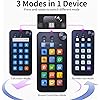
  • Numeric Keypad Mode The N1 Stream Controller Deck offers three different modes of operation, whereas similar products on the market only support custom keyboard mode. By pressing and turning the knob, you can switch between shortcut key mode, calculator mode, and numeric keypad mode. Calculator mode simplifies mathematical operations, while numeric keypad mode compensates for the limitations of a compact keyboard as well as being a very good left-hand device.
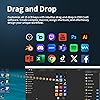
  • 18-key Customizable Macro Keyboard The N1 features 18 macro keys, consisting of 15 visual LCD buttons, 2 clickable buttons, and 1 rotary knob. In conjunction with the dedicated VSD Craft software, you can freely assign the function of each key to suit your preference. Key icons can be customized by drag & drop, taking screenshots, or selecting images. This unleashes unlimited personalization possibilities and instantly transforms your desktop into a highly efficient tool.
  • Multi-Scenario Quick Controls Customize dedicated shortcut scenarios to suit your needs: Daily mode instantly launches frequently used software, documents, and web pages; Work mode sets up quick controls for Photoshop/DAW/Premiere Pro/Blender and other software; Live mode sets up quick controls for your favorite software; and Work mode sets up quick controls for your favorite software. Live Streaming mode provides easy control of OBS streaming, while Media mode conveniently adjusts playback controls. In addition, automatic workflows can be set up to perform multiple tasks in a specified order, precisely tailored to your usage requirements.
  • Wide Application CompatibleN1 Stream dock works seamlessly with PC, Windows, and macOS, plus OBS Studio (Windows 10 64-bit+/macOS Catalina 10.15+), Streamlabs, Just connect via USB-C and you're up and running in seconds, and the included software is very easy to install and operate. The USB-C connection makes it easy to get up and running in seconds, and the included software is very easy to install and operate.
  • Extensive Plugins MarketplaceThe Stream Dock equiped with VSDinside marketplace for you to download, It offers thousands of free and premium options, including 200+ plugins, icons profiles and scenes for controlling apps like Discord, Twitch, and OBS for streamers and podcasters.
  • Supports dynamic iconsWhile most stream dock on the market are limited to static image icons, the N3 breaks new groundgoing beyond basic picture icons to support dynamic animated ones. Whats more, you can even use your favorite animations to create custom animated icon scenes for your device, transforming your interface from dull and static to uniquely vibrant and full of personality.
  • Please NoteIf you want use Spotify integration, you must have an active Spotify Premium account.
  • Technical SupportIf you encounter any issues during use, our dedicated engineering team is ready to assist you promptly.

Brand: TreasLin


Compatible Devices: PC


Connectivity Technology: USB-C


Keyboard Description: Macro


Recommended Uses For Product: Gaming, Streaming


Special Feature: Customizable Display Keys


Color: Black


Material: Plastic


Included Components: Removable Stand, Removable Adhesive


Model Name: N1


Compatible Devices: PC


Connectivity Technology: USB-C


Additional Features: Customizable Display Keys


Power Source: USB power


Hand Orientation: Left


Button Quantity: 18


Minimum Required Operating System Version: Windows 10


Compatible Operating System Family: Windows


Number of Keys: 18


Color: Black


Enclosure Material: Plastic


Brand: TreasLin


Keyboard Description: Macro


Antenna Location: Gaming, Streaming


Built-In Media: Removable Stand, Removable Adhesive


Model Name: N1


Unit Count: 1.0 Count


Manufacturer: Shenzhen An Rui Xin Technology Co.,Ltd.


Warranty Description: 1 Year


Frequently asked questions

If you place your order now, the estimated arrival date for this product is: Saturday, Jul 4

Yes, absolutely! You may return this product for a full refund within 30 days of receiving it.

To initiate a return, please visit our Returns Center.

View our full returns policy here.

  • Klarna Financing
  • Affirm Pay in 4
  • Affirm Financing
  • Afterpay Financing
  • PayTomorrow Financing
  • Financing through Apple Pay
Leasing options through Acima may also be available during checkout.

Learn more about financing & leasing here.

Top Amazon Reviews


  • Very neat device to use for many applications!! A must have for streaming!!
Size: N1 Color: Black
I’ve been using the N1 Stream Controller for a little while now, and it’s honestly been a great addition to my setup. If you like having quick access to shortcuts or want to streamline your workflow, this thing really delivers. It is bright and the colors are vibrant as well so its easy to see. Its also pretty much plug and play minus setting a few things up. The 18 customizable keys are the highlight for me. The LCD buttons make it super easy to see what each key does, and setting everything up in the software was pretty straightforward. I was able to customize icons and assign shortcuts pretty quickly, and now I’ve got one-touch access to apps, folders, and even multi-step actions. I also love the size of this and can be used as a numeric keypad as well. One feature I didn’t expect to use as much as I do is the different modes. Switching between shortcut mode, calculator, and numeric keypad is actually really convenient—especially if you’re using a smaller keyboard or just want everything in one place. The rotary knob is also a nice touch for adjusting things like volume or scrubbing through timelines. I’ve mainly used it for everyday tasks and a bit of content work, and it works smoothly with my PC. It connected instantly with USB-C, and I didn’t run into any setup issues. The plugin marketplace is another bonus—there are a lot of options to expand what it can do, especially if you’re into streaming or creative software. Overall, this is a really solid and versatile controller. Whether you’re working, streaming, or just want to speed things up on your computer, it’s a useful tool that’s easy to customize and actually makes a difference once you start using it. ... show more
Reviewed in the United States on March 24, 2026 by BP232

  • Great Stream Deck Alternative. Works Exactly as Expected
Size: N1 Color: Black
I’ve been really impressed with this stream controller so far. Setup was quick, and the software made it easy to customize the keys exactly how I wanted. The LCD buttons are clear and responsive, and being able to assign macros, shortcuts, or apps to each key has made my workflow a lot faster. The build quality is solid and it feels sturdy on the desk. I also like the extra functionality with the rotary knob and the ability to switch modes (shortcut keys, calculator, and numeric keypad), which makes it useful beyond just streaming. It’s been great for controlling OBS, launching apps, and triggering actions with a single tap. Overall, this is an excellent value if you want a customizable macro pad or stream deck without spending a ton. It does exactly what I needed and has become a permanent part of my setup. ... show more
Reviewed in the United States on March 12, 2026 by Kyle Hawkins

  • Handy Keyboard Stream Controller Deck
Size: N1 Color: White
this stream controller is easy to set up and use, with customizable macro keys and straightforward software. The device is very versatile. I appreciate that the buttons are quick to respond, and that the rotary feels like it has detents. The device works well, and, it is an excellent device that offers great value for money. ... show more
Reviewed in the United States on March 10, 2026 by Shelley N.

  • paired with a mouse wheel, perfect for MSFS2024
Size: N1 Color: Black
i thought i need more buttons, but figured a way to add buttons to another page. perfect for FSMS 2024, paired with a stationary mouse, the mouse wheel acts like a knob for G1000
Reviewed in the United States on March 3, 2026 by dan170

  • Love this!
Size: N1 Color: Black
This stream controller absolutely delivers for the price, so it’s an easy 5 stars from me. The 18 fully customizable keys (15 LCD plus 3 buttons) give you plenty of room to map OBS scenes, hotkeys, app launches, and complex macros for streaming and editing, and the bundled software makes setup straightforward on both Windows and macOS. Build quality feels solid: the keys have a satisfying, consistent click, the unit stays put on the desk thanks to rubber feet, and the RGB lighting and per‑key icons make it very easy to see what each button does at a glance, even in a dim streaming setup. Once configured, it’s been reliable—no random disconnects, and presses trigger actions instantly in OBS, Twitch, and YouTube, which is exactly what you want during a live scene change or audio tweak. What I liked: Plenty of keys for scenes, audio controls, app launches, and macros, without feeling cramped. Clear, colorful LCD icons and RGB effects that make it easy to organize pages and profiles for streaming, editing, or general productivity. Simple plug‑and‑play setup with a lightweight configuration app that supports both PC and Mac. Minor notes (not dealbreakers): Takes a bit of time upfront to design icons and map all your shortcuts, but that’s true of any good macro pad. If you want a capable, great‑feeling stream deck alternative without paying premium‑brand prices, this one hits a very comfortable sweet spot for both content creation and everyday workflow shortcuts. ... show more
Reviewed in the United States on March 11, 2026 by walkebe

  • Cannot customize easily - have to be a programmer - Pay for buttons
Size: N1 Color: White
No, you cannot create your own buttons - easily. You have to know how to program in Python. The interface is terrible. Do not buy this product. Notice the wording for buttons/themes; you can pay for "good" buttons/themes/scenes. Avoid this product. Spend the extra money on decks that allow you to customize the buttons in the interface. ... show more
Reviewed in the United States on March 12, 2026 by Brian Titus

  • Cheap Chinese Knockoff off Elgato
Size: N1 Color: Black
This a an attempted clone of an Elgato Stream deck in a slightly different form factor. The hardware is high quality and the device is solid and functional, with solid buttons and a strong feel. The calculator and extended keypad work independent of software (during bootup), which is important as Elgato has no such capability. The customizability is virtually unlimited. The problem is the relative lack of intuitiveness of setup with regards to the Elgato. Buy this after you've used a Stream deck and you will quickly realize that this is a cheap chinese-half hearted clone. When you try and get decent looking icons or just use it to the fullness of ability offered by a stream deck (deep macros, app integration) you will be disappointed. If you buy this first (like I did) you will likely think it's fine. If you buy a cheap stream deck you will see why everyone who is a pro uses them. The reason for the three star review is the level of polish that is not present in this device. ... show more
Reviewed in the United States on March 10, 2026 by Jake McTigue

  • Great Great
Size: N1 Color: Black
Great little stream controller! The buttons are responsive, the screen is bright, and it works perfectly for triggering shortcuts and macros. Setup was straightforward and it integrates well with my workflow. It feels solid for the price and makes controlling apps much faster. Definitely a great alternative to more expensive controllers. ... show more
Reviewed in the United States on March 10, 2026 Reviewed in the United States on March 10, 2026 by Gabriel Wanderley

Can't find a product?

Find it on Amazon first, then paste the link below.
Checking for best price...