Search  for anything...

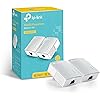
TP-Link AV600 Powerline Ethernet Adapter Kit - Gigabit Port, Plug Pair &Play, Power Saving, Nano Sized Powerline Network Adapter (TL-PA4010 KIT)

  • Based on 20,272 reviews
Condition: New
Checking for the best price...
$35.99 Why this price?
Save $4.00 was $39.99

Buy Now, Pay Later


As low as $8 / mo
  • – 4-month term
  • – No impact on credit to apply
  • – Instant approval decision
  • – Secure and straightforward checkout

Ready to go? Add this product to your cart and select a plan during checkout.

Payment plans are offered through our trusted finance partners Klarna, Affirm, Afterpay, Apple Pay, and PayTomorrow. No-credit-needed leasing options through Acima may also be available at checkout.

Learn more about financing & leasing here.

Free shipping on this product

FREE 30-day refund/replacement

To qualify for a full refund, items must be returned in their original, unused condition. If an item is returned in a used, damaged, or materially different state, you may be granted a partial refund.

To initiate a return, please visit our Returns Center.

View our full returns policy here.


Availability: In Stock.
Fulfilled by Amazon

Arrives Sunday, May 3
Order within 15 hours and 35 minutes
Available payment plans shown during checkout

Protection Plan Protect Your Purchase
Checking for protection plans...

Features

  • Fast speed: Wired connection with high speed data transfer rate, ideal for HD video or 3D video streaming and online gaming, up to 600Mbps.Power Consumption: Maximum: 2.5W, Typical: 2.3W, Standby: 0.36W
  • Plug and Play: No new wires and no configuration required; Step1: connect one adapter to your router. Step2: plug in another powerline adapter wherever you need wired internet service
  • Network expansion: The TL-PA4010 KIT transforms your homes existing electrical circuit into a high-speed network with no need for new wires or drilling and brings wired network to anywhere there is a power outlet(Up to 300 meters)
  • Miniature design: Smaller than most powerline adapters in the market, blends discreetly in front of any power outlet
  • Power Saving Mode: TL-PA4010 KIT automatically switches from its "Working" mode to efficient "Power-Saving" mode when not in use, reducing energy consumption by up to 85%*
  • Please note that the Powerline Adapters need to be on the same circuit(not necessary to be in one room). Powerline adapters must be deployed in sets of two or more
  • Compatible with all TP-Link Powerline Ethernet Adapters AV2000, AV1300, AV1200, AV1000, AV600, AV500, AV200. Please purchase TL-WPA4220 or TL-WPA4220KIT if you need WiFi Powerline Adapters
  • Industry leading Manufacture's 2 year Warranty and Free 24/7 technical Support

Description

Using advanced Home Plug AV technology, TL-PA4010 KIT provides users with AV600 powerline speeds on a line length of up to 750 ft. The dimensions for this product are 2 x 1.1 x 2.6 inches. The terms “AV600” and “600Mbps” are derived from applicable specifications and refer to the theoretical maximum physical-layer data transfer rate. Those terms are used on this product solely to indicate its compatibility with other “AV600” or “600Mbps” powerline devices. Actual data speeds vary and may be limited by the product’s Ethernet port and other network conditions such as data traffic, electrical noise, and wiring issues. For better performance, powerline devices should be deployed on the same electrical circuit and rated for the same HomePlug standard. A minimum of two powerline devices are required to establish a powerline connection. If you are uncertain about your network conditions, you should consult an IT professional to assist in selecting a networking product. About power saving, actual power saved varies based on network conditions and environmental factors.

Brand: TP-Link


Hardware Interface: Ethernet


Color: White


Compatible Devices: Desktop


Product Dimensions: 2"L x 1.1"W x 2.6"H


Data Link Protocol: Ethernet


Data Transfer Rate: 100 Megabits Per Second


Item Weight: 13.76 ounces


UPC:


Global Trade Identification Number: 29


Hardware Interface: Ethernet


Compatible Devices: Desktop


Data Link Protocol: Ethernet


Data Transfer Rate: 100 Megabits Per Second


Item Dimensions L x W x H: 2"L x 1.1"W x 2.6"H


Item Weight: 13.76 ounces


Color: White


Brand: TP-Link


UPC: 845973032029


Global Trade Identification Number: 29


Manufacturer: TP-LINK


Mfr Part Number: TL-PA4010KIT


Model Number: TL-PA4010KIT


Unit Count: 1.0 Count


External Testing Certification: CE,FCC,RoHS


Warranty Description: 2 year manufacturer


Built-In Media: 2 × Ethernet Cables, TL-PA4010 KIT


Frequently asked questions

If you place your order now, the estimated arrival date for this product is: Sunday, May 3

Yes, absolutely! You may return this product for a full refund within 30 days of receiving it.

To initiate a return, please visit our Returns Center.

View our full returns policy here.

  • Klarna Financing
  • Affirm Pay in 4
  • Affirm Financing
  • Afterpay Financing
  • PayTomorrow Financing
  • Financing through Apple Pay
Leasing options through Acima may also be available during checkout.

Learn more about financing & leasing here.

Top Amazon Reviews


  • Just As Good As The More Expensive Brands With Intercompatibility!!
I've been a Network Engineer for over 10 years and ever since I've dealt with computers, cabling is one of the worst aspects of the job. I can't tell you how many times I've run/extended CAT3/CAT5/CAT5e/CAT6 cabling and ended up terminating both ends and testing them. Some situations are easier than others when you're allowed to run a cable across the floor or above ceiling tile... but in other situations like getting networking in a certain room in your house can be a total pain in the butt. For the average home user, the only way to get networking from point A to your house to point B is either wired with cabling or use WiFi & bridging if the WiFi didn't extend far enough. When Powerline technology came out it added convenience of using existing power cabling but still was a little flaky and troublesome. But since then, Powerline has jumped leaps and bounds since and is much more reliable & faster. When it came time to buy originally back in July 2012, I put a lot of research into looking into the latest powerline solution for my home. I wanted something with high performance and the current version of "high performance Powerline devices" allows 500Mbps transfer rate. Even still, I was having trouble selecting which manufacturer to go with (Belkin, Cisco, Netgear, etc). After my homework (and despite Netgear's horrible sales support), I ended up with the NETGEAR Powerline 500Mbps Nano Adapter - Starter Kit (XAVB5101). Despite the insane price point (currently $87.99 on Amazon - 12/13/2013; I bought these for $108 back in July 2012), the Netgear adapters worked wonderfully in my home. I was able to maintain faster throughput from device to device while on wired Ethernet while not saturating my WiFi network. However, over the course of a year and a half, the number of devices I had in my house grew considerably (especially over WiFi). In the past year, I added a few cell phones, a laptop, a tablet, a Roku 3, a Western Digital TV Live, 2 Chromecasts, and a new Smart TV. Because of that, my WiFi started to become degraded because every single one of those new devices was connecting to my network over WiFi. When multiple devices would start streaming things like Netflix and I was doing transfers from my media server to a PC, Netflix would stutter and my WiFi throughput would literally crawl slower than a snail on a salt bed. That's when I realized I needed to invest in more Powerline Adapters for certain rooms to speed up transfers as well as help reduce the load of my WiFi network. But you see, despite being pleased with my Netgear adapters, I didn't want to spend another $100. A friend of mine (who I told the Netgear adapters about) bought another brand of Powerline AV 500Mbit adapters from a company called TP-Link to save money. He said they worked pretty good. After finding out that they were $35 on Amazon, I immediately pulled the trigger. I mean after all, I had a word of mouth approval from a friend and you can't argue saving over $50 vs another set of my Netgear adapters... the result? Absolutely no difference in speeds. Just like the Netgear adapters, these are essentially Plug & Play. There were literally no problems connecting these in my house. I went to the living room where I needed wired connectivity and plugged these up to the wall. The TP-Link adapter immediately recognized my existing Netgear Powerline adapters and the 2nd LED (Powerline LED indicator) immediately lit up. I plugged in my small 10/100 switch to it and then my Roku & TV up to it and the 3rd LED (Ethernet indicator) lit up and the devices could not only talk to other devices on my LAN, but they had Internet access as well. I personally noticed NO DIFFERENCE in throughput speeds both within the LAN and the Internet. The *ONLY* difference between the TP-Link set and the Netgear is the that the TP-Link doesn't tell you the "current speed" of that adapter's Powerline network. The Netgear has multicolored LEDs that indicate the speed of your Powerline network. While this normally won't matter to a lot of people, it will tell you whether you are having degraded performance within your home's electrical wiring. It also aids in troubleshooting as well. But it's not a show stopper... Personally, I would recommend this product over the Netgear adapters I have. 1. The price is a LOT cheaper. 2. TP-Link has a TWO YEAR WARRANTY vs the Netgear's ONE YEAR WARRANTY. If you're really concerned on whether you're buying "a crap product", rest assured that this works just as good as the bigger name brands and you have an extra year of product care! Highly recommended. ... show more
Reviewed in the United States on December 13, 2013 by Hyoun Kim

  • Easy setup, works great! - no more wi-fi for me!
In attempting to reduce wi-fi exposure at home I purchased these Powerline adapters to see how they work. They work great! Using for my laptop, TVs and podcast/music streaming at the moment and haven't had to turn on the wi-fi since using them. They state not to use on a power strip but tried it anyway and it works even on that! Great product, easy to set up... Ordering another set of 2 for expanding around the house as needed. Thank you! Great Product! ... show more
Reviewed in the United States on April 1, 2026 by BB

  • Try different outlets
EDIT: 6-1-2014 TP-Link TL-PA4010KIT AV500 is the product this review is for. Its been brought to my attention that the ethernet cables that come with these are only Cat5 not Cat5e. Also, the gauge is too thin. Replace them as soon as you can. I did and am now having better results. I hope this helps. ORIGINAL POST: We had the option to add network cabling when our house was built, but we did not. We did not know someday everything would be connected to the Internet. I want ethernet cables for my wired devices and wifi for my wireless devices in order to get better internet signal all around. I saw Powerline Adapters on Amazon and ordered them on a whim. Normally I don't do something like that but I figured for $40, what the hell. My hopes aren't too high but I'm hoping these gadgets work pretty well. It took a week for them to arrive, and in the meantime I was so excited I kept reading reviews on Amazon just to get some ideas on installing them. I usually get little bits of information here and there from reading Amazon reviews, so thanks fellow reviewers for all of your tips and tricks. I also consolidated some outlets in areas I knew I wanted to test them. They arrived on a Thursday. I planned on installing them on Friday after work, but was so excited to test their performance, I ended up installing them at like 2am. They are very small and un-intrusive looking. They synced up and connected super quick and easy. I didn't even push the sync button, just plugged them in. I did a speed check on my connection speed and was getting the same as a full wired connection. Awesome! But about 20 minutes in, my computer lost connection to the Internet. I was still connected to my network, just not the Internet. I fiddled with some connection settings on my router to ensure that it was a wired connection and not a wireless one. Power cycled everything back on, & I was back on the Internet.... For about 20 more minutes, then it disconnected again. It connected up by itself a few seconds later. Neither of them are plugged into surge protectors, they are plugged directly into the wall. They keep losing connection, it's worse than wifi. I think it could be some sort of power spike in the electrical lines. I don't know. I'm not sure if a different outlet would do any better in my house or if something is inherently wrong with my home's electrical wiring. I've also read that noise from other electrical appliances could cause interference. This is connected to my desktop PC in the kitchen obviously with a lot of other appliances. I do not want to update the firmware or try to re-pair these I might just put them in the box and send them back to Amazon. Most reviews would have you believe that this is more stable than wifi, it is not. It's about as reliable as wifi, maybe less. For $40 it was a worthy experiment. Who knows, it might work in a different application such as a Blu ray player without wifi, I will have to test that. I was hoping this would give me the same performance as a wired ethernet connection. Installation is definitely fast and easy, the connection is just not reliable. I just wanted to try a pair before I bought a bunch of them. Kinda disappointed, not surprised, but disappointed. Update: I really wanted these to work. I installed one in the master bedroom instead of the kitchen, where I have a non- wifi Smart TV as well as a Blu-ray player. I set up an old router as an access point and connected it to the adapter. Now the TV & Blu-ray player have internet. I've streamed some movies (in HD, of course) while running the vacuum on the same circuit, no problem. Being on the kitchen circuit must have been the problem in my first installation. Or maybe my ISP was doing maintenance on the system. It was 2 a.m. after all. A week later, I have not had a single disconnect. Plus, the second router is boosting the wifi signal all over the house and to the backyard. I must concede that powerline adapters are very reliable and dependant on the electrical lines to which they're connected. Like a lot of networking devices, environment, equipment and settings play a big part in success. Update 2: Just for fun, I took the adapter back out to the kitchen and reconnected it to my desktop PC. It had some connection issues on the first day, but only to the internet and not to my home network. After a week, that's been the only one. I have no idea why they only have the connection issues at first. Now, I'm considering getting another pair of these. They seem to be working out very well. I will update further if I have any more issues. I'm changing my rating to 4 stars for ease of installation and convenient network configuration. It is plug and play, but it took some fiddling to get it to work right. Update 3: I've had it in the kitchen for over a month now and only get a few disconnects. Sometimes where a web page won't load, but it usually connects right back up when I retry. I added a six plug outlet adapter to this outlet just to see how it would work, and it is no problem. I also used this computer to serve some video files to the ps3, wirelessly and that worked well too. I am going to get another pair of these and put them in my entertainment areas. ... show more
Reviewed in the United States on May 14, 2014 by whoa_buckey

Can't find a product?

Find it on Amazon first, then paste the link below.
Checking for best price...