Search  for anything...

TobenONE MacBook Pro/Air Docking Station Stand, Dual 4K HDMI, 100W Charger

Based on 362 reviews
Condition: New
Checking for the best price...
$143.99
Holiday Deal · 10% off was $159.99

Buy Now, Pay Later


As low as $24.00 / mo
  • – 6-month term
  • – No impact on credit to apply
  • – Instant approval decision
  • – Secure and straightforward checkout

Ready to go? Add this product to your cart and select a plan during checkout.

Payment plans are offered through our trusted finance partners Klarna, Affirm, Afterpay, Zip, Apple Pay, and Google Pay. No-credit-needed leasing options through Acima may also be available at checkout.

Learn more about financing & leasing here.

Free shipping on this product

FREE 30-day refund/replacement

To qualify for a full refund, items must be returned in their original, unused condition. If an item is returned in a used, damaged, or materially different state, you may be granted a partial refund.

To initiate a return, please visit our Returns Center.

View our full returns policy here.


Availability: In Stock.
Fulfilled by Amazon

Arrives Friday, Nov 20
Order within 21 hours and 37 minutes

Available payment plans shown during checkout

Protect Your Purchase

Easy claims online, fast replacements, no fees

Checking for protection plans...

At a glance

Condition
New
Model
UDS020-100W
Dimensions
9"L x 2"W x 3"H
Color
Grey
Wattage
100 watts
Warranty
24 Month
Works with
𝐈𝐧𝐜𝐨𝐦𝐩𝐚𝐭𝐢𝐛𝐥𝐞 𝐝𝐞𝐯𝐢𝐜𝐞𝐬 (𝐨𝐧𝐥𝐲 𝐬𝐮𝐩𝐩𝐨𝐫𝐭 𝐬𝐢𝐧𝐠𝐥𝐞 𝐦𝐨𝐧𝐢𝐭𝐨𝐫) MacBook Air 13" 2020, M1/MacBook Pro 13" 2020, M1/MacBook Air 13" 2022, M2/MacBook Pro 13" 2022, M2/MacBook Air 15" 2023, M2/MacBook Air 13" 2024, M3/MacBook Air 15" 2024, M3/MacBook Pro 14" 2023, M3/MacBook Neo 2026, 𝐒𝐮𝐩𝐩𝐨𝐫𝐭𝐬 𝐝𝐮𝐚𝐥 𝐦𝐨𝐧𝐢𝐭𝐨𝐫𝐬 MacBook Air 13.6" 2026, M5/MacBook Air 15.3" 2026, M5/MacBook Pro 14" 2025, M5/MacBook Pro 14" 2026, M5 Pro/MacBook Pro 14" 2026, M5 Max/MacBook Pro 16" 2026, M5 Pro/MacBook Pro 16" 2026, M5 Max/MacBook Air 13.6" 2025, M4/MacBook Air 15.3" 2025, M4/MacBook Pro 14" 2024, M4/MacBook Pro 14" 2024, M4 Pro/MacBook Pro 14" 2024, M4 Max/MacBook Pro 16" 2024, M4 Pro/MacBook Pro 16" 2024, M4 Max/MacBook Pro 14" 2023, M3 Pro/MacBook Pro 14" 2023, M3 Max/MacBook Pro 16" 2023, M3 Pro/MacBook Pro 16" 2023, M3 Max/MacBook Pro 14" 2023, M2 Pro/MacBook Pro 14" 2023, M2 Max/MacBook Pro 16" 2023, M2 Pro/MacBook Pro 16" 2023, M2 Max/MacBook Pro 14" 2021, M1 Pro/MacBook Pro 14" 2021, M1 Max/MacBook Pro 16" 2021, M1 Pro/MacBook Pro 16" 2021, M1 Max/MacBook Pro/Air 12"-16" 2015-2020, Intel chip

Features 5

  • Dual 4K@60Hz Display: Crisp Visuals for Editing, Design & Presentations. This MacBook pro docking station dual 4K monitor equipped with HDMI1, HDMI2, and VGA ports. It supports dual 4K@60Hz (via HDMI1+HDMI2, DP 1.4), delivering crisp, fluid visualsperfect for 4K video editing, graphic design, and multitasking. Note: HDMI2 and VGA mirror content, ideal for presentations needing identical main screen+projector displays
  • 100W PD3.0 Charging: Fast, Stable Power for Your MacBook. This laptop docking station stand supports 100W PD3.0 power input and delivers up to 87W charging for MacBooksrapidly charges your MacBook Pro/Air, so you can work all day without battery anxiety. Connect your MacBooks power to the docks USB-C PD3.0 port for stable use, and a 100W charger is included. You do not need to worry about your MacBook running out of power while working with dual screens
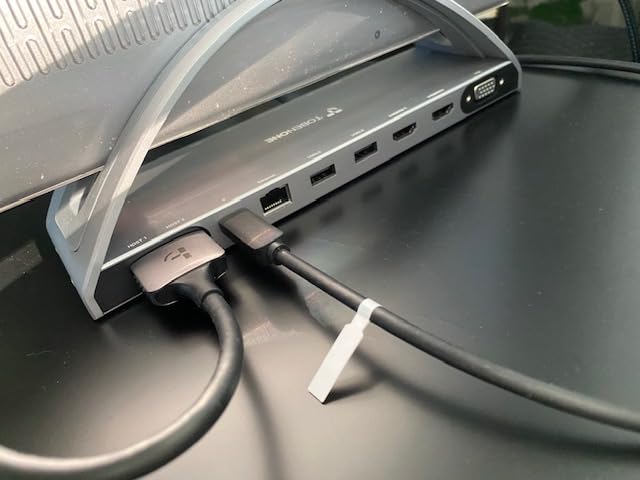
  • All-in-One Powerful USB C Docking Station: Packed with all essential ports. This mac docking station features 2 4K HDMI, 1 VGA, 5Gbps data-only USB-C, 100W PD3.0 USB-C, 25Gbps USB 3.0, 2USB 2.0 (for wireless devices), SD/Micro SD (simultaneous read/write), Gigabit Ethernet (10/100/1000Mbps), 3.5mm Audio, and 2 USB-C hosts for MacBook connection. Connect all your peripherals at oncecut cable clutter and boost productivity
  • Exclusively Compatible with MacBook Pro/Air Models: Specifically designed for MacBook Pro 2016-2026 (Intel, M1-M3 Pro/Max, M4/M4 Pro/M4 Max, M5/M5 Pro/M5 Max) and MacBook Air 2018-2026 (Intel, M1-M3 Pro/Max, M4/M4 Pro/M4 Max). No guessworkworks seamlessly with your MacBook. Note: M1/M2/M3 chip MacBooks and MacBook Neo only support single display, please verify your laptop model before purchase

Description

Founded in 2016, TobenONE is a technology innovation brand dedicated to providing professional office connectivity solutions. TobenONE not only continuously explores users' needs, but also optimizes the appearance of its products to create a comfortable and efficient ideal office environment for customers. TobenONE makes professional work more simple power and elegant. Support Dual Display for MacBook with the Intel, M1 Pro/Max, M2 Pro/Max, M3 Pro/Max, M4, M4 Pro/Max chips, and the latest M5, M5 Pro/Max chips. If dual-monitor extension fails, it may be due to an outdated system version. Ensure your system is running macOS 14.6 or later. Only support 1 external or Mirror display for the MacBook with M1/M2/M3 chip and MacBook Neo. It means that the two external monitors are the same content, but laptop screens can display different content from them.

Specs 16

Brand Tobenone
Color Grey
Hardware Interface 3.5mm Audio, Ethernet, HDMI, MicroSD, USB 3.1 Type A, USB 3.1 Type C, VGA
Total USB Ports 5
Product Dimensions 9"L x 2"W x 3"H
Number of Ports 13
Total HDMI Ports 2
Wattage 100 watts

Frequently asked questions

If you place your order now, the estimated arrival date for this product is: Friday, Nov 20

Yes, absolutely! You may return this product for a full refund within 30 days of receiving it.

To initiate a return, please visit our Returns Center.

View our full returns policy here.

  • Klarna Financing
  • Affirm Pay in 4
  • Affirm Financing
  • Afterpay Financing
  • Zip Pay in 4
  • Financing through Apple Pay
  • Financing through Google Pay
Leasing options through Acima may also be available during checkout.

Learn more about financing & leasing here.

Top Amazon Reviews


Solid Docking Station!
Set name: 15-in-2 for macOS
I typically have to use a very robust docking station for my work, so when I was simply needing one for double monitors and some adapters I need to use (personally), i was at a loss. I didn't need the one I use for work, and didn't want to pay that much. I was searching on Amazon for one that might work - nothing cheap, but less expensive than my other dock. I came across this one by TobenONE for my Mac. I checked the ratings and they looked good, so I decided to try it. I couldn't be happier with it! It didn't come with directions, and I didn't know if I'd be able to hook it up correctly (as I'm hit or miss w/tech stuff). So I contacted the company to see if there were any directions they could give me. But after I did that, I decided to give it a go. It's very intuitive - the set up. Very easy and it fired right up w/my Mac and my 2 monitors. It's a heavy little thing, so it's not going to fall over. It holds my Mac securely and is off to the side, so I have room on my desk. Compatible with my Mac, so that's perfect, and the connectivity is strong. I wish I'd have found this docking station sooner. Highly recommend this product. And kudos to the company for having support that gets back quickly! ... show more
Reviewed in the United States on April 24, 2026 by GatorMike

Great Stand + Removable Dock for Single Monitor
I have been using this dock for quite some time and i would say the quality of the products from these docks are similar to apple. This particular stand+docks is incredibly solid, with no fear of breaking of damaging. The swivel functionality comes in real handy to when managing accessories attached to the doc. I have few ultra wide moniors lying in my home starting from 2k all the way to 4k and use mac as the primary driving laptop. The dock works perfectly with these monitors. I saw a small issue with the 4k ultrawide monitor where the dock cannot use the full resolution and i had to scale the resolution one notch down in the settings (That is the main reason for 1 star knock off). Initially i was seeing a huge issue with cursor lag for logitech Mx Master 3S mouse but the customer service got back to me and sent me a replacement. Haven't had that issue afterwards. Testes this dock with few other keyboards and mouses and all in all it performed good. There is one minor issue that i had found after prolonged use of the dock where the i see a mini lag with keyboard & mouse for few seconds but it goes away by itself. Pros: - Incredible build - Looks premium and has good quality - Handy swivel functionality - Nice dock which works really well. - Dock can be removed. (Saves in buying a dock for travel) - Works with most of the monitors and accessories. Cons: - Cannot use the full 4k resolution for ultra-wide monitor. - Might see a small lag with I/O devices after prolonged use. - Dock can be tight when attaching removing (Not a major con, just fyi). I would say it is worth the price & deals can be found easily. Another major advantage i would say is the Customer Service. Tobenones customer service is really good and they get back to any issues generally within a day or two(max). Overall you will be in good hands when you purchase the device from this brand. ... show more
Reviewed in the United States on September 2, 2023 by praneeth

Seamless & Streamline | MacBook Dual Monitor Docking Station
Set name: 15-in-2 for macOS
I recently migrated my old iMac to my newer MacBook Pro and wanted to set it up to use two 27" monitors. After researching various docking stations to accomplish this, I discovered the company, TobenOne, and settled with their USB-C Dual Display Docking Station specifically for MacBook Pro. Why I settled with this unit was because I read and appreciated to hear from many customer reviews that TobenOne's customer service team was excellent and their response turnaround times were touted as speedy. Since I am not computer savvy, this was important to me. Luckily, out of the box, with the Quick Start Guide provided, the setup for me was seamless. I liked that this unit would securely hold up my laptop close but out of the way allowing more work space on my desk. I loved that my MacBook would not have to be open to operate my system. There are enough ports and connectors for my varied needs. Otherwise, I manage the other cables plugged in to the surge protector power strip beneath and behind my desk in baskets and the overall setup is very clean and tidy. I am very satisfied and highly recommend this product. ... show more
Reviewed in the United States on April 12, 2026 by Mimi

Solves the Multiple MacBooks and Monitors Problem Perfectly
Set name: 15-in-2 for macOS
I have a nice stacked dual monitor setup in my office. I have a recent MacBook Pro that I use for work and a MacBook Air for personal use. Both computers support dual monitors, which is great but poses some connection challenges I've invested a lot in my setup. The problem is that any time I need to switch computers, I would have to swap out my Apple Keyboard and Trackpad, which are all bluetooth. Then I have 4 wireless devices to keep track of and keep charged. On top of that, I frequently would need to re-pair each device to the computer again before connecting it to the monitors. It would take anywhere from 5 - 10 minutes to get it working. It doesn't sound too bad, but that sort of roadblock can really sap the energy from your morning. The TobenOne MacBook Docking station solves this problem completely! All I had to do was run charging cables from the. *back USB ports* on my TobenOne Docking Station to both my keyboard and my trackpad. When I swap out the computer, the mouse and keyboard automatically pair to that computer instantly. At first, I was concerned that there might be some difficulty with a dual monitor setup, as it's been a pain point in the past with certain MacBook models. But the TobenOne had no problems at all. And I didn't even have to install any custom software or drivers-- it worked right out of the box with both monitors using either of my MacBooks! The dosing station is nice and small, but sturdy. It provides a solid foundation so I'm not worried about it tipping over. Keep in mind: You must use the USB ports on the *back* of the unit in order to automatically pair an Apple Keyboard and/or Trackpad when you swap computers. It took me a while to figure this out. If you use the front ports, you might still get power to your device, but you'd have to go through the trouble of connecting it over bluetooth, which you can't do without lifting the lid and using it like a laptop. Using the USB ports on the back gets you around this problem. Before I found this out, I emailed support, thinking that I had a problem with my unit. They replied within just a few hours and were very polite and helpful, but I'd already resolved the issue on my own. Excellent customer service! One suggestion for future models: It would be great for the main bracket that holds the computer to come with replaceable rubber bumpers of different thickness. That way it would be possible to accomodate laptops with a case, or new models if Apple changes the thickness of the next MacBook line. Please talk to your engineering team about this-- I'd love to be able to use my dock and still keep cases on my expensive MacBooks. Overall: I can't imagine a better doc for my setup. Now I just need to do a little cable management and it'll be a perfect setup. This product completely solved my use case and I'd love to buy one for my upstairs area! ... show more
Reviewed in the United States on November 22, 2025 by Ed

A great dock + stand combo that needs a bit of refinement
This laptop dock and stand is, though minimal, very nice. The hinges are definitely strong with mine being able to directly support a 10lb dumb bell without collapsing - so you probably won't be able to adjust it without removing your laptop from it. The USB-C cable's length was well thought out and hits a good balance of length vs utility i.e. it is long enough to reach your laptop's port while managing to not get in the way. It's also fairly thick when collapsed, I wouldn't consider it non-portable but it's definitely not as portable as the marketing material claims (about 1.5" thick). The dock itself is a bit difficult to remove from the stand but I don't think that's a deal breaker as you'll most likely never remove it. It's also worth mentioning that although the hinges are strong, the stand still has a lot of bounce (as expected) if you need to use your laptop's integrated keyboard. I see little utility in the 360 degree rotation functionality. Why is it of little utility? because it is meant to be used with a monitor and rotating the stand also rotates the dock with all of the connected cables. It also clicks whilst rotating, which I find to be a minor annoyance. However, if you are just using the stand functionality then it may be useful to you - I just didn't find it useful. There were no drivers that were installed, and everything was plug-and-play with one exception - the NIC. The NIC on the dock appears to not support VLANs properly without a driver update from REALTEK. However, after updating the drivers I was able to get up and running. I can confirm that the NIC functions as normal without the driver update if VLANs aren't a requirement. This may prove problematic for people who need VLAN support and do not have elevated user access to their machine. Strangely, the box lists SD/TF support, but there is no such connection on the dock. They don't advertise such support on the product listing before buying, so I'm not docking any points here. My closing thoughts here are: The dock and stand are great. A bit on the expensive side when compared to other similar products, and I believe TOBENONE needs to re-evaluate their listing price for this product in order to compete. My price point was $89.99 - 30% ($62.99 total) at the time of purchase. I don't know how the quality of other products compare, but I do know that this is one of the higher priced, before any discounts, dock and stand combos currently listed as of writing this review. Pros - The dock and stand are made of what seems to be quality material. - The actual dock can disconnect from the laptop stand. - The stand's hinge strength was able to withstand a 10lb dumb bell without collapsing. - Dock was able to handle 3440 x 1440 @ 75Hz resolution just fine. - Rubber Feet and rubber protectors on the stand prevent the stand and your laptop from sliding. - Well packaged Cons - VLAN doesn't work out-of-the-box on (Windows), and require drivers. - The stand has a lot of bounce if you need to use the laptop's keyboard whilst on the stand. - Clicking when rotating (this is subjective, of course). - A bit on the thicker side when collapsed - not as portable as TOBENONE claims. How future iterations could improve: - A headphone/microphone jack - including a USB-C power supply for power delivery - An additional HDMI port would add a lot of value ... show more
Reviewed in the United States on June 23, 2023 by Michael

high quality of build and materials, and works as expected
I use this in my work-from-home setup, with an HP Dragonfly Chromebook and a 40" 4k TV as the main display. (The TV runs at 30Hz so I only tested that refresh rate, but it seems that others report no problems at 60Hz.) The build is super-sturdy. The hinges are tight, and take a surprising amount of force to move. I prefer that, because I can still use (occasionally) the keyboard, keypad, and touch screen with absolutely no fear of shifting the angles. They might loosen in time, but there's plenty of room before they become too loose. The hub is easily removable, in case your cables cannot reach it conveniently. It is kept in place by a well-designed mechanism with spring-loaded spheres. It feels like it could be removed and replaced tens of thousands of times before it wears out. I am including photos. You'll need to judge for yourself if the hub has the functionality you need. The leftmost USB-C plug has power delivery; but if you plug a charger into it, then you're left with a single USB-C plug for the laptop. I have multiple USB-A accessories (Logitech camera, security key, wireless mouse, and keyboard), so I need an additional USB hub (which also has audio output). If you have a hub that plugs into a USB-A port, you're good, and you will need to plug a single USB-C cable into your laptop. But if your hub (like mine) plugs into a USB-C port, then your laptop will need to use both USB-C ports with this setup. Unless your additional USB-C hub can also do power delivery... oh, I had not thought of that! (BTW I am not saying anything that you can't figure out on your own---just a reminder that these things are a bit tricky.) One more little detail: the swivel clicks as it rotates. I am not sure for what purpose. Perhaps to let the user know that the swivel is working properly, instead of dragging the base on the desk. Overall it's a good and safe buy. ... show more
Reviewed in the United States on May 2, 2023 by Luigi Semenzato

Strong, powerful and effective addition!
I bought this in December 2025, and it has been a phenomenal addition to my desk setup; it fits well on my desk! The quality of the material is solid, sleek and top notch in my opinion with such a good weight to the base; there has been no loss of movement in the swivel and it still clicks and snaps as you rotate. My Macbook can be placed at any angle and it has never slipped or slumped from wherever I set it. The actually dock ports are perfect for my needs and can go as high as I need at times; I project to both an ASUS ProArt Monitor and a vertical Samsung TV without any issues or blinking. And being able to remove the dock and magnetically mount somewhere else as needed is amazing! ... show more
Reviewed in the United States on July 31, 2025 by Sean V

Solid dock with a twist
I have had laptop stands before which swiveled but otherwise fixed in height. I have also used docks separately. The best part about this this is that it is not only swivels, but also folds down flat and can be adjusted anywhere in between to allow multiple viewing angles to work from. The flexibility alone makes this stand/dock more useful than most. The build quality is top notch and does not feel cheap at all. On top of that, it has a nice integration of a small (removable) dock with a gigabit ethernet port, two USB ports, an HDMI port and USB-C power ports. Your laptop can then be connected via a single USB-C port to have access to everything the dock has connected to it. The HDMI port works without having to install other drivers as I have had to do with other docks allowing video from places like YouTube TV and Netflix to work without having to disable hardware acceleration in the browser. As an added bonus, the small dock snaps in and out of the stand so it can be used for travel. My only wish is that this little dock had a second HDMI port to work from dual monitors in my home office. That did not stop me from giving this product 5 stars. ... show more
Reviewed in the United States on July 13, 2023 by Paul Luetje
Checking for best price...