Search  for anything...

TobenONE DisplayLink Docking Station 4 Monitors, 20-in-1 Quad 4K@60Hz HDMI Display with 150W Power Supply for Thunderbolt 5/4/3, USB-C Windows,Chrome, MacBook/Mac mini(6 USB, Ethernet, SD/Micro SD)

  • Based on 0 reviews
Condition: New
Checking for the best price...
$246.49 Why this price?
4th of July Sale · 15% off was $289.99

Buy Now, Pay Later


As low as $41.08 / mo
  • – 6-month term
  • – No impact on credit to apply
  • – Instant approval decision
  • – Secure and straightforward checkout

Ready to go? Add this product to your cart and select a plan during checkout.

Payment plans are offered through our trusted finance partners Klarna, Affirm, Afterpay, Apple Pay, and PayTomorrow. No-credit-needed leasing options through Acima may also be available at checkout.

Learn more about financing & leasing here.

Free shipping on this product

FREE 30-day refund/replacement

To qualify for a full refund, items must be returned in their original, unused condition. If an item is returned in a used, damaged, or materially different state, you may be granted a partial refund.

To initiate a return, please visit our Returns Center.

View our full returns policy here.


Availability: In Stock.
Fulfilled by Amazon

Arrives Wednesday, Jul 8
Order within 17 hours and 51 minutes
Available payment plans shown during checkout

Protection Plan Protect Your Purchase
Checking for protection plans...

Features

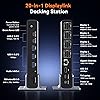
  • Enhanced Expansion Connection: This universal docking station can expand to 4 displays and features 20 ports, equipped with 4 HDMI, 4 DP, 3 USB 3.2, 2 USB C 3.2, 1 USB 2.0, along with SD/micro SD card slots, Ethernet, and audio ports. It also has a power button that controls all external devices. Quad monitor docking station is suitable for professional multitasking, meeting all your needs for connecting high-speed peripherals and optimizing workflow, effortlessly enhancing work efficiency
  • Quad Display: The upgraded displaylink 4 monitor docking station features 4 HDMI and 4 DP ports, allowing both Windows laptops and MacBooks to connect to 4 external monitors (Note: M1 chip MacBooks can only extend to 3 monitors). All monitors deliver a stunning 4K@60Hz resolution, providing a seamless multitasking experience
  • Powerful and Convenient Charging:With a 150W power adapter, this mac quad display docking station can provide your laptop with 100W of charging power for fast charging, the laptops USB-C PD port needs to support 100W charging, and the docking station's USB-C port supports up to 18W phone charging, making it an ideal choice for keeping your workspace tidy
  • Universal Compatibility: The DisplayLink thunderbolt 4 docking station works seamlessly with Windows laptops (Windows 10+), MacBook Neo, MacBooks, Mac Minis, and Android systems. Supports Thunderbolt 3, Thunderbolt 4, Thunderbolt 5, USB4, and USB-C ports. Also compatible with Chrome OS 100+, macOS 11+, and Ubuntu systems. Note: Need to install the Displaylink driver before use, and HDCP is not supported
  • Each TobenONE laptop docking station with 4 HDMI comes with a 2-year defect coverage and long-term technical support. We understand the importance of customer service and have a dedicated support team to assist with any issues, ensuring your purchase experience is fully protected. Please feel free to contact us if you have any questions

Brand: Tobenone


Color: Grey


Hardware Interface: 3.5mm Audio, DisplayPort, Ethernet, HDMI, MicroSD, USB 3.1 Type A, USB 3.1 Type C


Compatible Devices: Need to install Displaylink driver before use, HDCP is not supported. Windows 10 / 11 & macOS 10.15.x and later, ChromeOS 100.x. Thunderbolt 5/ Thunderbolt 4/ Thunderbolt 3/ USB4.0/ USB-C Microsoft Surface line/HP Spectre x360 series, Dell XPS 13 / XPS 15 / Latitude series, Lenovo Thinkpad T series. Such as Microsoft Surface Book 2, Surface Go, Surface Laptop 3, Surface Pro 7; Dell XPS 13/XPS 15 9300/ 9310/ 9350/ 9360/ 9370/ 9380/ 9550/ 9560/ 9570/ 7390 +more) / Latitude 5310/ 5580/ 7490 +more); HP Spectre x360 13t, Specter x369, Elitebook 840 G5 series, Elitebook X2, Elitebook x360 1030 G3, Elitebook 745 G6, Elitebook 830 G6, 2018 HP Elite 800 G4, Zbook 17 G4; Lenovo Yoga 730/ Yoga 910/ Yoga 920/ Yoga 930, Yoga15 Thinkpad Ultrabook Pro, Thinkpad E590/ Thinkpad P72, Thinkpad T470/ T480/ T490; Thinkpad X1 Carbon; Legion Y530, Lenovo C930/ T480s; Huawei Macbook Mate10 or later; Google Slate (2019); Pixel book go 2019/2020, LG Gram, Samsung Galaxy TabPro S, Apple M2/M3/M4 and Intel Macs (MacBook Neo MacBook Pro, MacBook Air with macOS 10.14 or later) See more


Total USB Ports: 6


Product Dimensions: 11.81"L x 3.14"W x 0.86"H


Number of Ports: 20


Item Weight: 2.27 Pounds


Total HDMI Ports: 4


Wattage: 100


Hardware Interface: 3.5mm Audio, DisplayPort, Ethernet, HDMI, MicroSD, USB 3.1 Type A, USB 3.1 Type C


Compatible Devices: Need to install Displaylink driver before use, HDCP is not supported. Windows 10 / 11 & macOS 10.15.x and later, ChromeOS 100.x. Thunderbolt 5/ Thunderbolt 4/ Thunderbolt 3/ USB4.0/ USB-C Microsoft Surface line/HP Spectre x360 series, Dell XPS 13 / XPS 15 / Latitude series, Lenovo Thinkpad T series. Such as Microsoft Surface Book 2, Surface Go, Surface Laptop 3, Surface Pro 7; Dell XPS 13/XPS 15 9300/ 9310/ 9350/ 9360/ 9370/ 9380/ 9550/ 9560/ 9570/ 7390 +more) / Latitude 5310/ 5580/ 7490 +more); HP Spectre x360 13t, Specter x369, Elitebook 840 G5 series, Elitebook X2, Elitebook x360 1030 G3, Elitebook 745 G6, Elitebook 830 G6, 2018 HP Elite 800 G4, Zbook 17 G4; Lenovo Yoga 730/ Yoga 910/ Yoga 920/ Yoga 930, Yoga15 Thinkpad Ultrabook Pro, Thinkpad E590/ Thinkpad P72, Thinkpad T470/ T480/ T490; Thinkpad X1 Carbon; Legion Y530, Lenovo C930/ T480s; Huawei Macbook Mate10 or later; Google Slate (2019); Pixel book go 2019/2020, LG Gram, Samsung Galaxy TabPro S, Apple M2/M3/M4 and Intel Macs (MacBook Neo MacBook Pro, MacBook Air with macOS 10.14 or later)


Total Usb Ports: 6


Number of Ports: 20


Total Number of HDMI Ports: 4


Wattage: 100


Smart Home Compatibility: Not Smart Home Compatible


Item Dimensions L x W x H: 11.81"L x 3.14"W x 0.86"H


Item Weight: 2.27 Pounds


Brand: Tobenone


Manufacturer: TobenONE


Warranty Description: 2 Year Warranty


Color: Grey


Frequently asked questions

If you place your order now, the estimated arrival date for this product is: Wednesday, Jul 8

Yes, absolutely! You may return this product for a full refund within 30 days of receiving it.

To initiate a return, please visit our Returns Center.

View our full returns policy here.

  • Klarna Financing
  • Affirm Pay in 4
  • Affirm Financing
  • Afterpay Financing
  • PayTomorrow Financing
  • Financing through Apple Pay
Leasing options through Acima may also be available during checkout.

Learn more about financing & leasing here.

Top Amazon Reviews


  • A serious quad-4K dock with real power delivery, spectacular for data work
I’m running an MSI Stealth 14 (64 GB RAM) with an internal 8 TB SSD and an external NVMe SSD, driving a 45" MSI ultrawide and a 32" Acer. This TobenONE DisplayLink dock has been bulletproof. Power that actually keeps up. The 150 W brick feeds a true 100 W to the laptop and still powers my external SSD, webcam, card readers, and other peripherals—no brownouts, no slow battery drift, even under heavy I/O and CPU load. That extra headroom is the difference between a one-cable setup and daily cable gymnastics. Displays without drama. Dual-monitor is plug-and-go and stays locked at 60 Hz. Wake-from-sleep is consistent, handshakes are clean, and I can stack windows across both screens without random dropouts. If I ever need it, the dock can scale to more displays via DisplayLink. I/O that moves big data. The 10 Gbps USB ports keep both SSDs at expected speeds, Ethernet is stable for large transfers, and SD/microSD on the front saves time. Hot-plugging has been boring, in the best way. Build & reliability. Solid chassis, snug ports, sane thermals. After long days of analysis, video calls, and backups, it hasn’t flinched. Bottom line: Useful, reliable, and genuinely powerful. If you run a performance laptop with multiple fast drives and dual monitors, this dock delivers the goods without compromise. Pros Real 100 W laptop charging from a 150 W adapter, no power sag Dual displays are stable at 60 Hz; easy path to more via DisplayLink 10 Gbps USB keeps internal + external SSD workflows fast SD/microSD and front-facing ports for quick swaps Rock-steady sleep/wake and hot-plug behavior Considerations Multi-monitor on some systems requires installing the DisplayLink driver (by design) Use short, certified cables to keep the desk tidy and transfers reliable ... show more
Reviewed in the United States on November 13, 2025 by Ken

  • TobenONE UDS050A — The Best Dock I’ve Used with My MacBook Air
TobenONE UDS050A — The Best Dock I’ve Used with My MacBook Air I’ve been using the TobenONE UDS050A with my MacBook Air, and it’s easily the best docking station I’ve owned. Once I installed the DisplayLink driver, everything worked flawlessly — I’m running three external monitors plus a TV as a fourth display, and it handles all of them smoothly with crisp 4K resolution and no lag. One of my favorite things about this dock is that it only needs one USB-C port on my MacBook instead of two like previous models I’ve tried. That makes my setup cleaner and frees up a port for other accessories. It also has plenty of USB ports on the front for easy access, and I like that it keeps the single USB-C laptop connection on the back, which makes cable management simple. The compact design takes up very little space, and the 100W power delivery keeps my MacBook fully charged even with all displays and devices running. Pros - Works perfectly with MacBook Air — supports three monitors + a TV - Uses only one USB-C port on the laptop - Compact design with lots of front-facing ports - Charges laptop at full speed (100W) - Smooth performance and no screen flicker or lag Cons - Requires installing the DisplayLink driver (setup is simple) - Only one rear USB-A port — not a dealbreaker, but worth noting Final Thoughts The TobenONE UDS050A turns my MacBook Air into a full desktop workstation with a single cable. Between the flawless multi-monitor performance, compact design, and excellent power delivery, it’s a huge upgrade over other docks I’ve used. Highly recommended for anyone who wants a reliable, all-in-one docking solution for Mac. ... show more
Reviewed in the United States on October 21, 2025 by Brian

  • Oops, They've done it again!! (in a good way!)
TobenOne has done it again. This dock is easy to use and it has great IO. I see some improvement over the last model I reviewed. The cable is back to the usual high quality one over the cheap feeling braided one. The unit functions very well and has the option of HDMi or DisplayPort. (Each HDMI/DisplayPort is a group. So you have to pick HDMi or DisplayPort for that group. There are 4 groups total.) The metal frame gives it a premium feel like most of their other products. Overall it’s a great dock and worth the money. My only possible improvement we can see is to include more USB-A and USB-C. We know it's hard to design a device that has everything will all the powered device requirements, but until things go totally wireless, we still need those USBs. Due to the overall quality of design and excellent customer service, I always check Tobenone to see if they have what my company needs before I buy any other ancillary device. ... show more
Reviewed in the United States on October 27, 2025 by ScottyWil

  • Just one -- TobenONE - you won't be disappointed!
The first docking station(s) I've used were Plugable, and they have served me well. Then TobenONE caught my attention. I was curious about the aluminum housing as opposed to Plugable's plastic. I never experienced any overheating with Plugable's plastic, but there's something about metal that provides the confidence of longevity. However, with everything else, appearance may catch your eye, but reliability creates return customers. Now for the review. Each Amazon order is rated as follows: 1) Delivered on time and well packaged - outstanding! 2) How easy is it to set up? I followed the instructions and preloaded the docking station drivers from DisplayLink.com. I loaded the drivers on two devices: an Asus gaming laptop and a Minisforum Neptune series mini-pc, attached to four 27" monitors. Note: unlike Plugable docking stations, TobenONE has an on/off button. All four monitors fired up as expected. Then I rearranged the monitors within the Windows Display settings and proceeded to perform a restart. Upon restart, all monitors maintained their settings - Success! After about a month of daily/hourly usage, the system has been flawless. The docking station also comes with a convenient stand, allowing the device to be vertically oriented. This orientation allows the naturally efficient aluminum to dissipate heat. Inputs: around the back of the unit, you have a gigabit Ethernet LAN, four monitor inputs (HDMI or DisplayPort), a dedicated USB-A port for the keyboard, a replaceable power cord, and an included cable for your docked device. Across the front, you have very useful SD card ports and 3 10 Gbps USB-A ports, along with two 10 Gbps USB-C ports. I also appreciate the headphone jack. All in all, I'm very satisfied with the device and will look forward to future TobenONE devices. If any reliability issues occur, I will update the review. ... show more
Reviewed in the United States on October 12, 2025 by Brian

  • Good Device
Works flawlessly with both Mac and PC. Handled everything I threw at it with zero issues. Setup was straightforward, and running multiple 4K displays was smooth and stable. Solid build, tons of ports.
Reviewed in the United States on April 17, 2026 by J. H.

  • Drove Multiple Monitors Right Away. Drove Multiple Monitors Right Away.
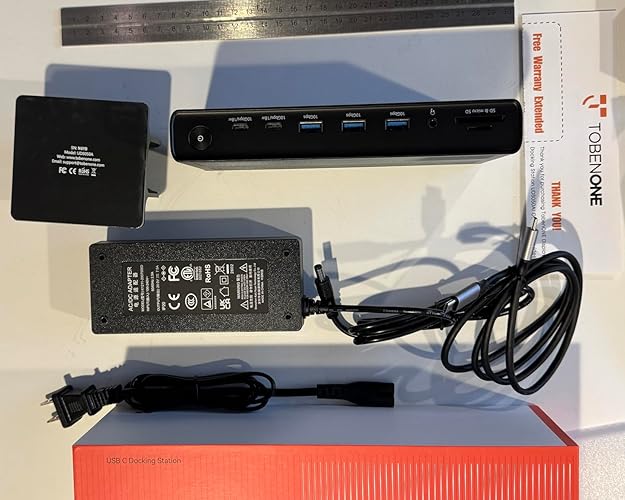
I was excited to receive this dock to evaluate as I am very familiar with previoius TobenONE products. I have the TobenONE USB C Wireless HDMI Transmitter and Receiver which I just took on a trip to be able to wireless transmit photos to a TV, and the TobenONE 165W USB C Charging Station. I was eager to see this new product, as I am currently happily using a slightly older TobenONE docking statio [TobenONE DisplayLink Docking Station Triple Monitor] which I bought to do just that, share the screen with multiple side monitors, in addition to using the MacBook Air’s own monitor. (It is crazy that you need a special dock to pull that off, so glad I found one, after trying a few) ProTip: The TobenONE USB C Wireless HDMI Transmitter and Receiver can also be plugged in, in addition to that and this dock, so that is also a fun addition. I have only had a few days, but it worked right out of the box on a computer that already had the DisplayLink drivers. Those were easy to download. To ‘install’ I just: 1) Put the dock in stand, 2) Plugged the power cable to the dock 3) Connected One USB-C from dock to MacBookAir 4) Plugged in one monitor by HDMI and one by DisplayPort To get going, I only had to click only a few boxes and out of the box I was driving the two external monitors, in addition to the computer’s monitor. I really like that there is only one USB-C to connect for power, driving the external monitors and accessories that I connected, shortly after. DisplayPort sharing doesn’t work with streaming services, so I use my Wireless HDMI Transmitter and Receive if streaming off my mac. As I said above, this dock was up and installed in a few minutes and working great. Once I use for a few months, I’ll write more about all the fun uses for the many extra monitor ports and connected devices. Photos show the box with ruler for scale, and two views unboxed. It looks better on the mount BTW. ... show more
Reviewed in the United States on April 14, 2026 Reviewed in the United States on April 14, 2026 by T. Crash

  • Welbuilt and very useful
I found this device to be well-built and very useful. It's a small form factor that saves space on my desk. The setup required minimal effort. The multiple screens came to life and were very responsive. The USB ports and card readers are great. I have used it with my laptop and my Chromebook, and it works flawlessly with both platforms. I highly recommend this product! ... show more
Reviewed in the United States on January 23, 2026 by The Dog Guy

  • Beware--This Is Not a True Docking Station Beware--This Is Not a True Docking Station
This is not a true "docking station" and I find it unbelievable that anyone can rave about this device. The dock has a glaring deficiency that not apparent until you buy it and plug everything in. The power button on the dock does not control the device (e.g., laptop in my case) that is plugged into it. As a result, the simple act of turning the computer on again after a shutdown entails pushing everything aside (keyboard, mouse, work), opening up the laptop carefully because there's a short cable connected to it, pressing the power button on the laptop, and either logging in to the laptop directly or trying to get the monitors connected to the dock to wake up. Even if you log in through the laptop expect some tap dancing on your keyboard and/or mouse to try to get your monitors to be ready for work as intended. This is not a "docking station". A true docking station is a seamless extension of your laptop, turning it into a desktop with multiple monitors. When the power button on the docking station does not turn on your computer, it's like a sick joke! I went back through the ad on Amazon to figure out where in the world could a warning of this type have been hiding. Then I found this sneaky description (see pic attached to this review). Now I notice that the power button on the dock is described as: "Control the dock power on/off". Now I notice what's not being said. This is absolutely unacceptable. I also came across an article from "Plugable" suggesting that the power button on docking stations do not turn on/off the device that is plugged into them (e.g., laptop) unless that docking station is made by the same brand (e.g., Lenovo, Dell, etc.) as the device (search for "enabling-laptop-power-on-via-dock-power-button"). This article explains that OEM's of laptops are trying to prevent third-party manufacturers of docking stations from implementing this power-button feature by withholding critical functionality and firmware support. Therefore, third-party docking stations cannot turn on the device that is plugged into them. However, I'm not buying it because I could have sworn that I've used other non-OEM docking stations that did turn on/off the device they were plugged into, so this problem totally blind-sided me. In any event, it is not ok for a third-party seller of docking stations to not warn buyers of this glaring problem. ... show more
Reviewed in the United States on December 24, 2025 Reviewed in the United States on December 24, 2025 by Blue

Can't find a product?

Find it on Amazon first, then paste the link below.
Checking for best price...