Search  for anything...

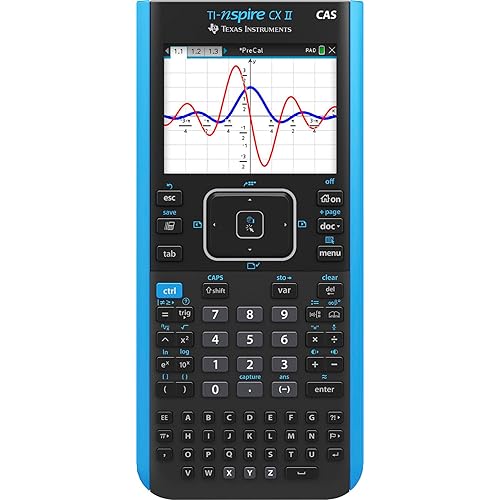
Texas Instruments TI-Nspire CX Graphing Calculator

  • Based on 1,942 reviews
Condition: New
Checking for the best price...
$189.99 Why this price?
New Year Deal · 17% off was $230.08

Buy Now, Pay Later


As low as $31.67 / mo
  • – 6-month term
  • – No impact on credit
  • – Instant approval decision
  • – Secure and straightforward checkout

Ready to go? Add this product to your cart and select a plan during checkout.

Payment plans are offered through our trusted finance partners Klarna, Affirm, Afterpay, Apple Pay, and PayTomorrow. No-credit-needed leasing options through Acima may also be available at checkout.

Learn more about financing & leasing here.

Free shipping on this product

30-day refund/replacement

To qualify for a full refund, items must be returned in their original, unused condition. If an item is returned in a used, damaged, or materially different state, you may be granted a partial refund.

To initiate a return, please visit our Returns Center.

View our full returns policy here.


Availability: Only 2 left in stock, order soon!
Fulfilled by Golden Knight Trading Company

Arrives Sunday, Jan 18
Order within 17 hours and 22 minutes
Available payment plans shown during checkout

Protection Plan Protect Your Purchase
Checking for protection plans...

Features

  • Color Screen. The screen size is 320 x 240 pixels (3.5 inches diagonal) and the screen resolution is 125 DPI; 16-bit color
  • Rechargeable battery included. Lasts up to two weeks on a single charge
  • Thin Design and lightweight with easy touchpad navigation
  • 100 MB storage memory / 64 MB operating memory

Description

Stay mobile, continue learning - Transfer class assignments from handheld to computer (PC and Mac). Complete work outside of school using student software. On the desktop at home or a laptop on the bus, at the library, coffee shop wherever. Visualize in full color - Color-code equations, objects, points and lines on the full-color, backlit display. Make faster, stronger connections between equations, graphs and geometric representations on screen. Real-world images - Use digital images or your own photos. Overlay and color-code math and science concepts. Discover real-world connections. Recharge with ease, the TI-Nspire Rechargeable Battery, installed with the handheld, is expected to last up to two weeks of normal use on a single charge. No alkaline batteries needed. The sleek TI-Nspire CX handheld is the thinnest and lightest TI graphing calculator model to date. It's also the brightest with a high- resolution, full-color display that makes it easy to see every exponent, variable and line. 3D Graphing - Graph and rotate (manually and automatically) 3D functions. Change the wire or surface color of your 3D graph.

Manufacturer: ‎Texas Instruments


Brand: ‎Texas Instruments


Item Weight: ‎7 ounces


Product Dimensions: ‎11.8 x 7.25 x 2 inches


Item model number: ‎N3/TBL/1L1/J


Batteries: ‎1 Lithium Metal batteries required. (included)


Is Discontinued By Manufacturer: ‎No


Color: ‎Black


Material Type: ‎graphing


Number of Items: ‎1


Size: ‎Standard Packaging


Manufacturer Part Number: ‎N3/TBL/2L1


Date First Available: February 10, 2011


Frequently asked questions

If you place your order now, the estimated arrival date for this product is: Sunday, Jan 18

Yes, absolutely! You may return this product for a full refund within 30 days of receiving it.

To initiate a return, please visit our Returns Center.

View our full returns policy here.

  • Klarna Financing
  • Affirm Pay in 4
  • Affirm Financing
  • Afterpay Financing
  • PayTomorrow Financing
  • Financing through Apple Pay
Leasing options through Acima may also be available during checkout.

Learn more about financing & leasing here.

Top Amazon Reviews


  • Outstanding
So the time has come to send my oldest to middle school. His school requires the use of one of two calculators in his math class...the TI-84 Plus OR the TI-Nspire. After doing a LOT of research I settled on the Nspire. Why? Well.... At first glance the TI-84 would have been the better choice. It's based on a platform that was first introduced in 1996, and twenty years later the market has had a lot of time to embrace this calculator. Indeed, there's a vast amount of resources out there to support the TI-84 and having all of that would seem to make the case that it is the best choice. The lower price point is also another factor. But then my research started showing something. The updates for the TI-84 had been doing a commendable job at beating back the clock, but the reality is the hardware is aged and can only do so much. While it may have been the best calculator in the world ten years ago, the reality is that was ten years ago. In other words, it is now limited and will always be limiting going forward. Add to that TI's loving attention to the Nspire, and it becomes clear that the Nspire is the new platform. Equipping my son with yesteryear's technology would be, I think, to put him at a disadvantage with his peers. So the Nspire it is. Sadly the school outright prohibited the use of CAS calculators in their list. More's the pity, as the CAS version offers some very compelling features and abilities at a trivial price increase. If it weren't forbidden, my son would have received the CAS version of this calculator. On the other hand, this particular model will serve him well into college, so buying this platform today means I don't have to buy it for him in six+ years. And if the need for CAS becomes acute then, well, the CX CAS will be waiting. Using this handheld (it's really not a calculator, but a mini computer) has addressed a lot of the nonintuitive quirks of the TI-84. You work with documents, you can interact with things directly via the touchpad, and so on. Regular OS updates ensure that this platform has a LOT of life in it. Too, the Nspire has capabilities that are simply impossible for the TI-84 to have, like 3D graphing. On the other hand, since math teachers tend to be a staid and Victorian lot, you'll still see the TI-84 hanging around schools longer than I think is wise. Since TI stopped selling the TI-84 keyboard attachment for the Nspire, it's clear that TI is committed to forcing the issue. Better to, I think, learn the platform of the here and now vs the old one. What put me over the edge was a brief survey I took of the engineers in my office. To a man (and woman), they agreed that the Nspire was the way to go. So that's why I bought this, and the support from TI in addition to the software tools (the PC application, document transferability, etc) has made that decision a wise one. I firmly believe this is the best, most flexible handheld calculator device on the market today. I armed my son with this, a couple of tutorial books, and let him play...and he's taken to it quite well. It's an outstanding device. ... show more
Reviewed in the United States on August 2, 2016 by J. Tant

  • Quality product
Good quality calculator that will last you for years to come. This calculator has lasted me from high school math up until the end of my college year (still works like a champ with no issues, but I just don’t have much of a use for it anymore). I bet it could last another ten years. High quality product and easier to use than some of the other graphing calculators available. ... show more
Reviewed in the United States on March 20, 2025 by Jason Williams

  • Excellent for any math or science course (AP courses and most college courses as well)
This is an excellent device, and although it takes getting used to, it is much more intuitive than the TI-84 and others like it. While other calculators offered by TI also have color LCD panels, this one seems to match the aptitude of this calculator, finally putting all the power and functionality under the hood. It offers plenty of space for documents and pictures, which can be helpful in graphs and determining geometry. It doesn't stop there, though. I'm a high school sophomore in Precalculus and AP Statistics, and this is more than enough to get me through these classes, because it offers a much more computer-like intuitive workspace rather than the often obscured environment on the TI-84. I find it handy to be able to type in my operators, especially in Precalc, because experience with this has let me type much quicker. If you have never used one of these, I found it handy to have a "study buddy" who knows or is learning how to use this. I would also recommend finding a "scavenger hunt" like activity from TI's website to learn the basics of what your calculator can do. Then, experiment with it in your free time. Create a new document and play with the various functions. The great thing is, if you mess something up, you can just delete the page or even the entire document. Many of the key combinations that work on PCs also work on the TI Nspire, like Ctrl+C for copy, Ctrl+V for paste, Ctrl+I for new page and Ctrl+S for save, which helps the learning curve. ... show more
Reviewed in the United States on October 24, 2015 by skim7568

  • Buena
Ideal para la Escuela
Reviewed in the United States on December 8, 2025 by Jhamit Cusva

Can't find a product?

Find it on Amazon first, then paste the link below.
Checking for best price...