Prime Day deals are live! View Deals
Search  for anything...

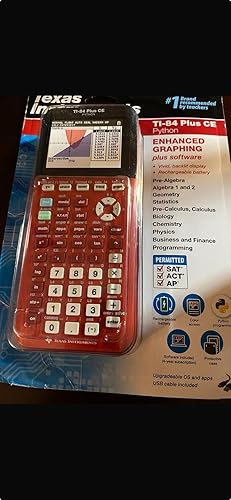
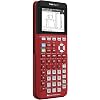
Texas Instruments TI-84 Plus CE Radical Red Graphing Calculator

  • Based on 262 reviews
Condition: New
Checking for the best price...
$145.99 Why this price?

Buy Now, Pay Later


As low as $24.33 / mo
  • – 6-month term
  • – No impact on credit to apply
  • – Instant approval decision
  • – Secure and straightforward checkout

Ready to go? Add this product to your cart and select a plan during checkout.

Payment plans are offered through our trusted finance partners Klarna, Affirm, Afterpay, Apple Pay, and PayTomorrow. No-credit-needed leasing options through Acima may also be available at checkout.

Learn more about financing & leasing here.

Free shipping on this product

30-day refund/replacement

To qualify for a full refund, items must be returned in their original, unused condition. If an item is returned in a used, damaged, or materially different state, you may be granted a partial refund.

To initiate a return, please visit our Returns Center.

View our full returns policy here.


Availability: Only 5 left in stock, order soon!
Fulfilled by bestexp

Arrives Sunday, Jun 28
Order within 22 hours and 9 minutes
Available payment plans shown during checkout

Protection Plan Protect Your Purchase
Checking for protection plans...

Features

  • 2.8" color LCD with 320 x 240 pixels resolution for clear viewing. Rechargeable lithium-ion battery
  • Variety of preloaded applications Including MathPrint, Cabri Jr., CellSheet, TI Testguard 4.1, Vernier EasyData and more to simplify use; Business functions: Calculate TVM (Time-Value-of-Money), cash flows and amortization with a full-screen interactive editor
  • 1- and 2-variable statistical analysis with With logistic, sinusoidal, linear, logarithmic, exponential, power, quadratic polynomial, cubic polynomial and quadratic polynomial regression models. Up to 10 graphing functions, Define, save, graph and analyze multiple equations at once. Stores up to ten 50 x 50 matrices as well as converts matrices to lists and lists to matrices for flexibility.
  • USB cable lets you connect to Mac or PC computers for ease of use. Impact-resistant slide case protects the calculator
  • The TI-84 Plus CE is approved for use on the following exams: PSAT, SAT, and ACT college entrance exams; AP Exams that allow or require a graphing calculator; the IB exam.

Description

Master the ACT, SAT, PSAT/NMSQT or AP exams with the help of this Texas Instruments TI-84 Plus Silver Edition 84+CE graphing calculator, which features a sequence graphing mode that shows time series plots, cobweb or stairstep plots and phase plots. . What's Included: TI-84 Plus Silver Edition Graphing Calculator;Lithium-ion battery, unit-to-unit cable, USB cable; Slide case; Owner's manual

Brand: Texas Instruments


Color: Red


Calculator Type: Business, Graphing


Power Source: Battery Powered


Screen Size: 9 Inches


Calculator Type: Business, Graphing


Power Source: Battery Powered


Screen Size: 9 Inches


Number of Batteries: 2 AA batteries required.


Display Type: LCD


Color: Red


Enclosure Material: Graphing


Item Dimensions L x W: 7.59"L x 3.42"W


Brand: Texas Instruments


Model Name: ti-84


Manufacturer: Texas Instruments


Mfr Part Number: 84PLCE/TBL/1L1/T


Model Number: 84PLCE/TBL/1L1/T


Item Weight: 0.31 Pounds


Unit Count: 1.0 Count


Frequently asked questions

If you place your order now, the estimated arrival date for this product is: Sunday, Jun 28

Yes, absolutely! You may return this product for a full refund within 30 days of receiving it.

To initiate a return, please visit our Returns Center.

View our full returns policy here.

  • Klarna Financing
  • Affirm Pay in 4
  • Affirm Financing
  • Afterpay Financing
  • PayTomorrow Financing
  • Financing through Apple Pay
Leasing options through Acima may also be available during checkout.

Learn more about financing & leasing here.

Top Amazon Reviews


  • Pricey but needed
Need for my son’s high school geometry class and it works great. A little pricey for something he will only use for now but can save it for my other son to use as well .
Reviewed in the United States on October 27, 2025 by Kristina Philbin

  • Perfect Calculator Perfect Calculator
I purchased the "for dummies" book on this calculator when I purchased the calculator. I'm reading the book cover-to-cover and I'm about halfway done. This calculator is perfect in every way and I could not have asked for more. I like that TI offers this calculator in so many color variations. I opted for the 'Radical Red' version and it looks amazing. Why anyone would buy a foreign-made calculator when they could get one made by Texas Instruments is beyond me. Anything made in China these days presents a security risk to my data. Calculators from Japan (Casio) aren't bad but as long as I can get a top-of-the-line calculator that's made in the USA, that's what I'm going to do. TI has dominated the market for well over 3 decades now and I don't see things changing any time soon. ... show more
Reviewed in the United States on March 5, 2024 Reviewed in the United States on March 5, 2024 by Jason Enochs

  • TI-85 goodness!!
Great calculator as always from Texas Instruments. I’ve had a few of their products through the decades and this one is as good as they get. Programmable. Easy to use. Graphs are easy to see. And the red colour was a nice bonus!
Reviewed in the United States on May 5, 2024 by 208JeD

  • Please get it if you take advanced math.
This is everything you need in a calculator. I would recommend watching a YouTube video on how to do certain functions. I should have bought this sooner cause my math classes doing me in.
Reviewed in the United States on April 24, 2025 by favitte

  • Good buy
This is the best calculator to buy for high school or college. We bought a cheaper version for our older child, and it broke after a few months and ended up needing to buy this brand anyway. It’s better to just go ahead and spend the money.
Reviewed in the United States on December 27, 2022 by faris jobe

  • If you are needing a graphing calculator, then this is it, but...
When it comes to calculators, especially in the graphing category, Texas Instrument has ingratiated itself very well in academia in the US. Whether you view that as an indictment or a compliment, it does mean that the TI-84 Plus CE is very well supported in the community, and that can be a valuable asset when learning how to use the calculator. My background is computer science and not math. As for my calculator experience, I own an HP Prime (g2), a Casio ClassPad 4 (CG fx-500), TI-89 Titanium (my first grapher), and a TI-NSpire CX ii CAS. I've used all of these CAS calculators as a student in various calculus classes. I also own a TI-83 Plus Silver Ed., and now the TI-84 Plus CE Python Ed. My review of this calculator is from the viewpoint of being an end-user rather than a teacher. As such, my remarks are more critical than those from a flag waver for TI - hence the "but..." in the headline for this review. Price - Given that a person can buy the TI-NSpire CX ii CAS for $130 plus or minus $10, I find the TI-84 Plus CE price to be on the high side, especially since it only has about 60% of the functionality that the NSpire CX CAS model has. The difference of course is because of the limitations placed on calculator features allowed on the various standardized tests given in high schools and some colleges. TI has made sure that the TI-84 Plus CE meets most if not all of these requirements. Since the demand is there, they can charge more money. CAS (computer algebra system) calculators are usually excluded from standardized tests. User Interface - I rate the TI-84 Plus CE at three stars mostly because of the screen size used in graphing. The quality is good, but the size of the usable screen is about 75% of the available screen size. I am guessing that this is a carry-over from the previous model, the TI-84 Plus C Silver Edition. It uses a smaller screen. By the way, that was the first model to be rechargeable and graph in color. The graphing screen on the NSpire is a third bigger and all of it is used! Let's talk about the body of the calculator. It's thin and lighter weight than previous models and is rechargeable. The keyboard layout is much the same as the TI-83/84 earlier models. One improvement with the Python model is that the template for entering fractions has been made available as a shifted key. Do an [Alpha] [X,T,O,n] key sequence to get it on the screen. That O by the way is a theta on the key. Other attributes - The TI-84 Plus CE, including the Python Edition, comes in a handful of colors. I bought the Radical Red version. It is curious to note that the color choice can make a huge difference in price. As mentioned, my 84 CE is the Python Edition. Based on a YouTube video on the Python Edition, it looks like the underlying hardware for the Python model is different from the non-Python model, so it may not be possible to "load" Python on the standard 84 CE model. Both models are completely programmable using TI-BASIC. At this point, I am not sure just how useful Python might be over TI-BASIC. I will leave that topic for another reviewer to cover. Software - The TI-84 Plus CE requires a specific version of the TI-Connect app that runs on a PC or MAC. The CE version contains a TI-BASIC editor for writing your own procedures and functions. Oddly enough, TI does not have a Python editor that runs on the PC/MAC, and the PC emulator for the calculator is no longer free after the introductory time runs out. Also on the minus side, you will need to download all the manuals. On the plus side TI offers a number of manuals beyond the typical user's guide, for its calculators, including programming manuals, and there is a large number of activities available for downloading into the calculator. The TI-Connect app makes getting apps and code uploaded to the calculator very easy. It's a nice computer-to-calculator interface. As for Python, as I stated earlier, I cannot tell you what, if any, advantages there might be in writing your own apps in Python rather than TI-BASIC. By the way, the Latest TI-NSpire CX ii CAS also can be programmed using Python. Some miscellaneous comments - How many calculators does a person need? Everybody's need is bound to be different, but I think that at least two are needed. I like having a pocket-sized, instant-on, scientific calculator that is solar-powered. I prefer the Casio fx-991 Classwiz; it has the most bang for the buck, being priced at $20. For a second calculator I want a CAS grapher, and I currently like the TI-NSpire CX ii CAS. Both the HP and Casio CAS calculators have a couple of more engineering math functions in them than the TI, but the TI is better supported. If you are still in high school, you may not be allowed to use a CAS calculator, but you still need a grapher, so the TI-84 Plus CE is aimed directly at you. You can put off buying a CAS calculator until you are at the university and taking science and engineering classes. Finally, a word or two about TI-84 Plus CE calculator how-to books available here on Amazon - If you are brand new to graphing calculators, I like Marco Wenisch's "TI-84 Plus CE Guidebook for HIgh School & College." More in depth is Christopher Mitchell's "Using the TI-84 Plus" 2nd edition, as it covers the Plus CE model. If you are at the high school AP or college level already, then I find Carl Swenson's "Getting Started with the TI-84/TI-83 Graphing Calculator" book to be exceptional, especially if you are wanting to use your 84 in calculus and physics classes. Disclaimer: I am not associated with Amazon, TI, Casio, or any of the publishers or authors of the books I mentioned. My review and opinions are based soley on my own preferences and personal experience with the items mentioned. I receive no benefits in any form, or even know if you purchase any item I have mentioned. As many are fond of saying - Your mileage may vary! ... show more
Reviewed in the United States on September 24, 2023 by Todds Books

  • Texas Instruments TI-84 Plus CE Radical Red Graphing Calculator Texas Instruments TI-84 Plus CE Radical Red Graphing Calculator
Bought this calculator for my son. He loves it. It is easy to use and it is huge so it makes it easier for him. No complaints.
Reviewed in the United States on September 21, 2024 Reviewed in the United States on September 21, 2024 by Ssb

  • Required
It’s a required tool for college classes. Ordered one for the oldest child and just purchased a blue one for the next oldest. Fast shipping! The cost is ridiculous, but it’s the same price anywhere else.
Reviewed in the United States on December 11, 2023 by KC

Can't find a product?

Find it on Amazon first, then paste the link below.
Checking for best price...