
Search  for anything...

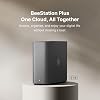
Synology BeeStation Plus 8TB Personal Cloud Storage Device (BST170-8T)

  • Based on 0 reviews
Condition: New
Checking for the best price...
$592.82 Why this price?
Save $917.17 was $1,509.99

Buy Now, Pay Later


As low as / mo
  • – Up to 36-month term if approved
  • – No impact on credit to apply
  • – Instant approval decision
  • – Secure and straightforward checkout

Ready to go? Add this product to your cart and select a plan during checkout.

Payment plans are offered through our trusted finance partners Klarna, Affirm, Afterpay, Apple Pay, and PayTomorrow. No-credit-needed leasing options through Acima may also be available at checkout.

Learn more about financing & leasing here.

Free shipping on this product

FREE 30-day refund/replacement

To qualify for a full refund, items must be returned in their original, unused condition. If an item is returned in a used, damaged, or materially different state, you may be granted a partial refund.

To initiate a return, please visit our Returns Center.

View our full returns policy here.


Availability: Only 5 left in stock, order soon!
Fulfilled by Amazon

Arrives Sunday, Jun 21
Order within 11 hours and 27 minutes
Available payment plans shown during checkout

Protection Plan Protect Your Purchase
Checking for protection plans...

Features

  • Set up a personal cloud in minutes and get right into data managing works
  • Bring your data from computers, tablets, phones, external drives, and cloud services to one place and access them anywhere, anytime
  • Share storage with family or team members, giving each person their own cloud space
  • Back up phone photos and let local AI find who or what you're looking for
  • 3-year warranty included

Description

With 8TB of built-in storage, BeeStation Plus is designed for data-intensive professionals, households, and small studios seeking a cloud alternative. It efficiently manages large volumes of data, whether transferring content-heavy files on your desktop, backing up thousands of mobile photos, or organizing files via the web. Experience high-performance, cloud-like workflows while keeping full privacy and control.

Brand: Synology


Color: Black


Product Dimensions: 7.73"D x 2.46"W x 5.83"H


Size: 5.83 inches x 2.46 inches x 7.73 inches


Material: Metal


Brand: Synology


Manufacturer: Synology


UPC: 846504006229


Mfr Part Number: BST170-8T


Model Number: BST170-8T


Warranty Description: 3 years


Unit Count: 1.0 Count


Item Dimensions D x W x H: 7.73"D x 2.46"W x 5.83"H


Size: 5.83 inches x 2.46 inches x 7.73 inches


Item Weight: 2.7 Pounds


Compatible Devices: Laptop, Smartphone, Tablet


Mounting Type: Tabletop


Color: Black


Enclosure Material: Metal


Is Assembly Required: No


EU Spare Part Availability Duration: 3 Years


Frequently asked questions

If you place your order now, the estimated arrival date for this product is: Sunday, Jun 21

Yes, absolutely! You may return this product for a full refund within 30 days of receiving it.

To initiate a return, please visit our Returns Center.

View our full returns policy here.

  • Klarna Financing
  • Affirm Pay in 4
  • Affirm Financing
  • Afterpay Financing
  • PayTomorrow Financing
  • Financing through Apple Pay
Leasing options through Acima may also be available during checkout.

Learn more about financing & leasing here.

Top Amazon Reviews


  • Easiest Time Capsule (and Plex Server) Replacement Available Easiest Time Capsule (and Plex Server) Replacement Available
Hi Gang! By now you've probably heard that Apple's legendary Time Capsule has finally reached end of life and will no longer work after the next Mac OS update. So where do we go now? Plugging in a removable drive once in a while isn't going to get you hourly backups (unless you leave it plugged in all the time, ah... no) and most people over time are simply going to forget to do it. What we NEED is a Time Capsule replacement that does it all and hopefully does it better and with more features. Same goes for anyone who is looking for a replacement for WD My Cloud Hard Drives. Well look no further than the Synology Bee Station PLUS. Why the Plus? It's got a faster processor, 4 gigs of RAM (instead of 2), and a built-in Plex Server (which works great!). I did a ton of research and this is really the only direct replacement I could find. Sure you can get a full blown NAS but now you're looking at nearly a thousand bucks by the time you buy two 8 TB drives, not to mention the extreme amount of set up and learning curve required to get it working, all to implement a bunch of features you will most likely never use. This thing is the perfect replacement. It's easy to set up and will do everything the Time Capsule and WD drives do (and more) and do it all faster and with double the space. Setup is fairly easy if you watch the Tutorials published by Synology and by users on YouTube. I personally used GROK Ai as my technical assistant and he was very helpful. What a crazy world we live in. How long before we have a personal Robot to do all this technical stuff for us? Anyway, since it's still up to us humans here's setup in a nutshell: Time Machine: To set up your BeeStation for Time Machine, go into System Settings>Advanced and hit the enable Local Access and SMB buttons on your BeeStation. That's it on the Bee. Next go to your Mac's Time Machine settings and click "Add Backup Disk". Select your BeeStation from the list (it's called TimeMachine), click "Set Up Disk," and enter your Mac's administrator credentials, followed by the local username and password you created for your BeeStation. Don't worry there's a Wizard that walks you through it. You can also set a quota for your various Macs if you want to control which devices gets the most hard drive space or simply set them up as per normal and let Apple Time Machine manage the allocation. Easy Peasey. No worries about Time Machine using up all the space on your Bee Station, since Synology automatically limits the total amount of space you can use for Time Machine to 4.4 TB. That's more than double what the Time Capsule had. I set ours up to give my Macbook a 3 TB quota (which is triple the size of my hard drive) and 1.4 TB quota for my other Macbook which is triple the size of the HDD in that one. Most sources say double the size of your Hard Drive is enough since Apple compresses them, but I only have two Macs and wanted to do some over kill since I don't plan to use the Bee Station for anything other than Time Machine and my Plex Server which uses less than 500 Gigabytes. Plex: To set up a Plex server on BeeStation Plus, navigate to System Settings > Integration in the BeeStation portal and click the install the Plex Media Server button. You can install it normally or use the recommended method of installing with a Plex Claim Token for easier account linking by signing into your Plex account and copying the token. After installation, you will need to complete the initial Plex setup wizard, where you can name your server and add media libraries by pointing to the folders within the automatically created "Plex Media Library" folder on your BeeStation. To upload files you will use the Bee Files App and either drag and drop the files into it's window or you can click on the little "+" sign in the upper left corner where you can add folders and media from there. If you want more details Synology provides links to their own tutorials and there are tons of videos on YouTube on how to do it as well. Once THAT'S done, YOU'RE done. You've now got tons of space for Time Machine backups and tons more for Videos in Plex that you can access any time from anywhere. I am currently running hourly backups with Time Machine on my Macbook Air M4 and my wife's Macbook Pro M1. To be perfectly honest it HAS had a couple of hiccups saying the “Disk became unmounted” when I first set it up. Not sure if I caused it by unplugging the unit and Ethernet cables when I moved it to my makeshift server closet. Today I ran backups on both Macs at the same time and just for grins I played a Movie on my Plex server at the same time. No strain whatever. Worked like a charm. Then tonight I opened my wife’s laptop to take that pic for this review and the next backup failed saying the disk wasn’t properly ejected… Only thing is, I believe I never cancelled out of Time Machine and may have left it open when I closed the lid. So who knows? I’ll take off one star for it being temperamental but Im not convinced that the glitches I’ve encountered were not caused by me. Other than that it’s been working perfectly. So yeah, I’m keeping it. It’s the easiest one to set up and the more expensive and complicated NAS systems out there will probably have some initial glitches too. This one is specifically designed to work with Time Machine (a lot of the others aren’t), it costs the least, and is the easiest to understand and set up. It runs cool as a cucumber (see pic). The fan is quiet enough, but you can hear the hard drive very slightly when it’s cranking along. I don't think it will be an issue for most people and any mechanical drive is going to do the same thing. Overall it’s the best replacement I could find for the now obsolete Apple Time Capsule and it’s worked flawlessly 99.9 percent of the time. It did have some glitches but I suspect it’ll be fine once I stop messing with it. If not I will let you know. UPDATE: I have confirmed that the problems I encountered were indeed caused by yours truly. So know that going in. If you unplug it or any of the cables it will lose the next couple of backups. Same will happen if you open Time Machine backups and then close the lid on your laptop without properly exiting out of the program. Oops! My bad. So I put it back up to 5 stars. It was the Apple software that had the glitches not the Bee Station. As with all things Apple, it has fixed itself now and it humming along happily. ... show more
Reviewed in the United States on November 15, 2025 Reviewed in the United States on November 15, 2025 by bareyb

  • Simple and Reliable
Very simple and dependable NAS
Reviewed in the United States on May 27, 2026 by C. Robinson

  • Plex "Integration"?
I hate this god forsaken thing. 1. It is hardwired to my whole LAN and somehow can't connect 90% of the time. It has USB and USB-C, but those are only for attaching an external drive. Why? 2. The Plex "integration" is why I bought this unit and it sucks. I actually returned the 4Tb version because it didn't have this (apparently useless) feature. It is partitioned with only 4Tb useable for Plex and I can't access the BeeStation from the Plex side. 3. It is LOUD! In 40 years have never heard a drive so loud. It sounds like someone scribbling furiously with a pencil on paper, right next to your ear (while you have a headache), but amplified, when it's running. 4.It freezes up and there's nothing to do but wait it out or reset it while it sounds like a mouse is scurrying around inside. ... show more
Reviewed in the United States on April 11, 2026 by Cl3mm3rs

  • BeeStation, 8TB Saves you Dollars, time and space.
The perfect solution for storing your online files. Easy to access from just about anywhere. Great speed with the right internet connection. Save dollars while safely backing up your files. Set up takes awhile and requires a basic knowledge of tech specs.
Reviewed in the United States on February 9, 2026 by Keybrink

  • EZ to install, tons of storage, works well, synchs changes quickly
Got this to consolidate all the data on my wife's various laptops so that they can finally be retired. Seems to work fine, changes to data are synched quickly. Very easy to install and manage.
Reviewed in the United States on September 26, 2025 by Craig Shipley

  • Good for Time Machine, and handy, but not a smooth experience
Ok, so you get a good target for Time Machine backups. You also get a decent'ish file archiver (though not as good as the defaults from big tech companies). You get a decent file sharing system. But the experience isn't very smooth. 1. If you try to set it up on mobile, you get redirected to desktop website that requires a lot of horizontal scrolling and doesn't work well on mobile. It's 2026 and people are selling "easy to use" options that are desktop-only? 2. If you setup a passkey, that doesn't work *at all* on the desktop app. 3. The provided web interface is good enough otherwise, but if you upload or download files, it's glacially slow because it goes all the way out to the public internet, then back down again to your computer or phone. It's not a local transfer unless you use SMB. That's madness and super-inefficient. 4. The Mac app is just not very polished. It's Electron. The popup windows feel clunky. It puts a weird button in Finder that doesn't do anything. It's just overall, well, bad. 5. The iCloud Photos import doesn't work with Advanced Data Protection. Just overall, a lot of paper cuts on what is billed as a simple and easy product. Having said all that, it works quite well as a Time Machine target and when you also backup the Synology itself, you're doing pretty good at a 3-2-1 backup. ... show more
Reviewed in the United States on January 5, 2026 by Ken

  • Time Capsule replacement!
This the only device I could find to replace my aging time capsule that actually works on my network. Its OS allows it to work as time capsule. It’s a bit of a learning curve for me but I’ll figure it out. The added Plex server is nice touch, makes it worth the money.
Reviewed in the United States on December 25, 2025 by Robert F. Berning

  • Avoid at all cost, just get a NAS.
Very easy to set up, but what isn’t these days? They market it for iphone and ipad users, but the only way to get icloud of Google Photos transferred is through a desktop app. This was not clear at all when I purchased. Icing on the cake things you expect them to have are not in the software; like dark mode or one unified app. You have to use bee files for files and bee photos for photos making things complicated. It’s a completely waste and their support takes days to respond to a team that’s overseas. Just get a UGreen NAS. ... show more
Reviewed in the United States on February 20, 2026 by Ray Da Man

Can't find a product?

Find it on Amazon first, then paste the link below.
Checking for best price...