Search  for anything...

S15 Stream Controller, 15-Key LCD Studio Control Deck, Black

Based on 155 reviews
Condition: New
Checking for the best price...
$59.99
Holiday Deal · 14% off was $69.98

Buy Now, Pay Later


As low as $10.00 / mo
  • – 6-month term
  • – No impact on credit to apply
  • – Instant approval decision
  • – Secure and straightforward checkout

Ready to go? Add this product to your cart and select a plan during checkout.

Payment plans are offered through our trusted finance partners Klarna, Affirm, Afterpay, Zip, Apple Pay, and Google Pay. No-credit-needed leasing options through Acima may also be available at checkout.

Learn more about financing & leasing here.

Selected Option

Free shipping on this product
This item's return window has been extended for the holiday season: FREE refund/replacement until Jan 31, 2027

To qualify for a full refund, items must be returned in their original, unused condition. If an item is returned in a used, damaged, or materially different state, you may be granted a partial refund.

To initiate a return, please visit our Returns Center.

View our full returns policy here.


Availability: Only 5 left in stock, order soon!
Fulfilled by Amazon

Arrives Friday, Nov 13
Order within 12 hours and 16 minutes

Available payment plans shown during checkout

Protect Your Purchase

Easy claims online, fast replacements, no fees

Checking for protection plans...

At a glance

Condition
New
Color
Black
Model
S15-BN1
Weight
157 g
Works with
Mac, PC

Features 6

  • 15 Customizable LCD Keys for Everyday Control The STREONOR S15 stream controller gives you 15 customizable LCD keys for shortcuts, hotkeys, app actions, OBS scene controls, launch tools, editing commands, and repeated tasks. A practical macro deck for streaming, video editing, office work, gaming, and daily productivity.
  • 3 Status Display Panels for Useful Real-Time Information Unlike standard macro keypads, the S15 includes 3 non-touch status display panels for at-a-glance information. Display supported data such as weather, time, CPU temperature, GPU status, memory usage, or system performance, so you can stay informed while working, streaming, editing, or gaming.
  • Preset Control Pages for Different Scenarios Create dedicated layouts for the way you use your desk setup. Build a streaming page for OBS scenes and microphone control, an editing page for timeline shortcuts and export commands, an office page for email, browser tabs, screenshots, and meeting tools, or a gaming page for quick commands, media control, and frequently used apps.
  • Action Flows, Plugins, Icons, and GIF Customization Use STREONOR software to build action flows that trigger multiple commands with one key. Explore 100+ plugins, icon packs, GIF icons, scenes, tutorials, and custom layouts to personalize your workflow for live streaming, content creation, music control, productivity, gaming, and everyday desktop tasks.

Description

STREONOR is built for the modern desk setup, where work, creation, entertainment, and daily productivity share the same space. We believe a desktop should feel organized, personal, and easy to control. From customizable controls to practical desk tools, STREONOR helps users shape smoother workflows, reduce repeated actions, and keep important functions close at hand.

Specs 18

Brand Streonor
Connectivity Technology USB-C
Special Feature 100+ Plugin Support, Customizable Display Keys, OBS Scene Control, Status Display Panels
Color Black
Model Name S15
Number of Buttons 15
Number of USB 2 Ports 1
Item Highlight Programmable Macro Pad, Hotkey Soundboard Keypad with 3 Status Displays for OBS, Twitch, YouTube, Audio Control, PC & Mac

Frequently asked questions

If you place your order now, the estimated arrival date for this product is: Friday, Nov 13

Yes, absolutely! This item's return window has been extended for the holiday season: FREE refund/replacement until Jan 31, 2027.

To initiate a return, please visit our Returns Center.

View our full returns policy here.

  • Klarna Financing
  • Affirm Pay in 4
  • Affirm Financing
  • Afterpay Financing
  • Zip Pay in 4
  • Financing through Apple Pay
  • Financing through Google Pay
Leasing options through Acima may also be available during checkout.

Learn more about financing & leasing here.

Top Amazon Reviews

Professional Feel Without the Premium Price
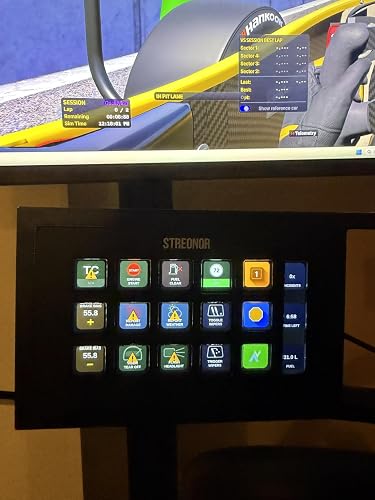
I am genuinely impressed with this 15-button stream controller. It is a premium-feeling device that arrives in high-quality packaging and delivers everything it promised for less than half the price of major brands. The build quality is solid, the buttons have a fantastic tactile feel, and the screen is sharp with fully adjustable brightness. It has been an absolute game-changer for iRacing, making it easy to manage pit stops and in-game settings without reaching for a keyboard. If you want the functionality of a top-tier controller without the premium price tag, this is an easy recommendation. ... show more
Reviewed in the United States on July 19, 2026 by Danilo

Wow! This Thing Blew My Expectations Out Of The Water!
The Streonor S15 Stream Controller has been an absolutely stellar surprise for me! I always wanted to pick up something akin to a streamdeck. But found the prices are just way too high. I honestly didn't expect a whole lot out of this particular one. I figured it would feel a bit cheap or have some issues. I was completely wrong! The 15 programmable keys give me plenty of shortcuts for frequently used actions, and being able to customize them makes it much more convenient than relying on keyboard hotkeys. I especially like the LCD displays on the keys because they make it easy to identify what each button is programmed to do. The three status displays are also a nice touch for keeping an eye on information while streaming or working. The controls are useful for things like OBS commands, launching programs, controlling audio, triggering sound effects, and managing other repetitive tasks. You can add a whole bunch of pages with different functions, and I love that! The black design looks clean and fits nicely alongside other gaming and streaming equipment. Setup and customization are straightforward, and once the buttons are configured to your liking, having commonly used commands directly at your fingertips can save quite a bit of time. There are only two "very tiny" complaints I have... First off being that the cord is a little bit on the short side. You may just want to get an extended USB hub or a USB extension cable to help with that. And the second, being along the same lines as the first... If this had an option for a bluetooth connection or wireless. It would be PERFECT. That cord is the only thing holding this beautiful device back just a little bit. Other than that, I love this thing. And look forward to any future iterations Streonor has down the line! ... show more
Reviewed in the United States on October 5, 2026 by Blake T. Dunbar

Useful stream controller with great customization.
This controller is a very useful addition to a desk if you rely on shortcuts, macros, or repeated commands throughout the day. The buttons feel responsive, the small displays are bright and easy to read, and having 15 programmable keys gives plenty of room for common actions. Once configured, commands trigger quickly without noticeable delay. The software takes a little time to learn because there are a lot of options, but the flexibility is worth the effort. I especially like being able to create multiple pages so the same hardware can handle far more than 15 functions. The stand keeps it at a comfortable angle, and the compact size does not take over the desk. It offers a lot of control for the price. ... show more
Reviewed in the United States on October 8, 2026 by OmicroN

Not perfect, but great value
First, I have to say that I haven't used a fancy controller like this -- I know that there are some out there, and I'm sure that they're nicer, but I'm giving this one four stars because it works pretty well and is excellent value. It's not perfect, though. Some points: - It's a Hong-Kong-centric experience. You can definitely adjust everything so that it works for whatever your locale happens to be, but just know that out of the box, it's set up for an English-speaking Hong Kong resident - There's not a huge amount of useful support information about more detailed setup options. You'll figure it out if you play around, but for some odd things (like tying a button to making a VPN connection, for example) you'll be searching for what combination of things will work. Command line, in case you're wondering. - The software has some quirks. The weather, for example: the list of cities does not have country or state names tied to them, so if your city name is fairly common, you'll have a list of identical city names and have to figure out which one is yours based on the weather reported by each. - The software is not a small, lightweight package the way it could be. I think it was 500+ MB for what is ultimately a pretty simple software package. - Out of the box, there are lots of animated icons. Maybe you like that. I do not enjoy having a panel with a bunch of look-at-me animation going on; this is supposed to be a functional thing, not a cartoon. You can change that, of course, but it's an odd default choice. - The USB cable comes out of the back of the panel, meaning it can't lie flat. It comes with a plastic wedge which accommodates the cable and tips the panel up so that it's directed at your face from desk height, which is nice, but if you wanted to mount it on the wall or otherwise in a non-standard way, you're out of luck. Now, that said, here's the good stuff: - The button action is nice enough, and the system is very responsive - There's a ton of flexibility in how you set buttons up, what they do, and how they act - You can have multiple panels so that you have not just 15 keys, but 15 times as many panels as you set up - It does what it says it does. It's not a glitch-filled mess -- it seems reliable and capable. Ultimately, I think that there are nicer options out there. But the value of this panel is very high, and I take that into consideration. You may feel differently, but I think that this will work very well for most people. ... show more
Reviewed in the United States on July 26, 2026 by JR2, Jr.

great option for a control surface
This thing is pretty cool! It doesn't take up a lot of desk space, and it isn't permanently attached to the included stand. So you have the option to use your own mount or stand if you really want to! The display on the little screen and the buttons look nice, and my icons looked accurate. The app for this is both windows and mac compatible, and free to download. It was a bit confusing to get the hang of since I've never used one of these control surfaces before, but it isn't too hard to learn either. I didn't notice any input lag on this, the stuff I set the buttons to happened as soon as I pressed it. Maybe your experience will be different if you program a button to do a bunch of actions, but it works instantly the way I have it set up. ... show more
Reviewed in the United States on September 5, 2026 by B

Full-featured software that takes a bit to learn, but this is a very powerful device
Great compatibility, the ergonomics are perfectly fine (it's a push-button pad, not an ergonomic keyboard). Appearance is amazing, as the screen behind it is fairly vibrant and very customizable. The setup is moderately easy, but to do really advanced macros you'll have to customize your gifs, put them in place, draft the macro rules etc. The lighting is amazing as you really can customize the board to your heart's content, and many of the presets are all very solid as well! My only concern is with the somewhat weird jankiness of the software, but it does feel like there is a decent amount of development behind it and they're updating it fairly frequently. There's also a pretty decent ecosystem of user generated content for it, though I don't know if it's just all manufactured by the company or not. As it stands though, you're able to do some pretty cool stuff & publish it for others to use if you want. Five stars for feeling like it's actually subsidized by someone, you get a lot more than you pay for here in my opinion. ... show more
Reviewed in the United States on September 3, 2026 by Supplement

Whatever you might need to do on your computer, this time saving product is worth checking out.
This can be a very useful addition to a workstation with almost any purpose, creating videos, photography, or web based advertising creation. I will be most likely using it to control surveillance equipment including cameras and possibly other remote control items. It's got some pretty extensive software support for Windows and Mac, and in this way can control almost anything with the apps and programs for different operations. This can be specifically useful in a surveillance camera setup. There is support software of course with the system, but not everything is quick to operate, particularly camera angles in a PTZ setup, there are presets but getting there takes a few keystrokes on a computer, and standalone camera contollers are quite expensive. This would offer some additional push button presets for multiple keystroke operations that would take longer to do manually. When checking cameras for surveillance, anything that can speed up the process and replace multiple keystrokes and mouse movements with one push button makes things much more effective. As I get this setup figured out totally, I will update here with results. But so far, for the price range, this item provides some automation to make almost any computer driven operation quicker. ... show more
Reviewed in the United States on August 19, 2026 by Douglas

A Solid Alternative to the Big Brands
An ok Alternative to the Big Brands At $59.99 (price at the time of order), this costs about a third of what I paid for my name-brand stream controller, and it gets surprisingly close in functionality. The hardware feels good, the LCD keys look good but are clunky and feel bad, but once configured it does exactly what I need it to do. The software isn't quite as polished as the premium brands, and there's a bit more of a learning curve, but it's perfectly usable. These controllers are incredibly versatile. Beyond streaming, I use them for productivity shortcuts, launching applications, controlling Spotify, and switching my computer's audio output between desktop speakers and my home stereo with a single button press. There are a lot of workflow improvements you can build once you start experimenting with macros. The only thing I'd do differently is buy the version with the assignable rotary dials. I already have volume controls on my keyboard, but having dedicated knobs for volume, media, or other adjustments would make an even better desktop controller. Overall, this is a lot of functionality for the money and a great option if you don't want to pay premium-brand prices. Decent unit I'd just like improved tactile feel on the buttons, they feel so clunky and rock side to side. ... show more
Reviewed in the United States on August 7, 2026 by Amazon Customer
Checking for best price...