Search  for anything...

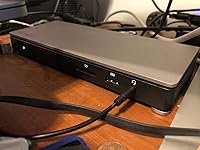
StarTech.com Thunderbolt 3 Dock - Dual Monitor 4K 60Hz TB3 Laptop Docking Station with DisplayPort - 85W Power Delivery Charging - 6-Port USB 3.0 Hub, SD 4.0, GbE, Audio - Windows & Mac (TB3DOCK2DPPD)

  • Based on 352 reviews
Condition: New
Checking for the best price...
$479.99 Why this price?

Buy Now, Pay Later


As low as / mo
  • – Up to 36-month term if approved
  • – No impact on credit
  • – Instant approval decision
  • – Secure and straightforward checkout

Ready to go? Add this product to your cart and select a plan during checkout.

Payment plans are offered through our trusted finance partners Klarna, Affirm, Afterpay, Apple Pay, and PayTomorrow. No-credit-needed leasing options through Acima may also be available at checkout.

Learn more about financing & leasing here.

Selected Option

Free shipping on this product

This item is eligible for return within 30 days of receipt

To qualify for a full refund, items must be returned in their original, unused condition. If an item is returned in a used, damaged, or materially different state, you may be granted a partial refund.

To initiate a return, please visit our Returns Center.

View our full returns policy here.


Availability: In Stock.
Fulfilled by MserGlobal

Arrives Jan 9 – Jan 31
Order within 9 hours and 30 minutes
Available payment plans shown during checkout

Protection Plan Protect Your Purchase
Checking for protection plans...

Style: 85W Power Delivery | 4x USB-A 3.0 | 1x USB-A 3.0 Fast Charge Port


Features

  • THUNDERBOLT 3 CERTIFIED DOCK: Aluminum, 40Gbps dual 4K 60Hz DP & TB3 (USB-C) video output or single monitor 5K 30Hz, 85W PD, USB 3.0 Hub, SD 4.0 card reader, Gigabit Ethernet & Headset port
  • 85W POWER DELIVERY: Thunderbolt 3 Dock can power and charge Ultrabooks & workstation laptops such as MacBook Pro (15 & 16), MacBook Air, HP, Lenovo ThinkPad & Dell XPS using macOS, Windows
  • MORE USB DEVICE PORTS: TB3 docking station has a 6-port USB 3.1 Gen 1 5Gbps Hub (5x USB-A, 1x USB-C ports) w/ 1x BC 1.2 (1.5A) fast charging always-on port that works with or without laptop connected
  • EASY TO USE: Universal Thunderbolt 3 dock w/ auto driver setup; incl. TB3 host cable and 6ft USB Type-C to DisplayPort cable for second DP monitor; extended dual display support on MacBook Pro/Air with Intel processor & single display with Apple M1 Chip
  • FLEXIBLE THUNDERBOLT 3 PORT: Thunderbolt 3 port replicator w/ downstream TB3 port that supports 3 modes of operation: 2nd monitor, daisy chain up to 5 TB3 peripherals, or connect USB Type-C accessories

Description

Style:85W Power Delivery | 4x USB-A 3.0 | 1x USB-A 3.0 Fast Charge Port Easily transform your TB3 equipped MacBook Pro or Windows laptop into a dual-4K workstation with up to 40Gbps of throughput. The high-quality Thunderbolt 3 dock features six USB 3.0 ports, 85W Power Delivery to charge your laptop, and an SD card reader. Create a Dual-4K 60Hz Workstation This dual-monitor docking station supports 40Gbps speeds and 4K (4096 x 2160) resolution at 60Hz on two monitors, enabling resource-demanding applications on independent displays without draining system resources. The TB3 dock can support 5K (5120 x 2880) resolutions @ 60Hz on a single display. Connect your laptop to: - 1 x 4K monitor via the DP Port - 1 x 4K monitor via the TB3 USB-C Port (1.8 m cable included) OR - 1 x 5K monitor via the DP and TB3 USB-C ports Easy Installation & Deployment Simply connect the TB3 port replicator to your laptop with the included TB3 cable and start working immediately. No time-consuming driver installations are required. Set up a second monitor using the included USB-C to DisplayPort cable adapter, eliminating the need for extra adapters. Plenty of Ports Including SD Card Reader The TB3 docking station offers six USB type 3.0 ports, including a Fast-Charge port and USB-C port, an GbE port and audio/microphone port. The built-in SD card reader adds storage not usually available on most docking stations. 85W Power Delivery Using a single cable, the universal laptop docking station provides up to 85W of Power Delivery to power and charge your laptop, and power your peripherals with its 180W power adapter. TB3DOCK2DPPD is backed by a StarTech. Operating Temperature: 0°C to 40°C (32°F to 104°F)


Brand: ‎StarTech


Series: ‎Dual 4K 60Hz Monitor Thunderbolt 3 Dock with 6x USB 3.0 Ports


Item model number: ‎TB3DOCK2DPPD


Item Weight: ‎1.08 pounds


Product Dimensions: ‎8.7 x 3.4 x 1.3 inches


Item Dimensions LxWxH: ‎8.7 x 3.4 x 1.3 inches


Color: ‎Space Gray


Voltage: ‎20 Volts


Manufacturer: ‎STARTECH.COM


Is Discontinued By Manufacturer: ‎No


Date First Available: ‎December 29, 2017


Frequently asked questions

If you place your order now, the estimated arrival date for this product is: Jan 9 – Jan 31

Yes, absolutely! You may return this product for a full refund within 30 days of receiving it.

To initiate a return, please visit our Returns Center.

View our full returns policy here.

  • Klarna Financing
  • Affirm Pay in 4
  • Affirm Financing
  • Afterpay Financing
  • PayTomorrow Financing
  • Financing through Apple Pay
Leasing options through Acima may also be available during checkout.

Learn more about financing & leasing here.

Top Amazon Reviews


  • Issues with macOS Mojave
Style: 1x USB-A 3.0
I just upgraded to macOS Mojave and I've noticed my displays are no longer behaving consistently. Sometimes, one monitor will turn off and goes to sleep mode, while the other is working just fine. Otherwise, the only way for me to completely get the two monitors to work again is by rebooting. Yet, still at other times, I have to unplug and re-plug the dock. I hope StarTech comes up with a firmware update. When the dock is working it works great, but when it's not, it can be very frustrating. ... show more
Reviewed in the United States on November 15, 2018 by Dad2014

  • This dock does the job, but has limitations for a MacBook Pro
Style: 1x USB-A 2.0 | 1x USB-A 3.0
Edit: Reduced to 1*. No matter what I do it always reverses my external monitors. I've tried different usb-c ports. I've swapped the HDMI cables on both the monitors and the dock. *No matter what* the screen order is wrong. It's so annoying and it sucks my productivity. I thought it was just sometimes but with Catalina it is *every time*. I bought this for my MacBook Pro. The unit itself is extremely sturdy and well built. The usb connector and cable is robust and sturdy. The case is solid metal and feels like it could take a beating in a bag. This would be a 5 star unit but it really has some problems: 1. No matter what, when I connect my computer to the dock my screens are reversed. I've set the display preferences. I've swapped the monitor cables. Nothing works. I have to reset it every time. 2. The ethernet connection is extremely slow, like 100 Mb/s slow. Like, it's faster to use my wifi slow, by 3.5x. 3. Why is one of the USB ports only USB2? Seriously? I don't really care that much but in light of the other problems it's worth pointing out. ... show more
Reviewed in the United States on September 13, 2019 by Kevin H

  • REQUIRE ACTIVE ADAPTER
Style: 1x USB-A 3.0
They don't tell you this, but if you are looking to use this with a monitor with a DVI connector, you need an ACTIVE adapter. Nowhere on this page does it say that it requires a Display Port to DVI Active Adapter. I searched. I asked them for help and they're like... yeah you need to buy an active adapter and here's a link to their own $44 cable(not a link to amazon). So 2 cables at $44 I could've bought something that worked. ... show more
Reviewed in the United States on November 14, 2018 by lala

  • One Cable to Rule Them All! TB3 Done Right!
Style: 85W Power Delivery | 4x USB-A 3.0 | 1x U...
Pretty darn impressed with this dock (TB3DOCK2DPPD). I have to say the build quality on this dock is impressive; built like a tank - heavy, solid aluminum construction. I was originally buying the pluggable TB3 Dock (Thunderbolt 3) as they are reputable TB3 docks but I've been trusting StarTech products for some years now and this dock has all the options I was looking for including three USB-C ports where most TB3 docks have only two, I should mention the 3rd port is USB-C (5.0Gbps) and not a TB3 port @40Gbps but as I have an external USB-C hard drive enclosure (see the end of this review for links to all products listed), this works out pretty handy without any additional adaptors needed. I'm running a 15" 2017 MacBook Pro w/Touch Bar; One single TB3 cable plugged into my MBP that rules them all! Charges @ 85W - nice to leave my original Apple charger in my pack as I no longer needed at home when using this dock. A 1' foot TB3 cable is included, however I purchased a "certified" 3' TB3 cable @ 40Gbps and certified is the key here. Usually TB3 cables beyond 1' start to degrade in bandwidth, so for example a typical 6' TB3 cable will usually be 20Gbps, not the full 40Gbps, that's right, half your bandwidth gone just by doubling the length of your cable - serious bandwidth passing through copper here, in fact TB3 was originally designed with optics in mind. These cables are not cheap so pay attention to bandwidth constraints and certified cables if you need more than the included 1' cable; A USB-C cable is a different beast from a Thunderbolt 3 USB-C cable. While Apple/Intel chose to use the standard USB-C plug (shocker here, it's about time they followed a standard), the cables may look the same, plug-in to each other's ports the same, but the results will be vastly different. I was running two ASUS HD (1920x1080) monitors, one connected to the dock's USB-C TB3 port, the other connected to the dock's Display port. These were older monitors using HDMI so for adaptors I used an Apple USB-C to HDMI adaptor, while the other I ran a StarTech Display Port to HDMI adaptor (again, see below for a full list of mentioned products). This setup ran flawless with this dock but I have since upgraded to a 32" 4K Monitor, the LG 32UD99-W, and am now running USB-C to USB-C from Dock to Monitor and so far, everything has been spot-on, not to mention the 32" monitor is absolutely stunning. I was concerned about issues waking up the MBP from sleep and the dock not waking the monitor but fortunately, I haven't seen any of these issues as other's have mentioned from other TB3 docks on the market and as I almost never shut-down my MBP, but instead use sleep mode, this has been well received. However, there have been a couple of instances, one where a USB3.0 port wasn't responding on the dock and a power cycle was necessary. I recall one of those instances happening after unplugging the TB3 cable from the MBP and later plugging it back in and another were the monitor wasn't recognized but again, far and few - there's a ton of bandwidth passing through this single cable. Aside from these two hiccups, this dock has been solid, reliable, & I couldn't be happier with the performance. So here's my setup with hardware I can acknowledge that works well with this dock: 32" 4K (3840x2160) LG Monitor: USB-C cable from dock to monitor. Display Port cable from dock to monitor also worked well. WD 1TB SSD drive connected to dock's 3rd USB-C port (primary Storage working drive) WD 500GB drive connected to dock's USB3.0 port (Time Machine Backups) Sony DVD external drive connected to dock's USB3.0 port (rarely use but had the spare port) Wacom Intuos Pro Tablet (medium) via dock's USB3.0 port. Utilizing the Dock's 1GB Ethernet Port (WAN speed test's out performed those from direct adapters previously plugged into the MBP by roughly 12Mbs) Utilizing the Dock's front audio jack when using headphones, controllable from the MBP's Menu Bar. (slight degrade in quality) Use the front USB3.0 port for quick access such as thumb drives, external drives, USB charging, etc. All this,... connected by a single cable which also charges the MBP. Pretty darn Impressive! Pro's: This Dock offers all the key options available for today's TB3 Dock: - Dual 4K Displays (4096 x 2160p) at 60Hz (I only have 1 4k display so I haven't tested this but I was running 2 HD monitors at 60Hz. - 85 Watts of charging (Apple's adaptor for the 15" MBP is 84W). - An SD Card Reader & on the front face of the dock! Not a deal breaker but one less adapter needed and if you're a photographer, this is nice addition. - A 3.5mm Audio Jack and USB3.0(5Gbps) charging port also on the Dock's front face. - 3 USB-C ports. 2 are TB3 (one for host/laptop the other for monitor), and the 3rd is standard USB-C @5Gbps. More devices rolling out daily with the new standard. - 4 Additional USB3.0 (5Gbps) standard type-A ports - These come in very handy for all your existing hardware. - 1 Gigabit RJ45 Port. Out performed my USB-C to Ethernet adaptors by about 12Mbps). - Basically enough ports, power, & performance wrapped-up in a single box and a single cable. Unplug and go! Includes a 6 Foot USB-C to DisplayPort Cable Con's: - Price. A bit more cash than I was willing to spend (actually a lot more) but it also has options no other TB3 dock offered. - Power: If you're concerned about energy, all those ports require additional power. The adaptor rates at 20V DC, 9A @ 180W. - Cable Restraints: This goes for any TB3 dock; cable length is a drawback and less is more. Included is a 1' USB-C TB3 (40Gbps) cable and purchasing a 3' TB3 cable @ 40Gbps will cost you another $50+. Links to all the products listed that are connected to my TB3 Dock: StarTech.com Thunderbolt 3 Dock - with SD Card Reader - 85W Power Delivery - Dual 4K - Windows / Mac - USB C Dock - USB-C to DP Cable for Second Display StarTech.com USB-C External Hard Drive Enclosure - USB 3.1 Type C - Integrated USB C Cable - SATA 6Gpbs - SSD/HDD Enclosure [Certified] Cable Matters 40Gbps Thunderbolt 3 Cable in Black Supporting 100W Charging 3.3 Feet (Not Compatible with USB-C ports without the Thunderbolt Logo) Apple USB-C Digital AV Multiport Adapter StarTech.com DP2HD4KS DisplayPort to HDMI 4K Audio/Video Converter LG 32UD99-W 32-Inch 4K UHD IPS Monitor with HDR 10 (2017) ... show more
Reviewed in the United States on March 21, 2018 by Mark Houde

  • it WORKS (dual display - Displayport + Apple Thunderbolt display) + PD 85W
Style: 85W Power Delivery | 4x USB-A 3.0 | 1x U...
So I looked around for a while after getting the new 2018 MBP 15" thunderbolt 3 x4 for a dock that would mimick my one stop setup like my HengeDock did. Drop it in and its got everything. But it was being problematic. Lots could give me displayport. or hdmi. not many would give me thunderbolt 3 + Displayport out. This was the ONLY one I see that gives those two AND 85W power delivery. Plus I dont need to use a USBC port to Charge it, it has its OWN. Yea, its expensive. Maybe plugging in the upcoming hedgedock plus their displayport+PD and the TB3 to TB2 adapter would be good enough, but I will still be in the $200+ range, so really this isnt too far off and its got tons of USB3 ports. I only got it maybe 20 minutes ago but I plugged it all in and Viola! My ONLY drawback is the audio out (which i need to use as the Displayport monitors sound has no system adjustable volume, and the thunderbolt display ONLY has weak speakers) is facing Outward. maybe on 2.0 they can put a switchable pair on each side so speakers out in the back, headphone out in the front. Its nice and beefy, feels like its got something to it. good color, similar to the stand of the TBdisplay. Comes with all the cables: USBC to displayport, TB3 to TB3 with PD, a 220V power supply cable, so i can even bring it when i travel! Update: Still working great! Works perfectly as expected. ... show more
Reviewed in the United States on October 26, 2018 by Slvrscoobie

Can't find a product?

Find it on Amazon first, then paste the link below.
Checking for best price...