Search  for anything...

Smart WiFi Fan Switch Ceiling Fan and Light Remote Control Kit, WiFi Controller Compatible with Alexa Google, Phone APP Control, No Hub Required, Universal Ceilingfan Light Remote Control

  • Based on 1,938 reviews
Condition: New
Checking for the best price...
$24.99 Why this price?
Save $15.00 was $39.99

Buy Now, Pay Later


As low as $6 / mo
  • – 4-month term
  • – No impact on credit to apply
  • – Instant approval decision
  • – Secure and straightforward checkout

Ready to go? Add this product to your cart and select a plan during checkout.

Payment plans are offered through our trusted finance partners Klarna, Affirm, Afterpay, Zip, Apple Pay, and Google Pay. No-credit-needed leasing options through Acima may also be available at checkout.

Learn more about financing & leasing here.

Free shipping on this product

FREE 30-day refund/replacement

To qualify for a full refund, items must be returned in their original, unused condition. If an item is returned in a used, damaged, or materially different state, you may be granted a partial refund.

To initiate a return, please visit our Returns Center.

View our full returns policy here.


Availability: Only 5 left in stock, order soon!
Fulfilled by Amazon

Arrives Monday, Aug 17
Order within 12 hours and 20 minutes
Available payment plans shown during checkout

Protection Plan Protect Your Purchase
Checking for protection plans...

Features

  • Universal Remote for Ceiling Fan with Light - Simply adds this smart fan controller to your ceiling fan to have it wifi enabled and remote controllable. Change your fan speed or turn on/off light from anywhere with your smartphone or included RF remote (batteries not included). The size of the receiver that is 4.5*2*1 inch, just make sure there is enough space in your fan canopy to make sure it fits your fan!
  • Wide Application With the function of turn light on/off (no dimming) and set fan low/ medium/ high speed, this universal ceiling fan remote control kit works well with most of ceiling fan light, like Hunter, Harbor Breeze, Westinghouse, Honeywell and Others well-known brands.
  • Easy Installation The remote fan control kit can be installed over pull chain switch or wall switch ceiling fan. Please remember to turn on light and fan to max speed with your original switch before using this wifi controller. However, please check the dimension of receiver carefully to make sure there is enough space in the canopy of your fan to cover the receiver.
  • Share with your families and set time schedule The wireless fan control allows you to setup multiple users, and you can also set time schedule to turn on/ off ceiling fan light at certain time.

Description

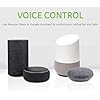
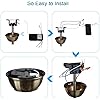
Simply adds this smart fan controller to your ceiling fan to have it wifi enabled and remote controllable. Change your fan speed or turn on/off light from anywhere with your smartphone or included RF remote (batteries not included). With Smart Life app, the wifi fan controller is easy to pair with the Alexa or Google Assistant. Just give voice command and enjoy hands-free control over your home. Or you can set IFTTT to make your life more easier and smarter. The smart ceiling fan control enables you to adjust the fan 3 speed, turn on/off light (no dimming), and time schedule settings. Make your life easier and more convenient. 1. Remove your fan canopy. 2. Wire the receiver to fan and light correctly. 3. Fix the receiver in the canopy. 4. Close your fan canopy. With the wifi fan controller powered on, choose this fan controller in smart life app, tap the settings option, you will get a option for tuning on/off the voice. It is for turning off the beep sound. This option only avalable when the fan controller is ON. Aubric universal ceiling fan remote control kit works well with most of ceiling fan with light, like Hunter, Harbor Breeze, Westinghouse, Honeywell and others well-known brands. If you need extra remote control One Aubric smart wifi fan controller is able to pair with up to 5 remote controls. If you need extra remote control, please search asin B08HWPWJ45 on Amazon. To add extra remote control: Please power off the smart fan controller and power it back on, within 5 seconds, please press "Hi" and "Light" buttons on the new remote control until you get 3 beeps, which means it is paired successfully. To remove a remote control from the wifi fan controller: Please press "Stop" and "2H" buttons on the remote control until you get 3 beeps, which means it is unpaird successfully. Please double check the size of receiver carefully before order to make sure there is enough space in the canopy of your fan. Please double check the size of receiver carefully before order to make sure there is enough space in the canopy of your fan. Please double check the size of receiver carefully before order to make sure there is enough space in the canopy of your fan.

Brand: Aubric


Special Feature: Universal


Color: White and Black


Max Number of Supported Devices: 1


Compatible Devices: Fan


Additional Features: Universal


Maximum Number of Supported Devices: 1


Compatible Devices: Fan


Connectivity Technology: Radio Frequency, Wi-Fi


Button Quantity: 1


Controller Type: Voice Control


Maximum Range: 30 meters


Number of Batteries: 2 AA batteries required.


Battery Type: Alkaline


Color: White and Black


Brand: Aubric


Model Name: 2e33ee2c-e792-494e-8216-6928bbbd84fd


Model Number:


UPC: 751450698995


Manufacturer: Aubric


Mfr Part Number:


Item Weight: 200 g


Frequently asked questions

If you place your order now, the estimated arrival date for this product is: Monday, Aug 17

Yes, absolutely! You may return this product for a full refund within 30 days of receiving it.

To initiate a return, please visit our Returns Center.

View our full returns policy here.

  • Klarna Financing
  • Affirm Pay in 4
  • Affirm Financing
  • Afterpay Financing
  • Zip Pay in 4
  • Financing through Apple Pay
  • Financing through Google Pay
Leasing options through Acima may also be available during checkout.

Learn more about financing & leasing here.

Top Amazon Reviews


  • Good unit at a reasonable price
I had a fan with a 10 year old Hunter remote; the computer died, so decided to try something different. This unit worked very well. Easy to install (beyond the typical pain of working with ceiling fans), and the functions work well from the remote. I ended up buying two more for fans that did not have a controller. The hook up to Alexa was simple, and now I can control those three fans by voice. One downside is with the phone app. It won't let me use more than around 10 characters for the light. This is fine for the fan and remote, but if you want something like "Master Bedroom Light" for use with Alexa, that's not an option. Another quirk is the light tends to turn on after return of power. Not a huge deal, but if you have a power outage in the middle of the night, the fan will wake you to tell you when it's over. I'd prefer it default to Off. But compared with the Hunter control -- this one is less likely to turn on the wrong light. And the Hunter had a habit of randomly turning things on or off (most likely another appliance it registered as it's signal). After several months, I've yet to see any of that behavior. Intend to buy more of these for the other fans in the house. Oh, and my son destroyed one of the brand new remotes (long story) -- the unit allows for new remotes (available on Amazon), and you can pare it without climbing up to the ceiling. Took a few seconds to replace the remote. ... show more
Reviewed in the United States on November 2, 2020 by Thumper

  • Very worth but I hope I never have to install this again.
Installation can be challenging if you don’t have a tall ladder or prior ceiling fan experience (like me), but I was still able to make it work. I included photos of my original wiring before connecting everything to the control kit. My fan is a no-light model, so here’s how I wired it. My setup had six parts: 1. House wires: White (neutral), Black (live), Green/Bare (ground) 2. Wi-Fi control kit: 2 Black, 2 White, 1 Blue (light power) 3. Light/Fan switch: 2 Yellow, 2 Pink, 2 Gray 4. Capacitor: Red, Gray 5. Ceiling fan: White, Pink, Gray, Red 6. Pull-string switch: Mostly preassembled, but I had to insert a black wire into the L terminal (check your own diagram) and reconnect the gray wire. First, connect the house black and white wires to the Wi-Fi control kit’s matching labeled wires (L and N). Next, connect the Wi-Fi kit to the fan’s internal extension cable (White, Blue, Black). In my apartment fan, this cable was already there once I disassembled the housing. Since my fan has no light, I capped off the kit’s blue wire. Then connect the Wi-Fi kit’s white wire to the fan white wire and the capacitor white wire. After that, connect the remaining wires by matching colors. My final wire groups were: • White • Pink • Gray • Red • Yellow Once everything was wired, I paired it in the app and linked it to Alexa. Now I can control the fan by phone, remote, or voice. Works great—I just hope I never have to open that fan again. ... show more
Reviewed in the United States on April 21, 2026 by Jerson

  • Step by Step Instructions for Wiring Setup
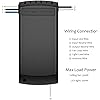
Ease of setup: Horrible. GIVE BETTER INSTRUCTIONS FOR THE WIRING! No video, no step by step. Maybe everyone else already knows how to do wiring, but I certainly don’t. Functionality: Good, works as described. Step by step instructions (since the box didn’t have good ones): 1. Look at your receiver. This is the setup: - LEFT SIDE: 2 INPUT WIRES. (1 Black, 1 White) - RIGHT SIDE: 3 OUTPUT WIRES. (Black, white, and blue) The left side (input wires) will attach to wires coming FROM the ceiling. The right side (output wires) will attach to wires going into the fan. 2. Turn off the electrical breaker for the fan. 3. Remove the fan canopy, so you see all the wires from the ceiling. Take a picture of the wires before you mess around, so you can remember the groupings if needed. 4. You should see a group of white wires and a group of black wires. Take the caps off the white wire group. (twist counterclockwise) 5. Identify which wires are coming FROM the ceiling and which wires are going INTO the fan. In my case, after removing the orange caps, there were 2-3 grouped white wires coming FROM the ceiling, and 1 white wire going INTO the fan. 5. The white wire going INTO the fan is probably wrapped around the white ceiling wires. Unwrap/separate it. 6. On the receiver: Remove the rubber covering at the tips of the wires. You should be able to pull it off with your bare hands. DO NOT do this for the white bottom wire, only the ones on the sides. 7. Take the receiver’s white input wire (the left one) and twist the silver tip around the group of white wires coming from the ceiling. Then, twist the orange wire combiner cap clockwise, back on tightly. 8. Then, take the receivers output white wire (right side) and twist it around the white wire going into the fan. Then, add the orange cap, twist clockwise. REPEAT STEPS 4-8 FOR THE BLACK WIRE GROUP. TIP- If your fan has wire groups of more than one color: On my ceiling fan, there was a red wire grouped with the black wire going into the fan. I ignored that, and left the wire as part of its original group. Worked fine. 9. If you followed the steps correctly, all that’s left is the blue wire on the receiver. That’s for the light- it should connect to a blue wire going INTO the fan. 10. Turn the electrical breaker back on. Turn the fan on. 11. I’d recommend that BEFORE you close up the ceiling canopy, set up the app, remote, etc and make sure it works. ... show more
Reviewed in the United States on January 5, 2026 by DJ

  • Works great, but Smart Life and Alexa Integration docs could be more helpful
I have a Hampton Bay ceiling fan from HD that has a RF remote. This is a drop-in replacement and a must for anyone who wants wifi and smart home integration. Installation is easy--drop the fan casing, replace the remote unit and connect wire for wire as the existing unit (remember to turn off power to the circuit to the fan first). The remote itself is clean, white and sleek with a timer function, and not the chunky, ugly shield-shaped remotes that came with the fan. The only nit is that the tiny little instruction sheet included is barely legible, and only covers adding the fan to Smart Life app. If you already have Smart Life/Alexa skill already enabled, then Alexa automatically picks up TWO devices--one called 'Light' (if your fan has lights), and 'Celling fan lights" for the fan control only! I assume same will happen if you enable Smart Life/Alexa skill after you add the fan. In any case, a little more documentation would be helpful. For Alexa, I suggest you rename the 'Ceiling fan light' to 'Living Room Ceiling" or "Bedroom Ceiling". That way, you avoid the terribly wordy "Alexa, set Ceiling fan light fan speed to 2", to a more natural "Alexa, set Bedroom Ceiling Fan Speed to 2". ... show more
Reviewed in the United States on April 28, 2023 by MisterY

  • Needs a high dome gang box cover
The receiver fits into the frame of a ball & socket style ceiling fan mount, sitting between the gang box and the drop pole for a fan. It will not fit inside a gang box, and it does not work well with low profile fans \ fan covers that hug the ceiling unless you use a large cover, or beat the snot out of a low profile cover. I have seven of these units, they work well so far. The manual remote works as expected. The "Smart Life" application integrates well with Alexa, and is pretty simple. The app is able to offer 3 fan speeds, while the light is a simple on\off. ... show more
Reviewed in the United States on December 12, 2024 by Anony Mous

  • No WiFi connection
Works as a wireless remote but will not connect to WiFi
Reviewed in the United States on April 14, 2026 by Matthew

  • Stopped responding to wifi after 2.5 months
First off, and most importantly, it completely stopped responding to wifi after 2 and a half months. It will not even power cycle, which, Idk how, but no matter whether I cycle for 5 seconds or 30 seconds, slow or fast, it will not enter reset mode. So I can't even try reconnecting it. It does still respond to the remote controller, but I had one of those already. Things I noticed right away. The case is slightly fatter than the one that came with the fan, making it a very tight squeeze. I needed a mallet to gently hammer it all the way in. The fan settings are slower than the original controller. It has no dimmer for the light. It makes a clicking noise every time it receives a signal, either from the remote or wifi. Complete waste of money in my opinion. ... show more
Reviewed in the United States on August 25, 2025 by JDS

  • Easy to install and works well with remote or Alexa
The Smart WiFi Ceiling Fan and Light Remote Control Kit was easy to install provided you have enough room in your fan canopy. It's not overly large, but some fan canopies can be tight on space. Instructions are clear and easy to follow. The handheld remote works very well. The controller allows the fan to operate at a very low speed while also keeping the fan's top speed available (I had purchased a different brand that never seemed to allow full fan speed). Integration with Alexa is easy and works really well after linking your SmartLife account to Alexa. For me, Google Assistant integration only allows for fan On/Off (no light control and no fan speed control). The SmartLife app is simple and easy to use. There is not built in light dimming in the controller. Not an issue for me but it might be for some. When controlling the fan from Alexa I say "Set the ceiling fan speed to 1, 2, or 3 rather than low, medium, or high as suggested by another reviewer. ... show more
Reviewed in the United States on August 7, 2022 by Bob

Can't find a product?

Find it on Amazon first, then paste the link below.
Checking for best price...