




Siser Romeo High-Definition Cutter - 24" Professional Cutting Machine for Vinyl, Paper, and More – WiFi Compatible with Windows & Mac - Includes Leonardo Design Studio Software, Roll Holder Accessory




Buy Now, Pay Later
- – Up to 36-month term if approved
- – No impact on credit to apply
- – Instant approval decision
- – Secure and straightforward checkout
Ready to go? Add this product to your cart and select a plan during checkout.
Payment plans are offered through our trusted finance partners Klarna, Affirm, Afterpay, Zip, Apple Pay, and Google Pay. No-credit-needed leasing options through Acima may also be available at checkout.
Learn more about financing & leasing here.
Selected Option
30-day refund/replacement
To qualify for a full refund, items must be returned in their original, unused condition. If an item is returned in a used, damaged, or materially different state, you may be granted a partial refund.
To initiate a return, please visit our Returns Center.
View our full returns policy here.
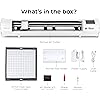
Set name: Romeo
Features
- Twice the Size, Half the Production Time - Romeo boasts a full 24" cutting area, doubling the size of Juliet! Not only does this allow you to cut larger designs, but your volumes can be increased as well. Combined with an open workspace design, Romeo is built with the business in mind.
- Power at Your Fingertips - Romeo is a high-definition cutting machine capable of cutting the finest details in a variety of materials. Romeo is designed for all Siser HTV and EasyPSV via preinstalled cut settings, but works superbly with other materials such as cardstock, stickers, and more!
- Go Matless - Romeo comes with a 12"x12" Light Tack Cutting Mat for easily loading a variety of materials. But Romeo also has the capability of cutting materials without the mat! Quickly load materials into Romeo mat-free and take advantage of the entire cutting area.
- Quick and Quiet - Romeo is built with an advanced motor that allows for super speedy cuts- up to 60% faster than traditional desktop cutters! Not only is Romeo faster, but quieter too! Say good-bye to those horrible, loud grinding noises!
- Accessible for Beginners, Built for Pros - Newbies to cutting machines will find Romeo simple to set up and learn, thanks to an intuitive touch-screen user interface. But Romeo also comes with a number of professional features not seen in other machines, like adjustable pinch rollers, variable grit rollers, commercial-level blades, and a premium build quality.
Description
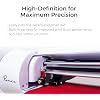
Searching for the perfect cutter that will take your business to the next level? Look no further than Romeo! This high-definition cutter includes all the amazing features from Juliet with double the cutting width so you can cut your production time in half. Fine details and full-length cuts are no problem for Romeo. Equipped with high-quality blades and features that are reminiscent of large-format cutters, Romeo leads the way in professional projects. The sleek touch screen includes Siser specific presets along with the ability to utilize the built-in registration camera, so you can print and cut with precision. Paired with Leonardo Design Studio, Romeo has the power to craft possibilities into reality. The Romeo by Siser has been designed to be not only advanced, but intuitive as well. Loaded with powerful features that are easy to understand, Romeo is built to seamlessly adapt to your workflow— no matter your experience or skill level. Romeo elevates the creating experience for those who have high volume workflows. Romeo can accommodate materials up to 24” wide with an unobstructed workspace that makes production quick and easy. When you need more control, Romeo also includes four adjustable pinch rollers with variable grit rollers for maximum stability, no matter what type of material you’re using. Take the guesswork out of cutting. Romeo comes with dozens of pre-set cut settings for all Siser materials. Plus, you can even create and edit your own custom cut settings! Thanks to adjustable pinch rollers and variable grit rollers, Romeo can adapt to accommodate and cut a wide range of materials with exceptional stability and precision. Romeo is built for the creators who want to maximize their potential. That’s why Romeo is not only 24" wide (twice the size of Juliet), but also has an unobstructed workspace to make production easier so you can get more done, faster. Print & cut projects are no problem! Using the camera built-in to the machine head, Romeo can read registration marks and cut full color designs with ease. Small details equal huge potential! Thanks to its pinpoint accuracy, Romeo can cut some of the most intricate details with precision down to .01mm without skipping a beat. Romeo does more than just cut! Create beautifully drawn designs using Siser Sublimation Markers (or other drawing utensils) with the included marker adapter. A powerful cutter is nothing without powerful software. That’s why Leonardo Design Studio was created to be the perfect companion software to the Romeo cutter. Easily connect Romeo to Leonardo Design Studio via either the included USB cable or a WiFi connection and you’re ready to go. The best part? Leonardo Design Studio isn’t just cut software— it’s also an incredibly versatile workspace. Use the built-in canvas and tools to create your own artwork or download pre-made files from the extensive art library. You can also view swatches and specs for every Siser material, get inspiration from our handmade projects, learn new skills with tutorial videos, and so much more - all within a single software! Leonardo Design Studio is free with every Romeo purchase.
Brand: Siser
Material: Vinyl
Color: White
Product Dimensions: 7.25"D x 36.5"W x 7.75"H
Active Surface Area: 285.5 square inches
Brand Name: Siser
Manufacturer: Siser
UPC: 810078551140
Part Number: SNAHDCR24
Model: SNAHDCR24
Included Components: 1 Cutting Machine Kit
Operation Mode: Automatic
Print media: Card stock
Item Dimensions D x W x H: 7.25"D x 36.5"W x 7.75"H
Active Surface Area: 285.5 square inches
Item Weight: 10 Kilograms
Material Type: Vinyl
Color: White
Frequently asked questions
To initiate a return, please visit our Returns Center.
View our full returns policy here.
- Klarna Financing
- Affirm Pay in 4
- Affirm Financing
- Afterpay Financing
- Zip Pay in 4
- Financing through Apple Pay
- Financing through Google Pay
Learn more about financing & leasing here.
Similar Products






Top Amazon Reviews


