Search  for anything...

Cricut Maker 4 - Smart Cutting Machine (Seashell) | Engagement Bundle - Includes Smart Vinyl, Cardstock, Transfer Tape, Iron On HTV, Mat, Pens, Tool Kit, & 30 Images in Design Space App

  • Based on 454 reviews
Condition: New
Checking for the best price...
$449.00 Why this price?

Buy Now, Pay Later


As low as / mo
  • – Up to 36-month term if approved
  • – No impact on credit to apply
  • – Instant approval decision
  • – Secure and straightforward checkout

Ready to go? Add this product to your cart and select a plan during checkout.

Payment plans are offered through our trusted finance partners Klarna, Affirm, Afterpay, Apple Pay, and PayTomorrow. No-credit-needed leasing options through Acima may also be available at checkout.

Learn more about financing & leasing here.

Selected Option

Free shipping on this product

FREE 30-day refund/replacement

To qualify for a full refund, items must be returned in their original, unused condition. If an item is returned in a used, damaged, or materially different state, you may be granted a partial refund.

To initiate a return, please visit our Returns Center.

View our full returns policy here.


Availability: In Stock.
Fulfilled by Amazon

Arrives Tuesday, Jun 23
Order within 17 hours and 8 minutes
Available payment plans shown during checkout

Protection Plan Protect Your Purchase
Checking for protection plans...

Style: Engagement Bundle


Features

  • THIS IS THE ULTIMATE SMART CUTTING MACHINE: With lots more compatible materials and tools than our other cutting machines, youll be amazed by whats possible. Blow minds with big banners, engraved metal, debossed leather, and so much more. Plus, bust out popular projects like custom cards, T-shirts & full-color stickers.
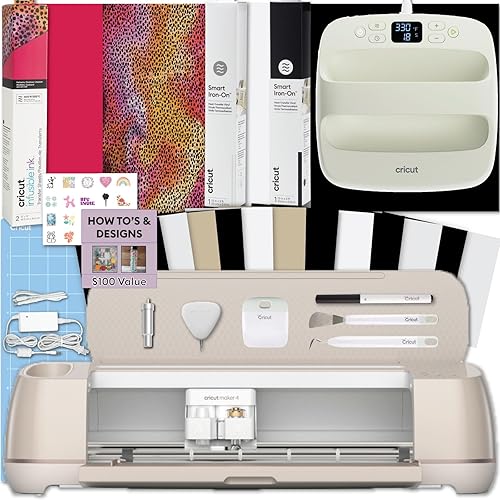
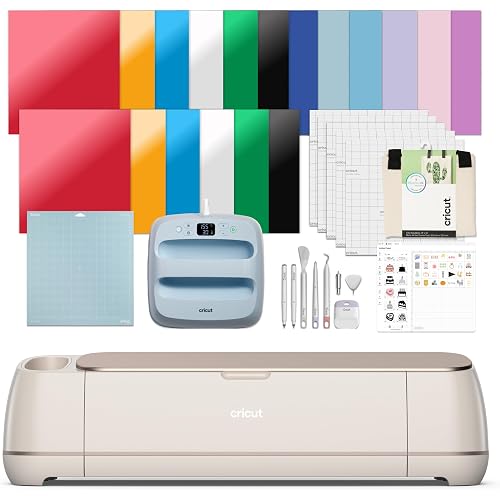
  • BUNDLE INCLUDES Cricut Maker 4, Fine-Point Blade, Light Grip Mat, 2 Fine Point Pens, Mini Weeder, Materials for a practice cut, Scoring Stylus, Scraper, Spatula, Weeder, Smart Iron-On, Smart Vinyl, Cardstock Sampler, Transfer Tape, 30 Digital Images
  • ENDLESS CREATION & PERSONALIZATION - Cricut Maker 4 works with 300+ materials, including leather, wood, vinyl, iron-on HTV, cardstock, stickers & so much more. This machine not only cuts, but it also draws, foils, scores, engraves, debosses, perforates, & more.
  • COMPATIBLE WITH INKJET PRINTER - Create full-color designs for stickers & more with the Print-Then-Cut feature, compatible with most inkjet printers.
  • NO DESIGN EXPERIENCE REQUIRED: Design Space is the free, easy-to-learn design software that connects to all Cricut cutting machines (available on desktop and mobile). It features guided design flows, customizable templates, and AI generation tools* to help you design and personalize with ease. Our free out-of-the box content library includes 3,000+ images, 100+ fonts, and 1,000+ projects to help get you started. Add our optional Cricut Access Subscription* to unlock the full library.
  • BONUS DIGITAL CONTENT Bundle includes 30 additional premium-quality images with purchase.
  • CREATE WITH OVER 1.5 MILLION IMAGES* The ever-growing Design Space content library includes a total of 1,500,000+ images, 1,000+ fonts, and 100,000+ projects when you unlock our full library with our optional paid Cricut Access Subscription.*

Description

Personalize without limits with Cricut Maker® 4, the next generation of our ultimate smart cutting machine. With lots more compatible tools and materials than our other cutting machines, you'll be amazed by what's possible. Make big banners, engrave metal, deboss leather, and so much more. Plus, it can make all the popular projects our other machines can make like custom cards, T-shirts, and full-color stickers. This machine delivers speed, precision, and accuracy, cutting up to 2X faster than the previous model.1 It comes with materials to hit the ground cutting, and easy-to-follow setup instructions online. No design experience required. Works with free Design Space® app. This bundle includes the Essential Materials bundle - 6 sheets of Smart Vinyl (13x12"), 6 sheets of cardstock (12"x12"), 5 sheets of transfer tape, 6 sheets of Smart Iron On HTV (13"x12"), StandardGrip Machine Mat, 4 Tools (Weeder, Scraper, Spatula, Scoring Stylus), & 2 Fine-Point Pens. It also includes 30 images of digital content within Design Space. These will be available upon registration of your machine.

Brand: Cricut


Material: Plastic


Color: Seashell


Active Surface Area: 144 square inches


Operation Mode: Automatic


Brand Name: Cricut


Manufacturer: Cricut


Global Trade Identification Number: 52


UPC: 093573765858


Part Number: 8002709


Model: 8002709


Included Components: Smart Cutting Machine


Item Type Name: Cricut Maker 4 - Smart Cutting Machine (Seashell) | Engagement Bundle - Includes Smart Vinyl, Cardstock, Transfer Tape, Iron On HTV, Mat, Pens, Tool Kit, & 30 images in Design Space App


Unit Count: 1.0 Count


Operation Mode: Automatic


Print media: Card stock


Compatible Devices: Desktop, Mobile


Active Surface Area: 144 square inches


Item Weight: 10.41 Kilograms


Material Type: Plastic


Color: Seashell


Frequently asked questions

If you place your order now, the estimated arrival date for this product is: Tuesday, Jun 23

Yes, absolutely! You may return this product for a full refund within 30 days of receiving it.

To initiate a return, please visit our Returns Center.

View our full returns policy here.

  • Klarna Financing
  • Affirm Pay in 4
  • Affirm Financing
  • Afterpay Financing
  • PayTomorrow Financing
  • Financing through Apple Pay
Leasing options through Acima may also be available during checkout.

Learn more about financing & leasing here.

Top Amazon Reviews


  • Absolutely crafting
Style: Engagement Bundle
This is so much fun to do crafts with. I think I’ve personalized everything in my house. Great value and fun for the money. Bluetooth connected super easy. You have to connect on every device though. Top quality fun and crafts!
Reviewed in the United States on February 15, 2026 by Michele Barrett

  • Love it Love it
Style: Engagement Bundle
I love this machine! A bit pricey but worth it if you are rebinding books as much as I do and use it for the covers. Also going to try to use it for some mugs and glass tumblers! It’s easy to use if you just follow the prompts on the cricut design space.
Reviewed in the United States on March 21, 2026 Reviewed in the United States on March 21, 2026 by Christie B.

  • La mejor compra
Style: Engagement Bundle
Es increíble la cantidad de cosas que hago con esta máquina, tengo la Cricut joy xtra y prefiero mil veces usar esta que la joy, he estado probando todas las funciones y todo me ha funcionado de maravilla
Reviewed in the United States on May 9, 2026 by Kimberly Contreras

  • Love my Maker 4
Style: Engagement Bundle
1st time cricut user and I love my maker 4. Wish I got one sooner.
Reviewed in the United States on May 24, 2026 by Teresa

  • Terrible software focused on selling subscriptions over quality
Style: Engagement Bundle
I bought this to do custom small batch stickers with complex shapes, and I've found the software to be borderline unusable. I'm new to sticker production, but I'm not new to manufacturing, and the software is of unacceptable quality compared to prosumer and professional solutions in the CNC space. I'm not sure what the quality of the hardware is because the software's problems make it so difficult to use the device. Getting specific: - It's an Electron app, basically rendering a web page as though it were an app, instead of a native app. Because it's just a web app under the hood, it consumes a lot of power, and performs very poorly on computation heavy tasks, like calculating the path for a cut. This gets worse the more complex your designs are. It's not impossible to get decent performance in electron apps w/ web assembly, but I get the sense that selling their subscription service is a higher priority for Cricut than the quality of their software because... - Its built as a cloud first app. A huge amount of data is being sent to Cricut for processing, a lot of the latency in the app comes from downloading/uploading. I have privacy concerns, but I haven't done a deep enough analysis on the data to know if this is for nefarious reasons. Regardless, it's a poor design choice from a usability perspective. The dependency on the cloud adds tons of latency to every task, like preparing a job or uploading an image. This problem becomes fatal when using large images, the application starts hanging and timing out, and having beefy PC hardware does nothing to help because its all on the cloud. Most other apps in manufacturing are local first w/ cloud features, players who tried to go cloud first got thoroughly rejected, and they're more responsive and snappier for it. On MacOS especially, it's baffling that the app isn't using iCloud for its application data since this would speed up operations by leveraging the local file system and would also be privacy preserving. - The app uses primary colors to advertise and try to goad you into purchasing a Cricut Access subscription. Features of Cricut access are put higher in lists for basic tasks like image uploading to apply further pressure. Advertisements for the service reappear when you first open it. It's disruptive with default settings, but even with all in-app notifications turned off, the frequency and presence of the ads is ridiculous they appear on nearly every screen in the app. When you choose not to purchase the subscription, you should stop showing the ads. As mentioned before, what this communicates to me is that the subscription, and not the software, is the priority for Cricut. - The image upload workflow is very stiff, which further hurts usability for graphic stickers. You can't drag and drop images onto the canvas, you have to go through 4-5 menu dialogues to initiate an upload, optionally remove backgrounds, confirm how to cut it, and then load it onto the page. Image uploading is slow again because its being uploaded to the cloud, and tbh, I don't want to upload my images to Cricut's server (another reason why iCloud, and therefore Advanced Data Protection is a nobrainer). What's worse though is that after uploading, the app doesn't let you adjust the settings of your upload after you go through the dialogue. Missed a spot on manual background removal? Now you have to start from the beginning. The better workflow would have been allowing drag and drop, and then putting settings into a context menu on right click and allowing adjustments on demand. My needs for the device are very specific and also very simple, its the bread and butter for the device. Custom stickers with complex shapes. Because of the size and variety of cuts I want to make with my stickers, cutting by hand is not an option. I can't speak for other workflows, but given how basic my needs are, I can imagine there's additional frustrations in other crafts. What I can say is that the software for the device is very poor compared to adjacent industries, and that the process of simply printing and cutting a sticker has too many steps that take too long to complete because of Cricut's choice to be a web first product. Unwinding design choices like this require an internal shift in focus and a significant amount of time, it's not likely to get better any time in the near-medium future. I'm going to give the device another week or two, but I'm already seriously considering switching to a CNC setup, which would give me a better machine with better performance, around the same price point, with much better and tunable software. ... show more
Reviewed in the United States on September 4, 2025 by Markamus Twain

  • Excellent model
Style: Engagement Bundle
It is excellent, and I have made many projects for gifts. It’s easy to set up and with the materials that comes with it, you can start the same day. It’s fast and the subscription with the app gives you access to thousands of different projects.
Reviewed in the United States on January 14, 2026 by MK

  • Totally worth it
Style: Engagement Bundle
I’m not a typical craft gal but this machine is so nice to have! Been using it for wedding related things and let me tell you it takes some time to learn the more intricate things like embossing and stuff but it’s got everything you need. And man does it feel like good quality!!! So not cheap at all but totally worth it and once you get the hang of it, it’s pretty easy to use. I suggest getting the long pads vs the 12x12 the 12x24 are so much easier for big projects! ... show more
Reviewed in the United States on September 12, 2025 by Anhely

  • Decent cutter
Style: Engagement Bundle
Works well, not much faster than the 3. Kind of a pain to use more hobby for side projects not to make bulk orders of things
Reviewed in the United States on February 14, 2026 by Ben Sobolik

Can't find a product?

Find it on Amazon first, then paste the link below.
Checking for best price...