Search  for anything...

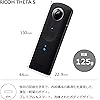
Ricoh Theta S Digital Camera (Black)

  • Based on 1,407 reviews
Condition: New
Checking for the best price...
$321.25 Why this price?

Buy Now, Pay Later


As low as / mo
  • – Up to 36-month term if approved
  • – No impact on credit
  • – Instant approval decision
  • – Secure and straightforward checkout

Ready to go? Add this product to your cart and select a plan during checkout.

Payment plans are offered through our trusted finance partners Klarna, Affirm, Afterpay, Apple Pay, and PayTomorrow. No-credit-needed leasing options through Acima may also be available at checkout.

Learn more about financing & leasing here.

Free shipping on this product

Returnable until Jan 31, 2025

To qualify for a full refund, items must be returned in their original, unused condition. If an item is returned in a used, damaged, or materially different state, you may be granted a partial refund.

To initiate a return, please visit our Returns Center.

View our full returns policy here.


Availability: Only 1 left in stock, order soon!
Fulfilled by TOMIYOSHI T+

Arrives Jan 23 – Feb 8
Order within 23 hours and 18 minutes
Available payment plans shown during checkout

Protection Plan Protect Your Purchase
Checking for protection plans...

Features

  • 360 Degree Spherical Panorama images and Spherical Videos up to 25 minutes
  • Live view function on mobile device; Wi Fi communications protocol: HTTP (open spherical camera API 7 compatible)
  • Transfer videos directly to your mobile device without the need of a computer
  • Full HD Video at 30fps , 360 Degree Spherical Video Supported by YouTube
  • Charge the battery by connecting it to a PC using the supplied USB cable

Description

Ricoh's 3rd generation 360 degree camera comes to life with the Theta S. The Theta S adds a larger sensor for improved still and video capture. Video recording time increased to 25 minutes, video streaming capabilities and a live view function to your mobile device. Capture everything around you with complete 360 degree imaging. Your world is not flat. Take amazing spherical images and videos with RICOH THETA S. From the Manufacturer Ricoh's 3rd generation 360 degree camera comes to life with the Theta S. The Theta S adds a larger sensor for improved still and video capture. Video recording time increased to 25 minutes, video streaming capabilities and a live view function to your mobile device. Capture everything around you with complete 360 degree imaging. Your world is not flat. Take amazing spherical images and videos with RICOH THETA S

Brand: RICOH


Photo Sensor Technology: CMOS


Video Capture Resolution: 1080p


Maximum Aperture: 2


Flash Memory Type: Internal


Video Capture Format: MP4


Screen Size: 1 Inches


Connectivity Technology: USB, HDMI


Color: Black


Special Feature: Lightweight


Product Dimensions: 5.1 x 1.73 x 0.9 inches


Item Weight: 4.8 ounces


Item model number: 910720


Batteries: 2 AAA batteries required. (included)


Is Discontinued By Manufacturer: No


Date First Available: August 28, 2015


Manufacturer: Ricoh Cameras USA


Frequently asked questions

If you place your order now, the estimated arrival date for this product is: Jan 23 – Feb 8

Yes, absolutely! You may return this product for a full refund within 30 days of receiving it.

To initiate a return, please visit our Returns Center.

View our full returns policy here.

  • Klarna Financing
  • Affirm Pay in 4
  • Affirm Financing
  • Afterpay Financing
  • PayTomorrow Financing
  • Financing through Apple Pay
Leasing options through Acima may also be available during checkout.

Learn more about financing & leasing here.

Top Amazon Reviews


  • Loving it!
First 360º Camera I've owned, after having thought of the idea independently many years ago. I'm glad to have seen it developed so well. It's really a refined design, excellent quality photos and videos, and a very simple shooting experience. Holding it feels natural, and it's a surprisingly light feeling to know you don't have to aim before shooting. It comes with a classy pouch to keep it in when not taking photos, which is both light and easy to get the camera into and out of. Much appreciated touch. Sharing photos is very simple, sharing videos I've not yet figured out (Updated, figured it out!). Connecting to WiFi is simple, though it never connects to your home WiFi – instead it hosts its own network that you connect to when you want to download photos and videos (which works well when you're out and about). Photos download pretty fast, videos can take some time. You can also download both via USB, though surprisingly not via their (OS X, at least) app. You need to first download using any other photo app (Photos recognized it and popped open automatically on my Mac), then copy them to a folder, then copy the contents of that folder into the app to see them. Seems very convoluted for something that should be simple. Also, you cannot import videos to this app. Very strange, so I have yet to find a way to view videos except for on the app, having downloaded via WiFi from the camera. Maybe my only complaint is that I cannot turn off the sounds on the camera, so you can't be too stealthy with it. The sound is fun, but a bit cartoony (like a laser gun shooting off), so it'd be nice to be able to silence it if desired. Also, the live streaming isn't so useful because it just shows two hemispheres on a screen, which is hard to wrap your head around. Be sure to download the "Theta S" app and NOT the "Theta" app, as the latter will not work. Overall, very happy to own this thing. It's a head turner, people love it, and I really enjoy knowing I've grabbed the whole scene and left nothing out. A few rough edges to iron out software-wise, though nothing so bad as to depreciate its awesomeness. If you have the cash, and are interested, get this great toy! UPDATE 1: Figured out video, and some thoughts... YouTube : Figured it out!! Okay two things, firstly let it be noted that the raw video format is .MP4, though if you import into OS X Photos, then export, it's M4V, which will mess you up. To get the raw .MP4 from the camera, use the "Image Capture" app on OS X. Then, this video can be dropped into the Theta app on your Mac, which will convert the video to standard 360º format which can be shared via their app, or automatically detected by YouTube. Sweet. Using their app, though, you can only upload 5 Mb worth of video, which is ~11s long (YouTube has no limit, though give it a few minutes after it's live before it's detected as 360). A trade-off, it appears the quality of the video on theta360 ends up being much more crisp, see for yourself : Example using theta360 : https://theta360.com/m/j9kGfEUCFatdUePld3w7qhRrs Example using YouTube : https://www.youtube.com/watch?v=O6fAPTSkGqI Live Streaming Mode : This is NOT live streaming to the internet via their app or local wifi, but instead it's live streaming via HDMI or USB. HDMI streams to a TV, USB streams to an app like VLC which knows how to receive a Live Stream from an attached device. From an app like this, you could then stream to the internet via your computer. I've also realized what the HDMI is for now – it's not for playback of recorded video, but only for live streaming video. The video that comes out is the same as what's exported, two hemispheres. Live Preview : Live preview to the iOS controller is also cool, though limited. It's a lower resolution image at 10 fps. When in photo mode, you get a live video preview, and can tap the screen to take a snapshot. When in video mode, you get no live preview, and can only start/stop recording. WiFi : I really wish this thing would connect to my home Wifi while I'm home so that I don't need to take my iPhone off of my home wifi while interacting with the camera. Seems like it'd be easy for Ricoh to implement by allowing me to enter my WiFi credentials in their app. Update 2 : Mastered video formatting and more tips... Video metadata is unfortunately discarded during the conversion process using the Theta app on your computer. To restore the original metadata, I've created a script that uses Exiftool. Follow these steps to have perfectly converted videos (written for OS X) : 1. Download & install exiftool from http://www.sno.phy.queensu.ca/~phil/exiftool/ 2. Import a video from your Theta S using Image Capture (NOT Photos.app) 3. Drag/Drop the video into the Theta app, converting w/ default naming scheme. 4. Repeat steps 2 & 3 for as many videos as you have, the next steps do bulk processing. 5a. Download this bash script : http://pastebin.com/51VYga4c 5b. Put it somewhere on your computer (ex. ~/Desktop/moveMetadata.sh) 5c. Make the bash script executable w/ : cd ~/Desktop && chmod u+x ./moveMetadata.sh 6a. Change to the directory of your videos, for example : cd ~/Desktop/Videos 6b. Start the script! Execute : ./moveMetadata.sh The bash script will move over the metadata and modify the new video to have the same creation date as the original video. You can now discard the original video, confidently knowing that all metadata is still in place. Also discovered that when capturing images via the app, GPS data and vertical image correction is automatically applied to images! APPS! I've figured out what I believe to be the best apps for interacting with content from the camera. Here you go: KIRORU 360 - View images from the camera roll easily, designed to be used with Google Cardboard. https://itunes.apple.com/us/app/kiroru-360/id954157416 Round.me - Best place for uploading sets of spherical images. Supports Google Cardboard and has a solid web interface. Creating "spaces" is easier on the desktop than within the app. Has iOS and Android apps. https://round.me (Example : https://round.me/tour/20157/view/49383/) Google Street View - Automatically connects to Theta S and allows you to take geotagged pictures and quickly publish them onto Street View. Strips images of metadata, though, and too specific of a use case for casual image capture. In addition to realtime capture, you can also import previously-captured images into this app. https://itunes.apple.com/en/app/photo-sphere-camera/id904418768 Theta S - Obligatory. Somewhat basic, but essential. https://itunes.apple.com/us/app/id1023254741 Developer Toys : The Ricoh Theta S is compatible with the Open Spherical Camera API created by Google : https://developers.google.com/streetview/open-spherical-camera/ This python implementation is an example of how to easily interact with the camera in your own application : https://github.com/florianl/pyOSCapi ... show more
Reviewed in the United States on October 26, 2015 by Eric Pheterson

  • Solid consumer 360 degree camera.
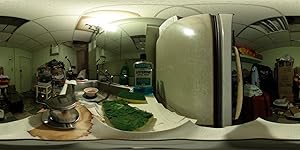
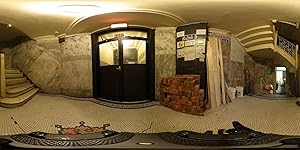
If you are expecting a pro level high resolution VR camera, then this camera is not for you. It takes several cameras and hours of editing to produce high definition 360 content. There is a 360 gopro rig that can produce much higher quality video for over 10 times the cost of this camera. What I feel this camera is best for is to make 360 videos more accessible to the average consumer. I'm sure the overall quality of videos will get better with each generation. We will probably see a 1440p video resolution for the next theta s generation. Picture quality- Picture quality is a huge step up from the previous theta m15 model. Long exposures with a tripod produces clean and relatively detailed low light shots. Noise reduction mode works well to lower visible noise and increase sharpness. Connecting to a smartphone also opens up additional shooting modes and offers a live preview. You can also connect the camera to the google street view app and upload photo spheres to maps. The theta app also allows the option to move photos directly to your smartphone. These photos can be backup via google photos and viewed as photo spheres in the google app/webpage. The camera does struggle somewhat with scenes of varying exposures. The new firmware 1.21 does introduce HDR, which helps bring out more detail in shadows, but is overly saturated. The HDR option also introduces increased chromatic aberrations, especially in sunny conditions. Fortunately, you can edit these images and still be able to view them in 360. Overall, I found the images to be great and the 360 nature makes for an engaging viewing experience. Video quality- Overall for $349 dollar device, I found the video quality to be adequate. There is a definite lack of resolution compared to a standalone video camera but the 360 nature of these videos makes for an engaging experience. The ability to change the view allows you the experience the video in ways a standard camera can’t offer. The video is defined not by its resolution but by its ability to offer a new way of interaction. Overall, The product is an evolutionary advancement to consumer 360 cameras. Here is a link to view my photo samples in 360. https://theta360.com/users/52458 ... show more
Reviewed in the United States on December 26, 2015 by vngo vngo

Can't find a product?

Find it on Amazon first, then paste the link below.
Checking for best price...