
Search  for anything...

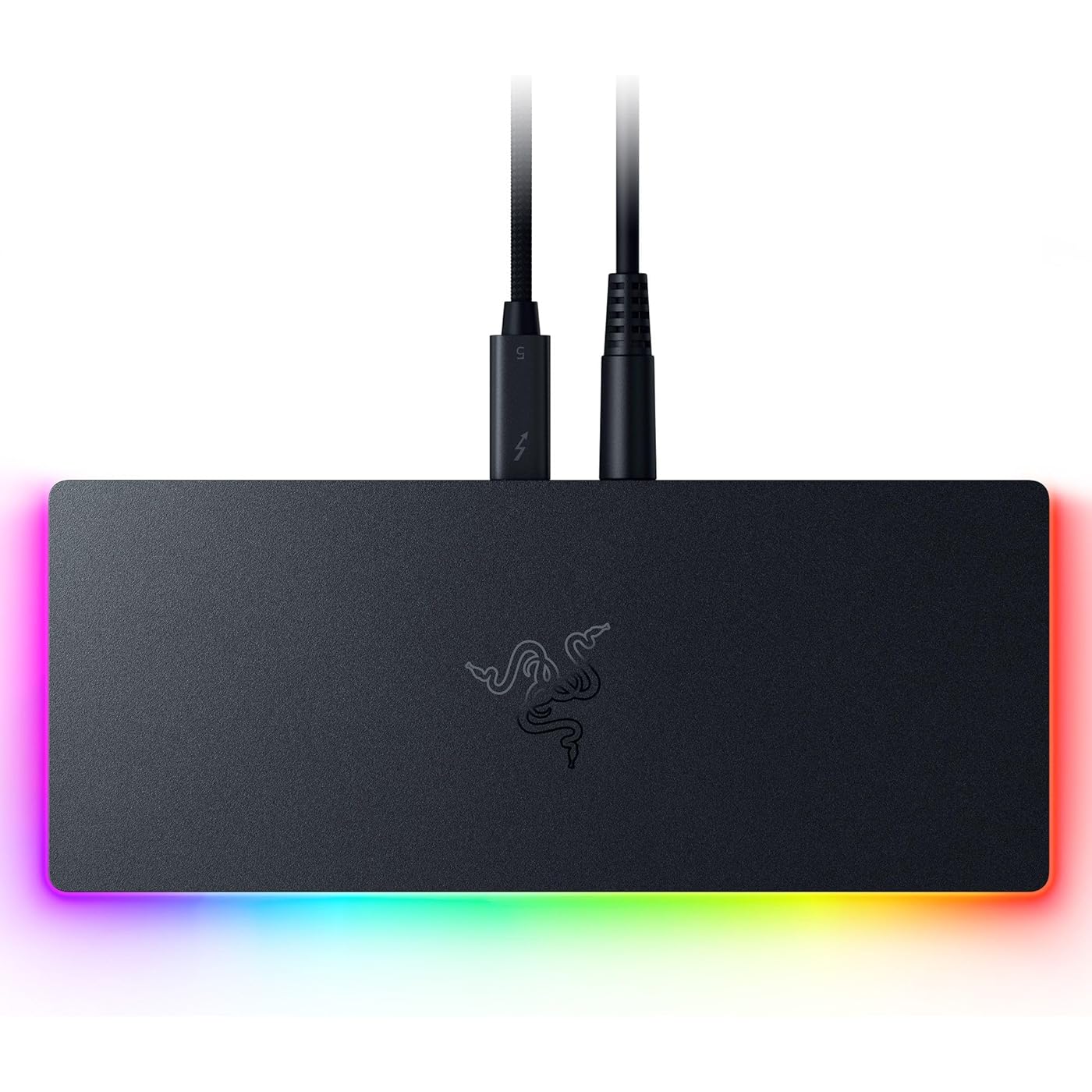
Razer Thunderbolt 5 Dock Chroma: 11 Port Docking Station with M.2 SSD Slot - 120Gbps Transfer Speeds - 3X 4K Displays at 144 Hz on TB5/4 Laptops - 140W PD Charging - Active Cooling - TB Share - Black

  • Based on 0 reviews
Condition: New
Checking for the best price...
$399.99 Why this price?

Buy Now, Pay Later


As low as / mo
  • – Up to 36-month term if approved
  • – No impact on credit to apply
  • – Instant approval decision
  • – Secure and straightforward checkout

Ready to go? Add this product to your cart and select a plan during checkout.

Payment plans are offered through our trusted finance partners Klarna, Affirm, Afterpay, Apple Pay, and PayTomorrow. No-credit-needed leasing options through Acima may also be available at checkout.

Learn more about financing & leasing here.

Selected Option

Free shipping on this product

FREE 30-day refund/replacement

To qualify for a full refund, items must be returned in their original, unused condition. If an item is returned in a used, damaged, or materially different state, you may be granted a partial refund.

To initiate a return, please visit our Returns Center.

View our full returns policy here.


Availability: Only 10 left in stock, order soon!
Fulfilled by Amazon

Arrives Wednesday, Jun 10
Order within 18 hours and 43 minutes
Available payment plans shown during checkout

Protection Plan Protect Your Purchase
Checking for protection plans...

Color: Black


Features

  • THUNDERBOLT 5 READY Experience speeds of up to 120 Gb/s for gaming, the ability to output to multiple displays, and connect an entire suite of peripheralsall while powering or charging a Thunderbolt 5 laptop
  • 11 PORT DOCK WITH M.2 STORAGE SLOT Features multiple Thunderbolt 5 ports, Gigabit Ethernet, a 3.5 mm audio combo jack, a UHS-II SD Card Slot, USB Type A 3.2 Gen 2 ports, and a storage slot for an ultra-fast M.2 SSD
  • BUILT-IN M.2 STORAGE EXPANSION - Easily add up to 8TB of NVMe SSD storage with the integrated M.2 slot, delivering high-speed storage, faster load times, and seamless access to large filesperfect for gaming, video editing, and creative workflows.
  • SUPPORTS TRIPLE 4K DISPLAYS AT 144 Hz Enjoy a silky-smooth viewing experience when gaming or double down on resolution for creative work with an 8K display at 60 Hz; keep clutter to a minimum thanks to a single USB Type C connection
  • ULTIMATE DISPLAY FLEXIBILITY - Power everything from ultra-immersive visuals to lightning-fast competitive play with display support up to 8K 60 Hz, 4K 240 Hz, triple 4K 144 Hz, or 1440p 500Hz.

Description

Get a quantum leap in connectivity for your desktop or laptop with the Razer Thunderbolt 5 Dock Chroma. Boasting the fastest transfer speeds, 10 ports, an M.2 storage slot, and support for triple 4K displays at 144 Hz, have all your options covered with a single, powerful Thunderbolt connection.

Brand: Razer


Color: Black


Hardware Interface: Thunderbolt


Compatible Devices: MacBook Air, MacBook Pro, Mac Mini, iMac, Mac Studio, Mac Pro with M-series chips., Thunderbolt 5/4 Windows Laptops, Windows Desktops See more


Total USB Ports: 2


Product Dimensions: 8.08"L x 3.35"W x 1.18"H


Number of Ports: 11


Wattage: 140


Number of Items: 1


Number of Packs: 1


Hardware Interface: Thunderbolt


Compatible Devices: MacBook Air, MacBook Pro, Mac Mini, iMac, Mac Studio, Mac Pro with M-series chips., Thunderbolt 5/4 Windows Laptops, Windows Desktops


Total Usb Ports: 2


Number of Ports: 11


Wattage: 140


Smart Home Compatibility: Not Smart Home Compatible


Item Dimensions L x W x H: 8.08"L x 3.35"W x 1.18"H


Color: Black


Brand: Razer


UPC: 840272914311


Manufacturer: Razer


Model Number: RC21-02290100-R3U1


Mfr Part Number: RC21-02290100-R3U1


Warranty Description: 1 Year Manufacturer


Frequently asked questions

If you place your order now, the estimated arrival date for this product is: Wednesday, Jun 10

Yes, absolutely! You may return this product for a full refund within 30 days of receiving it.

To initiate a return, please visit our Returns Center.

View our full returns policy here.

  • Klarna Financing
  • Affirm Pay in 4
  • Affirm Financing
  • Afterpay Financing
  • PayTomorrow Financing
  • Financing through Apple Pay
Leasing options through Acima may also be available during checkout.

Learn more about financing & leasing here.
Top Amazon Reviews


  • Excellent Dock especially for Razer branded laptops
Color: Black
I needed a better docking station fr my razerblade 17 with a few more ports than the dell dosk I had. I had been eyeing this dock for awhile now and finally decided to get it. Be sure your pc has the latest updates including bios. There is a driver for the thunderbolt service that needs to be up to date for this to work otherwise it will continually disconnect and reconnect as I found out. Check with your pc’s manufacturer to make sure you have all the updates including bios done. After that it was pretty much plug and play. Granted my PC is Thunderbolt 4, the dock is backwards compatible. I like that the majority of the ports are in back including the power cable so everything run behind it for neatness. It does have a substantial power supply. It is well built and speed so far has been decent although my DAS doesn’t really tax it. The 2 usb-a ports in the back support my mechanical keyboard Seagate backup drive. My DAS array and CD burner are via USB-C. The built in SD card reader is nice, although it is located on one end. I tend to use the SD reader that is part of my compact flash reader for pulling images from my cameras. I use another USB-C port for my CFExpress reader. Video is USB-C to Display Port which helps reduce the number of cables to my laptop. It does the job well and being made by the company that made my laptop, I find it better than some others that I have tried. ... show more
Reviewed in the United States on October 18, 2025 by Jon Frazier

  • Great potential but not ready for MAC users, yet.
Color: Black
The Razer Thunderbolt 5 Dock Chroma has impressive specs on paper, but in real-world use it falls far short—especially for anyone relying on stable, professional-grade connectivity. The biggest issue is constant, random disconnects that interrupt monitors, peripherals, and network connections without warning. This completely undermines productivity and makes the dock unreliable for any professional workstation. What makes the situation worse is that Razer currently provides no firmware updates to address these stability problems. Despite multiple user reports describing the same issues, there’s no available fix and no clear communication from Razer on when—or if—a firmware update will be released. For a premium-priced Thunderbolt 5 dock marketed toward high-end users, the lack of support is extremely disappointing. Until Razer releases a firmware update that resolves these disconnect issues, the Thunderbolt 5 Dock Chroma is not suitable for professional environments in my opinion. It has potential, but in its current state, it’s simply not reliable enough to recommend to MAC users. If a firmware update it released publicly on the site that fixes these issues, I will come back and modify my review. I am using the Razer supplied cable to connect to the MAC as well as the Razer supplied power supply to provide power to the dock. The power supply is plugged directly into a wall outlet. ... show more
Reviewed in the United States on November 18, 2025 by AlphaInfinity

  • Feature‑Rich Thunderbolt 5 Dock with Strong Port Selection and Practical Design
Color: Black
I purchased the Razer Thunderbolt 5 Dock Chroma to centralize peripherals, displays, and storage on my laptop desk setup and take advantage of the built‑in M.2 SSD slot for fast local transfer. Intended use: Expanding ports and connectivity for laptops and desktops, including displays, network, audio, and local storage. Setup and compatibility: Setup was simple — a single Thunderbolt 5 cable provided stable connectivity with a USB‑C enabled laptop. The dock was recognized immediately without needing additional drivers on Windows, and macOS also detected ports and displays without issue. Port availability and layout: The dock offers a comprehensive array of ports, including multiple USB‑A and USB‑C ports, Ethernet, audio, display outputs, and a dedicated M.2 SSD slot. The layout is intuitive, and most cables connected without crowding or interference. Display and data performance: External displays connected via the dock and operated at expected refresh rates and resolutions for my setup. Data transfers through USB‑A/C and the M.2 SSD slot were fast and reliable — large files moved consistently without dropouts. Build quality and design: The dock feels solid and well‑finished. RGB Chroma lighting is subtle and customizable without being distracting. It remains stable on the desk and doesn’t feel wobbly under plugged‑in cables. M.2 SSD slot: The integrated M.2 SSD slot makes accessing high‑speed storage convenient. Installation was straightforward, and the drive functioned as expected for read/write performance without bottlenecks during large file transfers. Limitations: Given the number of supported standards, full performance can depend on the connected device’s Thunderbolt version. On older devices, some bandwidth features may not run at maximum capability. Overall experience: In regular use, the dock has been dependable and versatile, streamlining multiple peripherals and making it easier to manage displays, storage, networking, and power delivery from one hub. Conclusion: The Razer Thunderbolt 5 Dock Chroma is a strong option for users seeking a well‑rounded docking station with plenty of ports, reliable data and display performance, and the convenience of a built‑in M.2 SSD slot. ... show more
Reviewed in the United States on January 3, 2026 by CP

  • Great dock. Missing power cord in the box.
Color: Black
Really nice dock. Works well. I was surprised at how light it was. Good for travel. Strangely didn't come with power cord. I had to reuse original Razer laptop power cord and plug it into power supply of the dock.
Reviewed in the United States on September 18, 2025 by Roman

  • RAZER DOCK = Awesome. RAZER Thunderbolt 5 Cord is CRAP!
Color: Black
So I bought this Dock in September of 2025 to go with my new laptop, a MSI Raider 18 HX AI. When I first started using it I was using the Cord that came with the dock. Kept having a ton of issues, contacted RAZER and we did a complete swap. New Dock and New Cords. Same issues. I then reached back out to RAZER to try a new cord so we did another swap for just the cord. Same issues, constant disconnection. Then my Laptop had a BIOS update, that seemed to make everything more stable but I would still have a disconnection issue once or twice after boot and then everything was stable. I just tried a brand new cord that was not made by RAZER for the dock and everything now works flawlessly! So basically, The Dock! IS AMAZING!!! The stock cords?!?!?! Absolute garbage! Went through 3 official Thunderbolt cords from RAZER before replacing it! Do yourself a favor and get a better cord! ... show more
Reviewed in the United States on January 8, 2026 by Jason Knight

  • Pricey but amazing! Turn your laptop into a full desktop!
Color: Black
With my M4 MacBook Pro I have this to use my laptop at home. This makes it work like a desktop. I have 3 monitors, network cable, wired mouse and keyboard and a large M2 drive all connected in this dock. Not only that but it all connects to my laptop with a single USB type C connection, and that includes full speed charging, too. It doesn’t seem possible but it really does all that with a single connection. I see full gigabit internet speeds and that M2 drive is as fast as my internal drive. If I didn’t see the laptop there I would just assume I was using a big desktop machine. But, the best thing is that I simply pull the one little cable and I take the laptop with me. It’s even better than the old docks that used to mount into a bottom connection on the laptop. I should say, the lights are really cool, too. I got them because I use the monitors on a gaming rig that has all the lights, so it makes it look like it fits better with my other stuff. ... show more
Reviewed in the United States on January 23, 2026 by Adam White

  • Pretty, fast, loads of features, but ....
Color: Mercury White
Ultimately I found this to be a very disappointing product from a company that has a strong reputation. Packaging and presentation was well up to the standard of a premium product, and set up and installation were fairly straightforward. The set up I have: dock attached to a modern ARM laptop, with a load of USB peripherals and 2 x 4K60 monitors. Three aspects that I was disappointed with: 1) I could never get the device to recognize a second monitor. Other older docks driver this set up OK, and an Intel based machine had no issues, but on multiple ARM based laptops the second monitor wouldn't detect. 2) The dock is noisy - constant background hum 3) Ludicrous amounts of Razer bloatware were installed, including items not supported by my dock and which I explicitly told the installer to skip. All stuff that seemed to be advertising and encouraging me to purchase other Razer products that I don't have. Connecting and using the various USB peripherals seemed to work OK. Unfortunately tho, this product will be returned. It doesn't work in the scenario I need it to work in, so I'll stick with my older technology for now. ... show more
Reviewed in the United States on March 18, 2026 by John Clavin

  • Solid performance
Color: Mercury White
I needed some extra ports for my Mac Mini M4 pro and this dock fit the bill. I installed the internal NVME drive, one external TB5 drive, DVD player, speakers to the audio jack and Mic to one of the USB ports and a WEB cam to another. All work great. Some have noted a fan noise but I hear none but then not sure it ever comes on since it may be thermal controlled and my unit never seems to run very warm. Some have also noted the cost but when you see that a TB5 enclosure is $200.00 alone then you had a hub I can see that a total of $400.00 is about right. I was surprised that no paper work was included showing installation and drive compatibility specs. so I deducted one star. Only the dock, power brick and TB5 cable. I find the TB5 external drive speeds to almost match the speed when connected directly to my Mac. Overall a very nice dock. 1-31-26 update: In my previous comments I noted that there was no manual but I just found it slid inside a pocket in the packaging (almost hidden) along with some decals. I'm making this a 5 star product. ... show more
Reviewed in the United States on January 18, 2026 by tbirdvet

Can't find a product?

Find it on Amazon first, then paste the link below.
Checking for best price...