Search  for anything...

Razer Naga Pro Wireless Gaming Mouse: Interchangeable Side Plate w/ 2, 6, 12 Button Configurations - Focus+ 20K DPI Optical Sensor - Fastest Gaming Mouse Switch - Chroma RGB Lighting

  • Based on 4,070 reviews
Condition: New
Checking for the best price...
$239.90 Why this price?

Buy Now, Pay Later


As low as $39.98 / mo
  • – 6-month term
  • – No impact on credit to apply
  • – Instant approval decision
  • – Secure and straightforward checkout

Ready to go? Add this product to your cart and select a plan during checkout.

Payment plans are offered through our trusted finance partners Klarna, Affirm, Afterpay, Apple Pay, and PayTomorrow. No-credit-needed leasing options through Acima may also be available at checkout.

Learn more about financing & leasing here.

Selected Option

Free shipping on this product

FREE 30-day refund/replacement

To qualify for a full refund, items must be returned in their original, unused condition. If an item is returned in a used, damaged, or materially different state, you may be granted a partial refund.

To initiate a return, please visit our Returns Center.

View our full returns policy here.


Availability: Only 2 left in stock, order soon!
Fulfilled by Amazon

Arrives Jun 9 – Jun 11
Order within 16 hours and 13 minutes
Available payment plans shown during checkout

Protection Plan Protect Your Purchase
Checking for protection plans...

Size: Mouse


Style: Naga Pro


Features

  • 25% FASTER THAN COMPETING WIRELESS MICE Razer HyperSpeed wireless technology brings together extreme low-latency and interference reduction for true wireless freedom
  • FOCUS+ 20K DPI OPTICAL SENSOR Offers on-the-fly sensitivity adjustment through dedicated DPI buttons (reprogrammable) for gaming
  • FASTER THAN TRADITIONAL MECHANICAL SWITCHES New Razer optical mouse switches uses light beam-based actuation, registering button presses at the speed of light
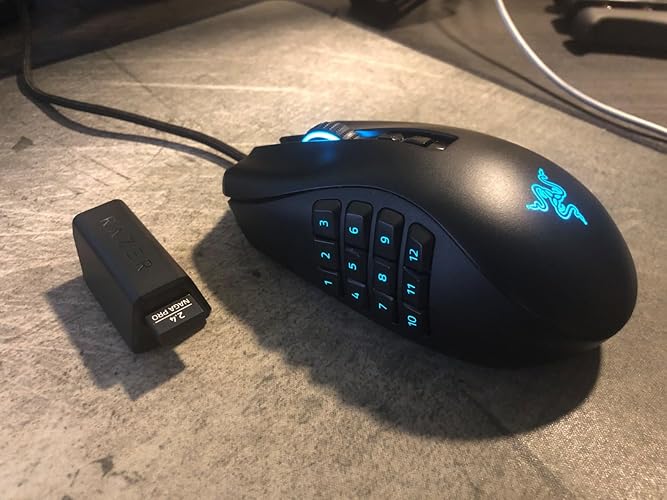
  • FULL MODULAR CUSTOMIZABILITY 3 interchangeable side plates with 2, 6 and 12-button configurations
  • UP TO 19 PROGRAMMABLE BUTTONS Allows for button remapping and assignment of complex macro functions through Razer Synapse
  • CUSTOMIZABLE CHROMA RGB COLOR PROFILES Supports 16.8 Million Color Combinations with Included Preset Profiles
  • #1 SELLING PC GAMING PERIPHERALS BRAND IN THE U.S. Source Circana, Retail Tracking Service, U.S., Dollar Sales, Gaming Designed Mice, Keyboards, and PC Headsets, Jan. 2019- Dec. 2023 combined

Description

Why specialize in one genre, when you can rule them all? Dominate in every domain with the Razer Naga Pro—a modular wireless gaming mouse with 3 swappable side plates, for the button layouts you need to become a multi-genre master in MMO, Battle Royale, FPS and more. Battery Life Up to 150 Hours.

Brand: Razer


Color: Black


Connectivity Technology: USB


Special Feature: Wireless


Movement Detection Technology: Optical


Connectivity Technology: USB


Additional Features: Wireless


Movement Detection: Optical


Button Quantity: 19


Hand Orientation: Right


Compatible Devices: Personal Computer


Operating System: Windows, macOS, Linux


Battery Average Life: 150 Hours


Hardware Platform: PC


Power Source: Battery Powered


Mouse Maximum Sensitivity: 20000 Dots per Inch


Smart Home Compatibility: Smart Home Compatible


Minimum Required Operating System Version: Windows 10


Range: 10.0 meters


Color: Black


Style Name: Naga Pro


Pattern: Mouse


Enclosure Material: Plastic


Brand: Razer


Antenna Location: Gaming


Model Number: RZ01-03420100-R3U1


Are Batteries Included: Yes


Are Batteries Required: No


Manufacturer: Razer


UPC: 811659037770


Global Trade Identification Number: 70


Mfr Part Number: RZ01-03420100-R3U1


Warranty Description: 2 year manufacturer


Item Weight: 4.11 ounces


Item Dimensions L x W: 4.68"L x 2.94"W


Unit Count: 1.0 Count


Frequently asked questions

If you place your order now, the estimated arrival date for this product is: Jun 9 – Jun 11

Yes, absolutely! You may return this product for a full refund within 30 days of receiving it.

To initiate a return, please visit our Returns Center.

View our full returns policy here.

  • Klarna Financing
  • Affirm Pay in 4
  • Affirm Financing
  • Afterpay Financing
  • PayTomorrow Financing
  • Financing through Apple Pay
Leasing options through Acima may also be available during checkout.

Learn more about financing & leasing here.

Top Amazon Reviews


  • Amazing Wireless Gaming Mouse!!!
Let me start off by saying that I wasn't looking to spend this much money on a wireless gaming mouse when I was looking for one, but after pulling the trigger and using it, I am VERY glad that I did. Not only does this mouse fit perfectly against my hand, (I'm a palm guy) everything else about it has been superb so far. The battery life is amazing, the precision is phenomenal and the multiple side attachments are great. I play ESO most of the time and the option to have 12 thumb buttons is great, although I opt for the 6 button side attachment for ESO so I can have the thumb grip as well. One thing about using the 12 button attachment is, that it's hard to try picking up the mouse and moving it quickly without pressing a button you may have mapped. Other than that, it's great One issue I had when I first installed this mouse is that none of the lighting would work. I found the issue to be that the contacts just needed to be cleaned for the 12 button attachment and then everything worked. The other two attachments worked fine right away. All I did was blow on them and wipe them with the inside of my t-shirt to solve that problem. Synapse software is working fine so far as well. A lot of the bad reviews for this mouse are from people I believe purchased this mouse from a 3rd party seller, for a cheaper price. To make sure you're always getting the best technology, and legit, new in-box, make sure you're getting a "Sold from and Shipped by Amazon" product. You'll avoid those possible "used and not working properly" issues. Mouse comes with a 2.4Ghz wireless adapter, can connect Bluetooth if you prefer that instead, or wired, as it comes with a wired USB cable for charging. It also supports the Razer wireless mouse charging base if you want to add that if used with a desktop. VERY good mouse... highly recommend!!! ... show more
Reviewed in the United States on September 8, 2021 by JohnnyTwoBags

  • Versatile, Precise, and Built for Gamers
The Razer Naga Pro Wireless Gaming Mouse completely exceeded my expectations. The interchangeable side plates with 2, 6, or 12-button configurations make it perfect for MMO, MOBA, or FPS gaming, giving ultimate customization. The Focus+ 20K DPI optical sensor is incredibly precise, and the fastest gaming mouse switches feel responsive with zero lag. Chroma RGB lighting adds a sleek, customizable flair, and the wireless connection is rock-solid. High-performance, flexible, and thoughtfully engineered — exactly the kind of gaming mouse I love testing and recommending. ... show more
Reviewed in the United States on February 20, 2026 by Benjamin Butters

  • Naga Pro brings positives of Naga Trinity to a wireless mode
TL;DR - I've been waiting for a new wireless version of the Naga for some time now. As a multi-genre gamer that mainly plays MMOs but occasionally dabbles in other genres like shooters, the Trinity concept is perfect. The Naga Pro feels like slightly upgraded and wireless available version of an already great mouse. If you're a fan of the original Naga Trinity or looking for a great all-around wireless gaming mouse with a large number of buttons, the Naga Pro comes as a strong recommendation. Longer version: I've always liked the general feel of the Naga mouse - not too big, not too small, relatively ergonomic to my average if not slightly smaller hand size for a guy. I've been using the mouse and its different versions since the OG back in 2009, and my favorite version was the 2014 Epic Chroma that also had a wireless option. Since then, Naga mice haven't supported wireless. That's unfortunate as I like the clean desk look of a wireless mouse, and get annoyed by the "tug" of the cable despite trying some gadgets that try to wrangle cables in the ideal positions. The downside for wireless, purportedly, is the delay versus wired mouse. Honestly, I cannot tell the difference. It feels instantaneous to me. Wired vs Wireless is only something that matters to professional gamers, when every tiny detail gives an edge over the competition. But for 99% of gamers out there, your skill is going to define your performance/ranking far more than something like a minuscule amount of delay on your mouse. Suffice to say, it's not going to turn your game around enough to choose wired over wireless if you generally prefer wireless. Razer touts its "Hyperspeed" wireless - I don't know how much of that is just marketing nonsense. To my feeling, the responsiveness at least compares to my Logitech G305, which I use for my setup in my living room with my nVIDIA Shield. Now I'll ramble a bit about Naga as a product line. I've gone through like 6 different Naga mouse over the years - none of them broke; they've all performed great. I only upgraded them because of wanting features, or because they were getting too grimy after many hours of use (which as an MMO gamer, they have gotten many hundreds of hours of mileage). Firstly, if you're generally in the market for a MMO mouse and looking at the different options out there, I think the Naga has always been the best. I've tried some of the others out there from Corsair and Logitech. They're decent products, but ultimately the thing that has me coming back is the physical ergonomics of the Naga. I love the shape of the mouse, and the 12 buttons are easy to differentiate from each other by the individual button contours. It doesn't even need "bumps" to help you train your muscle memory (which would eventually erode over time, trust me). The only downside is that I feel like the last three buttons (10, 11, and 12) are difficult to hit without hand strain, but this may be because of my smaller sized hand and getting older. That being said, 1 through 9 is still some great button real estate. As far as playing MMOs, I consider the Naga (or a similar mouse) essential. I honestly don't know how I used to play without them. You can use them as additional button binds, or you can replicate your number keys to give your hands some different options to hit the same keys (which I do to overcome hand strain from long hours of play). If you've never tried a mouse like this and aren't sure if it's worth it - it is. The only challenge is the initial learning curve. It took me several weeks to really get used to using the mouse, but once I did, there was no going back. It helps so much in raiding, for example, when you might need to be running around with WASD while also hitting a complex button rotation. Doing this is night and day between having a Naga and not having a Naga. Now, I'll zero in on the Naga Pro. This only just came out, so I can't review it for things like battery longevity. That being said, Razer's not new to the PC product game, so I have nor reason to doubt in its technical specifications for the charge time. Out of the box, the mouse does feel very similar to the Trinity, if not exactly the same. The shape is the same, the side button contours are the same, and the materials seem the same. The materials I think are perhaps the only slight downfall of the product - it has a bit of a plasticy feel to it; I wish the product felt more solid. That being said, the light weight does help in situations like FPS gaming, when you need to move the mouse quickly. For a chunkier sized mouse, it's not a bad weight. But if you solely game FPS, the Naga would be hard to recommend. There are lighter mice out there, and you might want to consider something wired. That being said, if you are just a casual FPS gamer, or playing something like Borderlands, the Naga works just fine, if not outstanding with the additional button potential. The hot-swappable left panel is one of the coolest innovations in gaming mice tech I've seen in years. It works instantly and without a hitch. It snaps in place magnetically - it feels solid and never like it's a weird attachment. Speaking about the additional buttons, that's another thing that's changed over the Trinity. The hot-swappable left panel has gotten rid of one panel in exchange for another. Instead of the "circular" button layout designed for MOBAs (which tbh I never used, even as someone who occasionally plays MOBAs), there is a more condensed 1-6 button layout. It's kind of a nice option for people who play MMOs with fewer keybinds like Guild Wars 2, or someone who can't reach all 12 buttons. I see this as an improvement over the Trinity, as I never used the circular button layout and could potentially use the 1-6 grid layout. Long story short (too late), so far, I think the Naga Pro is great. It maintains the greatness of the Trinity product and brings in to a wireless version. If you liked the Trinity, you will like the Naga Pro. If you did not like the Trinity, you will not like the Naga Pro. If you're new in the market for a MMO mouse, I recommend trying it out. Be gentle with it though and leave yourself the option to return if you don't like it. Some people complain about the scroll wheel, but I've never had an issue there. Suffice to say, mice are personal and subjective peripherals, and things like shape and ergonomics differ in preference from person to person. This might not be the mouse for you. But as a concept, it's executed well and one of the best on market. The final downside is the price - it's on the expensive side. But for me, input is how you interact with your game - it's the connection between you and what's happening in-game. It's worth investing in as a core part of your setup. ... show more
Reviewed in the United States on September 4, 2020 by Eric Peterson

  • It doesn't get much better than this
The Naga Pro is a fantastic mouse for gaming, as well as general computer activities. It's well built, the texture isn't too smooth, and it's not as heavy as other "MMO" mice. It has a slightly rough texture that feels very comfortable in the hand. The feet on the mouse are virgin-grade PTFE, which is the best material available and allows for very smooth movement. The side panels hare held in place with 2 neodymium magnets. The magnets are strong enough to keep the panel firmly attached to the mouse (no wiggling at all), but are still easy to pry off whenever you want to swap panels. Only the 12-button side panel has RGB, and the entire panel counts as a single LED, so you unfortunately can't customize the LED color of individual buttons (but you can program their individual functions). Also, the buttons on this panel are angled a little weird, and they're a little too flexible. Remember when you were a child, and your teeth would slowly become "loose" before falling out? These buttons feel similar to loose teeth, although they feel fairly comfortable to use and work perfectly well for their intended purpose. I didn't have much issue with accidentally pressing them with my thumb. The 6-button and 2-button panels are a lot more convenient than the 12-button panel for most scenarios. They both have a section underneath the buttons where you can place your thumb to properly grip the mouse. And the buttons on these panels feel a lot more like regular mouse buttons. Just keep in mind that the body of the mouse only has 2 sections with RGB - the scroll wheel and Razer logo. One thing I noticed is that the "Profile" button underneath the mouse is actually customizable. It has all the same reprogramming options as the rest of the buttons on the mouse. Not sure what it might be useful for, but thought that it's an excellent improvement over previous Razer mice I've used, which didn't allow that button to be changed. As a final note, I'd like to add that even if you aren't interested in the RGB lighting (it can be completely disabled), I highly recommend this mouse, as well as Razer mice in general. It may seem like Razer products are sought after mainly for their extensive use of RGB, but it turns out they make very good quality mice. If you're looking for a mouse with a lot of extra buttons, the Naga Pro is what you want. ... show more
Reviewed in the United States on March 15, 2023 by Alexander M.

  • My new favorite mouse. Would be perfect if it held up better under use.
Initial impressions after the first day of use: Fantastic gaming mouse. Excellent build quality. Works out of the box on Linux, but I haven't tried the open source software to go with it (not really needed). Buttons are solid and responsive. Changeable side plate is very cool. Weight is just right; not too heavy, not too light. Some minor gripes: the two primary mouse buttons are very loud; not suggested for quiet spaces. The six button side panel isn't backlit like the twelve button panel. The mouse wheel click action is also a bit wonky. If you middle click a lot, like to paste text in Unix or to open browser links in new tabs, you may notice that it tends to scroll instead of click. Even with those gripes, if this device holds up after a couple years of usage, then I could say it is the perfect mouse. Edit: After several months, my right mouse button stopped working. I disassembled and found that a small rubber boot that normally sits between the plastic of the mouse button and the switch itself came off. The result was that you really had to mash the button down hard to register a click. I replaced the missing boot with three layers of electrical tape and got the button working again. This fix probably won't hold up very long. Lowered review to 4/5 stars. ... show more
Reviewed in the United States on May 31, 2023 by Null Reference

  • Did not pass the year test
Edit: lowering to one star just to make an impact against buying this mouse until Razer fixes the Synapse software issues. No, I'm not going to deal with putting in a support ticket. I have a recurring issue where the software will steal windows focus. Popups are literally so annoying, and even worse, it doesn't even show the popup window unless you press "enter" while the focus is captured. It shows a cloud sync conflict. Even if I try to clear that up, it just happens again later. Edit 2 (2.5 years in): That software issue seems to have gone away, but the issue with the thumb button panel has gotten worse. Either the buttons don't click (unless I press very hard) or they get stuck (holding my push-to-talk open). VERY annoying. I hope this 1 star review influences the next product to keep what's important as RELIABLE. I do not care about swapping out mouse button pads. I just want the thumbpad to be reliable. I never had a problem like this with the fixed panel on the naga 2012 & 2014. What I wanted: a rechargeable, wireless mouse with excellent tracking and feel with an MMO numpad (why I went with this over Logitech). This was the only mouse on the market. So, I'm back a year later. Within a few months: - The left click started getting a bit weird like there is some kind of debris under it. Tapping the mouse on something makes it go away temporarily. (I was afraid of "tapping" something costing 2.5x as much as my keyboard, but after a few months of disappointment I tend to get curious.) - The scrollwheel started to get a bit weird (seems Razer consistently has trouble with this). The scrollwheel is getting worse over time, with inconsistent jumps when using it. - What is worse is the "key chatter" when clicking the scrollwheel. Earlier in the product life it hardly had a problem, but now when I click it, there is a good chance it will double-click, basically nullifying the previous click if you want to toggle quick-scroll on a web page during work or auto-run in a game. - Sometimes the button panels need to be reseated (pulled off, put back on to make sure the thumb buttons work). I don't really care for "multiple button panels." Why would I ever want less buttons or to torment myself with a different mouse feel for different games? I have played Diablo 3, CS:GO, and WOW all at high levels with a Naga 2012 and it is safe to say the only thing that matters is: working buttons and tracking. - A few tracking issues. The mouse overall has good tracking, but sometimes I would notice periodic glitches. I thought it was just my computer being slow, but then I realized the only thing freezing was my mouse. Reconnecting it in makes that problem go away if it ever happens. Luckily, reconnecting is very easy when the cord extends to your desk into the wireless adapter. - The software is also bad. I have had my profile magically reset sometimes (all of my key bindings), and I can just tell that this thing could be coded better. What is it with hardware manufacturers not having a respectable software pipeline? I would chalk some of this up to "unlucky manufacturer faults", but after having survived a nightmare of tracking issues with my Naga 2014, Razer needs to improve their manufacturing process for these things, especially if they are going to cost 2.5x as much as my functional keyboard (Razer keyboard actually seems pretty good - check my Razer Cynosa review). A bit pricey for a mouse with this many problems. So, why 3 stars and not 1? The mouse is OK. My main gripe currently is the mousewheel button having key chatter. That is the only thing getting in the way of "functional". And I could care less about anything not affecting functionality or just being a temporary quirk that can be solved mainly by reconnecting. Pros: - It's wireless, and tracks good. The wireless dongle extends right to your mousepad, so you don't need to worry about a bad connection. - Visible RGB warning when the battery is low. Easy to take the plug out of the little dongle and plug in the mouse. - Battery lasts plenty - days of use and all you need to do is plug it in. - The cord is lightweight and flexible so it doesn't push on the mouse much when plugged in. Overall, I'm more satisfied than dissatisfied, so 3 stars here. Much better experience than my Naga 2014 with a critical tracking defect (and with the amount of people who had that problem, it pointed the fault to Razer and not bad luck). If you're a gamer, you'll run into a few minor problems that can be solved simply by reconnecting (either the cord or the button panel). I have not had any problems occur within hours after reconnecting. ... show more
Reviewed in the United States on January 2, 2022 by Mukunda Johnson

  • Unleash Your Gaming Potential with the Razer Naga Pro Wireless Gaming Mouse!
I recently got my hands on the Razer Naga Pro Wireless Gaming Mouse, and let me tell you, it has completely transformed my gaming experience. As a passionate gamer, this mouse has taken my gameplay to a whole new level of control, versatility, and precision. First and foremost, I have to mention the wireless functionality of the Naga Pro. It’s absolutely seamless and reliable. The 2.4GHz HyperSpeed wireless technology ensures a super-fast and lag-free connection, giving me the freedom to move around without any restrictions. I’m impressed with how responsive it is; it feels just as good as using a wired gaming mouse. With no worries about input delay, it creates an immersive and enjoyable gaming environment. One of the standout features of the Naga Pro is its modular design. I love how the side plates are interchangeable, allowing me to customize the mouse to match different game genres and playstyles. Whether I’m playing an MMO and need the classic 12-button layout, diving into a MOBA with a 6-button configuration, or engaging in FPS games with a clean and minimalistic layout, this mouse has got me covered. The magnetic attachment system is a breeze to use, and it keeps the side plates securely in place during intense gaming sessions. Speaking of buttons, the Naga Pro has mechanical switches that feel amazing to click. They’re tactile, responsive, and consistent. Each click provides a satisfying feedback that adds to the overall gaming experience. The button placement is well-thought-out and easily accessible, enabling quick and seamless execution of complex commands. It’s also worth mentioning that the ability to assign macros and remap buttons using Razer Synapse software adds an extra layer of customization, allowing me to tailor the mouse to my specific needs. The Naga Pro’s 20,000 DPI Focus+ optical sensor is a beast in terms of accuracy and sensitivity. It offers flawless tracking, even during the most intense and fast-paced gaming moments. Being able to customize the DPI settings allows me to fine-tune the mouse’s sensitivity to match my preferences perfectly. This ensures precise aiming and pixel-perfect accuracy, which is a significant advantage, especially in competitive gaming. Comfort is key during long gaming sessions, and the Naga Pro delivers in that department. The ergonomic design fits my hand perfectly, providing a comfortable and natural grip. The mouse glides smoothly across different surfaces, thanks to its PTFE feet, reducing fatigue and giving me better control. The build quality is exceptional, too, with a sturdy construction that feels durable and reliable. Last but not least, let’s talk about battery life. The Naga Pro impresses with its long-lasting battery. I can enjoy up to 150 hours of uninterrupted gaming on a single charge, which means I rarely have to reach for the charging cable. Plus, the included charging dock makes it incredibly convenient to keep the mouse charged when I’m not using it. The fact that I can continue gaming while it’s charging is a testament to the versatility and convenience of this fantastic gaming mouse. In conclusion, the Razer Naga Pro Wireless Gaming Mouse is an absolute must-have for gamers who are serious about their gameplay. Its wireless capabilities, modular design, precise tracking, and ergonomic feel make it a powerhouse in the gaming world. With the Naga Pro, you can unleash your gaming potential and elevate your gameplay to new heights! Disclaimer: I received no compensation or incentives for writing this review. I genuinely believe in the quality and performance of the Razer Naga Pro Wireless Gaming Mouse. ... show more
Reviewed in the United States on May 21, 2023 by Jamal

  • Powerful tool for Games, Editing, or those who just like lots of Buttons! Powerful tool for Games, Editing, or those who just like lots of Buttons!
I've been using a Razer Naga since 2010, and I've never been able to return to having only 3-6 buttons on my mouse. I've tried several options similar to the Naga and returned them after only a few days of light use for one problem or another. Finally, I landed on the Naga Pro, and I've been extensively using this mouse for around a month. If you are a gamer, a video editor, or you like to play around in any program and need more shortcuts, this mouse will change your life. I've tested single-handed computer operation in games and adobe creative suite using this mouse, and it can help people tremendously. If you get an injury, you don't have to stop gaming. Just bind some of those keys onto the mouse and keep going. For example, I spent the majority of my time playing Diablo 4 using only this mouse. Pros: -Up to 19 programmable buttons -Battery Life lasts ~1 1/2 days (considerable use) -Configurable Plates for different button preferences -Glides much nicer than expected, and its feet seem higher quality than my old Naga -Chroma (lights) -Left & Right click on the scroll wheel have been a gamer changer for me -Option to use Bluetooth, wired mode, or the included dongle. Switching between the three is easy too. -Often on sale and not too different from the Naga Pro 2, but much cheaper -Uses Synapse 3, so it will be supported for quite a while Cons: -Side buttons are very sensitive (this could also be a pro, depending on the user) -The left and right clicks are somewhat heavy and seem to take a bit more effort to push down -Louder clicks than some options out there -Still not the cheapest option out there ... show more
Reviewed in the United States on August 14, 2023 Reviewed in the United States on August 14, 2023 by John Smith

Can't find a product?

Find it on Amazon first, then paste the link below.
Checking for best price...