


Search  for anything...

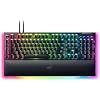
Razer BlackWidow V4 Pro Wired Mechanical Gaming Keyboard: Green Switches Tactile & Clicky - Doubleshot ABS Keycaps - Command Dial - Chroma RGB - Magnetic Wrist Rest - Snap Tap

  • Based on 853 reviews
Condition: New
Checking for the best price...
$199.99 Why this price?
Holiday Deal · 20% off was $249.99

Buy Now, Pay Later


As low as $33.33 / mo
  • – 6-month term
  • – No impact on credit
  • – Instant approval decision
  • – Secure and straightforward checkout

Ready to go? Add this product to your cart and select a plan during checkout.

Payment plans are offered through our trusted finance partners Klarna, Affirm, Afterpay, Apple Pay, and PayTomorrow. No-credit-needed leasing options through Acima may also be available at checkout.

Learn more about financing & leasing here.

Selected Option

Free shipping on this product
This item's return window has been extended for the holiday season: FREE refund/replacement until Jan 31, 2026

To qualify for a full refund, items must be returned in their original, unused condition. If an item is returned in a used, damaged, or materially different state, you may be granted a partial refund.

To initiate a return, please visit our Returns Center.

View our full returns policy here.


Availability: In Stock.
Fulfilled by Amazon

Arrives Tuesday, Dec 16
Order within 3 hours and 51 minutes
Available payment plans shown during checkout

Protection Plan Protect Your Purchase
Checking for protection plans...

Style: BlackWidow V4 Pro


Pattern: Green Switches - Tactile & Clicky


Features

  • GREEN MECHANICAL SWITCHES FOR PRECISE EXECUTION Experience the perfect pairing of pressure and response time with satisfying, tactile feedback
  • IMMERSIVE UNDERGLOW & PER-KEY LIGHTING Featuring per-key lighting and a striking 3-side underglow when paired with the wrist rest, sync the keyboard with your battlestation and enjoy greater immersion when gaming
  • COMMAND DIAL & 8 DEDICATED MACRO KEYS Assign a custom function to the keyboards programmable dial, and game with greater command using a set of macro keys for essential keybinds
  • MAGNETIC PLUSH LEATHERETTE WRIST REST WITH UNDERGLOW Designed to provide secure support for long hours of play, the soft, cushioned wrist rest also features Razer Chroma RGB lighting
  • DOUBLESHOT ABS KEYCAPS Using a doubleshot molding process to ensure the labelling never wears off, the keycaps also have extra-thick walls which make them extremely tough to withstand prolonged, repeated use

Description

Empower your play with a centerpiece that elevates your entire setup. Enter the next phase of battlestation evolution with the ultimate mechanical gaming keyboard. Take full command with a set of features designed for advanced control, and enhance your immersion with full-blown Razer Chroma RGB.

Brand: Razer


Compatible Devices: PC


Connectivity Technology: wired


Keyboard Description: Gaming


Recommended Uses For Product: Gaming


Special Feature: Chroma RGB, Doubleshot ABS keycaps, Green Mechanical Switches- Tactile & Clicky, Programmable Macros, Wrist Rest See more


Color: Black


Keyboard backlighting color support: RGB


Style: BlackWidow V4 Pro


Product Dimensions: 18.36"L x 6.01"W x 1.73"H


Brand: ‎Razer


Series: ‎Blackwidow V4 Pro


Item model number: ‎RZ03-04680200-R3U1


Hardware Platform: ‎PC


Operating System: ‎Windows


Item Weight: ‎3.61 pounds


Product Dimensions: ‎18.36 x 6.01 x 1.73 inches


Item Dimensions LxWxH: ‎18.36 x 6.01 x 1.73 inches


Color: ‎Black


Power Source: ‎Corded Electric


Manufacturer: ‎Razer


Date First Available: ‎February 16, 2023


Frequently asked questions

If you place your order now, the estimated arrival date for this product is: Tuesday, Dec 16

Yes, absolutely! You may return this product for a full refund within 30 days of receiving it.

To initiate a return, please visit our Returns Center.

View our full returns policy here.

  • Klarna Financing
  • Affirm Pay in 4
  • Affirm Financing
  • Afterpay Financing
  • PayTomorrow Financing
  • Financing through Apple Pay
Leasing options through Acima may also be available during checkout.

Learn more about financing & leasing here.

Top Amazon Reviews


  • 💔 The D doesn't work like it used to anymore. 😏 It was good while it lasted!
Style: BlackWidow V4 Pro Pattern: Yellow Switches - Linear & Silent
I played with this keyboard a lot. Pretty much everyday since I had it. This was a beautiful keyboard. ✨☺️💖 I loved the way the lights wrapped all of the way around the wrist rest pad. It was comfortable, it was even easy to customize with fun different key caps! I spent 2 years and 4 months with it before I started having issues. 💔 I'm not sure what the average lifespan of a keyboard usually is, but I guess I wore out the D after using it too much. Unfortunately, the D is now somewhat unresponsive when I touch it. Perhaps it was all of the repetitive strafing from side to side that went on in the competitive games I had been playing. The A and D keys were definitely put to work with many long hours of play sessions. It was not each time I pressed the key where it didn't respond, but the inconsistentcy was enough to cause me to retire this keyboard. Time to move on to my next, new keyboard. ⌨️🌷RIP🌷 this beautiful keyboard. We had some good times together! Maybe I'll get the same type, or maybe I'll try something different. Who knows! I'm not sure yet! ... show more
Reviewed in the United States on December 1, 2025 by Light Jetton Light Jetton

  • If you dont mind spending the money, the quality is absolutely there for this keyboard
Style: BlackWidow V4 Pro Pattern: Green Switches - Tactile & Clicky
Over all I will say that I typically really enjoy razer products and my wife gifted me this keyboard and I absolutely love it. the aluminum metal makes it feel very durable and just a overall great feeling so the build quality is really felt once you hold it in your hands. Easy plug and play and works well with the razer program. The extra keys are easy to program if you need it. This is a heavier keyboard so its not something I would recommend for like traveling. The color options are good just like most rgb keyboards. I personally like the clicky'ness of blue switches so I can tell you that the green switches sound great IF you like that sound. It is loud if you get the green switches so if your going to be using this near someone or just don't want keys that are a bit loud defiantly get red switches. The keyboard just feels so nice when typing and pretty much anyone I let try it or use it falls in love with it to. It definatelly has a more premium price but you can feel it in the quality of the keyboard. If you want something that will last you and feel great I would recommend this keyboard. Highly recommend. ... show more
Reviewed in the United States on November 24, 2025 by Amazon Customer

  • Great keyboard, but terrible documentation, customer support, and faulty software.
Style: BlackWidow V4 Pro Pattern: Yellow Switches - Linear & Silent
It's probably well-known by now that you need the Synapse software to unlock a good chunk of features this keyboard has, but did you also know that the incredibly terribly written manual also neglects to mention details like needing to download additional software and offers misleading information? Yeah, neither did I, but after spending 3 hours with Razer technical support I found that to be the case. One hour was spent with an agent who kept putting me on a silent hold and wouldn't respond and two hours with another agent who put me on hold a lot as she came to grips with the fact that what I saw on my screen didn't match what was on hers plus needing time to research/request help from people on her end. So, what did I discover? Well, one of the features of this keyboard is creating macros, yes? That extra row of keys on the left-hand side labeled M1-M5? Looking at the attached picture, one would think you press a key-combo (Function + F9), press whatever you want the macro to be, press the key-combo again, then one of the M-buttons, and from now on any time you press that Macro key you'll repeat what you just made, yes? Nope, that's not entirely how it works. Oh, you MADE a macro, sure, but the keyboard somehow doesn't already know how to use it even if you have Synapse installed. No, what you need to do is go to the Dashboard of the Synapse software, click Modules, and download the module for Macro. THEN you can actually use the macro you made. Do you see anything similar to "Download the Macro Module in the Dashboard" in the attached picture? No, no you do not. Minor detail, I suppose, but when giving a step-by-step, skipping the FIRST step is very counterproductive. Another fun little fact is, if you look at the picture, you'll see key combos for how to change the lighting patterns and colors. Function key + CTRL + a number and you'll have a different pattern. Press that combo again and you change colors. Seems pretty simple, right? Wrong. Apparently, that's an EXAMPLE chart...just without the word "Example" anywhere on the page. The second agent on the phone merely referred me to YouTube videos on how to program these in because, I suppose, they don't have example keyboards and software to use and have to rely on screenshots and knowledge-base articles. I've only had this keyboard in my possession for a day, so I haven't had time to watch YouTube videos on how to decipher the puzzle that is the Chroma Effects. Obviously, since the combos listed in the manual don't do squat, I have to figure out something else. I even had to instruct the agent on how the Gaming Mode function worked because the manual doesn't mention that having it "off" in the Synapse software means it is then toggled by the key combo, whereas having it "Enabled In-Game" does exactly that and "Always" means it is literally always on no matter what you do (or until you turn it off in Synapse). A fun bonus was when the 'R' key on this brand-new keyboard stopped working for some reason while I was still testing it. At that time, I had nothing programmed and was merely installing the Synapse software. Every other key worked, but 'R' just...was taking a break, a nap, or was on hiatus while the rest of the keyboard was still functional. I thought I had a defective keyboard because, let's be honest, I had a manual telling me to do things that didn't work so having a specific key not function seemed to confirm something was wrong with it. Shortly after a reboot, the key was working again, as you can tell by the fact I'm not typing in a strange way. I have a word or two for whatever absentminded professor wrote this documentation: find someone who hasn't used the keyboard before and have them follow the manual you created and see how well it goes. THEN make the necessary corrections before you send it off with the product. I'd use other, more colorful words, but Amazon would not allow me to actually post this. I'd also advise Razer to provide actual products and software suites for their support representatives to use, so they can accurately answer questions, but something tells me they aren't concerned with customer satisfaction. Otherwise, they wouldn't be sending out poorly-written manuals with their products. Razer also has this bizarre obsession with offering to replace products rather than doing anything that can even remotely be called "troubleshooting", so adjust your expectations accordingly when purchasing ANY Razer products. For example, I purchased a Deathadder V2 mouse over a year ago and contacted Razer regarding cosmetic damage that was occurring because of normal use. Their solution was to use up three weeks of my time by sending a replacement mouse and tape grips instead of just having a way to fix the cosmetic damage. And yes, I know this is not exactly a place where Razer looks for feedback and acts on it, so that's why I've copied and pasted this into a document to send it right to them. I am a simple person with regard to the concept of having proper expectations. If Razer advertises a product can do something, it should be able to do it. If the manual that comes with a product provides instructions on how to do something, following those instructions should work. Finding out that there's missing information or that the listed information doesn't work at all does not build consumer confidence or satisfaction. I'd almost know it down to 2-stars for that, but I'm sure the keyboard itself works perfectly fine...though I may adjust my rating and review to reflect that in the future if that changes. Unlike most who say this sort of thing in their reviews, I DO adjust mine. Update: May 5, 2023 - So I contacted Razer "Support" through their site and used the chat function. After describing the problem, the agent immediately jumped to the concept of performing an RMA replacement. As someone who purchased this thing on May 1, 2023, and received it three days later, I'd go through Amazon if I wanted to do that (which I'm starting to consider). As part of the troubleshooting, the agent suggested I disconnect the keyboard, press and hold Escape+Caps+Space, connect the USB, and let go of the keys afterward. Congratulations! I now have a keyboard in Demo Mode that doesn't respond to input. I had to connect up another keyboard to look up (and realize) I had to perform the same steps to take it out of Demo Mode. So, not only is Razer "Support" obsessed with RMAing products for trivial things, but they're also giving out terrible troubleshooting instructions without providing all the details. That knocks an otherwise good keyboard down from 3-stars (due to the documentation and poor customer service) to 2-stars (due to the absolutely terrible customer service). If I wasn't stuck in a place that literally prevents me from returning this product, at least for the next 15 days, I would be doing so. Instead, I'm trying to unlock the full usage of a product I'm paying for. I'm starting to realize my mistake. To summarize: I need the Synapse software to use macros. I need to turn off/disable the Synapse software to use the Chroma Effect key binds, but then I can't use macros. Absolutely *Brilliant*, Razer. Note: that was sarcasm. Update 2: May 18, 2023 - The keyboard developed an ADDITIONAL problem: the Control key would randomly act like it was stuck. So, for example, if you held down Control and pressed Escape, the Start Menu would pop up, right? Now imagine it doing that without holding down Control. Now imagine this kind of "undocumented feature" also applied to any other key you pressed. To fix this, I could press both Control keys at the same time, using Alt+Ctrl+Del, putting the keyboard into/out of Demo Mode, or exit the Synapse software. However, if I EVER intend to use Macros with this thing, I need the Synapse software...and that software is causing the problem. I did not intend to spend nearly $300 on this keyboard and insurance just to have to work around poor programming and poor documentation. Razer has seriously dropped the ball on this and I've been dealing with 2 weeks of issues. As compensation, they've offered me numerous apologies in a template format, which truly shows they couldn't care less. I'm NEVER purchasing another Razer product and I highly encourage anyone reading this to shop elsewhere. From 2-stars down to 1. ... show more
Reviewed in the United States on May 5, 2023 by Brent Trehern Brent Trehern

Can't find a product?

Find it on Amazon first, then paste the link below.
Checking for best price...

