Rapoo Portable Wireless Keyboard with Touchpad, Multi-Device HTPC Keyboard for PC-Connected TV/Tablet/Steam Deck/Gaming Console/Raspberry Pi/Mini PC - Support Touch Gestures for Windows & Mac, Black


Buy Now, Pay Later
- – 4-month term
- – No impact on credit to apply
- – Instant approval decision
- – Secure and straightforward checkout
Ready to go? Add this product to your cart and select a plan during checkout.
Payment plans are offered through our trusted finance partners Klarna, Affirm, Afterpay, Zip, Apple Pay, and Google Pay. No-credit-needed leasing options through Acima may also be available at checkout.
Learn more about financing & leasing here.
Selected Option
FREE 30-day refund/replacement
To qualify for a full refund, items must be returned in their original, unused condition. If an item is returned in a used, damaged, or materially different state, you may be granted a partial refund.
To initiate a return, please visit our Returns Center.
View our full returns policy here.





Color: Black
Features
- All-in-one Solution for Multi Media and OSFeaturing Bluetooth 5.0/4.0 + 2.4GHz tri-mode wireless connectivity, this portable HTPC keyboard provides a great way to navigate, browse, search or type on your PC-connected TV, tablet, steam deck, gaming console, SBCs, mini pc, phone and other devices with Bluetooth or USB-A port.
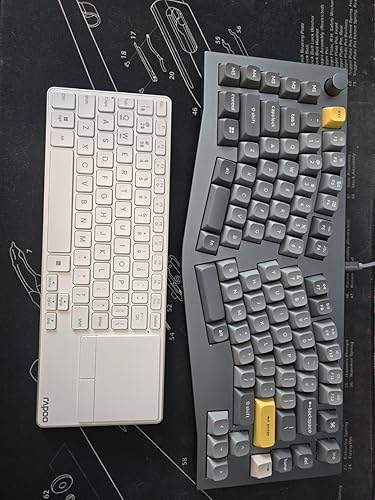
- Ultra-Thin and Portable Design With the same length (11.09in/281.6mm) of iPad Pro 13-Inch (M4) and is even thinner (0.15in/3.9mm), E900T fits perfectly with most tablets and makes it easy to work-on-the-road.
- Built-in Touchpad and Gestures Support for Windows & MacJust use the best pointing device that we are all born with, no need to take a mouse all around, this keyboard supports multi-finger gestures for both Windows and Mac OS [Note: Press FN+W to enter Windows mode / FN+Q to enter Mac mode].
- Multi-Device and Multi-OSRapoos outstanding multi-device support, connects up to 4 devices across OS (Windows, Mac, Chrome, Android) - while our competitors products only support 3 devices.
- 73-Key Compact LayoutSpace-saving and portable, easy to carry in your bag or backpack, great for school, travel, and business. The multimedia hotkeys provide quick access to control your entertainment such as play/pause, volume +/-, eliminating the clutter of a separate keyboard and mouse.
- Low Power ConsumptionUpgraded with our latest low-power technology, E900T can go up to 13 months with 1 or 2 AAA batteries (the battery number only affects runtime). We provide 2 new AAA batteries in the box, and we do recommend users to make the most of used batteries from other electronics - before applying the new ones.
Description
No longer selecting letters one by one, just type words or even URLs to search for content on TV. Connect up to 4 devices across media & OS (TV, gaming console, PC, Mac, tablet, smartphone, etc). Get reliable and encrypted wireless connection via Bluetooth or the plug-and-play USB receiver. Tablet-sized tenkeyless layout w/ all the keys you need and a large touchpad for seamless control. No guess work when typing, avoid password typos and improve your overall efficiency and experience You can play, pause, track forward and backward, mute, and adjust volume directly from the keyboard. Upgraded low energy Bluetooth, lasts up to 13 months using 2 AAA batteries (included). Built-in storage compartment keeps the USB receiver in place, convenient to use and avoids losing. How to switch the wireless modes between Bluetooth 5.0/4.0 and 2.4GHz? Just turn the mode button (BT/OFF/2.4G) according to your needs - you can find the mode button on the back side of the keyboard. The Bluetooth 5.0/4.0 is automatically detected and applied according to your device version. How to pair the keyboard with different devices? 2.4GHz mode: just plug the USB dongle; Bluetooth mode: long press (> 3 seconds) key combination [FN]+[1], [FN]+[2], [FN]+[3] to pair the keyboard with 3 devices. How to switch among the 3 Bluetooth devices? Short press (< 3 seconds) key combination [FN]+[1], [FN]+[2], [FN]+[3] to switch the keyboard among 3 Bluetooth devices. How to switch the multimedia hotkeys between Windows and Mac OS? Windows: Press key combination [FN]+[W]; Mac OS: Press key combination [FN]+[Q]. E900T E9050L E9310M E9350L E9550L
Brand: Rapoo
Compatible Devices: Smart TV
Connectivity Technology: Bluetooth, RF
Keyboard Description: Multimedia
Recommended Uses For Product: Everyday Use
Special Feature: Lightweight, Low-Profile Key, Portable, Quiet, Trackpad
Color: Black
Style: Classic
Product Dimensions: 4.09"L x 0.15"W x 11.9"H
Included Components: 2*AAA Batteries
Compatible Devices: Smart TV
Connectivity Technology: Bluetooth, RF
Additional Features: Lightweight, Low-Profile Key, Portable, Quiet, Trackpad
Number of Batteries Required: 1
Power Source: Battery Powered
Switch Type: Scissor
Keyboard Layout: QWERTY
Hand Orientation: Ambidextrous
Button Quantity: 73
Minimum Required Operating System Version: Windows 11
Compatible Operating System Family: Windows
Compatible Tablet Computer Models: Apple iPad Pro 13-Inch (M4)
Number of Keys: 73
Color: Black
Style Name: Classic
Item Dimensions L x W x H: 4.09"L x 0.15"W x 11.9"H
Brand: Rapoo
Keyboard Description: Multimedia
Antenna Location: Everyday Use
Built-In Media: 2*AAA Batteries
Model Number: E900T
Model Name: E900T
Unit Count: 1 Count
Manufacturer: Shenzhen Rapoo Technology Co., Ltd.
Number of Packs: 1
Number of Items: 1
Item Weight: 150 g
Mfr Part Number: e900t-BLK
Warranty Description: 1-year warranty
Frequently asked questions
To initiate a return, please visit our Returns Center.
View our full returns policy here.
- Klarna Financing
- Affirm Pay in 4
- Affirm Financing
- Afterpay Financing
- Zip Pay in 4
- Financing through Apple Pay
- Financing through Google Pay
Learn more about financing & leasing here.


Top Amazon Reviews