



Search  for anything...
OWC

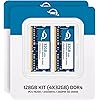
OWC 128GB (4 x 32.0GB) 2400MHz DDR4 PC4-19200 SO-DIMM 260 Pin CL17 Memory Ram Module Upgrade (OWC2400DR4S128S)

  • Based on 1,691 reviews
Condition: New
Checking for the best price...
$565.45 Why this price?

Buy Now, Pay Later


As low as / mo
  • – Up to 36-month term if approved
  • – No impact on credit
  • – Instant approval decision
  • – Secure and straightforward checkout

Ready to go? Add this product to your cart and select a plan during checkout.

Payment plans are offered through our trusted finance partners Klarna, Affirm, Afterpay, Apple Pay, and PayTomorrow. No-credit-needed leasing options through Acima may also be available at checkout.

Learn more about financing & leasing here.

Selected Option

Free shipping on this product

30-day refund / replacement

To qualify for a full refund, items must be returned in their original, unused condition. If an item is returned in a used, damaged, or materially different state, you may be granted a partial refund.

To initiate a return, please visit our Returns Center.

View our full returns policy here.


Availability: Only 3 left in stock, order soon!
Fulfilled by Amazon

Arrives Saturday, Mar 14
Order within 23 hours and 14 minutes
Available payment plans shown during checkout

Protection Plan Protect Your Purchase
Checking for protection plans...

Size: 128GB


Style: 4 x 32GB


Features

  • Compatible with select PC Laptop, PC Notebook, & All in One Computers
  • Compatible with Specific PCs
  • Fully compliant with JEDEC specifications
  • Warranty Safe Upgrade

Description

4 x 32 GB (128 GB) PC19200 DDR4 2400MHz SO-DIMM Memory, 260-Pin, 1.2 Volts, Non-registered, Non-ECC, Fully compliant with JEDEC specifications, ROHS compliant, warranty safe upgrade; Backed by OWC Memory Lifetime Limited Warranty including the OWC Lifetime Advanced Replacement Program, Compatible with select PC Laptop, PC Notebook, & All in One Computers

Brand: OWC


Computer Memory Size: 128 GB


RAM Memory Technology: DDR4


Memory Speed: 1200 MHz


Compatible Devices: Desktop, Laptop


RAM: ‎128 GB DDR4


Brand: ‎OWC


Series: ‎OWC2400DR4S128S


Item model number: ‎2400DR4S128S


Item Weight: ‎2.08 ounces


Package Dimensions: ‎7.01 x 4.92 x 0.47 inches


Color: ‎4 x 32GB


Computer Memory Type: ‎DDR4 SDRAM


Voltage: ‎1.2 Volts


Manufacturer: ‎Other World Computing


Date First Available: ‎June 1, 2020


Frequently asked questions

If you place your order now, the estimated arrival date for this product is: Saturday, Mar 14

Yes, absolutely! You may return this product for a full refund within 30 days of receiving it.

To initiate a return, please visit our Returns Center.

View our full returns policy here.

  • Klarna Financing
  • Affirm Pay in 4
  • Affirm Financing
  • Afterpay Financing
  • PayTomorrow Financing
  • Financing through Apple Pay
Leasing options through Acima may also be available during checkout.

Learn more about financing & leasing here.

Top Amazon Reviews


  • Best upgrade to iMac 4K 2017
Size: 64GB Style: 2 x 32GB
I recently upgraded my iMac from 8GB to 64GB (2x32GB) with these memory modules, and the difference is night and day! macOS feels incredibly snappy and smooth now. Multitasking with heavy apps like Photoshop, Final Cut Pro, and multiple browser tabs is seamless—no more lag or spinning beachballs. Even demanding tasks like 4K video editing and virtual machines run effortlessly. Installation was straightforward, and the modules were recognized instantly by my iMac. If you're looking to breathe new life into your Mac, this upgrade is a game-changer. Highly recommend! ... show more
Reviewed in the United States on October 17, 2025 by Jean Paul

  • Memory serves me iMac
Size: 32 GB Style: 2 x 16GB
Great price on a great product. iMac recognized the modules and everything works wonderfully. Highly recommended.
Reviewed in the United States on March 8, 2025 by MrFre3ze

  • OWC 2*16Gb RAM upgade for iMac 27" 5K retina 2017 - it just works
Size: 32 GB Style: 2 x 16GB
OWC 32GB (2 x 16GB) 2400MHZ DDR4 SO-DIMM PC4-19200 Memory Upgrade For 2017 iMac 27 inch with Retina 5K display I recently bought an iMac 2017 27" 5K retina base model with 8Gb RAM and wanted to add some RAM. After investigating for 32 Gb RAM for iMac 2017 27" from well known brands, I decided to go with OWC. It was a risky process for me because it was an International shipment for me and if something goes wrong returning it would be a hard process and the disappointment would be much higher. The package was scheduled to arrive between 2-12 April 2018 but to my surprise it was delivered to me on March 26th :) I fitted the RAMs in excitement (despite having dealing with hardware for years, I took my time to read and watch OWC and Apple advice first). My process was exactly like this: -Shut down and wait for about 10 mins (I wouldn't but it wouldn't harm I thought). -Placed the iMac on a soft cloth and opened the RAM bay. -Preinstalled 8 Gb RAM was on slots 1 and 3. -Insatlled OWC 16 Gb modules on slots 2 and 4. -Closed the bay, plugged the cables and turned it on. Voila, after 15-20 seconds apple logo was on screen and it booted without no problems. Checking RAM it shows a botal of 40Gb now. Thanks OWC. Wish you had an office in my country or at least I could buy anything from you internationally. After using these RAMs for months, I decided to buy another 32 Gb and upgrade to a total of 64 Gb. Removed the stock 8 Gb and placed the new 32 Gb set. Now working with 64 Gb. :) All went well (bought second set from Newer Galaxy Distribution Company, LLC through Amazon - delivered just on time. Thanks) ... show more
Reviewed in the United States on March 27, 2018 by Cetin Basoz

  • So far so good, easy install in iMac 2017 27 inch Retina 3.4 ghz
Size: 16GB Style: 2 x 8GB
I have a mid-2017 iMac 27 inch Retina with the 3.4 GHz Quad-Core Intel Core i5. I just upgraded the memory by replacing the OEM 8gb (2x4gb) with 32gb of OWC RAM (4x8gb). Some people have reported problems following the upgrade - e.g. not being able to reboot, etc. Just one data point, but I didn't have any problems at all. Shut down the computer, pulled out the OEM cards, plugged in the four new OWC cards, and turned the power back on. Will update later if the memory fails in the future - a problem others reported. Fingers crossed, but so far, the upgrade was simple and fast. NOTE that the computer was generally a little "slow" immediately following the reboot (when starting an application, for example), but that apparently is normal as various information is re-initialized. After a few minutes, performance was back to normal, and much better with several apps open because of the additional memory. IMPORTANT: Note that according to Apple, the 3.4 ghz processor maxes out at 32gb total. It's a little hard to find that fact online, but it is a limitation specifically for the 3.4 ghz processor. The 3.5 ghz and above can supposedly accommodate 64gb. ... show more
Reviewed in the United States on October 7, 2022 by ManBehindTheCurtain

  • Mid 2017 iMac 4.2ghz with Fusion Drive - 32gb upgraded to 64gb
Size: 64GB Style: 4 x 16GB
I have a mid-2017 iMac 27 inch Retina with the 4.2 GHz Intel i7 with 2TB Fusion Drive INITIAL PROBLEMS (All Resolved): FiIRST PROBLEM: Replacing the 32gb memory with 64gb, the Mac initially didn't boot.I had to put my old memory back, boot it up, then try different configurations where I would keep original 16gb memory and place new 32gb making a total of 48gb. First time didn't work. Put the two sticks aside, and put the other two sticks in. Success! I now had 48gb. But, the system was slow as snot and took a long time after logging in. Now, I shut it down, removed original memory and moved 32gb upgraded memory to position 1 and 2 and put the sticks that weren't working in position 3 and 4. Finally, booted up! 64gb memory! SECOND PROBLEM: As mentioned everything was slow. I now had 64gb memory, but everything was slow but not as slow. Once I had mouse movement, I immediately removed the cache files in the library folder. Then I started opening up the apps that I use the most, first. With Fusion Drive, it uses a large cache to make opening apps a lot faster. The Fusion Drive is a mix of Flash or SSD and HDD. After using it for 4 hours and rebooting once everything became quite snappy and by the second day, I can finally see the payoff of having 64gb of memory. I have experienced issues with memory not allowing computer to boot up before, even in Windows. Sometimes memory sticks just have to be put in a specific order and no one knows that until they try. Most of the time, no issue. The GOOD So far, I am no longer needing a swap file. The responsiveness of apps and loading data is noticeably faster. This is a cheap upgrade that adds immediate benefits and well worth the money. More memory gives the system more headroom to work with. I was considering buying an M4 MacMini to replace this 2017 iMac because I felt it was important to have the speed and memory to tackle whatever tasks I need to plow through. Adding the memory changed that decision and helped to extend the life of this machine for another few years. I would rather save the money and use what I have. If you are on the fence, just do the upgrade. You will notice a difference and it will give your Mac new life. I only feel bad that I didn't make this choice years ago, or when I first bought the Mac. Of course, back then, the cost was double than what it is now. ... show more
Reviewed in the United States on November 20, 2024 by Lee Rutter

Can't find a product?

Find it on Amazon first, then paste the link below.
Checking for best price...