


Search  for anything...

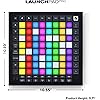
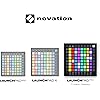
Novation Launchpad Pro MK3 MIDI USB Grid Controller

  • Based on 564 reviews
Condition: New
Checking for the best price...
$389.99 Why this price?
Save $51.00 was $440.99

Buy Now, Pay Later


As low as / mo
  • – Up to 36-month term if approved
  • – No impact on credit to apply
  • – Instant approval decision
  • – Secure and straightforward checkout

Ready to go? Add this product to your cart and select a plan during checkout.

Payment plans are offered through our trusted finance partners Klarna, Affirm, Afterpay, Zip, Apple Pay, and Google Pay. No-credit-needed leasing options through Acima may also be available at checkout.

Learn more about financing & leasing here.

Selected Option

Free shipping on this product

FREE 30-day refund/replacement

To qualify for a full refund, items must be returned in their original, unused condition. If an item is returned in a used, damaged, or materially different state, you may be granted a partial refund.

To initiate a return, please visit our Returns Center.

View our full returns policy here.


Availability: In Stock.
Fulfilled by Amazon

Arrives Wednesday, Sep 16
Order within 3 hours and 52 minutes
Available payment plans shown during checkout

Protection Plan Protect Your Purchase
Checking for protection plans...

Style: Launchpad Pro [MK3]


Features

  • Our Deepest Ableton Live Integration Quickly launch clips and scenes, access mixer, device, and transport controls, and quantize, duplicate and double, all without touching your mouse. Capture MIDI makes sure you never lose an idea
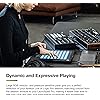
  • Dynamic and Expressive Playing Large RGB velocity- and pressure-sensitive pads give you a perfect reflection of your Ableton Live or Logic Pro session, matching colors from the session window to your Launchpad Pro
  • Powerful Four-track, 32-step Sequencer Create tracks with Launchpad Pro's sequencer, featuring eight-note polyphony, pattern chaining and scenes to create and trigger longer sequences. Transform your patterns on the fly with probability/mutation
  • Dynamic Note & Scale Modes Effortlessly play in-key basslines, melodies, chords and leads. Launchpad Pro even knows when youre drumming and shows your drum rack on the grid. Easily explore, build, and play complex chords straight from the grid
  • Control MIDI-compatible Hardware, Software, Or Both Tailor Launchpad Pro to your setup. Use Custom Modes to send MIDI commands to software/hardware simultaneously. Hook Launchpad Pro up to an all-hardware rig using MIDI In, Out and Out 2/Thru ports

Description

Launchpad Pro is made to produce. As Novation’s most powerful grid controller for making music in Ableton Live and with hardware, it gives you all the tools you need to create and perform your tracks. Launchpad Pro has Novation’s deepest Ableton Live integration yet. Launch clips and scenes, access mixer, device and transport controls, and quantise, duplicate and double, all without touching your mouse. One-click access to Ableton Live's Capture MIDI function makes sure you never miss an idea.

Brand: Novation


Number of Keys: 64


Connectivity Technology: USB-C


Special Feature: Sequencer


Model Name: Launchpad X


Number of Keys: 64


Connectivity Technology: USB-C


Additional Features: Sequencer


Instrument Key: Any


Compatible Devices: PC, Synthesizer, Groovebox


Supported Software: Ableton, Logic, HUI


Connector Type: MIDI 3.5mm, USB-C


Hardware Interface: USB


Keyboard Description: No Keyboard


Control Type: Grid Controller


Platform: Mac, Windows 10, Windows 7


Human Interface Input: Buttons


Hardware Platform: MIDI Controller


Instrument: Synthesizer


Total USB Ports: 1


Control Method: Touch


Total USB 2.0 Ports: 1


Mixer Channel Quantity: 4


Noise Control: None


Color: Black


Product Style: Launchpad Pro [MK3]


Item Highlight: USB, 64 RGB Velocity and Pressure Sensitive Pads, 4-Track Sequencer, MIDI I/O, Ableton Live Lite


Brand Name: Novation


Model Name: Launchpad X


Model Number: AMS-LAUNCHPAD-Pro-MK3


Included Components: Launchpad Pro, USB-C to USB-A Cable


Model Year: 2022


Number of Items: 1


UPC: 815301001218


Manufacturer: Novation


Global Trade Identification Number: 18


Item Type Name: DJ Controller


Manufacturer Part Number: AMS-LAUNCHPAD-Pro-MK3


Unit Count: 1 Count


Warranty Description: 2 years.


Item Dimensions D x W x H: 3.15"D x 15.55"W x 3.15"H


Item Weight: 2.7 pounds


Material Type: Plastic


Frequently asked questions

If you place your order now, the estimated arrival date for this product is: Wednesday, Sep 16

Yes, absolutely! You may return this product for a full refund within 30 days of receiving it.

To initiate a return, please visit our Returns Center.

View our full returns policy here.

  • Klarna Financing
  • Affirm Pay in 4
  • Affirm Financing
  • Afterpay Financing
  • Zip Pay in 4
  • Financing through Apple Pay
  • Financing through Google Pay
Leasing options through Acima may also be available during checkout.

Learn more about financing & leasing here.

Top Amazon Reviews


  • Bought it for drums, but this changed the way I write music completely
Style: Launchpad Pro [MK3]
I got this thinking I was just going to use it to help tap out drums for recording music. While it helps do that very well, and works with Superior Drummer 2, I found that I have a lot more use for it than I thought I would. If you are getting it for drums, I would highly suggested connecting it to your computer and going to the Components site. This allows you to program which notes (and colors) appear for each pad. This is very helpful when setting up drums. Now for what I found most interesting and complete unexpected. This has something called Note mode. By default it has a chromatic scale (every note, laid out like a piano would), however, you can change it so it only has the notes of the scale you are using available , i.e. "Scale Mode". This means that you cannot hit a wrong note, every pad is assigned with notes from the scale you have chosen. There are 16 different scales to choose from, and you can also choose the key of the scale. Interestingly, you can choose an offset too, which determines how many notes the next row should be offset by. All of this comes together in an experience I never anticipated having. As a guitarist for 20+ years, I am pretty capable of playing something if I want to, comfortable with scales, etc. But with that, I get stuck in a rut of playing a certain way, or having familiar phrasing, note choice, etc. Furthermore, I'm "terrible" at song writing, I'm decent at doing covers. It's not that what I write is completely awful, it is just that what I write is obvious for lack of better words. When I listen to the bands I like, what impresses me the most is when there was a surprise to the music and it worked well into the song. My song writing is typically not that at all. With this scale mode and not being able to hit a wrong note, I can just tap random patterns out and have come up with concepts that I would have never written by myself prior to this. What makes it better, is that I don't have any concept of what the notes are going to sound like yet before I hit them, I haven't memorized where each note is located like a piano or a guitar, so it is forcing me to tap randomly. And from that, I am hearing note choices I would not have attempted before. The process is so fascinating, because it is like taking all the extra baggage that goes into song writing (i.e. knowing music theory, knowing the notes on a guitar and scales, being able to play the guitar, trying to translate an idea into a reality, not hitting wrong notes, trying to figure out the harmony) and divorcing it from just thinking about what you want to accomplish. If I want a higher note, I just move up, if I want a lower note, I just move down. In a way, it is like distilling the song writing process into just thinking and not having to work so hard at the doing aspect. It is so hard to describe the feeling, but I haven't felt that close the song writing process in maybe... forever? The process of making harmonies for lead parts on guitar isn't rocket science, but sometimes it can take a little work to figure it out. This makes playing a harmony much easier. If I am trying for thirds, I just play the same pattern two pads over, done. This has been another way to breed creativity. I have tried different notes together and it has lead to better harmonies. When I finally get the music midi recorded from the launchpad, I then learn the parts on guitar. This can be challenging, which is part of the "beauty" of doing music this way. I would have never played guitar this way, nor made these note choices for myself on the guitar. Just a note on this compared to the Launchpad X. Shipping was originally delayed to the point where I wasn't sure I was going to get this, so I ended up getting the Launchpad X and then this finally arrived. This gave me the opportunity to test out the pad sensitivity between the do. For whatever reason, I felt like the launchpad X had decent pad sensitivity, but the pro mk3 just had slightly better sensitivity. I am not sure it would have been worth the extra money to spring for the pro mk3 just for this factor alone, both are good products, but the pro mk3 does seem to have slightly better pad sensitivity. I ended up returning the X and keeping this pro mk3. This also has a sequencer and some other additional functionality too that the X doesn't have, including a row of buttons on the left and two rows of buttons on the bottom. ... show more
Reviewed in the United States on February 1, 2021 by Patrick W

  • YES! You DON'T need a computer to use this as a sequencer!!
Style: Launchpad Pro [MK3]
I am ecstatic about this Launchpad. About a year ago, I tried sequencing some of my synthesizers using my Novation Circuit and had a blast. While I have a nice Ableton Live Rig, I had so much more fun doing hands-on sequencing with the Circuit as well as tweaking my hardware synths in real time. As time went on, I wanted more tracks, but only two of the Circuit's tracks can send different note commands, the other two tracks are dedicated to drums. I searched and searched for another sequencer and eventually gave up. So many people recommended the Korg Electribe but I am so fond of the Circuit's workflow. I find it's UI so intuitive and easy to sequence notes on the fly. Recently, I came across the MK3 and read numerous times that it could sequence hardware synths!......And Ableton Live. A question I couldn't find a concrete answer for was "Can I use this to sequence hadware synthesizers WITHOUT a computer?" My review title states the answer to this question. This Launchpad Pro MK3 comes with a USB C to USB C cable, a USB A to USB C cable, and a dedicated DC adapter to run it without a computer! Oh, and it's MIDI In and OUT ports are 3.5 mm TRS jacks, so three MIDI DIN breakout cables are included as well. Since this is from Novation, it has a workflow very much like the Circuit, which pleases me greatly. You can hold a note, then press buttons representing a timeline to place that note (or notes, you can send notes polyphonically if the synth you're sequencing on that track/channel has polyphonic ability/multiple voices. Or you can record MIDI and play your notes live. I've got this Launchpad sequencing a IK Multimedia UNO Drum, an Arturia MiniBrute, and a Yamaha Reface DX, no problem. Once I clear some space, I'm going to dig up either my Akai TimbreWolf, Korg Minilogue or my Novation Bass Station II for the fourth track. I am having a blast noodling with my synthesizers again, and kudos to Novation for making this happen. I do know that older Launchpad Pros did have an option to add a sequencer function, as their software was open sourced. While I do tinker with electronics, I'm not much for coding, so I didn't feel comfortable trying that. With this LP Pro MK3, I took it out of the box, connected everything, and started sequencing right away. I've yet to even connect my MK3 to a PC at all! I have but one complaint, and this may be addressable via PC editing or a firmware update: This LP Pro MK3 has a great Chord note function. But you can't use the Chord function in tandem with the sequencer. A minor gripe though, since you can still play chords on the note section of the sequencer, but it would still be nice to at least have a MIDI record function and play the desired recording using Chord mode. ... show more
Reviewed in the United States on September 22, 2020 by Hawk eye

  • Reviewed as a hardware controller, no computer, for accessibility and playability.
Style: Launchpad Pro [MK3]
I'm using the Launchpad Pro mk3 to play a hardware synth, no computer, no Ableton integration, and I love it. Here are my notes: Playability and accessibility If you have physical issues and need to play in different positions for comfort, there are some nice features here: -I like that there are several grid keyboard layouts to choose from; they don't list them as right/left handed, but they do work out that way. -When it's in one of the hands-on-playing modes, all of the other menu selection buttons around the bottom and side shut off so that you don't accidently change screens with an errant tap. -Besides the nice color contrasts, there are a few small nubs on the diagonal grid buttons that can help you find and keep your location while playing. -The buttons have very little travel and are soft to the touch; they aren't mushy or clacky and you don't have to thump them to register something. Very responsive. Comfortable to play on for several hours. You can lightly rest your hands on the buttons without triggering them. -Menus/settings are quick to queue up on the fly and I think the color patterning is a real bonus; you can see things at a glance much faster than if you had to scroll a tiny alpha-numeric screen. tldr: I like that it works well for low light, there's high contrast, and I don't have to squint at a screen. It's easy on my hands and can be customized for R/L/both; locking menus behind a "shift + button" for access means I can rest my hands on the edge without selecting things by mistake. _______________ Other notes: -UPDATE: Ah! For MIDI over USB, I just needed a cheapo USB hub to connect to my synth and the Launchpad. I dug something out of my junk drawer; it's probably 15 years old, no separate power, just a dongle with 3 usb ins and 1 usb out. -The sequencer is very quick/straight-forward to use. It helped to watch a tutorial, but I don't feel like I have to reference the manual each time or keep post-it notes with reminders of button combinations nearby. None of that. -Decent build quality and it's lightweight. I really like that the rubberized bottom isn't just a few nubs on the corners, but it outlines the perimeter of the box and gives a more stable base that won't slide around or become lopsided. _____________________ Summary I bought this thinking I would try out the Akai too and maybe a Linnstrument if everything was too DAW focused (I just want a grid controller for external synths), but I'm just going to stick with Novation on this. They've managed to tap into my lack of patience for learning menus and setups and created a really functional controller. ... show more
Reviewed in the United States on February 12, 2024 by Internet Person

  • Deserves 5 Stars but Amazon…
Style: Launchpad Pro [MK3]
In my personal opinion, the LPPMk3 is a great controller and sequencer. Works with hardware synths and Ableton 12 with no issues. The setup is fairly easy and there are plenty of videos on YouTube. I recommend XNB. All around it a a great device for the price. I recommend it over the SEQTRAK unless you need a “groove box”. My biggest discrepancy isn’t with the device itself or with Novation. I think they and Arturia are great brands. My caution comes from receiving a preowned device being sold as new. I hate situations where there’s a bait and switch. That’s legit fraud but Amazon attempts to pull it off from time to time. But from your local music store, Sweetwater, or directly from Novation. Don’t buy from Amazon if you can help it and if you do, inspect your gear thoroughly and take pics in case you need to make a complaint. ... show more
Reviewed in the United States on April 20, 2026 by Banks

  • SO how does this compare? From Push to the dark side
Style: Launchpad Pro [MK3]
My original Push just died and I needed to play live and record albums. I decided to try a Novation Launchpad Pro and boy am I glad I did. This thing rocks. I compose albums and play live using only a Push and now the Novation is a great replacement at 1/3 the cost. The pads are very responsive. Like the Push I can play in a Note mode but unlike the Push there's also a chord mode (I'm leaving my Theoryboard behind) AND there's a sequencer (which suits my music well) .... another plus it's lighter and smaller for my shoulder bag - way lighter than a Push... So that's the good - how about the bad to make you pause? It doesn't have knobs to reach up and adjust the volume while you play and no master (I really miss that) Yes it can change volume with pad column swipes but not the same. I may have to add another fader/knob unit? It is NOT as tough (but did you notice it's smaller and lighter with same pad size) I treat this instrument like I would a guitar- no throwing, crushing etc While it has everything (almost) I need for playing or recording. It does NOT have things the PUSH had... it doesn't label things (column are color matched not named) it does not allow you to see instrument names or have directory access of VST's etc It won't edit samples etc. In other words all that stuff that can be done on the PUSH screen moves back to the computer. So if you work by looking at the PUSH screen and want to ignore the computer pay the extra and get a PUSH. If you are fine with looking at (or even having a computer) and only want to play things into Live while using a computer this might very well be your jam..... Plus did I say you can play other DAWs or even hardware synths with this since it sends out MIDI and is not absolutely paired with only Ableton... Hello Apple Mainstage ... show more
Reviewed in the United States on September 29, 2023 by Michael E. Clay

  • Great for my 13 year-old grandson!
Style: Launchpad Pro [MK3]
My grandson loves it!
Reviewed in the United States on May 7, 2026 by Just me

  • Awesome
Style: Launchpad Pro [MK3]
Great product
Reviewed in the United States on May 2, 2026 by Anoop mathew

  • Best addition to my music production gear in a long time
Style: Launchpad Pro [MK3]
This thing is great. It does way, way more than what I initially bought it for. It opens up Ableton so much! It's like using a computer with just a keyboard for years and then, suddenly, someone gives you a mouse and everything becomes much more natural and fluid. I highly recommend this. I expect even the X or mini would be just as effective but if you can get this the 'Session' mode is worth it (which is unique to the Pro model). Over this weekend alone, I've created 6 or so songs - it's amplified my productivity and creativity. Hardware-wise, I have no complaints. It's thinner than I thought. It stays in place. It comes with MIDI dongles so I can connect it to my devices with traditional MIDI ports (although I don't use it that way). I recommend this. ... show more
Reviewed in the United States on February 27, 2023 by Frank Villasenor

Can't find a product?

Find it on Amazon first, then paste the link below.
Checking for best price...