Search  for anything...

NexiGo Iris, 4K AI Webcam with 1/1.8" Sony_Sensor, Onboard Flash Memory, HDR, PiP, DSLR-Style Control, Auto Framing/Tracking with Flexible FOV, Noise-Canceling Mics, for Zoom/Teams/OBS and More

  • Based on 18,429 reviews
Condition: Used - Like New
Checking for the best price...
$169.99 Why this price?
Save $80.00 was $249.99

Buy Now, Pay Later


As low as $28.33 / mo
  • – 6-month term
  • – No impact on credit to apply
  • – Instant approval decision
  • – Secure and straightforward checkout

Ready to go? Add this product to your cart and select a plan during checkout.

Payment plans are offered through our trusted finance partners Klarna, Affirm, Afterpay, Zip, Apple Pay, and Google Pay. No-credit-needed leasing options through Acima may also be available at checkout.

Learn more about financing & leasing here.

Selected Option

Free shipping on this product

This item is eligible for return within 30 days of receipt

To qualify for a full refund, items must be returned in their original, unused condition. If an item is returned in a used, damaged, or materially different state, you may be granted a partial refund.

To initiate a return, please visit our Returns Center.

View our full returns policy here.


Availability: Only 5 left in stock, order soon!
Fulfilled by Amazon

Arrives Sunday, Sep 13
Order within 29 minutes
Available payment plans shown during checkout

Protection Plan Protect Your Purchase
Checking for protection plans...

Color: DeepBlack


Features

  • Big SensorThe NexiGo Iris is equipped with a 1/1.8-inch Sony_STARVIS sensor for incredible low-light performance and a wide dynamic range. The 10-element all-glass lens minimizes distortion so you look like your true self on camera.
  • DSLR quality with webcam convenienceThe Iris was designed to create a new class of webcams with advanced features built into the hardware: including AI-powered framing and tracking, onboard flash memory, and an innovative Picture-in-Picture (PiP) presentation mode. And with the included remote, you can activate all of the webcam's features with the press of a button.
  • Uncompressed Video without artifactsThe NexiGo Iris features hardware-based optimization that delivers the best codec for your video. It provides an HDMI output that allows sending uncompressed 4K video to your PC for pro-quality recordings, making it the first webcam to provide uncompressed 4K videos. Meanwhile, the USB port supports uncompressed video up to 1080p at 60fps.
  • Onboard Flash Memory and Top-Level SecurityFlash memory built into the Iris HD webcam 4K enables you to save three different image settings and recall them quickly. You don't need to install software to get the best video quality. With no driver or maintenance required, holding professional-quality video conferences has never been easier for personal workspace and conference room camera.
  • Innovative PiP and Smart AIThe intelligent AI enables automatic framing and tracking functions for the best angles in every video call. Picture-in-Picture(PiP) mode also lets you show off meetings like never before, letting you display a small frame that highlights your face and a larger frame that can zoom in to your liking. It also offers 10 programmable positions that allow you to make changes quickly with pan, tilt, and zoom functionality.

Description

The Iris AI-powered webcam has an intelligent built-in image processor. This processes all AI functions inside the webcam itself, without the need for additional software. Picture-in-Picture mode lets you show off meetings like never before. It allows you to display a zoomed-in shot and a full-frame shot at the same time. This feature is great for product demos because you can have a zoomed-in shot showcasing the product while the full frame highlights your face. The Iris features advanced AI-powered motion tracking technology that will keep you centered in the frame as you move around the room. It uses a combination of audio and visual cues to follow anyone is actively speaking and/or gesturing. The Iris also features AI-powered auto framing, which automatically adjusts the camera's field of view to keep everyone in the room centered and on-screen. The Iris comes with a full-featured remote control, letting you adjust all of your settings with a simple button press. The Iris will toggle horizontal mirroring of the OSD menu if you press and hold the menu button for at least two seconds. 4K larger Sensor Webcam 4K Webcam w/ 60fps 4K PTZ Zoomable Webcam 10X Optical Zoom Camera 20X Optical Zoom Camera Meeting 360 Ultra Webcam Meeting 360 Webcam How do I mirror the OSD menu in a Zoom meeting? Press and hold the menu button for at least two seconds; it will toggle horizontal mirroring of the OSD menu. How do I use the Picture-in-Picture mode? Press the PiP button, or select it from the OSD menu, to enable Picture-in-Picture mode. A small window will appear at the bottom right of the frame. Can I zoom in/out while the auto-framing function is active? Yes, while auto framing is active, you can also zoom in and out using the zoom buttons. Does it work with ATEM Mini? Yes, the HDMI output supports all video switchers, including ATEM mini.

Brand: NexiGo


Photo Sensor Technology: CMOS


Video Capture Resolution: 4K


Maximum Focal Length: 200 centimeters


Maximum Aperture: 2.2 millimeters


Flash Memory Type: SD


Video Capture Format: MP4


Supported Audio Format: AAC, MP3, PCM


Screen Size: 1.8 inches


Connectivity Technology: HDMI


Sensor Type: CMOS


Connectivity Technology: HDMI


Color: DeepBlack


Special Feature: Largest Sensor on a Webcam, Onboard Flash Memory, HDR, PiP, DSLR-Style Control, Top-Level Security


Photo Sensor Size: 1/1.8-inch


Water Resistance Level: Not Water Resistant


Image stabilization: false


Form Factor: Webcam


Item Weight: 0.98 kg


Style Name: 4K Webcam with Large Sensor


Item Dimensions D x W x H: 2.36"D x 6.69"W x 2.28"H


Number of Batteries: 2 AAA batteries required.


Operating System: Proprietary operating system


Maximum Focal Length: 200 centimeters


Maximum Aperture: 2.2 millimeters


Minimum Focal Length: 30 centimeters


Lens Type: Zoom


Minimum Aperture: 2.2 millimeters


Focus Type: Auto Focus


Screen Size: 1.8 inches


Viewing Angle: 90 degrees


Display Resolution Maximum: UHD


Flash Memory Type: SD


Flash Memory Speed Class: UHS Class 1 (U1) or higher


Flash Memory UHS Speed Class: 1


Flash Memory Video Speed Class: 30


Flash Memory Bus Interface Type: SD


Compatible Devices: Devices with USB or HDMI ports, including computers, laptops, and video capture devices


Brand: NexiGo


Model Number: NexiGo-Webcam Iris


Camcorder Type: Webcam


Model Name: Iris


Built-In Media: Webcam, Remote Control, User Manual


Antenna Location: Professional video conferencing, online teaching, live streaming, and professional-quality video capture


Unit Count: 1 Count


Manufacturer: Nexight INC


UPC: 766214653240


Video Resolution: 4K


Video Capture Format: MP4


Effective Still Resolution: 8.5 mp


Shooting Modes: Low Light


Image Aspect Ratio: 169


Supported Image Format: JPEG


White Balance Settings: Auto


File Format: JPEG


Exposure Control Type: Automatic


Effective Video Resolution: 3840 pixels


Log Gamma Curve: [ASSUMED] Yes


Supported Audio Format: AAC, MP3, PCM


Digital Zoom: 10 x


Zoom: Digital


Frequently asked questions

If you place your order now, the estimated arrival date for this product is: Sunday, Sep 13

Yes, absolutely! You may return this product for a full refund within 30 days of receiving it.

To initiate a return, please visit our Returns Center.

View our full returns policy here.

  • Klarna Financing
  • Affirm Pay in 4
  • Affirm Financing
  • Afterpay Financing
  • Zip Pay in 4
  • Financing through Apple Pay
  • Financing through Google Pay
Leasing options through Acima may also be available during checkout.

Learn more about financing & leasing here.

Top Amazon Reviews


  • The Nexigo Iris provides superior, fantastic, and astounding 4k visual quality.
Color: DeepBlack
I'd been looking for a new webcam with all of the features I wanted. A camera that would last far into the future, and the Nexigo Iris met my needs. I was aware with the name (NEXIGO) and knew they had established a solid reputation as one of the leading webcam businesses around. I knew the 4k camera's quality might not be upscaled like the other brands on the market, and after some research, I learned it was a true 4k webcam. The camera setup was quite basic and straightforward. The camera comes with one sturdy cable, a USB 3.0 cable with a USB-C to USB-A adapter. No HDMI cable included. USB 3.0 cable gives it the power and transfer speed to make a webcam record at 4k 30fps or 1080p at 60fps.Since many people don't understand how it works, you MUST have an USB 3.0 port on your computer to use the 4k features (and yes, it's compatible with USB 2.0 ports, but you won't be able to use all of its power). HDMI allows the camera to operate in "monitor view," which mirrors the camera's view onto an external monitor. The camera includes a cover clip that you can slide to open or close for privacy, as well as a remote control with all of the camera settings. The device is plug & play, simple to use, and has a decent weight to give it a premium feel and appearance. When you begin utilizing the webcam, you will see autofocus and auto light correction with high dynamic range (HDR) in action. The innovative onboard AI tracking system monitors motions and makes rapid changes on the fly. There are three fields of view, you are not confined to a single default. The three aspects are 55-degree, 81-degree, and 90-degree. If you're not sure what each has to offer, here's a quick rundown. The 55-degree view displays a close-up of your face, the 81-degree view is more balanced with your face and some of the background, and the 90-degree view shows more of the scene with you in the center. This cam is amazing and unbelievably nice. I was blown away by the crisp clean 60fps @1080p as soon as my feed went live. I increased the resolution to 4k and it was just as flawless with no stutter or frame loss. It has a high-quality dual stereo omnidirectional microphone with noise cancellation to eliminate background noise and improve voice clarity. So far, I haven't experienced any issues with my voice being distorted, echoing, or producing a hollow sound. The mic has a range of up to 20 feet. Here are just some of the features and technical specs: Digital zoom up to 10x digital zoom Autofocus 10 - 90 inches focus ranges AI Auto tracking and auto framing Picture-in-Picture Mode Onboard flash memory Low Light Correction Image sensor is a Sony STARVIS back illuminated sensor Has three different fields of view - 55V, 81H or 90D. 10-layer glass lens Supports 4K Ultra HD 2160p/30fps USB 3.0 Output: MJPEG/H.264 3840 x 2160@30/25fps, 1920 x 1080@60/50/30/25fps, 1280 x 720@60/50/30/25fps, etc. YUY2/NV12 1920 x 1080@60/50/30/25fps, 1280 x 720@60/50/30/25fps, etc. HDMI Output: 30fps mode 3840 x 2160fps@30/25fps, 1920 x 1080@30/25fps 60fps mode 1920 x 1080@60/50fps, 1280 x 720@60/50fps Multi OS support Windows 7 (Supports 1080p or lower), Windows 8.1/10/11 or later, and MacOS 10.10 or later are also supported. Zoom, Microsoft Teams, Skype for Business, Google Meet, Slack, Webex, OBS, Xsplit, and many other applications are supported. Color parameters can be changed using software. Download the free program from the URL indicated on the box or visit the Nexigo website. Overall: Excellent sound quality, crystal-clear video, autofocus, auto tracking, auto light correction, three customizable fields of view, high dynamic range (HDR), the camera's image quality is remarkable, and it offers a good choice of resolutions for still image and video capture. A little pricey, and in the past, it didn't actually translate to 'quality,' because webcams have a fairly low threshold. But this broke the norm; it delivers on what consumers have desired in webcams for over a decade. It is completely worth the money. This thing is fantastic. ... show more
Reviewed in the United States on October 6, 2022 by Shawn

  • Pleasantly surprised and impressed
Color: DeepBlack
This product exceeded my expectations. I wanted to purchase an easily portable webcam for running Zoom meetings in ad hoc settings. I work in a research institution with several thousand employees that does not skimp on equipment costs, and major meeting venues are all adorned with high end AV facilities. Unfortunately, these multi-thousand dollar AV devices still leave much to be desired. For example most of the time in a Zoom meeting the camera is fixed on a spot between the speaker and the screen, and a virtual attendee could neither see the speaker nor the screen as he wishes. This Nexigo Iris Webcam surprised me with its effortless solution to this problem, thanks to its very competent AI facial capture and locking feature. When I use it to run a Zoom meeting, the audience are no longer caught in this dilemma, as I can show with the attached video. My colleagues do not want to be included in the video for privacy concerns, so I crated a simple program to run John Malkovich’s headshot across three screens at a pretty fast pace to show you how the Nexigo Iris webcam effortlessly follows it in the inset screen while fixing its gaze on the panorama in the main screen. Note that even when the target image falls outside the main screen on either edges, left and right, the inset picture could still follow it outside the main screen. They didn’t use the largest sensor for this purpose for nothing apparently. Of course with a real person, the capture and tracking is even more fluid and immediate. I notice that as soon as the speaker emerges in range, even facing away from the camera, the webcam locks on him/her almost right away, even if it is the back of the head. Pretty impressive. This really improved the meeting dynamics a lot. The video quality is also very good with many useful features, such as a streaming mode and low light modes, as well as provision for fine-tuning the signal such as 2D/3D noise reduction. These features go way beyond the usual ones available in a webcam, even those expensive ones at my work place. I have also used the webcam outdoors for amusement. I captured a very pleasant outdoor video using this webcam, where the high optical quality can be easily discerned. I also cycled through many video features in that video. Unfortunately, Amazon allows only one video upload, so I can only include a screenshot. I also included a screenshot captured of a low light situation, without even invoking the low-light feature of the camera. I have not explored all the features yet, but so far what I have seen has already been quite impressive, and created a very efficient meeting atmosphere for my group. ... show more
Reviewed in the United States on October 9, 2022 by GRB

  • Brilliant picture with lots of options
Color: DeepBlack
So I’ve been using this webcam full-time for about 6 months now. Overall, I think it’s a great product with incredible resolution. As I primary work from home, I am on calls pretty much constantly. Having a dependable camera that produces clear video is quite helpful. Set up took me a little while to do - while it’s only a single cable (to a computer via USB. It also has HDMI) to connect, there are a lot of options in the on-screen menu. You can even reverse the on-screen menu itself. I’ve used this on a mix of macOS and Windows 11 operating systems, on multiple hardware platforms. Overall, I have been very pleased with its performance. You can adjust just about every aspect of the video feed, but I saw really impressive output straight out of the box. Even when strong mid-afternoon light made its way into my office, the picture has always remained clear and well-adjusted. When it had its first full workday, I was asked by several people on video calls “Hey, did you get a new webcam? The picture is great!” which I was impressed to hear. Especially coming from a C920. I haven’t tried the standalone mode (connect via HDMI). I definitely recommend this webcam if image quality is very important to you. My lone gripe is the camera can be a little slow to start on macOS. Never a problem joining a call, just not an “immediate” video signal. ... show more
Reviewed in the United States on October 26, 2023 by random nerd#29410

  • Nexigo Iris camera: Great build quality and features!
Color: DeepBlack
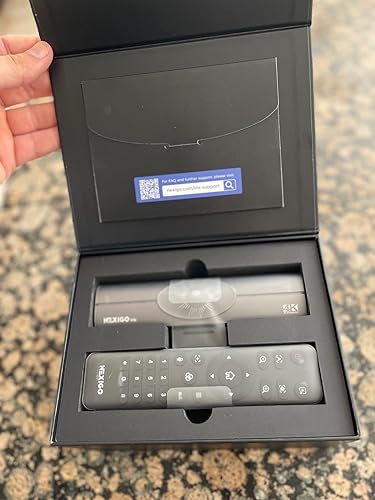
I have had some time to experiment with the Nexigo Iris and I come away very impressed. I will mention up front that I do not have too much experience with webcams so I will not be commenting on the value for the price. The product arrives extremely well packed. I am very impressed by the padded box it came in- complete with magnetic lid holders and special pouches for the quick start guide and manual. I am thankful for the printed materials as I prefer it over downloads or QR codes. The text is well written and easy to understand. The camera worked instantly upon being plugged into USB. There was no installation process, extra software to install, etc. Plug and play! When you pick up the camera, it up it feels very well made and has some weight to it. The built in screen holder worked very well and did not need much adjusting, although there is a great ability to do so if needed. The included remote control is very nice. Good size, easy to hold, and well labeled. It is NOT a minimalist design- it has a physical button for all of the settings that you will need to frequently get to. The only slight hiccup in set-up was that when I plugged it in and used it for google meet, the OSD came through mirrored. I was able to get to the correct menu setting and fix this without much trouble. I was originally a bit disappointed in the quality of video in the shadows. I had some significant backlighting which gave the camera a challenge. Switching the camera to low light helped a little but what really impressively helped was the backlight compensation mode (which has a dedicated button right on the remote!). The auto-tracking feature is fantastic. I am not familiar with whether this is a feature found on other products but I was very impressed. I could freely and comfortably shift in my seat- or even move around further than that- and the camera immediately responded and followed me a round without any delay. PRIVACY MATTERS! I was happy to see the inclusion of a plastic blind to put over the camera when it is not in use. The red light on the front indicating that it is turned off is also helpful. If you are in the market for a nice webcam, I recommend that you consider this item! I have found Nexigo to be a reliable brand that cares about customer satisfaction. ... show more
Reviewed in the United States on December 26, 2022 by Matthew Schucker

  • This camera rocks for the price!
Color: DeepBlack
I'm on my 3rd NexiGo camera and this is by far the best one so far. The last one I got was the N970P. I have a lot of meetings by zoom online plus host a podcast that has a video aspect to it. A couple of things that are important to me are image quality...and low light ability. This camera knocked it out the park on both. As soon as I plugged it in, there was a notable difference in the picture quality compared to my other NexiGo models. I love it when you can tell right away. I have a studio set up and because of the way the windows are set up, low level lighting ability is crucial. What impressed me the most is that I don't have to use studio lights to get a great picture. If you take a look at the image with my face....the only lights that were on were the back lit colored lights behind my screen. I wasn't able to do that with my previous cameras. I love the fact that I can just plug it in and I'm ready to go. If I do need to make an adjustment, the in camera menu is easy to use. I also loved the lens cover that you can just slide over to the right or left when you start the camera. The microphone was pretty good as well....although I use a Rode mic that plugs into a board. It's nice to know that if I travel with it, I will still have good audio. This camera is an improvement on my N970P. The only negative when comparing the two is when you are fully zoomed in, the picture on Iris is not as clear as the N970P.....but that is about it and it certainly isn't a deal breaker for me. For the price....you really can't beat this camera. I highly recommend it. ... show more
Reviewed in the United States on October 11, 2022 by Vegas Girl

  • Spend a little more for quality and be happy
Color: Neo
Great camera and easy to install. I had this camera and really like the cameras features. It's easy to tell when the camera has its lens closed and it only opens when you are using the application i.e. Microsoft's Teams etc. It cost a little more but is worth it
Reviewed in the United States on June 29, 2026 by EBC

  • Updated review -- some dissatisfaction
Color: Neo
First, the good... this was the least expensive external camera I was able to find that supports Windows Hello's facial recognition login. It was a fair amount more for the next least expensive camera. The only other contender in the price range was an HP camera that not only is well known that its facial recognition is non-operational on a USB 2.0 port (using on my KVM was useless for that), but worse, I just couldn't get it to even work directly on a 3.0 port. This one works anywhere I've tried plugging it in. I also like the very obvious automatic privacy shutter. It's huge and orange and it makes a loud click when it opens, and you can easily see and hear when your camera has turned on. Now for the negatives. First the facial recognition feature is really spotty. It won't work if you're in less than great lighting, unlike the Logitech Brio and every other camera I have that supports Windows facial recognition login. It also doesn't work if you're not within a couple of inches of the exact spot where you trained it. Just a few inches either way from that distance has it complaining that you're too close or too far, and I've had times where I barely move and it goes from "you're too close" to "you're too far away". And unless the distance and lighting happen to be absolutely perfect, you spend time either having it finally see you or adjusting your lighting and moving back and forth, and by then you could have just typed your PIN. A lot of times that's what you end up doing anyway. When it works immediately it's great, but a lot of the time it's frustrating. Contrast that with the Brio and the cameras that are built into the two notebooks I have that support Hello -- those are all instant 99% of the time with way more allowance for distance variation and all of them even work in very dim lighting. The Brio recognized me last night in near darkness. Next problem -- focusing. This thing just struggles to lock onto you sometimes. On many calls I had people remarking that I'm just a huge blur, and I had to spend some time trying to force it to refocus, moving around and waving fingers right in front of it. That happened a lot more often than it should have. Looking back at the Hello login problems, I have to wonder if some of those problems are because it's struggling to focus sometimes and that might make the recognition fail. Next up -- image quality. I realize this is a relatively inexpensive camera, but it's just not as clear as it should be for a 1080p camera. I've used some of the low-end Logitech webcams that cost half what this one cost that had better image quality. This one no doubt costs more than those because of the Hello support, but since that doesn't work as well as you're going to want, unless you really NEED that and are willing to put up with it being finicky, maybe go with a cheaper and better image quality camera. Last, the privacy shutter. IF you're paying attention even a little you'll know that the shutter has opened (i.e., camera is ON) because of the click and the visible large orange coloration when it's closed. If you're NOT paying attention and something turns your camera on, it'll be sitting there operating with no shutter in place without you having noticed. This automatic shutter depends on you keeping a bit of attention to it. I think it's a huge weakness that the "privacy shutter" just opens on its own whenever the camera turns on. You don't manually open or close it. A privacy shutter is usually there to prevent unknown spying software (installed by someone local with access to your system, or malware) from allowing someone to watch you. But if it just opens any time the camera comes on, that could happen in a moment when you've turned around or while you're walking around naked in the same room and not watching the camera. This "privacy shutter" is overall only of very limited use, and leaves a lot more risk than having a physical manual shutter. Overall conclusions -- The focusing issues are probably among the worst here, for a camera that has autofocus. This is so bad that I was motivated to buy another brand (my new Logitech Brio) to replace it. I can't believe a $90 camera has such a poorly operating autofocus. If they rework that and get it working as well as some of the cheaper autofocusing cameras, it might fix the Hello issues and turn this into a real bargain of a camera. As it stands, this camera just isn't worth it. ... show more
Reviewed in the United States on July 31, 2024 by C. C. Jones

  • Great camera
Color: Neo
Love this camera. It has made it possible for me to use my laptop on my large screen while keeping it closed on my desk. Great sound and quality. I love the Hello feature
Reviewed in the United States on July 28, 2026 by Michelle Adair

Can't find a product?

Find it on Amazon first, then paste the link below.
Checking for best price...