


Search  for anything...

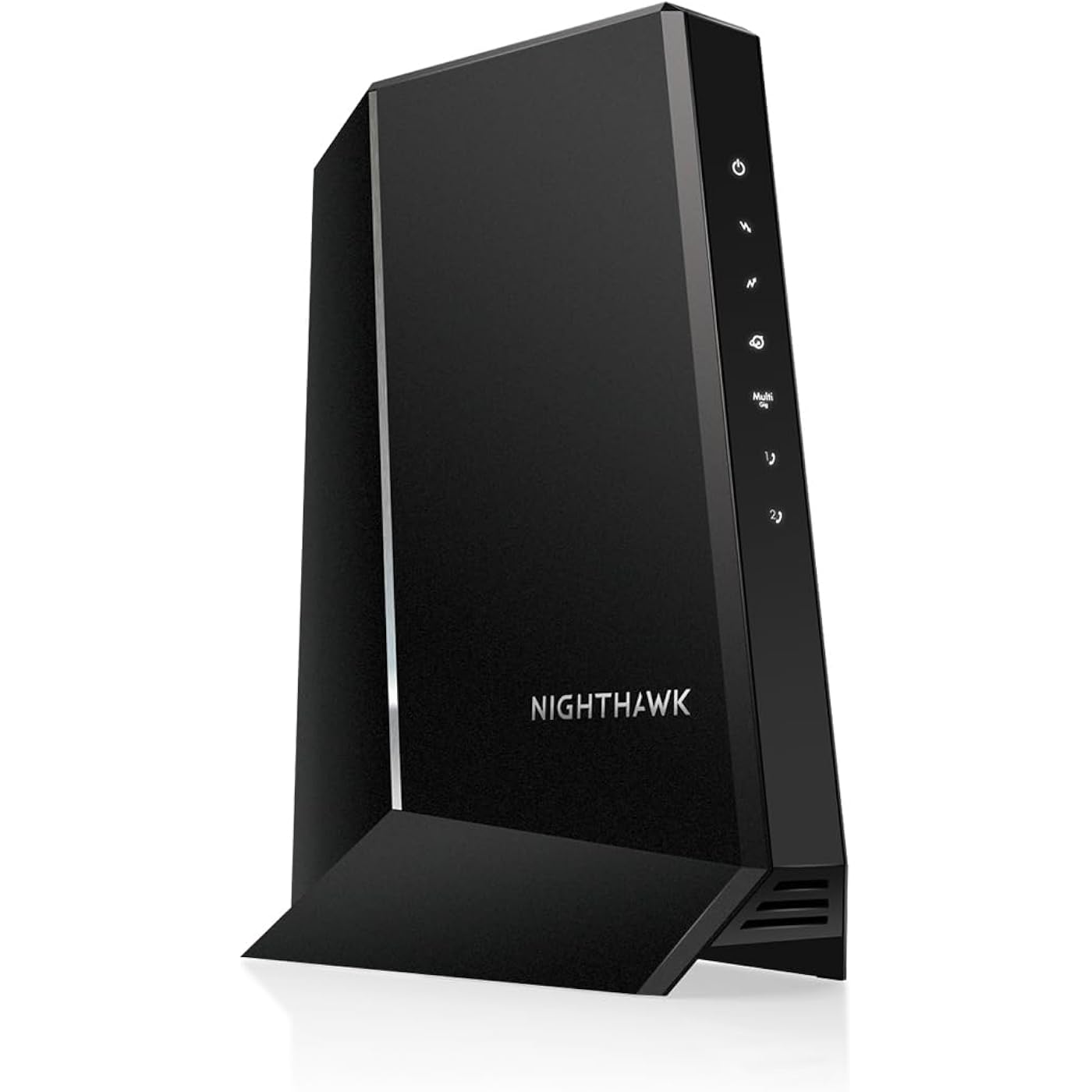
NETGEAR Nighthawk Multi-Gig Cable Modem for Xfinity Voice (CM2050V) – for Cable Plans up to 2.5Gbps - DOCSIS 3.1-2 Phone Lines
  • Based on 3,370 reviews
Condition: Used - Like New
Checking for the best price...
$229.99 Why this price?
Save $120.00 was $349.99

Buy Now, Pay Later


As low as $38.33 / mo
  • – 6-month term
  • – No impact on credit to apply
  • – Instant approval decision
  • – Secure and straightforward checkout

Ready to go? Add this product to your cart and select a plan during checkout.

Payment plans are offered through our trusted finance partners Klarna, Affirm, Afterpay, Apple Pay, and PayTomorrow. No-credit-needed leasing options through Acima may also be available at checkout.

Learn more about financing & leasing here.

Selected Option

Free shipping on this product

This item is eligible for return within 30 days of receipt

To qualify for a full refund, items must be returned in their original, unused condition. If an item is returned in a used, damaged, or materially different state, you may be granted a partial refund.

To initiate a return, please visit our Returns Center.

View our full returns policy here.


Availability: In Stock.
Fulfilled by Da Baers

Arrives Jul 17 – Jul 19
Order within 3 hours and 3 minutes
Available payment plans shown during checkout

Protection Plan Protect Your Purchase
Checking for protection plans...

Style: Modem for Xfinity Voice


Features

  • BUILT FOR FASTEST MULTI-GIG SPEEDS: Best for cable provider plans up to 2.5Gbps.
  • COMPATIBLE WITH XFINITY INTERNET & VOICE SERVICE: Certified by Xfinity and ideal for Xfinitys Triple Play plan. NOT compatible with Verizon, AT&T, CenturyLink, DSL providers, DirecTV, DISH.
  • WORKS WITH ANY WIFI ROUTER (separate unit), BEST WITH WIFI 6 or 7: Connect any WiFi router to this modems Ethernet port to support all your wireless devices. For the fastest Internet, connect to a NETGEAR WiFi 6 or 7 router or Orbi Mesh system
  • VOICE PHONE SUPPORT: For use with Xfinity Voice service and up to 2 telephone lines with enhanced call features including caller ID, 3-way conference calling, call forwarding and more.
  • MULTI-GIG ETHERNET: 1 x2.5Gbps Ethernet port for the fastest, true multi-gig Internet connections.
  • Easy and fast setup
  • Made for use in the U.S. only

Description

Experience a new generation of cable modems with DOCSIS 3.1 that delivers 2.5Gbps ultra-high speed Internet connections, so you can be ready for the fastest cable Internet service plans of today and tomorrow. DOCSIS 3.1 delivers the world’s fastest cable Internet with speeds that are 10 times faster than DOCSIS 3.0. The Nighthawk 2.5Gbps Internet Speed Cable Modem is also backward compatible with DOCSIS 3.0 and works with all Internet service speed tiers.

Brand: NETGEAR


Internet service provider: Xfinity


Connectivity Technology: Ethernet


Compatible Devices: Router


Product Dimensions: 6.8"L x 3.7"W x 8.2"H


Connectivity Technology: Ethernet


Compatible Devices: Router


Number of Ports: 2


Maximum Downstream Data Transfer Rate: 2500 Megabits Per Second


Maximum Upstream Data Transfer Rate: 2.5 Gigabits Per Second


Data Transfer Rate: 2.5 Gigabits Per Second


Number of Ethernet Ports: 2


Item Dimensions L x W x H: 6.8"L x 3.7"W x 8.2"H


Color: Black


Brand: NETGEAR


Internet Service Provider: Xfinity


Modem Type: DSL


UPC: 606449147483


Manufacturer: Netgear


Mfr Part Number: CM2050V-100NAS


Model Number: CM2050V-100NAS


Unit Count: 1.0 Count


Item Weight: 2.6 Pounds


Warranty Description: 1-year warranty


Built-In Media: Nighthawk 2.5Gbps Internet Speed Cable Modem (CM2050V), One (1) Ethernet cable, One (1) RJ11 telephone cable, Quick install guide, Power adapter


Frequently asked questions

If you place your order now, the estimated arrival date for this product is: Jul 17 – Jul 19

Yes, absolutely! You may return this product for a full refund within 30 days of receiving it.

To initiate a return, please visit our Returns Center.

View our full returns policy here.

  • Klarna Financing
  • Affirm Pay in 4
  • Affirm Financing
  • Afterpay Financing
  • PayTomorrow Financing
  • Financing through Apple Pay
Leasing options through Acima may also be available during checkout.

Learn more about financing & leasing here.

Top Amazon Reviews


  • NETGEAR Nighthawk Multi-Gig Cable Mode
Style: Modem for Xfinity Voice
Fairly simple to install. Worked well and was compatible with xfinity. A bit pricy! Decent range. Download and upload speeds are pretty solid for what it is used for
Reviewed in the United States on March 22, 2026 by MICHAEL STEELE

  • Bit of a battle to get up and running. Does not include wifi.
Style: Modem for Xfinity Voice
It took me a while to get it to actually get online and working with Xfinity and the network I have setup in my home. I needed to go online with my cellphone and go to the activate a new device page while just my computer and the new modem were networked together. Once it was activated I had to reboot the modem and it then went online and was networked into my computer and online. Then I had to get my wifi router passing the internet from the new modem which took some time. I reset the automatic DNS selection settings and that got everything working together so all my network devices got online. Since then everything has just worked including the phone lines and it's fast. It's a nice fast cable modem with telephone voice support, just be prepared for some work to get it setup and working properly if you have a complicated network with a lot of devices to work with. ... show more
Reviewed in the United States on June 23, 2022 by T. Glunz

  • Used, Security-Compromised Device Sold as “New” — Material Misrepresentation & Defective Product
Style: Modem for Xfinity Voice
This review documents a material misrepresentation and functional security defect involving a product sold and shipped by Amazon as Brand New. I purchased the NETGEAR Nighthawk Multi-Gig Cable Modem for Xfinity Voice (CM2050V) on October 21, 2025, paying full retail price ($299 + tax). The unit received was clearly used, improperly packaged, and security-compromised. Evidence of Prior Use (Not New Condition): Outer box was torn, unsealed, and forcibly opened Device surface had grease marks and fingerprints Power cable was loosely thrown into the box Missing required accessories: Installation documentation Ethernet cable Telephone cable All other items in the same shipment arrived factory-sealed and new, making this discrepancy unmistakable. Functional & Security Defect After installation and ISP MAC registration, the modem becomes operational; however, the administrative credentials cannot be reset: Factory reset procedures do not restore default credentials The default admin password (“password”) no longer applies Admin password cannot be changed or recovered This indicates one of the following: The device retains prior owner credentials, or The reset mechanism is non-functional Both conditions render the modem defective and insecure. A consumer networking gateway that does not allow credential control is not fit for purpose and presents a security risk. As a Network Infrastructure Engineer, I can state unequivocally that a modem in this condition fails basic security and usability requirements. Return Window Impact: This modem was shipped directly to Texas for an elderly family member. Due to an unforeseen family death, I was unable to install the device until November 26, 2025, at which point the return window (November 22) had expired. The defects were discovered immediately upon first installation. Conclusion: This is not a matter of buyer error or preference. It is a case of: Used hardware sold as new Incomplete contents Security-related functional defect At this price point, and for a foundational network device, this is unacceptable. Amazon must ensure that items sold as “New” meet minimum packaging, reset, and security integrity standards. I will follow-up this review with a formal Executive Escalation letter to request escalation regarding this defective and misrepresented product sold and shipped by Amazon as Brand New. ... show more
Reviewed in the United States on December 20, 2025 by Armando L.

  • stable and easy to set up
Style: Modem for Xfinity Voice
Description: NETGEAR Nighthawk cable modem with voice was easy to set up (minutes) and has been stable since turned on a month ago. The default password is on the bottom, be sure to change it when you do setup.
Reviewed in the United States on June 12, 2026 by Bruce Walters

  • Solid Modem but Phone Lines No Good for RCN
Style: Modem for Xfinity Voice
As a buyer, I'm uncomfortable seeing the name of a competing internet service provider on the actual tech product I'm considering. Looks like a thing that will only work with Company X. But I did a LOT more (time-consuming) research to be sure the Netgear Nighthawk CM2050v would be the modem to grow into, even if I discontinue my RCN phone/internet service and want to keep my landline and fax phone line with another ISP. It wasn't plug-and-play, as one of the video reviews would suggest. I'm not sure how that person plugged it in and had it interface with her ISP and router with no phonecall to her ISP. There's a MAC number on the unit that needs to be reported to your service provider in order to get it running. (Maybe if you're with Company X, you don't need to call it in?) Alas, the phone agent at my ISP ultimately bailed and scheduled me for an in-home appointment. After a lot of household disruption, this cable modem works as well as to be expected within the bounds of what I pay for at RCN. There was an initial internet outage that lasted an entire overnight (which isn't usually our experience, which is defined by frequent but brief interruptions). So I got nervous when already I was having to recycle the power on this thing and start over. But as some of the other reviews indicated, that might happen at the outset, then after that, smooth sailing. I'm disappointed that I still have to rent a separate RCN modem just for the landline phone and fax machine. But I'm so pleased there are companies still providing landline service so I can keep these amenities in my home office. I can also send a fax digitally, sure, but it's such a convenience to send/receive faxes out of the same box that makes copies, scans, and color print jobs, so why not keep my fax line, too? Company X does warn on their product that though there are two phone lines indicated, you'd need to paying for a 2-line package in order to use both. At this point, those lights remain dark because I'm not using them. Glad I got this for the same price as a no-phone Nighthawk unit of the same caliber thanks to a sale at the time of purchase. ... show more
Reviewed in the United States on January 13, 2023 by Roxane Assaf

  • Works perfectly--if you know what to do.
Style: Modem for Xfinity Voice
This device was set up and working perfectly in 15 minutes--but it is very important to know how to best do it, which I discovered from various online forums. It is designed to work with Xfinity, and is more expensive because it has phone ports, which were important to us. If they are not important to you, buy a cheaper model. Now for the set-up. The most important point in setting it up is to NOT deal with any verbal phone tech support, and it will become clear why. Xfinity's own website describes how to use the mobile phone app for setup--use it. Once you have downloaded the phone app and signed in to it, it allows Xfinity to identify you and know where your service is immediately. In the app, go to Account, Add new device, Your own--and follow the directions. The only input required of you is for the CM MAC number which is on the bottom of the unit. They do not need or want the MTA MAC number--forget about it. It took 8 minutes for their system to identify the device, and about another 6-7 minutes to set it up. That was all, and everything, phone line included, worked perfectly with my correct phone number. Given my previous interactions with Xfinity, I was amazed at how seamlessly this worked. They have gotten their act together--almost. Here's the hooker. I went on the the Xfinity website, and it had immediately identified that I now had my own modem. But I also wanted to call Xfinity to confirm that the old modem/router would be taken off my bill once I returned it--big mistake. Their automated phone tree started off by saying that it had detected a problem with my modem and wanted permission to reset it!!! I shouted no, no ,no and hung up. What I suspect is going on is that the Xfinity answering system and probably any employee you would talk to is operating off a legacy system which does not update immediately, like your account website and whatever infrastructure uses the mobile phone app to set up new equipment. The bottom line is to use the new mobile phone app for any setup and NOT, under any circumstances call for any tech support, verbal or automated, because they are not immediately in touch with the new setup infrastructure. I hope his helps any subsequent customers. With the new setup system, the device worked immediately and flawlessly. ... show more
Reviewed in the United States on July 9, 2023 by Joan

  • No animals were hurt while installing this modem.
Style: Modem for Xfinity Voice
Let's all remember, this is a modem. It's not a router. For me, that's good as I have a router/firewall device on the other side. Because it's a modem, its sole job is to pass through the single DHCP address from Xfinity. Configuration is pretty simple, you plug it in. From there you have to hook up a laptop/desktop to it to get into its local config so you can get the MAC to send to Xfinity, then that's pretty much it. A few gotchas though. I have multiple VLANs setup in different rooms and I put this on a VLAN from the switch. It did not like that. It couldn't pass the IP address back to my firewall/router. I didn't spend too much time troubleshooting it, rather I just added a coaxial wire to the room where my firewall is located (which has a service panel close to the coaxial main). The product has worked well for what I need. I haven't noticed a decrease in performance over the old Xfinity modem/router/WiFi combo. I bought this because my Xfinity device died, and I have my own WiFi (Orbi), and I also have a complex 2 ISP configuration, which cannot be easily managed with the Xfinity router. The dumb modem allows me to solve most of my problems. I did run into one issue, not with the modem, with the service. Xfinity actually charges you more for using your own hardware than renting theirs. It's unfortunate. The device is great and I will pay the extra $5 per month (instead of saving $14 as expected). When they reconfigured the plan I went from 80mbps up to 40mbps up. This isn't the device, because I was getting great upload speeds before having them change the plan to include the customer-owned hardware. They said it was the hardware, but the hardware ran fine for a week. It turns out they throttled it and you have to call them and argue through it with them. This is important information because it's not the device, it's the service levels on their side, so if you see things that don't look correct after it's set up and verified, then it's probably on their side. ... show more
Reviewed in the United States on December 22, 2023 by Agent Smith

  • Good
Style: Modem for Xfinity Voice
Wifi is actually not built-in, I was wrong. Good modem
Reviewed in the United States on April 23, 2026 by jaycee

Can't find a product?

Find it on Amazon first, then paste the link below.
Checking for best price...

