Search  for anything...
msi

MSI P65 Creator 8RF-441 15.6" Professional Laptop - Intel Core i7-8750H, GTX1070, 32GB DDR4, 512GB NVMe SSD, Win 10 PRO

  • Based on 32 reviews
Condition: Used - Like New
Checking for the best price...
$3,699.00 Why this price?

Buy Now, Pay Later


As low as / mo
  • – Up to 36-month term if approved
  • – No impact on credit
  • – Instant approval decision
  • – Secure and straightforward checkout

Ready to go? Add this product to your cart and select a plan during checkout.

Payment plans are offered through our trusted finance partners Klarna, Affirm, Afterpay, Apple Pay, and PayTomorrow. No-credit-needed leasing options through Acima may also be available at checkout.

Learn more about financing & leasing here.

Selected Option

Free shipping on this product

30-day refund/replacement

To qualify for a full refund, items must be returned in their original, unused condition. If an item is returned in a used, damaged, or materially different state, you may be granted a partial refund.

To initiate a return, please visit our Returns Center.

View our full returns policy here.


Availability: Only 4 left in stock, order soon!
Fulfilled by TinVIA Technology

Arrives Mar 18 – Mar 27
Order within 20 hours and 34 minutes
Available payment plans shown during checkout

Protection Plan Protect Your Purchase
Checking for protection plans...

Style: 144Hz 7ms | GTX 1070 | 32GB 512GB SSD


Color: Designer White


Features

  • Display: 15.6" FHD, Anti-Glare Wide View Angle 144Hz 7ms Ultra Thin Bezel 72% NTSC 1920x1080 16:9 | Operating System: Win 10 PRO
  • Processor: New Intel Core 8th Gen Core i7-8750H 2.2 - 4.1GHz
  • Graphics: NVIDIA GeForce GTX1070 8G GDDR5
  • Memory: 32GB (16G*2) DDR4 2666MHz 2 Sockets; Max Memory 32GB | Storage: 512GB NVMe SSD
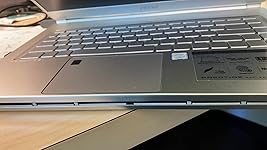
  • Special Features: Brushed Aluminum Build | Ultra Thin Bezel | White Backlit Keys | Fingerprint Reader | VR Ready

Description

MSI P65 Creator 8RF-441 MSI Thin Bezel Gaming/Productivity Laptop 15.6" 144Hz 7ms Display GTX 1070 8G i7-8750H 32GB 512GB NVMe SSD Win 10 PRO.

Brand: MSI


Model Name: P65 Creator 8RF-441


Screen Size: 15.6 Inches


Color: Designer White


CPU Model: Core i7


Ram Memory Installed Size: 32 GB


Operating System: Windows 10 Pro


Special Feature: Anti-glare,Thin Bezel


Graphics Card Description: Dedicated


Graphics Coprocessor: NVIDIA GeForce GTX 1070


Standing screen display size: ‎15.6 Inches


Screen Resolution: ‎1920 x 1080 pixels


Max Screen Resolution: ‎1920x1080 Pixels


Processor: ‎2.2 GHz core_i7


RAM: ‎32 GB DDR4


Memory Speed: ‎4.1 GHz


Hard Drive: ‎SSD


Graphics Coprocessor: ‎NVIDIA GeForce GTX 1070


Chipset Brand: ‎NVIDIA


Card Description: ‎Dedicated


Graphics Card Ram Size: ‎8 GB


Wireless Type: ‎802.11g


Number of USB 3.0 Ports: ‎4


Average Battery Life (in hours): ‎8 Hours


Brand: ‎MSI


Series: ‎P65 Creator 8RF-441


Item model number: ‎P65 Creator 8RF-441


Operating System: ‎Windows 10 Pro


Item Weight: ‎4.14 pounds


Product Dimensions: ‎14.08 x 9.75 x 0.69 inches


Item Dimensions LxWxH: ‎14.08 x 9.75 x 0.69 inches


Color: ‎Designer White


Processor Brand: ‎Intel


Number of Processors: ‎6


Computer Memory Type: ‎Unknown


Flash Memory Size: ‎512


Voltage: ‎230 Volts


Batteries: ‎100 Lithium Ion batteries required. (included)


Date First Available: September 24, 2018


Frequently asked questions

If you place your order now, the estimated arrival date for this product is: Mar 18 – Mar 27

Yes, absolutely! You may return this product for a full refund within 30 days of receiving it.

To initiate a return, please visit our Returns Center.

View our full returns policy here.

  • Klarna Financing
  • Affirm Pay in 4
  • Affirm Financing
  • Afterpay Financing
  • PayTomorrow Financing
  • Financing through Apple Pay
Leasing options through Acima may also be available during checkout.

Learn more about financing & leasing here.

Top Amazon Reviews


  • What an amazing machine to replace my desktop unit
Style: GTX 1050 | 16GB 256GB SSD Color: Aluminum Silver
The MSI P65 8DR is fast, quiet, and nice to the touch. The screen image quality is a delight and I have always been picky about screen resolution, contrast and color. Setting up the laptop was straight forward: I plugged it in (power and internet) then pressed the power switch. In a few seconds, I heard a greeting, and I followed the verbal/written instructions to set up the system. After the basic setup, I pressed WIN+ I, which opens the Windows settings, then clicked on "Update and Security" and began updating my system, which did it all by itself. Warning: my MSI P65 came with a Norton Security 30-day trial. They offered me to begin my trial subscription but refused it. So, in the settings, I typed the word Uninstall and selected "Apps & Features" from the results. From there I uninstalled Norton Security and Norton Studio. That only took a few seconds. Once Norton was out of the way, I restarted the system and Windows Security automatically took control of my security needs. As a computer programmer, instructor, and screen caster, the purpose of this laptop is to eventually replace my 12-year old Desktop. I will update my review when I begin working with this system. Right now, I'm waiting for a 64gb UBS flash drive to create a recovery drive in case of a catastrophic event. The system recommends a dedicated flash drive of at least 18gb capacity. Update: Periodically you will see a reminder to back up your system. If you click on it, it will take you to a utility program called MSI BurnRecovery. I used that app to create a recovery USB file of my initial setup. The process was straight forward, and it took me about 40 minutes. Hard drive space: The Solid-State Drive (SSD) consists of two partitions: C and D. So far, after Windows 10 Pro update, my C drive has 85.7GB free, and the D drive offers 74.7GB free, I wish I had more space, but I already knew about it before ordering this laptop. The thing is that, with today's cloud services like Amazon, and Office 365, I don't see a problem with such low capacity (and I can always install an additional SSD drive later), but if you are planning to save all your data on this computer, you will eventually run out of space. Since I don't play games, I will remove all the clutter from mine to give me room for my own software and current data. I'll be using this system for professional work. By default, everything is saved in the C drive, but that can be changed. I have instructed Windows to save applications on C, and data on D. This will make it easy for me to maintain my data. To do that, go to settings (WIN + i), and search for "Change where new content is saved". Then change the settings at will. Overall, I'm very happy with this purchase so far (no buyer's remorse). Month later: I have finally replaced my old desktop. The MSI P65 8DR continues to amaze me. I love the screen resolution and now watch all my Netflix and Amazon movies with this laptop. I’m impressed with how long the battery lasts. Even in those long nights watching three to four episodes the battery does not go below 50%. As to the screen size for movie watching, I was afraid of downsizing from a 22” monitor to a 15.6” unit, but this screen is so pleasant to the eye that I do not think about the real estate loss, I’m really happy about it, especially when I no longer need to stay in one place throughout the whole movie. Portability has its advantages. No fan noise: The MSI P65 8DR is practically silent. Even in those rare moments when the fan kicks in, I would have to place my ear on the machine to hear it. However, it does get a bit warmer after a while when watching movies. If you have the computer on your lap you may want to place a pillow between the laptop and your body for comfort. Still, that is not a deal breaker as I continue to enjoy this purchase and haven't found any regrets. May 2020 Fan noise (resolved) Suddenly the fan of my MSI P65 8DR began clicking like if dust was in its way. I'm still under warranty so I could not open the unit to inspect what was going on. After investigation, it turned out that I had fallen asleep listening to music on battery mode and on the next morning the laptop was dead. That must have reset the fan settings somewhat and the fan was now running on a basic level, which seems to be a constant run. Here's how I fixed it: First, I opened "Dragon Center" and turned on "Cooler boost" for a second (then take it back to its original setting). Be careful since a puff of dust will be expelled from the computer (that will diminish some of the noise). Then, I set the fan speed to "advanced" and the noise ended because the fans are better regulated, working only when necessary and at a better speed. Weeks later the computer remains quiet. Wrap up: It has been almost a year since I purchased this unit and I use it for work and pleasure about 12 hours a day. I'm still very happy about my choice of computer with no regrets at all. ... show more
Reviewed in the United States on June 11, 2019 by Tony

  • Swollen battery, broken Wi-Fi adapter, and worn hinge in 2.5 years
Style: GTX 1050 | 16GB 256GB SSD Color: Aluminum Silver
Great value when purchased. Trash after 2 years. Built quality is a problem. Maybe MSI just makes it deliberately so that you will buy a new one after 2 years? The motherboard design is flipped so it is difficult to maintain and upgrade it. There are many sticky thermal pads inside which are dust collectors. After two years, the whole machine (not only the fans) is blocked by dusts severely and the heat is a big issue. The machine chassis is mainly built with metal/alloy. But, the hinge is plastic! The surface got worn quickly and become very ugly. What a strange design. The Wi-Fi adapter stops working after two years suddenly. I guess it is due to the heat issue mentioned above. And more importantly, the swollen battery breaks the chassis and makes the laptop a bomb! ... show more
Reviewed in the United States on July 18, 2022 by ZZZ! ZZZ!

  • Not at all what I wanted.
Style: GTX 1050 | 16GB 256GB SSD Color: Aluminum Silver
I'll get this out of the way first - this is a fine laptop. The display beautiful, the audio is just fine. It has an aluminum casing and feels weighted but not too flimsy or light and the SSD is very snappy and fast. However... This is absolutely not what I thought I was getting. In my order, it specified that this particular model came with around 252 GB of ram. Now, I know SSD drives are typically very small and you're trading off for speed. BUT... Once I actually checked the disk it had much, much less space available. Once I had set everything up and it was all good to go I saw that I had under 75 GB of free disk space. 80. For a laptop that advertises itself as a good choice for gaming, 72 gb is an absolute no-go. That's one, maybe two current video games, and that isn't even counting other programs or files people might want to save to their device. Once everything was all set up I expected to have around 175-200 gbs of free space, but I didn't even get half of that. This was not what I paid money for and I will be returning this. This is unacceptable and false advertising. ... show more
Reviewed in the United States on May 12, 2019 by Crowsie

  • Great laptop, but upgrade it when you can.
Style: GTX 1050 | 16GB 256GB SSD Color: Aluminum Silver
Don’t get me wrong, this laptop is great for light current gen gaming AND content creation as well. But you can do more to bring out it’s full potential if you’ve had it for a while already. NOTEWORTHY THINGS: The 128gb nvme that comes with the gtx 1050ti model IS partitioned. This means that with the software MSI provides, you won’t get much of any storage space at all. It’s better to just upgrade this from the get-go if you plan on storing anything. This shouldn’t be a problem since the 8rd has two nvme bays. The 16gb of RAM you get is only single channel. This isn’t really a problem, but it can be better with dual channel. The i7 8750H in this thing is good for last gen, don’t get me wrong, but there’s only so much heat you can output in such a thin case without throttling the poor thing. Doesn’t mean it affects the performance very much. You can still do stuff like rendering and games like Far Cry 5 on it without too much impact. As for the gtx 1050ti, it’s just that: a decent last gen chip still good for current gen gaming. To put it into perspective: this specific machine meets recommended for 87% of the games listed on CYRI. Again, not bad for a last gen chipset. I haven’t tested battery life myself, but other reviewers say it well enough. The advertised life is more for when it’s being used lightly instead of under load. Maybe MSI should advertise the life under load with the max life too. All in all, this thing is decent for what you pay for. It’s still a good gaming rig with the right upgrades too. So keep this in mind if you decide to buy one. That’s about all I have to say. Thanks for reading. ... show more
Reviewed in the United States on August 8, 2020 by Alex

Can't find a product?

Find it on Amazon first, then paste the link below.
Checking for best price...