Search  for anything...

monTEK Single Monitor Wall Mount, Full Motion Spring Arm for 17-32" Screen

  • Based on 254 reviews
Condition: New
Checking for the best price...
$34.99 Why this price?
Save $15.00 was $49.99

Buy Now, Pay Later


As low as $8 / mo
  • – 4-month term
  • – No impact on credit to apply
  • – Instant approval decision
  • – Secure and straightforward checkout

Ready to go? Add this product to your cart and select a plan during checkout.

Payment plans are offered through our trusted finance partners Klarna, Affirm, Afterpay, Zip, Apple Pay, and Google Pay. No-credit-needed leasing options through Acima may also be available at checkout.

Learn more about financing & leasing here.

Selected Option

Free shipping on this product

FREE 30-day refund/replacement

To qualify for a full refund, items must be returned in their original, unused condition. If an item is returned in a used, damaged, or materially different state, you may be granted a partial refund.

To initiate a return, please visit our Returns Center.

View our full returns policy here.


Availability: In Stock.
Fulfilled by Amazon

Arrives Sunday, Oct 25
Order within 23 hours and 34 minutes
Available payment plans shown during checkout

Protection Plan Protect Your Purchase
Checking for protection plans...

Style: Single Arm


Features

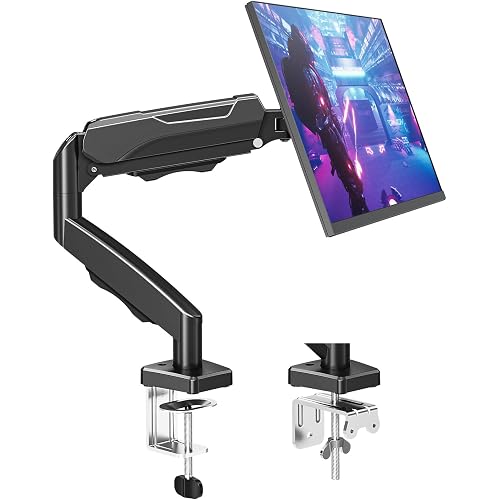
  • Universal CompatibilitymonTEK monitor wall mount fits 17 19 20 22 23 24 27 30 32 inch computer screens. Compatible with VESA 75x75mm and 100x100mm mounting holes. Please ensure your monitor has compatible VESA holesif not, you will need to prepare your own VESA mount adapter (not included)
  • Upgraded ConstructionThe single monitor arm is constructed from high-quality steel and aluminum for durability. It supports monitors weighing from 4.4 to 19.8 lbs, effectively reducing wobbling during use and keep the screen stable. The upgraded spring arm with 360rotation makes adjustment easier and smoother, giving you greater flexibility to position your monitor exactly as you need
  • Full Motion AdjustmentsEnjoy unmatched flexibility with +90 to -90 tilt, 180 swivel, 360 screen rotation. When not in use, the arm can be retracted close to the wall of only 4". This wall mount monitor arm extends up to 21.7" with a 9.84" height adjustment range, making it easy to find a more comfortable and ergonomic viewing angleperfect for long hours of work or gaming
  • Maximize Your Desk SpaceMount your monitor to the wall and instantly free up your valuable desk space. The monitor mount has a classic look that fits in any environment, while the integrated cable management system keeps wires organized and your workspace neat and tidy. Whether you're working, watching TV, monitoring or live streaming, this computer monitor wall mount brings both style and functionality to your setup
  • Easy InstallationDesigned for wood studs, brick, and concrete walls (Note: Please do not mount to drywall alone). The quick-release VESA plate makes installation effortless, allowing you to set up this monitor wall mount within 10 minutes. Ideal for use in office, home, studio, gaming setup, which is a multifunctional tool to enhance your efficiency and productivity

Description

Enjoy a comfortable and efficient viewing experience!

Mounting Type: Wall Mount


Movement Type: Tilt


Brand: monTEK


Material: Aluminum


Color: Black


Compatible Devices: Monitor


Maximum Tilt Angle: 90 degrees


Item Highlight: Holds to 19.8 lbs, Heigt Adjustable Mechanical Spring Monitor Arm, 75x75/100x100 VESA Wall Mount, Sturdy & Stable,Black See more


Unit Count: 1 Count


Number of Packs: 1


Brand: monTEK


Item Highlight: Holds to 19.8 lbs, Heigt Adjustable Mechanical Spring Monitor Arm, 75x75/100x100 VESA Wall Mount, Sturdy & Stable,Black


Unit Count: 1 Count


Number of Packs: 1


Manufacturer: monTEK


Number of Items: 1


Model Number: US-DS-MA1002WBK


Mfr Part Number: US-DS-MA1002WBK


Warranty Description: 1 Year Manufacturer


Mounting Type: Wall Mount


Movement Type: Tilt


Compatible Devices: Monitor


Maximum Tilt Angle: 90 degrees


Enclosure Material: Aluminum


Color: Black


Maximum-Supported Screen Size: 32 inches


Minimum-Supported Screen Size: 17 inches


Frequently asked questions

If you place your order now, the estimated arrival date for this product is: Sunday, Oct 25

Yes, absolutely! You may return this product for a full refund within 30 days of receiving it.

To initiate a return, please visit our Returns Center.

View our full returns policy here.

  • Klarna Financing
  • Affirm Pay in 4
  • Affirm Financing
  • Afterpay Financing
  • Zip Pay in 4
  • Financing through Apple Pay
  • Financing through Google Pay
Leasing options through Acima may also be available during checkout.

Learn more about financing & leasing here.

Top Amazon Reviews


  • Well-designed product, great customer support. (4 stars if using the cable runs with 4 cables.)
Style: Single Arm
I reviewed many monitor mounts before purchasing this one. I found some good ones that cost hundreds of dollars, but those were not in my budget. This one has all the features that you need at a fair price. There are several reasons why I am happy with this product. It is designed well. All of the structural parts are metal. The bearing joints have sleeves to protect them from wear. Three left/right joints allow for almost any left/right positioning. The vertical adjusting arm is designed so that the monitor does not change orientation when you raise or lower it. It has clamping screws for each of the joints to prevent movement/slipping that occurs on many other mounts. The spring tensioned arm which helps support the height of the monitor can be adjusted for any weight monitor (less than 19.8 pounds). You can move the monitor up or down a couple of inches after adjusting the spring, and it will hold there. The spring will not deteriorate over time like the gas filled shocks on some mounts. It comes with 5 mm lag bolts that can be used with the included 5 mm concrete/brick anchors for masonry walls, or screwed into studs. It comes with m4 and m5 VESA mounting screws to attach to the monitor/TV. The VESA screws fit my monitor's 8.5 mm deep holes perfectly (the 12 mm m4 bolts w/washers needed 8 mm deep holes). A warning, some monitors have holes that are not this deep, and you could damage your monitor by tightening these all the way. It also comes with Allen wrenches that are long enough to be useful. Great customer support. I wanted to get an extra piece for the mount. I contacted customer support through their website on Sunday evening and received a reply on Monday morning. After a couple of emails clarifying details, they shipped the piece I wanted in a couple of days. I've purchased too many other products where you simply cannot reach customer support, or they don't understand or can't deal with whatever it is you are requesting. This company was a pleasure to deal with. Miscellaneous Information #1: Cable runs in arms: If you don't intend to use the cable runs in the arms, you can skip to Misc Info #2. I would downgrade this slightly because of the difficulty in getting my 4 cables secured. If you only have 1 thin power and 1 video cable, this shouldn't be a problem. However, I have a touch screen monitor with speakers, so I needed 4 cables: 1-Power 2-HDMI for video 3-USB for touch feedback 4-Speaker As has been mentioned in other reviews, it is difficult to run the cables once the monitor is mounted and in place. With four cables, it's virtually impossible to get the cable covers back on with everything in place. The covers are barely large enough for the 4 cables. Here's what I ended up doing: I separated the 2 arms, and attached the upper arm to the monitor. I positioned the monitor upside down on a table with the bottom of the arm facing up. I removed the upper arm cover (4 L shaped tabs, it slides and lifts off). I attached the cables to the monitor. I routed the cables along the arm. I struggled to put the cover back on keeping the cables in place. After I completed attaching the cover to the upper arm, I attached the lower arm and removed its cover that is screwed in place. I ran the cables along the arm. Then, with significant effort, I put the cover back on. The cables had to be routed around the screw so they did not prevent the cover from closing. It is a really tight fit. It is so tight that you can't slide the cables once closed. I had to take it apart and start over after the first try because I didn't leave enough slack in the cables. In the end, it all worked, and I am happy with the result, but wish it had been easier. Three things to pay attention to: 1-It takes almost 3 feet of cable to get through the runs, so be sure you have long enough cables. 2-Be sure you leave enough slack at the joints to allow the monitor and arms to move in all of the various directions. 3-If you don't have the arms clamped into place with the clamping screws, be careful they don't come apart when moving the assembly. Miscellaneous Information #2: Mounting to stud wall where there is not a stud where you need it. This arm design works great if your monitor is 9-10 inches or more from the wall. The location of the mount on the wall is not critical because you have a lot of flexibility in left/right positioning. In this case, you can probably find a nearby stud that you can use. However, I needed the monitor to be against the wall when in use and moved out of the way when not. In my case, the wall plate needed to be in a precise location to the right of monitor center. Didn't have a stud there. Using anchors in sheet rock is NOT strong enough to hold something like this. I ended up using a piece of 1x12 that I could attach to the adjacent studs with structural screws. I attached the mount wall plate to the 1x12 with 5 mm nuts and cap screws (30 mm long) first. I was going to use 1/4 inch bolts, but 1/4 inch standard washers were too big for the wall plate recess. The lag bolts and washers that come with the mount are 5 mm. The 5 mm washers are too small for 1/4 inch bolts. Figuring out the positioning of the 1x12 and holes for the wall plate was the hard part. The monitor moves slightly left and right when moving up and down when positioned like this. Designing for the upper arm to be horizontal gives you the least left/right motion when raising/lowering the monitor. In this case, the top hole for the wall plate needed to be 17-7/8 inch to the right of, and 4-1/2 inches below, the VESA plate center. (Maybe this will help others considering this.) That's it. I would definitely recommend this, in spite of the difficulty I had with 4 cables. ... show more
Reviewed in the United States on August 21, 2025 by Researcher

  • Great Wall Mount
Style: Single Arm
easy to install and very sturdy. Make sure not o hang it too high
Reviewed in the United States on July 28, 2026 by Susan Stockman

  • Works great and holds well.
Style: Single Arm
Was easy to install and works great for my 24" monitor.
Reviewed in the United States on September 20, 2026 by GoodeZilla

  • Good quality
Style: Single Arm
It’s great quality and worth it but it needs tightening somtimes
Reviewed in the United States on August 1, 2026 by Mom Shopping List

  • Worth the money
Style: Single Arm
Great product
Reviewed in the United States on August 4, 2026 by jeo

  • Good but not strong
Style: Single Arm
Good but not too strong, great for office but I wouldn’t recommend for gaming set ups
Reviewed in the United States on March 25, 2026 by Lucas Manso

  • A Solid Deal
Style: Single Arm
Easy assembly and adjustable for different weight monitors. Works as good as wall mount arms at twice the price.
Reviewed in the United States on June 9, 2026 by Don S

  • Good enough
Style: Single Arm
Pretty good stand. You have to offset the base from the center of where you are mounting it, basically if you screw it in the center of a cubicle the screen won’t be centered. Good quality, reasonable price, plenty of hardware, and over all it adjust nicely. If this is what you’re looking for, then buy it. You won’t go wrong. ... show more
Reviewed in the United States on February 19, 2026 by Tyler Gridley

Can't find a product?

Find it on Amazon first, then paste the link below.
Checking for best price...