Search  for anything...

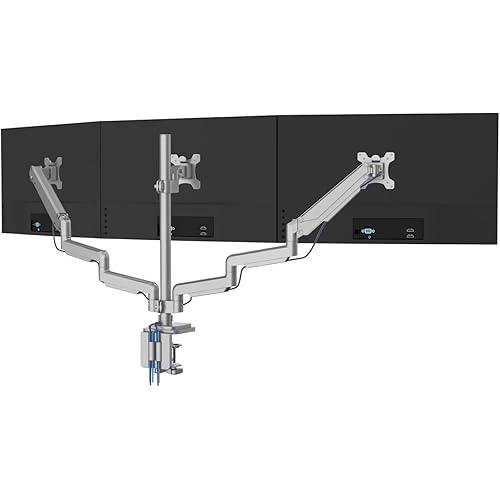
HUANUO Triple Monitor Mount for 17 to 32 inch Screens, Adjustment Gaming Triple Monitor Stand with Swivel, Tilt, Rotation, Clamp & Grommet Kit

  • Based on 7,237 reviews
Condition: New
Checking for the best price...
$119.68 Why this price?
Save $30.31 was $149.99

Buy Now, Pay Later


As low as $19.95 / mo
  • – 6-month term
  • – No impact on credit to apply
  • – Instant approval decision
  • – Secure and straightforward checkout

Ready to go? Add this product to your cart and select a plan during checkout.

Payment plans are offered through our trusted finance partners Klarna, Affirm, Afterpay, Zip, Apple Pay, and Google Pay. No-credit-needed leasing options through Acima may also be available at checkout.

Learn more about financing & leasing here.

Selected Option

Free shipping on this product

FREE 30-day refund/replacement

To qualify for a full refund, items must be returned in their original, unused condition. If an item is returned in a used, damaged, or materially different state, you may be granted a partial refund.

To initiate a return, please visit our Returns Center.

View our full returns policy here.


Availability: In Stock.
Fulfilled by Amazon

Arrives Thursday, Aug 6
Order within 5 hours and 47 minutes
Available payment plans shown during checkout

Protection Plan Protect Your Purchase
Checking for protection plans...

Color: Black


Features

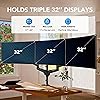
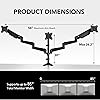
  • Fit for Your Monitors - Each monitor arm can only accommodate a maximum size of 32 inches. Monitors larger than 32 inches are not compatible. And the monitor must have VESA mounting holes of either 75x75mm or 100x100mm. The weight range of the screen must be from 4.4 lbs to 17.6 lbs. We recommend that you carefully verify this information before making a purchase.
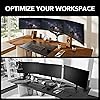
  • Super Space Saver - Conveniently frees up more valuable work space by elevating 3 monitors off of your desk, making your workstation spacious and clutter-free.
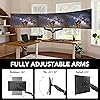
  • Customized For Optimal View - The arms allow easy to adjust monitors swivel, tilt and rotate to find an optimal view angle and position for comfortable work. Freely set your monitors to landscape or portrait mode!
  • Increase Comfort & Efficiency - Complete your work in 3 monitors at the same times with comfortable view position. Now you can enhance your work efficiency in comfortable work posture.
  • Two installation options - Two separate installation options are provided: C-clamp or grommet mount. C-clamp fits desk thickness 0.39-3.15", grommet mount fits desk thickness 0.39-2.36". Both options securely hold your monitor. Choose the installation method that suits your needs.

Description

Triple Monitor Mount Single Monitor Arm FlowLift Pro Dual Mount L-Shaped Standing Desk Mobile Standing Desk Dual Monitor Stand Single Monitor Mount

Mounting Type: Tabletop Mount


Movement Type: Articulating, Tilt, Swivel, Rotate


Brand: HUANUO


Material: Alloy Steel


Color: Black


Compatible Devices: Monitor


Maximum Tilt Angle: 90 degrees


UPC:


Unit Count: 3 Count


Number of Packs: 1


Mounting Type: Tabletop Mount


Movement Type: Articulating, Tilt, Swivel, Rotate


Compatible Devices: Monitor


Maximum Tilt Angle: 90 degrees


Enclosure Material: Alloy Steel


Color: Black


Maximum-Supported Screen Size: 32 inches


Minimum-Supported Screen Size: 17 inches


Brand: HUANUO


UPC: 810145633649


Unit Count: 3 Count


Manufacturer: HUANUO


Model Number: HNTS3B


Mfr Part Number: HNTS3B


Frequently asked questions

If you place your order now, the estimated arrival date for this product is: Thursday, Aug 6

Yes, absolutely! You may return this product for a full refund within 30 days of receiving it.

To initiate a return, please visit our Returns Center.

View our full returns policy here.

  • Klarna Financing
  • Affirm Pay in 4
  • Affirm Financing
  • Afterpay Financing
  • Zip Pay in 4
  • Financing through Apple Pay
  • Financing through Google Pay
Leasing options through Acima may also be available during checkout.

Learn more about financing & leasing here.

Top Amazon Reviews


  • I love this for my 32" monitors but wish the back pole was taller
Color: Black
Overall I love this item and unlike my last purchase, which I had to return, I plan to keep this one. PROS: Has two extension arms, meaning you have the middle part that connects to each side, plus an arm AND an additional arm, most would only have the middle part and one extension arm. This means for guys like me with 3 32" monitors you have the option of having them sit horizontally without having to sacrifice, IE one monitor is partially blocked by the other. As I noted I had to return a different brand and that was because of this. Weight - My monitors are roughly 15 1/2 pounds each and I didn't have any issues moving the arms around with the monitors connected. Says a lot about the stability that I'm talking about this product being able to hold a 15 lb monitor on a second arm extension, as opposed to one. Install time - About 10-15 minutes, 20 if you factor that I'm a moron who didn't check placement before setting everything up, then forced to disassemble and reassemble in the proper area. Bad joke aside was straight-forward setup but use your own screwdriver, the one that comes with this is limited. Range - Similar to what I've used in the past. Easy to lift upwards, downwards, tilt the monitor, rotate to portrait. Standard stuff CONS: Only one. The middle pole is a decent size, but not tall enough for me. If you're like me you want your monitors higher to reduce strain on your eyes (I'm 6' so I prefer not having to look downwards so much). In my situation even when I had the middle area at it's highest my middle monitor was too low. I ended up using a stand for my middle monitor instead of connecting. Checked with the manufacturer and unfortunately there wasn't an option to buy a taller stand or add an extension, so while I give this 5 stars IMO it's really 4.5 and only because of this limitation. TLDR - Great product, no regrets purchasing it. Can hold 3 horizontal 32" monitors but middle might be lower than you prefer. ... show more
Reviewed in the United States on April 29, 2025 by Taylor

  • Great product!
Color: Black
I've been using the HUANUO Triple Monitor Mount for a while now, and it's been a fantastic addition to my workspace. Here’s my experience with it: The first thing I noticed is how sturdy and well-built this mount is. Made from aerospace-grade aluminum, it feels solid and secure, even with three monitors attached. Each arm can hold monitors up to 32 inches and 17.6 lbs, which is perfect for my setup. The gas spring adjustment is smooth and allows for easy height, tilt, and swivel adjustments, making it simple to find the perfect viewing angle. One of the best features is the space-saving design. By elevating my monitors off the desk, it has freed up a lot of valuable workspace, making my desk look much more organized and less cluttered. The ability to rotate the monitors to portrait or landscape mode is also a big plus, especially for multitasking and coding. The installation process was straightforward, with clear instructions and all necessary hardware included. I opted for the C-clamp mount, which fits securely on my desk without any wobbling. There’s also a grommet mount option if you prefer that. On the downside, the initial setup took a bit of time, especially when adjusting the gas spring tension to balance the monitors correctly. It’s important to get this right to ensure the monitors stay in place. Additionally, this mount is best suited for wooden desks, as it might not be as stable on glass or particle board surfaces. Overall, the HUANUO Triple Monitor Mount has significantly improved my workspace ergonomics and efficiency. It’s sturdy, flexible, and offers great value for anyone looking to enhance their multi-monitor setup. ... show more
Reviewed in the United States on December 2, 2024 by Shelton Needham

  • Okay, but not really good for 27" monitors
Color: White
I decided to go with a 3 monitor setup rather than my usual 4 monitor setup (2x2) as I wanted to reduce having to look up at the 2 monitors above. My monitors are 27" and when trying to do a horizontal setup, there is just too big of a space in between monitors. Meaning, if I put the third section of the outer arms in, they are just too spread apart. I could adjust this, but the arms would then hit the wall so I would have to pull my new desk out further, which I don't want to do. For now, I had to rotate the two outer monitors to vertical, which dims the screens a bit and messes with the resolution. I also wanted to make sure that the mounting bracket to the desk doesn't damage the desk. The box does not come with sufficient protective pads, so I use the round rubber peel and stick rubber feet from a switch and that seems to work fine. No slip, but over time this might leave a mark so I'm looking for something better for that. My only other options are to get larger or smaller monitors which I'm considering doing as I need move toward 4k monitors for my content creation work. Final thoughts: The mount is nice and the cable management easy. Installation was easy. Works well on my L-shape Autonomous desk. I will need to change my monitors to larger or smaller. Smaller than 27" would use two sections on arms for horizontal layout. Larger than 27" would use three sections on arms for horizontal layout. They need to provide better padding for the desk mounting bracket. Price is okay. ... show more
Reviewed in the United States on August 17, 2024 by Mike S.

  • Perfect choice for multi arm monitor holder
Color: Black
I am so impressed with the quality of this product and its sturdiness. The price is well justified for the quality of the product. Every tool and component is included for successful installation. Arms could handle my old and heavy 32" monitors, so it is a 5star product and highly recommended.
Reviewed in the United States on July 7, 2026 by Alireza

  • Fairly easy to assemble and holds position well. Worth the price!
Color: Black
The stand is fairly easy to assemble. Just understand that this isn't something you will be putting together in 5 minutes! Expect a good 30 minutes to an hour. You can do this as 1 person. If this is going on a wood desk or a glass desk, be cautious! This may crack or damage the desk! They sell a metal plate for the glass desk as well as for the wood! If like me, your desk is wood with uneven surface, you may want to take an old mousepad and cut it a little larger than the foot and use that as a 'matt' for under the foot of the top and then use a plate (purchasable) for the bottom to protect the desk from damage. I used a small piece of wood being my desk was up against a wall and it hides the piece of wood. Once the foot was secured and the central mast was solid, not going anywhere then the arms were able to be put in place for the monitors to be put on with no damage to the desk. The only 'complaint' I have is the central monitor's limited positioning. It is virtually fixed to the mast. There is no moving closer (away from you) or towards you (away from the mast) to adjust the view for comfort. On each point on the arm there are lock screws to fix their position. This helps with their sturdiness however it doesn't help with the monitors themself. If you want to 'fix' the monitors themself, there is no way to do that. Bump them, and they can move a little and you are now working on getting them just right again. Overall, I am very satisfied with the stand, all the accessories offered FOR the stand, and the price. They even offered a mount bracket for my monitor that had no VESA mount to convert the desk stand mount into a VESA mount! ... show more
Reviewed in the United States on December 11, 2021 by Grey

  • Very sturdy, better then my old one
Color: Black
VERY sturdy, when I was doing research trying to figure out which to buy because they look all the same almost and many are cheaper, i decide to not go cheap because the one I had was cheaper even though it worked it had issues with stability a bit, but this one I noticed is very durable and sturdy, I can turn one arm all the way out opposite direction and it doesn't wobble much. At first I had issue with Weight of monitor tiliting down but after I put more muscle into tightening the bolt it fixed the issue. Good idea if you have a thin desk to add a piece of wood or 2by4 for extra stability, cheap fake wood desks bend too much not a mount issue, it's a desk issue. I would recommend mount the middle first then move the arm forward past the middle monitor to mount next monitor, noticed that was the easiest way for me to make it all fit nice and tight to each other ... show more
Reviewed in the United States on February 8, 2025 by Daniel

  • Not for the faint of heart
Color: Black
Yes I am giving this item one star to catch your attention of the monumental task your about to place onto yourself. Do not buy this type of triple monitor mount if you are faint of heart. This thing will test you to your very core and bring you to your knees, but it works great once you make it right for you if you can master it and show it whose boss. Yes I realize I may not be using it it in the perfect way, but this thing is an akward nightmare that is almost sentient. I have made it work and am using it to max capacity, but it has been quite the experiment to get it to a stable enough point where I can justify this is better than using the stands my monitors came with. It's been lots of trial and error, multiple busted monitors, lots of experimentation, lots of reinforcement, and lots of fine tuning. I work from home and have attached 3 32 inch monitors to this thing all horizontal. Whitch I do not recommend because while the description says it can support that, it really limits the range of motion of the 2 adjustable swing arms and you have to be careful not to bang the monitors into each other when adjusting or careful not to bust the screen of your middle monitor with the corner of the side monitor or just destroy the inner monitor corners all together. With 3 32 inch monitors this takes up the whole with and then some of 6 feet. And I can not pull the side monitors as far inward as I would like to get more of a half circle effect. Like other reviewers have pointed out, the C clamp really puts a lot of pressure into a very small area of your mounting surface. You can drill a hole in your desk but the hardware seems a bit thin to do this. Hindsight, I would have given more consideration to wall mount options. Because I like lots of surface space, no drawers, and simple solid wood tables are pricey and a dining table as the desk I would need would be ridiculous; l opted for a 6ft plastic folding table as my desk. I made sure to buy some metal C clamp reinforcement plates before setting this up for the first time. There was so much downward force from the C clamp, this contraption would have caved in the table and twisted it in half if I had let go completely. I did a little bit of wood working on a 2x6 scrap for the bottom of the clamp and used a thick plastic cutting board for the top of the clamp. And then added in the metal C clamp reinforcement plates for good measure. Trust me, it actually looks decent and not ugly like it sounds. I also mounted a clamp to the wall to grab the middle pole to keep this from ever falling forward (later on, I made it months ago but never mounted it to the wall until after the events below like an idiot). After using this set up for a few months, I noticed the C clamp was slipping away from the table. Like a moron, I did not remove any of the monitors before readjusting. I had my wife keeping things stable while I was under the desk to readjust the C clamp but the whole assembly fell forward and while she caught it, 2 of my 3 LG 32 inch gaming monitors got busted. I had to purchase replacement monitors but made sure to take a metal handle and run it across the backside of the C clamp and secure it to the 2×6. This way the C clamp cannot back away from my desk without taking the whole 2×6 with it. Then I added my security clamp/mount to the wall as well. This thing comes with plenty of spare hardware and parts to fine tune it to suit your exact needs for what you mount to it. Assembling it is a nightmare and the the directions would do a better job as bird cage lining. Pay attention to each arm segment. While all 4 looked the same, they are not and the directions will have you a bit off kilter. I had to unassemble and reassemble several times to get this thing right. Carrying this thing is about as easy as carrying a lifeless metal robot with heavy metal arms swinging every where ready to destroy anything in your path. Trying to add or remove one of the side monitors is rough as the spring loaded arm will fight you and it about takes 2 people to add or remove a monitor. You mount a versa plate with a plastic block attached to it that slides into the mechanical arm, but the arm moves up and down when trying to get it to lock into place. It's especially fun to remove a monitor as the spring loaded arm will keep popping up and relocking the monitor in place. Hence why I said you need 4 hands. You can adjust the tension on so many diffrent places that it's great for fine tuning. To wrap this up, this thing works well if you have the determination of a warrior but at times it can be like arm wrestling an octopus. I have 2 other mounts made by this brand and they have been fairly easy to work with since I am not pushing them to the make like this hefty boy. It is nice being able to grab a monitor and hoist it up in to the air to demonstrate things on the screen to a bystander. This is also a good option for a standing desk as you would just need an elevated surface for your mouse and key board because the monitors can lift pretty high with a baby's touch. So think long and hard about purchasing this, but it's a good unit and made well. I'm only giving it one star because it's been one **** of a fight making this thing work the way I want it too and using it with 3 32 inch monitors and a plastic table is a fool's errand but I was determined to win this fight. ... show more
Reviewed in the United States on March 5, 2023 by RD

  • A simple, effective solution.
Color: Black
Easy to assemble and mount. A bargain.
Reviewed in the United States on June 21, 2026 by QMCSDTDE

Can't find a product?

Find it on Amazon first, then paste the link below.
Checking for best price...