Search  for anything...

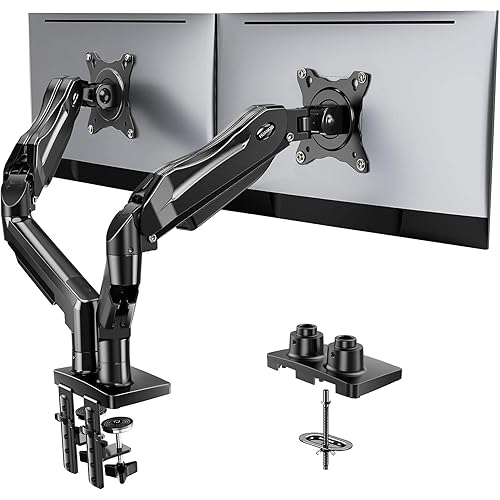
Mount-It! Triple Monitor Mount with Gas Spring Arms, Fits 24–32 Inch Screens, USB & Audio Ports, Full Motion Desk Stand with Tilt, Swivel & Rotation, Heavy Duty Silver 3 Screen Arm with Clamp

  • Based on 2,150 reviews
Condition: New
Checking for the best price...
$174.99 Why this price?
Save $5.00 was $179.99

Buy Now, Pay Later


As low as $29.17 / mo
  • – 6-month term
  • – No impact on credit to apply
  • – Instant approval decision
  • – Secure and straightforward checkout

Ready to go? Add this product to your cart and select a plan during checkout.

Payment plans are offered through our trusted finance partners Klarna, Affirm, Afterpay, Zip, Apple Pay, and Google Pay. No-credit-needed leasing options through Acima may also be available at checkout.

Learn more about financing & leasing here.

Selected Option

Free shipping on this product

FREE 30-day refund/replacement

To qualify for a full refund, items must be returned in their original, unused condition. If an item is returned in a used, damaged, or materially different state, you may be granted a partial refund.

To initiate a return, please visit our Returns Center.

View our full returns policy here.


Availability: In Stock.
Fulfilled by Mount-It!

Arrives Tuesday, Aug 18
Order within 14 hours and 5 minutes
Available payment plans shown during checkout

Protection Plan Protect Your Purchase
Checking for protection plans...

Color: Silver


Features

  • Space-saving triple setup Mount three monitors from 2432 inches, each up to 15.4 lbs, with 75x75mm or 100x100mm VESA patterns. Free desk space and enjoy an immersive multi-screen workspace.
  • Independent motion for each screen Tilt (+90/-45), swivel (180), rotate (360), and extend up to 17.1 inches. Customize every angle to reduce glare, ease neck strain, and improve posture.
  • Smooth gas spring adjustment Counterbalanced arms let you raise or lower screens with fingertip ease. Fine-tune tension once at the top hex bolt for secure, stable positioning every time.
  • Flexible viewing layouts Switch between portrait and landscape orientation to optimize coding, design projects, spreadsheets, or gaming marathons with uninterrupted comfort.
  • Convenience built in Integrated USB 3.0 and audio ports with matching extension cables keep connections within reach. Cable management channels hide wires for a clean, organized setup.
  • Premium silver design Crafted from reinforced steel and aluminum alloy for durability, stability, and a polished look. A favorite choice for gamers, content creators, and professionals who want both style and performance.
  • Easy install, expert support Secure with the included C-clamp or grommet base on desks up to 4 inches thick. Comes with instructions, tools, and US-based technical support plus lifetime warranty.

Mounting Type: ['C-clamp', 'Grommet Base']


Movement Type: Articulating, Swivel, Tilt


Brand: Mount-It!


Material: Metal


Color: Silver


Compatible Devices: Monitor


Maximum Tilt Angle: 15 Degrees


UPC:


Manufacturer: Mount-It!


Mounting Type: ['C-clamp', 'Grommet Base']


Movement Type: Articulating, Swivel, Tilt


Compatible Devices: Monitor


Maximum Tilt Angle: 15 Degrees


Enclosure Material: Metal


Color: Silver


Minimum-Supported Screen Size: 24 Inches


Maximum-Supported Screen Size: 32 Inches


Brand: Mount-It!


UPC: 713012040444


Manufacturer: Mount-It!


Mfr Part Number: MI-2753


Model Number: MI-2753


Item Weight: 0.01 Ounces


Frequently asked questions

If you place your order now, the estimated arrival date for this product is: Tuesday, Aug 18

Yes, absolutely! You may return this product for a full refund within 30 days of receiving it.

To initiate a return, please visit our Returns Center.

View our full returns policy here.

  • Klarna Financing
  • Affirm Pay in 4
  • Affirm Financing
  • Afterpay Financing
  • Zip Pay in 4
  • Financing through Apple Pay
  • Financing through Google Pay
Leasing options through Acima may also be available during checkout.

Learn more about financing & leasing here.

Top Amazon Reviews


  • A great mount with one tiny issue on the product I received
Color: Silver
Pros: 1. Great Price 2. Well Built 3. Easy to assemble 4. Cord management is awesome Update8/14/2017: 5 Starts now. I received the replacement and the pole worked perfectly. The headphone and USB ports work nicely as well. Great stand for a great price. Cons: 1. Up/Down monitor tilt is difficult to tighten and needs to be really tight, but it's the only difficult area. 2. I had an issue with the center pole not screwing down into the base all the way. It only allowed me two full turns into the base, leaving several threads out of the base. It was still tight and sturdy, but I am going to request a replacement just to fix this issue. Just make sure you test that out before drilling holes in your desk or clearing your work space to put this up. I just put this on my desk last night and boy does it make a difference. It's a great high quality stand. I chose to mount it with the brackets rather than drill holes for the grommet style mounting. It was quick and easy to assemble with a little difficulty getting the vertical tilt to lock down to where my monitors wouldn't tilt down so much. I currently only have two monitors connected, one a 25 inch 2560x1440 Asus and the other a 25 inch 2560x1080 LG. My third is currently at my work, but I can tell it will work great once it's connected. They both sit very well and look great on this mount. Again, this thing is super sturdy. With my only true issue being mentioned in the cons that the center pole didn't screw down into the base all the way. I haven't had the chance to test the headphone, mic, and usb ports in the base and I'll update once that's done. If my replacement fixes the center pole issue I'll update to a 5 star rating. I plan on posting some photos as well. ... show more
Reviewed in the United States on August 3, 2017 by Reader

  • Perfect mount, exactly what I was looking for, especially for an uncommon monitor configuration. Perfect mount, exactly what I was looking for, especially for an uncommon monitor configuration.
Color: Silver
I was skeptical about this mount initially since I have never heard of the brand Mount-It!. There are similar mounts made by Hauanuo, Ergotron, and various other brands that are similar looking, but more expensive. I have my monitors in a triple setup with an Ultrawide on the bottom, and 2 27inch monitors above it. The two arms, for being gas piston operated, are rock solid, which has not been an experience of mine with other mounts. In my configuration, my monitors do not move or wobble at all, granted the two top ones are resting on my ultrawide a bit, but even still. I have this mounted to a standing desk, and my previous setup would shake a lot when the desk was extended to a taller height, especially when walking on my treadmill. With this mount, it wobbles maybe 20% as much. The added USB ports on the mount are a nice touch, I didn't think I would use them, but I connected them to my PC anyway, and now I see no reason not to use them. Good feature, even if you're just charging your phone. There is virtually infinite customization with this arm. My configuration seemed like an uncommon one, so I spent a long time looking at mounts, and I'm glad I landed on this one. It's basically perfect, the price is nice, it's high quality, rock solid, pretty easy to build, even easier to manipulate to your needs. My only complaint is that it doesn't come in black, so it kind of doesn't match the rest of my setup. ... show more
Reviewed in the United States on November 12, 2024 Reviewed in the United States on November 12, 2024 by Alex Blinder

  • Great quality, Customer Service??
Color: Silver
Monitor is great, use a total of 5 and this supports the 3. I like ability to have last monitor on side vertical while having other portrait. Arms are sturdy and do not give after time. Good quality product. Issue: one of my mounting plates for back of monitor was damaged during move. They cite US based customer service - but on their page, do not see any way to contact them??? ... show more
Reviewed in the United States on March 4, 2026 by TWM

  • Works great with flexibility to move monitors
Color: Black
Works great - directions could be clearer but you can figure it out - took us about 30 min to install and flexibility to not use extenders on arms was a great benefit. Really is nice having three monitors for work. would recommend highly; quality is pretty good!
Reviewed in the United States on March 22, 2026 by phoenix

  • Sturdy, solid, full range of motion, and looks great -- I highly recommended this monitor arm!
Color: Silver
WOW! I wish I would have bought this thing a LONG time ago. I researched triple monitor mounts until I just about drove myself crazy. After reading hundreds of reviews, I settled on this one and could not be happier. It was easy to assemble and mount to the back end of my desk. It is extremely sturdy and holds my three 19" monitors solidly in any position I put them. I can articulate all three monitors in just about any direction or position, I can even spin them from portrait to landscape with no issue. The cable management features are pretty awesome too. It's very easy to route all your cables through the guides which keeps the entire thing looking clean and organized. The instructions that came with the item left a little to be desired, but they weren't too terrible. You basically have to interpret poorly drawn pictures/diagrams with no written instructions to go along with the pics. It took a hot minute for me to figure out how to properly adjust the hydraulic arms to they would hold the weight of the monitors and not sag. You have to turn the adjuster in the opposite direction of what you might think -- it's not a screw, it's an adjuster for the hydraulic inside the arm. Of course, there is a + & - stamped on the metal, but I didn't notice that right away. :) Another thing to keep in mind, don't stick the black pad to the base until you decide how you are going to mount it. If you stick it on, and then decide you are going to mount it with the bolts through your desk, you'll have to peel the sticker pad back off again, and it might not stick back on after that. Anyway, I LOVE this thing. It gets my monitors up off the desk providing tons of extra space, and makes my office look like a NASA command center or something. LOL! BTW, there are several other similar arms on Amazon that look almost identical to this one from Mount-It. Near as I could tell, the difference is this one from Mount-It has the USB port, mic and speaker jacks in the base. I find this pretty handy -- I keep the USB dongle for my wireless keyboard/mouse plugged into that USB port which puts it front and center in front of my keyboard & mouse for best reception. The other look-alike monitor mounts appear to have the cutout areas for those ports, but didn't actually have the ports in them. This one from Mount-It has the ports which is a nice option even if you don't use them at first. ... show more
Reviewed in the United States on July 4, 2019 by MaudMan

  • Super sturdy, I waited to judge and I'm still happy. Super sturdy, I waited to judge and I'm still happy.
Color: Silver
I web dev and game. I already had 2 27" monitors with piss poor refresh rates and I decided to buy a better 27" monitor for gaming. After leaving 1 of the monitors in a box for awhile I decided to invest in a better monitor stand - this one. My desk had a center plug that could be removed for access to a built in power brick. I removed the power brick entirely and opted for the bolted-in installation. I used the bottom plate of the mount to align my holes and overall the installation was rather easy. The other option that uses the vice like setup wasn't something I could use since my desk had a rather large trim under the table top. I could have just as easily trimmed an area to allow it rather than drill the holes for the bolted-in option but I figured the option I chose was the more secure. Adjusting the monitors once mounted wasn't nearly easy as the video leads you to believe but admittedly I'm a giant sissy. I even asked someone to assist me in supporting my monitors while adjusting them. The strength or tension in all the mount joints can be adjusted, and if you are setting this up on your own I would suggest loosening everything slightly to make moving everything in place easier. This might make getting a fixed position a little more difficult but you don't want to apply to much pressure to the edges of your monitor while adjusting. As for the strength, or possible long term sagging I have this to say: The mount's strength is out of the box impressive. I had 100% confidence that the hundreds of dollars in monitors I was putting on it would be safe. I've been using the mount for almost 2 months now and my monitors haven't sagged a bit. My office is on the 2nd floor of an old house and I often have 3 dogs behind me putting on a better wrestling performance than the WWE has seen since the attitude era, and despite visible bouncing the mount holds the monitors where they were set. Great product, would purchase again. tldr: bolted to desk. very sturdy. running 3 monitors: 27" landscape, 27" landscape, 27" portrait, very happy. ... show more
Reviewed in the United States on February 24, 2020 Reviewed in the United States on February 24, 2020 by Jesse J King

  • Great Monitor Mount. Great Monitor Mount.
Color: Silver
My set up 3- 24" monitors - 2 Dell U2417H on the sides and 1 - Acer Predator XB253Q in the middle. This stand easily fits my 3- 24" monitors. First things first I've nicknamed this mount the Cerberus Monitor Mount. You may hear me cal it Cerberus. I put Cerberus together really quickly. I used the C-clamp instead of the through desk mount style. I've used a single mount C-clamps in the past and they always felt unstable and somehow loosened over time?!? The double mount clamp really adds increased stability over a single mount C-clamp. As soon as I tightened both clamps up it was sturdy as all hell hound and completely unmovable (I tried) I was worried that the middle Cerberus head (monitor) would sit too far back when I changed from the stand to the mount but it really doesn't it's still within an arms reach. The mount sets the monitor off of the middle pole just right and is perfect distance away from me. The side monitors is where this mount really fit my need. As you can see in the pictures in order to fit my monitors on before I had to turn the monitor all the way to one side and even then the base of the stand still extended past the shelf. With Cerberus i can move the monitor anywhere and because I'm not restriced by the stands anymore the side monitors are flater and don't turn in as far. Which makes the viwing angle much nicer. lastly adjusting everything is simple and quick. For most adjustments you'll need the hex bit taht comes with the mount. However the leavers that tighten on the middle pole are ingenious. I was confused by them for a few seconds and then discovered thier genious. Think of it as a ratchet handel tighten, pull out handel, move handel back, lower handle and tighen some more. Adjusting the gas springs for different weight monitors is easy as well. I'm really glad that i bought this mount it makes everything look cleaner and better viewing angles. ... show more
Reviewed in the United States on January 24, 2021 Reviewed in the United States on January 24, 2021 by EyeTea Admin

  • Wonderful mount!
Color: Silver
I mounted two 24" (left and center) and a 27" on the right. Once I adjusted the spring tension, they are all supported and balanced wonderfully. The 27" display is my gaming monitor, and I can swing in front and center without it tilting. This is exactly what I needed for my dual work/play setup. Five stars, since it works exactly as advertised, is relatively inexpensive for a triple gas spring mount, and exceeded my expectations in both build quality and configurability. Update: I've LOVED having this stand! Last night I decided to move a couple panels, and moved my larger 27" to the center with the 'wide' 24" screens on the side. Those two smaller displays are used for external displays for my work laptop, and I needed them closer to me. I can swing them forward in front of the 27" monitor (used for my personal rig) and there is a lot of room for adjustment without the arms hitting that center display. This is temporary until I build a new desk that's not as deep as my current monster. Still, if I get them in place they're wiggling with my typing at all. I'd have to shake the entire desk to get them moving at all. This thing is excellent! ... show more
Reviewed in the United States on August 19, 2020 by SuperGnome

Can't find a product?

Find it on Amazon first, then paste the link below.
Checking for best price...