Search  for anything...

Mojo84 Plastic Transparent Rechargeable Mechanical Keyboard Programmable Wireless Keyboard Rainbow LED Backlit 75% Bluetooth/2.4G/USB Hot Swappable with 84 Keys

  • Based on 38 reviews
Condition: New
Checking for inventory...

Notify me when this product is back in stock

$239.00 Why this price?

Buy Now, Pay Later


As low as $39.83 / mo
  • – 6-month term
  • – No impact on credit to apply
  • – Instant approval decision
  • – Secure and straightforward checkout

Payment plans are offered through our trusted finance partners Klarna, Affirm, Afterpay, Apple Pay, and PayTomorrow. No-credit-needed leasing options through Acima may also be available at checkout.

Learn more about financing & leasing here.

Selected Option

Free shipping on this product

Eligible for Return, Refund or Replacement within 30 days of receipt

To qualify for a full refund, items must be returned in their original, unused condition. If an item is returned in a used, damaged, or materially different state, you may be granted a partial refund.

To initiate a return, please visit our Returns Center.

View our full returns policy here.


Availability: Unavailable
Fulfilled by Amazon
Available payment plans shown during checkout

Color: Mojo84 Plastic Original


Features

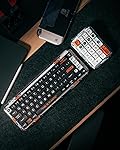
  • [Universal Compatibility:] The Mojo84 mechanical keyboard offers broad compatibility, seamlessly working with Mac, iOS, Windows, Android, and Linux. Experience a versatile three-mode connection via Type-C, Bluetooth 5.1, and 2.4G.
  • [Compact & Portable Design:] The Mojo84 is a wireless 84-key keyboard with a compact layout, separate arrow keys, and all essential F-keys. Its petite size enhances both gaming and work setups while optimizing your desk space.
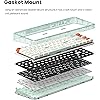
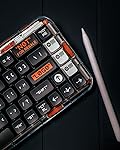
  • [Premium Materials & Craftsmanship:] Crafted with meticulous attention to detail, the Mojo84 features an advanced Gasket Mount structure and double-color ABS keycaps. This results in an enduring build and an exceptionally satisfying typing experience.
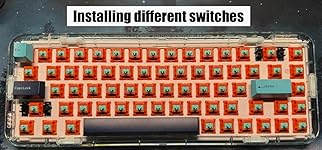
  • [Hot-Swappable Convenience:] The Mojo84 is a hot-swappable keyboard, allowing you to effortlessly replace and upgrade switches without the need for soldering. This feature is a true convenience for keyboard enthusiasts looking for customization.
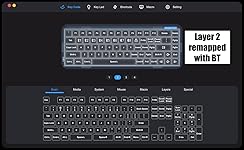
  • [Fully Customizable & Stylish:] Elevate your keyboard experience with the MelGeek Hive software. Customize every aspect of your keyboard, from vibrant RGB lighting to game shortcut keys and more, reflecting your unique style.

Brand: MelGeek


Compatible Devices: Laptop, PC, Tablet, Smartphone


Connectivity Technology: Bluetooth, 2.4G Wireless, USB-C


Keyboard Description: Mechanical, Gaming


Recommended Uses For Product: Multimedia, Everyday Use, Student, Gaming, Business


Special Feature: Rapid Trigger


Color: Mojo84 Plastic Original


Number of Keys: 84


Keyboard backlighting color support: RGB


Style: Modern


Product Dimensions: 12.84 x 5.54 x 1.33 inches


Item Weight: 3.52 pounds


Manufacturer: MelGeek


Item model number: FBA-MG84-SL-0006


Batteries: 1 Lithium Ion batteries required. (included)


Date First Available: October 9, 2023


Frequently asked questions

This product is currently out of stock. Please check back later for shipping info.

Yes, absolutely! You may return this product for a full refund within 30 days of receiving it.

To initiate a return, please visit our Returns Center.

View our full returns policy here.

  • Klarna Financing
  • Affirm Pay in 4
  • Affirm Financing
  • Afterpay Financing
  • PayTomorrow Financing
  • Financing through Apple Pay
Leasing options through Acima may also be available during checkout.

Learn more about financing & leasing here.

Top Amazon Reviews


  • Sounds great, excellent battery life, great connectivity
Color: Mojo68 Plastic
This keyboard sounds awesome, the multiple types of padding they use in it really make a difference. Since this is a hot swappable keyboard I had no issues changing out the switches for glorious pandas. I bought also bought the "advance" version with grey keys on Melgeek's website and got the TTC holy pandas and I like those even better, so something to consider. They have a little less actuation force and I find it a little easier to type on. The battery on this lasts forever using bluetooth -- it last weeks before it even gets down to 80%. I've used this in wireless, bluetooth and wired mode and they all work great, can't tell any difference between them. It also looks great. I'm very happy with it and feel like it's a good value -- basically a custom keyboard without any of the hassle. ... show more
Reviewed in the United States on May 24, 2024 by typetype

  • Very smoth and easy to Use
Color: Mojo68 Plastic Advance
Very nice keyboard
Reviewed in the United States on May 10, 2024 by Javier Castillo

  • The Mojo68 Plastic with Gateron Pro White switches is an interesting pre-built keyboard
Color: Mojo68 Plastic
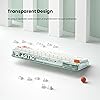
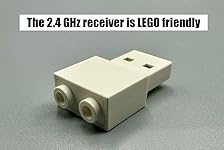
TL;DR The MelGeek Mojo68 is a very good pre-built 65% keyboard. But there are some aspects of this keyboard that will not be to everyone's liking. On one hand, the keyboard is usable straight out of the box. On the other, there is a limited set of switch options and the keycaps and styling are an acquired taste. The software configuration is reasonably good but there is a distinct lack of physical customization options. Read on for more! DETAILS The Mojo68 is a 68-key keyboard in the 65% layout, my favorite layout. It has the full complement of 68 keys that is common for this layout. While many 65% keyboards opt for two 1.25u modifier keys and a blocker to the right of the space bar, MelGeek has chosen to go with three 1u modifiers there instead. There is no wrong or right approach here but some third party keycap sets may not support the three 1u modifiers. The Mojo68 does not feature a knob nor an LED display, two popular trends that not everyone appreciates. Can't go wrong with a more traditional design. The Mojo68 has a comfortable 6 degree typing angle and a comfortable 19.8mm front height that's not short but also not too tall. The side bezels measure approximately 3/8", the chin also 3/8" and the forehead a bit wider at 1/2". The case is rounded and has no sharp edges. The bottom case is entirely flat with small silicone feet at the corners and does not have flip down feet. I'm not a fan of flip down feet and would rather have the bottom case of a keyboard sit flat on my desk. The case is made of polycarbonate, according to the included pamphlet, and is transparent. This allows some of the RGB effects to shine through and makes for a colorful experience when RGB effects are active. Because it is plastic, the fully built keyboard is not super hefty, weighing in at 39.5 oz (1120 g) out of the box. The space bar has "THIS IS PLASTIC" printed on it, in case one wasn't aware. MORE DETAILS +++ In the Box The Mojo68 comes with some accessories. In the box are: -- Color-themed USB cable with USB-C on one end and USB-A on the other. The Mojo68 has a USB-C port on the back. -- Keycap puller. I like this style of wired keycap puller. -- 2.4 GHz wireless receiver / dongle. -- Extra keycaps. There is a replacement space bar, three 1.25u keycaps two of which are macOS friendly, and one 1u ALT key. These come in useful later. +++ Connectivity The Mojo68 can connect up to 10 (!) different devices. A switch on the rear of the keyboard changes connectivity mode between wired, 2.4 GHz wireless and Bluetooth wireless. The Mojo68 can pair with 8 different Bluetooth devices, resulting in 10 possible different connections. The 2.4GHz dongle has a USB-A plug at one end and two LEGO-compatible studs on the other. That's a bit of a surprise until I realized that MelGeek also sells a keyboard that one can stack LEGO bricks on. Cute. +++ LED Indicators There are three small LED indicators on the left, lower side of the keyboard. The top LED turns red when caps lock is enabled and otherwise remains off. The middle LED blinks green when the 4400 mAh battery is charging, which is whenever power is delivered to the keyboard through the USB-C port, even when the keyboard is in one of the two wireless modes. When the battery is fully charged, the LED is solid green until the cable is removed. I have not yet run the battery all the way down but I expect this LED to indicate a low battery situation as well. The bottom LED reflects the current mode of connectivity: blue for Bluetooth, white for wired and green for 2.4GHz wireless. This LED flashes when pairing. +++ Construction The top and bottom polycarbonate case are snap-fit together, no screws. This makes the case harder to open up but certainly not impossible. WARNING: There is a small sticker between the case and the plate that will come loose when the case is opened, indicating the case has been opened. Opening the case may void the warranty. Keyboard enthusiasts like myself don't like to leave a keyboard well enough alone and will want to open it to try different things, like removing/adding foam, changing switches the proper way by supporting switch sockets from the back, upgrading stabilizers, etc. I used a spudger and two old credit cards to pry open the Mojo68's case. I had to be careful to avoid scratching the case or break any of the catches moulded into the sides of the top case. Avoid using a screwdriver around the case. The bottom of the case has a thick slab of silicone sitting inside. It has been moulded to fit the keyboard's battery and with numerous dimples designed to dampen vibrations in the case. +++ The PCB I believe the Mojo68's PCB is 1.6mm thick. I didn't actually measure it but it had a familiar thickness and was not very flexible like a thinner PCB will be. There are no flex-cuts to be found on this PCB. Unfortunately the connectivity mode switch and the USB-C port are soldered onto the PCB and not onto a separate daughter board. This is not so desirable as these two components are held in a fixed position by the rear of the case, which means this part of the PCB will not flex when typing. That said, it turns out the keyboard has little flex to begin with. More on that later. The PCB accepts both 3-pin and 5-pin switches. The PCB is a "hotswap" PCB as it features switch sockets on the back allowing switches to be removed and replaced at essentially any time. One reason to open up the keyboard is to take out the PCB to support those sockets from the back when installing new switches. There is a risk of popping off those sockets and damaging the PCB when not doing so. The PCB features LEDs set in a south facing orientation; i.e. each LED is on the "south" side of each switch position. This is a common switch orientation in enthusiast keyboards. The negative of this orientation is its distinct lack of support for shine through keycaps. On the positive side, this switch orientation can help avoid interference with cherry profile keycaps, though nowadays that problem can be resolved by using long pole switches. The PCB does NOT support the following: -- split space bars -- split backspace -- ISO layouts and split shifts -- 7u space bar With a hotswap PCB that has RGB, it is difficult if not impossible to support some of these options, so it is understandable the direction taken by MelGeek here. +++ The Plate The Mojo68 comes with a plastic plate whose sides are curled downward to encompass the plate foam. I think the material is either POM or ABS but I don't know for sure. There are standoffs moulded into the plate. The PCB is held to the plate using a number of small Phillips screws by these standoffs. The stabilizers mount directly to the plate and not to the PCB. Inspecting the stabilizers closely I can see some lube applied. And pretty effectively, too, as I can't detect any rattling with the stabilized keys. The backspace stabs may be just slightly over lubed because that key has a slightly sluggish return compared to the rest. MelGeek does not sell alternate plates. A keyboard enthusiast may find the lack of plate support a turn off. +++ Gasket Mount I opened up the Mojo68 so that I could remove the (poron?) plate foam to see how the board might sound without it. Unfortunately, that was not a good idea. The reason is because the plate foam is oversized, extending beyond the boundaries of the PCB to double as the foam for the gasket mount. The plate foam sits between the plate and the thin rails moulded on the bottom case, on which the plate ultimately rests. Removing the plate form means cutting small strips of foam to act as the gaskets. Gasket mounting using foam is supposed to provide a degree of downward flex when typing, leading to a less fatiguing typing experience. However, due to the thin plastic rails and the plate compressing down the foam down at these sharp edges points the foam provides very actual little flex, mostly negating the benefits of a gasket mount design. In other words, the Mojo68 presents a stiffer typing feel and not a soft one. The plastic plate and the PCB do flex somewhat but it takes quite a bit of downward pressure – much more than typing pressure – to activate it. +++ The Switches Between the PCB and switches is a thin layer of what looks like IXPE foam. This foam enhances the bottom out sound of switches, yielding a poppy and marbly effect. Folks who like thocky, marbly sounding keyboards appreciate the inclusion of this foam. I usually go without it but I left it sitting in the Mojo68 to accompany the plate foam. The Mojo68 I ordered comes with Gateron Pro White switches. These are lightweight switches, requiring less than 40gf to activate, and come factory lubed for out of the box smoothness. There is no spring ping nor leaf ping that I can hear when typing so that's great. The Gateron Pro series of switches have a regular stem length and are not considered to be long-pole switches. +++ The Keycaps The keycaps included with the Mojo68 is quite stylized and loud. The material is ABS, a common keycap plastic, that while pleasant sounding can wear down and shine much quicker than PBT keycaps. That's not a knock against this keycaps as it fits the aesthetic of the board well. If one doesn't like this keycap set, it can be easily replaced with another. As mentioned earlier, there is an extra space bar and a few modifier keycaps in the box. The pre-installed space bar can be instantly replaced for something a bit less wordy. The inclusion of the other keycaps allows for some limited key mapping without having to change out the keycap set. More on remapping later. The keycaps have MelGeek's MDA profile, a row sculpted profile that is similar to the very tall SA profile only shorter. It's not as short as the common Cherry profile, however, and has very scooped surfaces in comparison. +++ The Sound Without modifying the case in any way, the Mojo68 has a muted, deeper sound that can be described as "thoccy" when the Pro White switches bottom out. The bottom out is not loud but pleasant enough. The silicone base dampens the sound a fair amount, as does the plate foam. I removed the silicone base, left the battery dangling from the PCB and tried the keyboard without it. The sound gets louder and less deep and more of the case sound is apparent. There is no real hollowness though it starts to creep in just a tad when using the number row. I actually like the sound without the silicone base but because it is meant to hold onto the battery I reinstalled it. As I wasn't able to effectively remove the plate foam, I did not get to test how the keyboard sounds without it. The out of the box sound is ok, not exactly to my preferences but ok. I did wind up changing the sound and feel later on to something I like better with this keyboard. +++ MelGeek Hive MelGeek publishes the Hive software for keyboard customization. It requires a download but is supported across multiple operating systems. Hive does check for updates to notify of updates but it does not auto-update itself. MelGeek Hive can only be used when the Mojo68 is connected to a computer via USB and the switch set to wired mode. That's pretty standard for keyboard customization. Anyone familiar with VIA or Vial will find Hive easy enough to use. Hive allows key remapping, RGB customization, changing default key combinations and flashing both keyboard and 2.4GHz dongle firmware. Hive also allows customizing how layers are accessed and what functions are assigned to keys in the various layers. My Mojo68 arrived with outdated firmware. I used Hive to download and install the latest firmware. On my other keyboards where I can use VIA or Vial I have set up tap-hold and tap-dance customizations. I believe Hive's "shortcuts" can be used to imitate tap-dance but I was not able to mimic tap-hold, at least not with the space bar. The OS registers a space before the hold takes over. There may be a way to achieve this that I haven't figured out. These tap features are not commonly used so it's not much of a knock on Hive if they can't be achieved. +++ Remapping the Left Modifiers As a macOS user, I need a Command key to the immediate left of the space bar. I used Hive to easily swap the Cmd-L and Alt-L keys. This change is stored in the keyboard's onboard firmware, essentially a permanent change until the configuration is changed or reset with a firmware update. I prefer to do this instead of changing macOS settings to reverse the two modifier keys. I installed two of the extra keycaps here. +++ Remapping the Right Modifiers Out of the box the Mojo68 has an odd combination of keys set up to the right of the space bar. From left to right: -- Fn key. This key temporarily enables layer 2 of the keyboard, with layer 1 being the base layer. I don't like the Fn key in this position as this is where I want the right sided Command key. I used Hive to set this key to Cmd-R. In Hive, this Fn key is named Fn2 after its ability to activate layer 2. -- BT key. On the surface this key is used only to select one of the 8 Bluetooth devices. What it actually does is activate layer 3 where the Bluetooth actions have been mapped. In Hive the BT key is named Fn3. Using Hive I moved the Fn2 key tho this location and then moved all the Bluetooth action to alpha keys in layer 2. Goodbye to layer 3, don't need it. -- Right Control key. I like having a right side Control key so I left this key alone in Hive. I physically moved the Fn keycap over, removed the BT keycap and installed the extra 1u Alt keycap as my right Command key. +++ Remapping the Right Navigation Cluster Along the right side of the keyboard are four navigation keys. From the top and moving downwards, these keys are mapped to Home, Delete, Page Up and Page Down and Fn-Home triggers the End action. This is not a bad default configuration but it isn't the configuration I like. I used Hive to reset the keys to Delete, Page Up, Page Down and End, with Fn-End activating the Home function instead. Thanks to the keycaps profile and lack of more extra keys, I can't simply swap the keycaps around and retain a consistent row by row shape. +++ macOS Compatibility and Layers Mapping the modifiers as above makes the Mojo68 Mac friendly. But what about the Function keys and the macOS-specific actions that can be triggered using the function row? Because the Mojo68 is a 65% keyboard, there is no room for a function key row. Rather, function keys are accessed using the Fn key plus a number key. For example, pressing Fn-3 activates the F3 key. The F1 through F12 cations live in the Mojo68's layer 2 (along with other keyboard actions such as Home/End and Page Up/Down). While the keyboard will send F3 when Fn-3 is pressed, the macOS keyboard setting "Use F1, F2, etc. keys as standard function keys" controls how F3 is handled. When this setting is enabled, Fn-3 will be treated as a F3 key press. If this setting is disabled, Fn-3 will trigger the Mission Control action. I prefer to have the standard function keys always active so I used Hive to map Mission Control to Fn-M. Now I can have both F3 and Mission Control actions on the 65% keyboard. +++ The RGB I'm not a big fan of RGB but it is fun to have on once in a while. The Mojo68 has a LED at each switch location, a setup often referred to as per-key RGB. The board has a number of RGB patterns and colors, all of which can be customized in Hive. The keys combinations used to adjust the RGB and also programmable in Hive. When I took out the silicone base I noticed that there is some light bleed through to the underside of the PCB but unfortunately not enough to provide a light show from the underside of the board. With the silicone in place there is no light escaping from the bottom half of the case. SOME DETAILS ONE MAY OR MAY NOT LIKE ABOUT THE MOJO68 +++ The Price The Mojo68 retails for $200. As a fully built keyboard of its quality, that's not bad. But we are at a time and age when one can purchase a fully built, full aluminum keyboard for the same price as the Mojo68. And barebones all aluminum kits for $100 but of course those require additional parts and time to build. +++ The 2.4GHz Dongle There's no place in or around the Mojo68 to store the 2.4GHz wireless dongle. That's unfortunate as folks are going to misplace the thing, guaranteed. Attached it to a LEGO build, perhaps. +++ Switch Choice The Mojo68 Plastic sold through Amazon has limited options as I write this. In my case I had to accept the 3-pin Gateron Pro White switch. This is a very lightly weighted linear switch for users who prefer a light touch, like gamers, for instance. I do not like these switches but thanks to the hotswap PCB, I can use switches that are more to my preference but that comes at an extra cost. +++ Keycap Choice The Mojo68 comes with MDA profile keycaps, no other options. If one doesn't like these higher profile keycaps replacing them comes at extra cost as well. Or even if one likes the profile one then has not mind the rather loud design of the Mojo68's "Plastic" theme. +++ Lack of QMK/VIA/Vial Support This isn't a huge issue for me but for some keyboard enthusiasts the lack of open source firmware for the Mojo68 is a deal breaker. It's hard to beat the convenience of using a browser to access an always-up-to-date cloud service like VIA or Vial to customize a keyboard's behavior. To configure the Mojo68 one has to download and install the MelGeek Hive software. The lack of open source firmware means one cannot apply advanced customizations through code changes like one can with QMK. +++ Lack of physical customization It's clear from my case opening experience that MelGeek did not intend for this keyboard to be opened up. That's a perfectly acceptable design choice. As a result the Mojo68 is not the most friendly of keyboards to experiment with. MY VERSION OF THE MOJO68 I described the Hive changes I made earlier, remapping the Mojo68 key layout to my preferences. While I wound up not modifying the internals, I did change remove the Gateron switches and installed a set of Tecsee Carrot long pole linears. I changed the keycaps to a set of Drop DCX Dusk, with the navy and light blue coloring a very nice pairing with the Mojo68's blue tinted case. With these two straightforward changes I got the keyboard to sound and feel a lot better than stock. The long pole switches really pop, thanks to the PE foam, and the space bar really slaps. The sound is not to my usual clacky sound preference though thanks to the foam and silicone. I may try to properly remove the foam at some point. OVERALL Overall the MelGeek Mojo68 is a very good pre-built keyboard option. The plastic construction strays away from the "keyboard in a metal box" look and the overall shaping is attractive. Both fans and non-fans of RGB can appreciate its transparent design. The keyboard is fully usable out of the box but is not designed to be opened up for modification. Switches and keycaps can be replaced with others to suit one's preferences. The MelGeek Hive software is quite usable for customizing the board and has enough features to satisfy most users. At the end of the day I was mostly able to customize the Mojo68 to my liking. ... show more
Reviewed in the United States on December 19, 2023 by Anson Anson

  • 10 stars if I could
Color: Mojo68 Plastic Advance
If I could give this keyboard 10 stars I would. I’ve never owned an expensive keyboard, but this one has fit right at home with my gaming/productivity office. The keys are quiet but have a super pleasant sounds to them. The activation strength needed to press the key is perfect for those who like linear switches. The style alone is a great reason to buy this thing. I am considering buying the white version now! ... show more
Reviewed in the United States on March 14, 2024 by Nicholas Nicholas

  • Exceptionally made!
Color: Mojo68 Plastic Advance
Although this has a hefty price tag, you are getting the exceptional quality in return. This replaced my Epomaker TH80 and there was definitely a noticeable difference between the 2. The Bluetooth connection is much faster and responds better on the Melgeek. I also love how it connects between my work computer and my iPad flawlessly. The switches that came with this keyboard give the keys the subtle “thock” that really was satisfying. It wasn’t annoyingly loud and clicky like my last keyboard. I was so impressed with it, that I bought the number pad through a different site as Amazon did not offer it. I would buy it again if I needed to. ... show more
Reviewed in the United States on January 23, 2024 by Jax Jax

  • Perfect
Color: Mojo68 Plastic Advance
Love it
Reviewed in the United States on March 24, 2024 by Fareeha

  • Much better than expected
Color: Modern97 Fountain
Good typing experience, now I will use it for both gaming and working.
Reviewed in the United States on December 12, 2023 by Amazon Customer Amazon Customer

Can't find a product?

Find it on Amazon first, then paste the link below.
Checking for inventory...