Search  for anything...

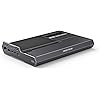
MINISFORUM DEG2 External GPU Docking Station Compatible with Oculink and USB4 V2(Support TBT5), eGPU Enclosure Graphics Card Extension Support ATX/SFX Power, with 2.5G LAN Port, M.2 Slot, USB3.2 Port

  • Based on 10 reviews
Condition: New
Checking for the best price...
$239.90 Why this price?
Save $59.99 was $299.89

Buy Now, Pay Later


As low as $39.98 / mo
  • – 6-month term
  • – No impact on credit to apply
  • – Instant approval decision
  • – Secure and straightforward checkout

Ready to go? Add this product to your cart and select a plan during checkout.

Payment plans are offered through our trusted finance partners Klarna, Affirm, Afterpay, Zip, Apple Pay, and Google Pay. No-credit-needed leasing options through Acima may also be available at checkout.

Learn more about financing & leasing here.

Selected Option

Free shipping on this product

FREE 30-day refund/replacement

To qualify for a full refund, items must be returned in their original, unused condition. If an item is returned in a used, damaged, or materially different state, you may be granted a partial refund.

To initiate a return, please visit our Returns Center.

View our full returns policy here.


Availability: In Stock.
Fulfilled by Amazon

Arrives Wednesday, Aug 26
Order within 17 hours and 18 minutes
Available payment plans shown during checkout

Protection Plan Protect Your Purchase
Checking for protection plans...

Style: DEG2(USB4 V2)


Features

  • Dual Mode FreedomThis DEG2 Docking Station supports Oculink and TBT5, just switch between TB5 and OCuLink with a physical toggle-nocable changes, no software tweaks. Choose the mode that fits your current device.
  • Optimiz WorkflowsDEG2 stores models/assets/project files on its internal M.2280 for faster GPU access. Heavy GPU tasks run on its desktop graphics card; ultrabook handles control/display, ensuring mobility without sacrificing power. Rendering, editing, and AI run on this single GPU, minimizing file transfers and streamlining workflow.
  • Flexible GPU and Power Supply CompatibilitySeamlessly supports both ATX and SFX power supplies, along with full-size GPUs. Enjoy effortless upgrades for individual components, ensuring a customizable and future-ready configuration.
  • Signal-Optimized Design for Better CompatibilityEngineered to ensure seamless interoperability across diverse cables, GPUs, and host devices, minimizing signal degradation, drops, and connectivity errors.
  • Auto Power-On & Single-Cable DockingDEG2 eliminates manual startups by syncing power with your host device, delivering seamless desktop-like operation. Leveraging USB4 V2 reverse power and full dock expansion via a single USB4 V2 connection, it transforms your workspace into a plug-and-play ecosystemready for productivity or entertainment in seconds.
  • Rich Connectivity1x TB5 140W (80Gbps) Port, 1x TB5 30W (80Gbps) Port, 1x OCuLink (64Gbps) Port, 1x 2.5G Lan Port, 1x USB 3.2 Gen2 Port, 1x USB 3.2 Gen1 Port, 1x M.2 2280 Port, 1x PCIEx16 Port, 1x ATX 24pin+8pin Port.
  • NoteGPU, ATX, and SFX standard power supplies are not included. It doesn't work with MINISFORUM MS-02 Wokstation.

Description

MINISFORUM was born among a group of computer engineers who are passionate about advanced technology. Since its inception in 2012, MINISFORUM has been committed to innovation and production of outstanding products. We listen to every user’s opinions and understand customers' needs. So, a large number of innovations have been carried out and innovative ideas have been injected into every product.

Brand: MINISFORUM


Color: Black


Hardware Interface: Bluetooth, USB


Compatible Devices: RTX 4090, AMD RX 7900 XTX


Total USB Ports: 2


Product Dimensions: 3"L x 1"W x 2"H


Number of Ports: 1


Manufacturer: Micro Computer (HK) Tech Limited


Hardware Interface: Bluetooth, USB


Compatible Devices: RTX 4090, AMD RX 7900 XTX


Total Usb Ports: 2


Number of Ports: 1


Item Dimensions L x W x H: 3"L x 1"W x 2"H


Color: Black


Brand: MINISFORUM


Manufacturer: Micro Computer (HK) Tech Limited


Frequently asked questions

If you place your order now, the estimated arrival date for this product is: Wednesday, Aug 26

Yes, absolutely! You may return this product for a full refund within 30 days of receiving it.

To initiate a return, please visit our Returns Center.

View our full returns policy here.

  • Klarna Financing
  • Affirm Pay in 4
  • Affirm Financing
  • Afterpay Financing
  • Zip Pay in 4
  • Financing through Apple Pay
  • Financing through Google Pay
Leasing options through Acima may also be available during checkout.

Learn more about financing & leasing here.
Top Amazon Reviews


  • I wish I can give this negative stars
Style: DEG2(USB4 V2)
There is so many things wrong with this where do I start... The first thing that upseted me the most about this is that I went through three different GPUs that I purchased from Amazon that wouldn't work but my old video card worked completely fine. I first thought maybe this video card is bad so I returned it well after the third one it can't be a video card. So then I started reading online and found out this EGPU doc has a hard time with Asus video cards. The next problem I have is with the thunderbolt port. It's very selective with what computers that it works with. My alienware m13 r4 does not detect the thunderbolt yet my crappy Asus two and one worst completely fine. Then I tried my son's computer which is also a alienware computer a 15-in can't remember the model but that also did not work. I tried the oculink and that has been working with everything I throw at it. My next issue with this is the m.2 slot. Why would you make it magnetic on the bottom when I'm trying to screw in the m.2 it's next you impossible because the magnet keeps on grabbing it. So the only work around I had was you put something to hold the m.2 drive down on top of it. Finally the last issue is not every GPU fits proper on this. And it has nothing to hold the CPU down on the PCIE slot. One other thing that I did not like was the power on switch. I wish it was a physical switch that was on and off instead of a digital on and off. I keep on trying to turn it on and it doesn't turn on, on certain video cards, it's hard to diagnose when the dock doesn't turn. After all this I found out that there is supposedly an untalked about recall on this model and they put it off of many stores saying it's sold out but not on Amazon. They are supposedly fixing some of these issues and then re-releasing this. Don't buy this and waste days on trying to make this work. ... show more
Reviewed in the United States on June 7, 2026 by Micah and Tina

  • Great eGPU at a good price
Style: DEG2(USB4 V2)
Impressed with this little device! After back to back bad experiences with Razer Corte x v2 (both dead on arrival), I decided to get this after waiting some reviewers on YouTube. Worked first time upon setting up, has no audible noise and has the connectivity I need. Using it with a Thunderbolt 4 only device, so cannot vouch for TB5 or Oculink connections. ... show more
Reviewed in the United States on June 10, 2026 by D B.

  • Excessive motherboard armor?
Style: DEG2(USB4 V2)
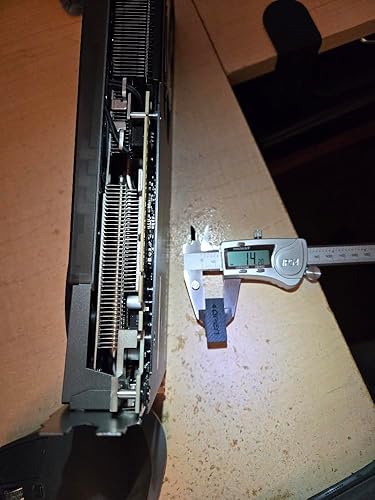
Compatibility with additional video cards could have been easily done with slightly larger notches or raised PCIe slot. The EPS8PIN connector can also be under some deeper high-efficiency or pasively-cooled power supplies, which also blocks easy access to the magnetic panel where the M.2 slot and OCuLink or USB4-V2-TBT5 mode switch is also hidden. The whole rubber piece with "Open" on it is misdirection, not even being a useful dust cover for shipping! Maybe a Hong Kong supplier already mass produced that part for a cancled product and bribed MinisForum to use it instead of writing off the loss? My photo is of an old Asus (TUF-GTX1650-O4GD6-P-Gaming) video card with the bracket removed, because it was obvious a DVI-D screw wasn't allowing it to fully insert, but the whole legacy video out componet was obstructed. While it wouldn't be a good choice even for a DEG1, having such an obsticle is an unusual deign choice. ... show more
Reviewed in the United States on July 15, 2026 by Christopher L. Schmeltz

  • Oculink works, Thunderbolt does not
Style: DEG2(USB4 V2)
Thunderbolt does not work, neither does USB4. But, when you switch it to oculink it does work. It fits an XFX 7900XTX but feels off. A corsair 850 PSU leaves 1mm of space between it and the first connector. The nvme drive is recognized over USB, but not oculink, which was to be expected. If you are buying this for oculink, it will be OK. If you expect to use this with USB4/Thunderbolt you will be disappointed because that does not work. ... show more
Reviewed in the United States on April 26, 2026 by D

  • Not All GPUs Will Fit - Rear Clearance Issue.
Style: DEG2(USB4 V2)
My MSI 5060 Ti 8GB Gaming Trio OC GPU will not plug into the PCI-E port due to clearance issues at the rear of the dock. There is a rubber plug that you remove to make room for cards that have a piece extending at the rear but it appears to be about 1.5mm too narrow to fit my GPU. I ordered two docks and may send them back as I imagine modifying the case by enlarging the notch/hole will void the warranty. ... show more
Reviewed in the United States on February 22, 2026 by Wake

  • Looks Premium, Fails Basic Function
Style: DEG2(USB4 V2)
First impression out of the box was that this is a well-built eGPU dock. However, after installing my 9070 XT paired with an ASUS TUF 850W PSU, neither my Legion Go 2 nor my Legion Go 1 would recognize the GPU. The same GPU and PSU work perfectly with a cheaper eGPU dock from Amazon, so this appears to be an issue with this unit specifically. Overall, this has been a disappointing purchase. ... show more
Reviewed in the United States on February 22, 2026 by Chester

  • Mini pc upgrade made easy.
Style: DEG2(USB4 V2)
Works great. Come set for thunder bolt 5 so don't forget to flip the switch under the magnetic panel for oculink.
Reviewed in the United States on April 24, 2026 by Gregeriah

  • magnetized location for the nvme drive - a fatal FLAW
Style: DEG2(USB4 V2)
Horrible experience using this POS. If you buy it make sure you get a hundred nvme screws to go along with your purchase, because the top small plate opening for the nvme is magnetized - as soon as you come near it with a screwdriver and a tiny phillips screw the magnet will suck the nvme screw inside the housing so deep there's often no way of getting it out, other than a complete disassembly of the unit. I've got like five screws that disappeared in the housing and that in itself is not a good thought or experience. If the jackwagons who designed this product ever tried installing one nvme screw, they'd discover this issue. I'm more convinced they know about it and just decided to let it out for sale with this fatal flaw. Aside from that, windows 11 doesn't know how to recognize the internal nvme so you'll be stuck in a non-stop loop of installing microslop until it gets it right. This is the most frustrating POS I have ever purchased for my computer. I gave up on it and purchased a 24GB/1TB M5 Macbook Air. Buy it, if you like taking things apart in the middle of installing your nvme. Don't buy it - if you're expecting a smooth hassle free installation. ... show more
Reviewed in the United States on May 14, 2026 by Dave N.

Can't find a product?

Find it on Amazon first, then paste the link below.
Checking for best price...