Search  for anything...

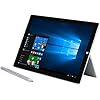
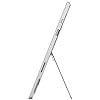
Microsoft Surface Pro 3 Tablet (12-Inch, 256 GB, Intel Core i7, Windows 10)

  • Based on 118 reviews
Condition: Used - Good
Checking for the best price...
$205.49 Why this price?

Buy Now, Pay Later


As low as $34.25 / mo
  • – 6-month term
  • – No impact on credit
  • – Instant approval decision
  • – Secure and straightforward checkout

Ready to go? Add this product to your cart and select a plan during checkout.

Payment plans are offered through our trusted finance partners Klarna, Affirm, Afterpay, Apple Pay, and PayTomorrow. No-credit-needed leasing options through Acima may also be available at checkout.

Learn more about financing & leasing here.

Free shipping on this product

This item is eligible for return within 30 days of receipt

To qualify for a full refund, items must be returned in their original, unused condition. If an item is returned in a used, damaged, or materially different state, you may be granted a partial refund.

To initiate a return, please visit our Returns Center.

View our full returns policy here.


Availability: Only 1 left in stock, order soon!
Fulfilled by Trade In My Tech

Arrives Jan 5 – Jan 8
Order within 20 hours and 3 minutes
Available payment plans shown during checkout

Protection Plan Protect Your Purchase
Checking for protection plans...

Features

  • Windows 10, 12-Inch Display
  • Intel Core i7 1.7 GHz Processor
  • 256 GB Flash Storage, 8 GB RAM
  • 1.76 pounds
  • 36W Power Supply and Surface Pen Included; Keyboard sold separately

Description

Surface Pro 3 256GB i7 W10 SC EN/XD US/Canada Hardware

Brand: Microsoft


Model Name: Surface Pro 3


Memory Storage Capacity: 256 GB


Screen Size: 12 Inches


Display Resolution Maximum: 2160x1440 Pixels


Standing screen display size: ‎12 Inches


Screen Resolution: ‎2160 x 1440


Max Screen Resolution: ‎2160x1440 Pixels


Processor: ‎1.7 GHz core_m_family


RAM: ‎8 GB


Hard Drive: ‎256 GB


Graphics Coprocessor: ‎Intel Iris Xe Graphics or Intel UHD Graphics 620


Card Description: ‎Integrated


Wireless Type: ‎802.11abg


Number of USB 3.0 Ports: ‎1


Average Battery Life (in hours): ‎9 Hours


Brand: ‎Microsoft


Series: ‎Surface Pro 3


Item model number: ‎5D2-00017


Hardware Platform: ‎Windows


Operating System: ‎Windows 10 Professional


Item Weight: ‎1.76 pounds


Product Dimensions: ‎15.12 x 9.19 x 1.55 inches


Item Dimensions LxWxH: ‎15.12 x 9.19 x 1.55 inches


Color: ‎Gray


Rear Webcam Resolution: ‎5 MP


Processor Brand: ‎Intel


Number of Processors: ‎2


Computer Memory Type: ‎Unknown


Flash Memory Size: ‎256 GB


Power Source: ‎Corded Electric


Batteries: ‎1 Lithium Ion batteries required. (included)


Date First Available: July 20, 2015


Frequently asked questions

If you place your order now, the estimated arrival date for this product is: Jan 5 – Jan 8

Yes, absolutely! You may return this product for a full refund within 30 days of receiving it.

To initiate a return, please visit our Returns Center.

View our full returns policy here.

  • Klarna Financing
  • Affirm Pay in 4
  • Affirm Financing
  • Afterpay Financing
  • PayTomorrow Financing
  • Financing through Apple Pay
Leasing options through Acima may also be available during checkout.

Learn more about financing & leasing here.

Top Amazon Reviews


  • it was just over $750 at Best Buy and had a 3/4 TB SSD
I purchased my SP3 to replace a crumbling Samsung Series 5 laptop. While I was initially searching for an Android based tablet, I started to see more functionality in the Surface series, as well as a familiarity I had with Windows 8/8.1/10 from the Series 5. Android tablets seem to be a dime a dozen these days, and the SP3 definitely makes it's mark on the tablet world. What drew me to the SP3 was it's functionality. When I bought the Series 5 four years ago, it was just over $750 at Best Buy and had a 3/4 TB SSD, i7 (gen 3), and that was without the touch screen. Now, for $650 you can get the SP3 that's totally touch screen, upgradable accessories (touch on that in a second), latest gen (or maybe second latest) i7 and a 256 HD. That's fairly impressive. You'll spend a bit more on accessories, but in the end I find it's well worth it. The accessories I purchased with the SP3 were actually for the SP4, yet backward compatible to the SP3. These were the SP4 pen and the SP4 keyboard cover with the fingerprint scanner. This was about an extra 180, but I could tell just by looking at the SP3 pen, I wasn't going to carry that atrocious looking thing around. And since the SP3 keyboard was around 125, it seemed logical just to pay an extra few bucks to upgrade to the redesigned SP4 pad, which came with the fingerprint reader. ABSOLUTELY worth it. The SP3 fired right up after plugging it in, and proceeded to setup windows. When it finally came to updating the OS, you have the option of going to your desktop. Now, since I logged into my previous MS account, it transferred my theme over to the SP3 automatically, so right there was a nice sense of familiarity. I was able to go fiddling around with some of the settings and browse the internet, as well as get familiar with the pen system. PLEASE DO NOTE when downloading the update, a lot of apps will crash on startup. I attempted to open OneNote and Calendar a few times, and they would crash after only a few moments. After the update, however, I was on my way to note heaven. The OneNote program works marvelously, although I've managed to switch note pages a few times because my writing hand (I'm a lefty) hit's a different page. This is sort of hard to fix because the SP is a TOUCH screen, no matter how much programming they make to attempt to curb that sort of stuff, it happens. I'm not docking any points here, just calling the kettle black. I do love though, how smooth note taking is. I'm using it mainly for Tech Math notes in college right now, and the ability to change ink color, highlight in different colors, writing sensitivity, move entire blocks and even RESIZE notes, which is definitely an amazing thing for somebody who, in High School, hated and detested math. Now, I don't even mind because of how well organized I can keep notes. Being a lefty never helped either. If you don't understand, go ask a lefty friend how frustrating it can be to take notes. All in all, I'm glad I went with the SP3. I had considered the SP4, but it's the price for what I wanted was just too much. I'm sure when the SP5 drops, the SP4 will be in the clutches of people like me who wanted a serious machine, and a serious upgrade. But for right now, the SP3 IS that serious machine. I will note, please make sure you purchase an insurance plan. These, as well as any machine could go downhill at a moments notice. It's an additional 150, but spread over the course of 3 years, it's still cheaper than $650. Upon opening the SP3, I nearly dropped it right out of the box because it happened to be upside down. Had I been any more excited to open it, I probably would have been replacing it before I could even turn it on. Hard telling what could happen to your machine in the future, so it's never a bad idea to get an insurance plan for these. ... show more
Reviewed in the United States on March 3, 2017 by B.F.

  • Surface Pro 3
Amazing machine. Initially had a software conflict backing up to my home server (Windows Home Server), perhaps due to installation of Norton IS with backup. Performed a Windows recovery through the Internet; process is intuitive; and machine, including backup to Windows Home Server, has worked perfectly since (I did not reinstall Norton IS). Boot time is fast and touch screen is response, with our without stylus. Weight with surface keyboard (1096 grams) makes it ideal for commuting; so that I've 'retired' my Fujitsu Stylistic tablet (541 grams) and Dell Inspiron (1535 grams); while Surface Pro 3 is heavier than my wife's IPAD (bare IPAD without case of keyboard is 657 grams), the increase in weight is negligible for a full featured machine with keyboard. Windows 10 is intuitive and much easier to use than Windows 8, I always reverted to Windows 7 after upgrading to Windows 8. By purchasing a 'new' machine from an Amazon seller, I obtained an i7 with 256GB for the cost of an i5 with 128GB. Delivery of machine was immediate and seller was outstanding. ... show more
Reviewed in the United States on February 28, 2016 by Amazon Customer

  • My favorite computer ever!
This is a great PC/tablet that's lightweight and powerful. Mine came with Windows 10, but I would have been happy with Win 8, which is a good platform for a tablet. The pen is a great feature and I love writing and drawing with it. Although my Pro 3 has only 256gb storage, I added a 64gb micro SD card which I can put music and programs on to conserve space. The downside of this computer is that it has only one USB port and no Ethernet port (an adapter is needed). Hence, the 4 stars instead of 5. The stand on the back adjusts to different angles, but is somewhat uncomfortable on your lap. The backlit keyboard that snaps on comes with a pen holder which I attached to the top of my Surface rather than to the keyboard, so if I don't want to bring the keyboard with me, I still can bring the pen without losing it. The pen also will attach to a few places on the Surface magnetically, but it's not a secure connection so you could easily lose the pen if you rely on that. All things considered, this is a great computer for those who like the ease of a tablet but also like a powerful computer. No comparison to an Ipad or any other tablet--this is really a computer that also can function like a tablet. ... show more
Reviewed in the United States on May 14, 2016 by Vegas23

  • 😒: The fan boosts on waaay too much -No ...
😒:The fan boosts on waaay too much -No an option for CUSTOM APP LOCKING!!!!! for privacy, when you want others to use or leave this out an about for free play -Does not have a second USB port (could help for the venting) -No magnetic hold for the surface pen -SP3, pen buttons are not customizable within windows for added scripts or others tweaks **Win10 app store is VERY VERY LACKING even some major devs aren't there!(that's what stopping me from getting a windows phone @__@) -Charge wire/port are not magnetic nubs or just a USB C type charge. -The windows button is not a finger id sensor. -Tablets and book versions can't handle heavy gaming 😋. *OneNote does not translate drawn words into font real time/on button click -no pulse 😁:customize pen sensitivity n click -Drawing is very fluid -Windows is very optimized for this hardware -Cute/Handsome with eloquence -Very powerful -Long lasting battery 8hours 50/75% brightness -Can play some triple AAA games low quality -the right size ... show more
Reviewed in the United States on February 13, 2017 by Michael, The Sir Ov' Sir's

  • Great quality, but touch isn't ready for prime time
Not a bad piece of hardware, but if you are planning on using primarily the touch screen, you'll probably be disappointed. It's nearly impossible to surf the web with the touch screen, as touches aren't recognized on many buttons, video players, etc. It's built well, but the touch screen issues make it a no-go for me. ... show more
Reviewed in the United States on February 5, 2017 by sflogen

Can't find a product?

Find it on Amazon first, then paste the link below.
Checking for best price...