Search  for anything...

Meross Smart Energy Consumption Monitor with 18 Circuit Monitoring, Electricity Usage Monitor, Real-Time Power Usage Monitor, Home Assistant Support, Smart Alerts, No Subscriptions, 2-Year Warranty

  • Based on 0 reviews
Condition: New
Checking for the best price...
$159.99 Why this price?
Save $90.00 was $249.99

Buy Now, Pay Later


As low as $26.67 / mo
  • – 6-month term
  • – No impact on credit to apply
  • – Instant approval decision
  • – Secure and straightforward checkout

Ready to go? Add this product to your cart and select a plan during checkout.

Payment plans are offered through our trusted finance partners Klarna, Affirm, Afterpay, Zip, Apple Pay, and Google Pay. No-credit-needed leasing options through Acima may also be available at checkout.

Learn more about financing & leasing here.

Free shipping on this product

FREE 30-day refund/replacement

To qualify for a full refund, items must be returned in their original, unused condition. If an item is returned in a used, damaged, or materially different state, you may be granted a partial refund.

To initiate a return, please visit our Returns Center.

View our full returns policy here.


Availability: Only 8 left in stock, order soon!
Fulfilled by Amazon

Arrives Thursday, Aug 13
Order within 15 hours and 25 minutes
Available payment plans shown during checkout

Protection Plan Protect Your Purchase
Checking for protection plans...

Features

  • SAFE & RELIABLE: Meross smart energy consumption monitor is ETLcertified and compliant with the UL 61010 testing standard, ensuring safe and reliable home energy monitoring. Works with most US homes: single-phase 2-wire systems, single-split phase 3-wire systems, and 3-phase 4-wire Wye systems with earthed (TN or TT) neutral (no Delta). Easy clampon design installs in minutes. Invert CT readings in the appno physical flipping. PROTECTED BY 2-YEAR WARRANTY for worry-free use.
  • TRACK ENERGY & CUT BILLS: Track power, voltage, current, and power factor within 2% accuracy. Clear power usage and cost charts by minute/hour/day/month/year help you easily understand your energy use. Store up to 5 years of data and export hourly reports for deep analysis. Most users save 1020% on energy costs by spotting energy hogs and getting accurate insights to cut their bills.
  • 24/7 ENERGY MONITORING + SMART ALERTS: Real-time home energy monitoring from anywhere. Set custom alerts for unusual usage spikes and threshold breaches for total peace of mind. Catch issues early with no subscriptions, no cloud lockin, and no hidden fees all built-in. Supports 2 main circuits (200A) + 16 branch circuits (60A), making it perfect for precise, circuit-level energy monitoring.
  • MAXIMIZE YOUR SOLAR SAVINGS (HOME ASSISTANT): This solar energy monitor integrates with Home Assistant to detect solar surplus and automatically power EV chargers, water heaters, and other highuse appliances. Stop wasting solar energyuse it yourself and cut your electricity bill faster. The perfect home energy monitor for solar homes.
  • LOCAL DATA, FULL PRIVACY, NO SUBSCRIPTIONS: Connect seamlessly with Home Assistant for advanced energy automation. All energy data stays localno cloud, no delays, no privacy concerns. Take full control of your home energy, reduce waste, and protect your privacy. Supports Open API and Web Control.

Manufacturer: ‎meross


Part Number: ‎EM16


Item Weight: ‎4.31 pounds


Product Dimensions: ‎4.5 x 3.48 x 1.1 inches


Item model number: ‎EM16


Size: ‎18


Color: ‎Orange


Item Package Quantity: ‎1


Number Of Holes: ‎18


Included Components: ‎1* Wire Harness, 2 * 200A Current Transformer, 16 * 60A Current Transformer, 2 * 3.5mm Insulation Plug, 16 * 2.5mm Insulation Plug, 3 * Wire Nuts, 3 * Extra Wire, ‎1 * Home Energy Monitor, 1 * WiFi Antenna


Batteries Included?: ‎No


Batteries Required?: ‎No


Warranty Description: ‎2 Year Manufacturer


Date First Available: November 24, 2025


Frequently asked questions

If you place your order now, the estimated arrival date for this product is: Thursday, Aug 13

Yes, absolutely! You may return this product for a full refund within 30 days of receiving it.

To initiate a return, please visit our Returns Center.

View our full returns policy here.

  • Klarna Financing
  • Affirm Pay in 4
  • Affirm Financing
  • Afterpay Financing
  • Zip Pay in 4
  • Financing through Apple Pay
  • Financing through Google Pay
Leasing options through Acima may also be available during checkout.

Learn more about financing & leasing here.

Top Amazon Reviews


  • Quality hardware, Easy to Install, Intuitive App, Really Pleased with Total Experience Quality hardware, Easy to Install, Intuitive App, Really Pleased with Total Experience
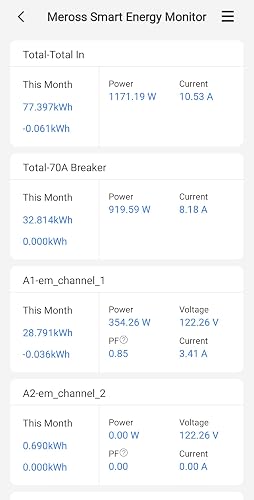
I was looking for a means to monitor my energy consumption from afar when I came across this Meross Home Energy Monitor. I read-up on it and found that it would meet all of my needs and more. It was delivered quickly and packaged well. I mapped out which circuits I wanted to monitor in advance. The installation went extremely well, even though I have a small, tight 24 slot breaker box. Everything fit in the breaker box fine with room to spare. Installing the current transformers was easy, as they just clip around your wires and then plug into the Meross energy monitor module. When I powered up the sytem, the light came on, I downloaded and opened the app, hit the + and it found the energy monitor quickly. It asked for my wifi info, and once provided connected quickly and began showing the energy status of every line I chose for monitoring. The app lets you merge multiple lines into one for total consumption if you chose, as well as specifically label each line so that you know what you are measuring, line by line. For unbalanced 240V lines, the app allows you to enter a factor (0.5) to obtain total consumption using two current transformers/sensors on that breaker. Only one current transformer/sensor is needed on balanced 240V lines. I found that the 16 branch current transformers plus the two main line current transformers was plenty. It lets me monitor all circuits that have any significant power consumption. I did not use nor need sensors on such things as overhead lighting, wall receptacles, etc. The consumption from these lines is still included in the total shown from monitoring of the mains coming into the house. The app shows voltage, amps, watts, and power factor for each monitored line. It tracks usage by hour, day, week, month and year. I installed it myself. If you are not comfortable working with electrical circuits, you may want to have an electrician install it. I am estimating I spent less than a total of two hours installing mine, including getting the app up and running. I plan to use it to fully understand my electrical consumption, monitor my usage to see what can be improved, and it gives me the ability to make sure our AC units are running properly even when we are away for extended periods during the summer. I recommend this package as it is easy to install, the app is intuitive and well thought out, and the information it provides is useful and actionable. ... show more
Reviewed in the United States on March 4, 2026 Reviewed in the United States on March 4, 2026 by JES

  • Not much work, lots of information! Not much work, lots of information!
The Meross Smart Home Electric Monitor (EM16P model) has completely transformed how I manage and understand energy use in my home—it's honestly one of the best smart home upgrades I've made in years! Installation was surprisingly straightforward for a whole-home device. As someone who's not an electrician, but having 45+ years of electrical experience, I installed it about two weeks ago and it took me about an hour. I found the instructions to be somewhat vague, but none-the-less interpretable. I installed this unit in my subpanel for my home, and it works just fine (though it makes no mention of subpanel installation in instructions). Once wired in, it supports monitoring up to 16 individual circuits (outputs) plus the two main lines (inputs), giving incredibly detailed visibility into exactly what's consuming power—fridge, mini-split. TV & home theater, home office setup, you name it. Once the wiring and the circuit monitors are installed it is a breeze to connect to the Wi-Fi. Start the app, turn on Bluetooth on phone, add device in Meross app (I have about a dozen Meross devices installed). The real magic happens in the Meross app: real-time tracking of power, voltage, current, and power factor with about ±2% accuracy. The charts are beautiful and intuitive—view data by minute, hour, day, month, or even year, plus estimated costs that help me spot wasteful patterns instantly. I added my electric provider rates and it will show the cost of operation of circuits also! I would suggest that you mark the ends of each wire from the sensors so that if you ever need to pull the controller out, you won't have to figure out which wire is which. I used a Dymo labeler. I love the smart alerts too—custom thresholds notify me of unusual spikes (like if the dryer runs longer than expected or something's left on). No subscription nonsense either; everything's included, and the 5-year historical data storage means I can look back and compare seasons or before/after efficiency tweaks. Oh, and if you have solar, it can track what is supplied from those circuits too! If you're serious about cutting energy waste, living more sustainably, or just wanting better insight into your home's electricity habits (me), the Meross Smart Home Electric Monitor is an absolute game-changer. Highly recommend—it's smart, powerful, user-friendly, and genuinely helps save money. Five enthusiastic stars! ... show more
Reviewed in the United States on March 13, 2026 Reviewed in the United States on March 13, 2026 by NealinNevada

  • Meross EM16P Makes Energy Monitoring Easy Meross EM16P Makes Energy Monitoring Easy
The Meross EM16P has been one of the most surprisingly smooth smart‑home additions I’ve installed. Setup was genuinely easy, and the device is forgiving in a way most clamp‑style monitors aren’t. If you accidentally clip the CT sensor on backwards, you don’t have to redo the wiring — you can simply flip the reading in the Meross app by setting the multiplier to ‑1. That alone removes a ton of installation friction. Once it’s running, the data visibility is excellent. The Meross app gives you clear, real‑time insight into power usage, voltage, and consumption trends. But the real win is how seamlessly it integrates with Home Assistant. It exposes all the right sensors, updates quickly, and makes it incredibly easy to build dashboards that show energy consumption per room or zone based on each breaker you’re monitoring. If you’re looking for a reliable, easy‑to‑install breaker‑level energy monitor that plays nicely with both its native app and Home Assistant, the EM16P is a standout. It delivers exactly the kind of granular visibility that makes whole‑home energy tracking actually useful. ... show more
Reviewed in the United States on April 17, 2026 Reviewed in the United States on April 17, 2026 by Aaron S

  • Easy setup and Real time energy tracking Easy setup and Real time energy tracking
Setting up the EM16 was a breeze, taking under 20 minutes with the included instructions. Right away, the app started keeping an eye on power usage and showing us the real-time numbers. After the initial setup, I upgraded to the latest firmware. Then, I gave all the channels names that matched the actual rooms or appliances, like kitchen, bedroom, etc. I really like the merge channel feature because it lets you combine multiple channels into a single group, so you can track the whole usage in one place. I merged AC1, AC2, and Furnace into an HVAC group to keep track of everything. The app also sends alerts when a channel goes over or meets a certain limit, and the best part is that we can access the web portal when we connect the device to an enabled access point. I’m planning to connect this Energy Monitor to Home Assistant to see what other cool features it has. Here are a few things I noticed: The hardware feels really good quality. Some of the hardware channels took a bit more work to clamp In the alert settings, the input values are round numbers, but they don’t let decimal values like 14.5. ... show more
Reviewed in the United States on March 3, 2026 Reviewed in the United States on March 3, 2026 by SK

  • Quick Installation, Useful Data, and a Great Product! Quick Installation, Useful Data, and a Great Product!
We've had the Meross Smart Energy Consumption Monitor installed for about a month now and I wanted to circle back with a review. We originally got this to keep an eye on our energy usage throughout the house (as one might expect) but it actually ended up providing us much more valuable information than that when our furnace recently quit while we were on vacation! We received an alert from our thermostat app that the house temperature had dropped below our threshold, and we were able to use the Meross app to determine if the furnace circuit was pulling any power. It was, but a very low amount which told us that the fan was likely running, but that the furnace itself couldn't possibly be kicking in as the draw wasn't nearly high enough. The real time energy consumption feedback was very helpful while we were working with a neighbor to trouble shoot things and get the house warmed up! Outside of this incident, we've been able to see how much our garage mini-fridges are actually costing us (leading to consideration of replacing them with a single, more garage ready unit) as well as understanding how much more it costs to have the furnace/AC fan on circulate (which runs 30% of the time) versus always on. We can also assess rooms where there really should be minimal/no regular draw to identify items which should really be unplugged when not in use. Installation wasn't overly difficult - we turned off power to the panel and had it installed in about 45-60 minutes. It's VERY helpful that the Meross app allows you to "flip" the signal if you accidentally install the CTs backwards. This avoids needing to remove and reinstall. One piece of advice is to write down the corresponding CT and breaker information during installation so you can easily update the app with the descriptors. The data also links to HomeKit and I'm looking forward to seeing what integrations I can dream up! I've included photos of the completed panel installation, a video showing the real time energy draw information available in the Meross app, and a photo of the history dashboard (which can be sorted by hour, day, week, month, or year). We're looking forward to getting a better view over the next few months as we get more data, especially once we hit the summer and can see air conditioner usage! Maybe we can finally answer the age old question of whether it saves money/energy to set the house warmer during the day and cool it down again before we get home! ... show more
Reviewed in the United States on April 11, 2026 Reviewed in the United States on April 11, 2026 by Kyle & Tanya

  • Great integration with Home Assistant and accepting higher amperage Great integration with Home Assistant and accepting higher amperage
I moved recently and my electricity bill has been quite high since. I have an emporia mains monitor already installed (it’s tied to my EV charger) so I confirmed that my actual usage reflects my billed usage but I wanted to figure out why my baseline (with nothing major on) draw was so high. I’m a Meross fan as I already have a number of their products but I already had the Emporia system installed. I went back and forth with buying the Emporia clamps but they max out at 50A when I have 60A and 70A breakers that I want monitored, and frankly, their app sucks – it’s incredibly difficulty to navigate and zoom in/out on data. I recently migrated my smart home over to Home Assistant, so when I saw that the Meross product supported HA and higher amperage monitors (and read in the reviews that you can use a single clamp across balanced double-pole breakers), I was curious to try it out. My panel is a mess, it’s a 200A panel but has many double pole as well as tandem breakers, plus a sub panel. The Emporia unit already takes up some space so cramming in a second unit was a pain. Furthermore, my mains come in in a separate compartment, before the meter, with no other access. So, I have to “fashion” my own way to access the mains between compartments. I have more breakers than the 16 clamps that come in this kit so I have to prioritize which breakers I care most about monitoring – still figuring that out and will need to play around with the data I collect. I was surprised with how easy the software setup was with the smart energy monitor, the app detected the unit on its own, so I went back one step and did a screen recording of the initial setup. It’s really nice when that step isn’t a frustrating mess. Everything was recognized, I realized that my main monitors were backwards (negative reading) so I flipped them and didn’t even get through the part of configuring the multipliers for the double-pole breakers with only one clamp. I did use two clamps for one of my double-pole breakers that goes to the sub panel since I assumed it would be an unbalanced load and I was right. I mentioned Home Assistant and determining which breakers I want to track based on the data. Home Assistant immediately recognized the device through my existing Meross integration and I had Claude Code build me a quick dashboard. Now I can collect data to analyze usage patterns and figure out which pesky circuits/devices are chewing up electricity as well as move the clamps around to determine which breakers I actually care about monitoring. I had some trouble deciding how to use the “C” channel since this smart monitor requires you to keep the channels aligned with the phases/split phases coming in. I contacted support for some advice and they quickly responded and acknowledged my feedback of matching phases to breakers/clamps being an inconvenience, but they said this greatly improves accuracy. I wonder if the Emporia monitor is less accurate since it doesn’t have this requirement. But, I was strategic and used the “C” channel for most of my double-pole breakers since I had the flexibility of deciding which phase to monitor. I still need to clean up the wiring (they say you can trim the wire lengths) and figure out which clamps I want to move around. The antenna works inside my electric panel even though I don't have the strongest Wi-Fi signal in that location and they recommend mounting the antenna through the exterior of the panel but the cable is a touch to short to well-locate it ... show more
Reviewed in the United States on March 25, 2026 Reviewed in the United States on March 25, 2026 by Mepel

  • Meross EM16P works well and is easy to install and set up Meross EM16P works well and is easy to install and set up
If your not comfortable or competent working inside your electrical box then hire a certified electrician to install this for you. Also, check with your local ordinance authority to make sure it will be ok to install this unit where you live and if you have any other concerns about codes, for example is it ok to use zip ties inside your breaker box? I have a municipal electrician in my family and have assisted him with jobs here and there and have a higher than average competence with house wiring. I installed this in the main breaker box for the house, there is no shutoff before the box so I turned off the main breaker and put some cardboard over the hot lines coming into the house near the shut off for safety during the install just in case. For prep, I needed to perform some box hygiene before installation as my box had seen years of circuits being added, while everything was to code and had passed previous inspections, the wiring was overly congested. Room is needed to run the current transformer wires to the main unit. It was a good lesson in the old saying don’t let perfect get in the way of good. Once I had enough room in my box the installation was very smooth. The packaging, monitor unit, transformers, instructions, and app are all very solid. I had a question regarding the connection of the main phase wires and got an answer quickly via the product support email. The monitor unit fit perfectly in the bottom of my breaker box and connected to my home wifi and the app quickly without any issues. The Meross app is well laid out, intuitive, and easy to understand I was able to change the names of each measurement transformer in the app to match the circuit description easily. I plan to migrate to home assistant in conjunction with Samsung Smart Things that I currently use in the near future and can’t wait to integrate this monitor with it. I am already thinking of a few dumb devices that can now become smart, such as the washing machine. After looking at usage around my homestead I was able to get a clear picture of what is using power around our household. I nixed a few vampire devices that where not critical and was able to get my idle consumption down by just unplugging a few power strips and wall warts and having some smart outlets turn off things when not being used. ... show more
Reviewed in the United States on March 17, 2026 Reviewed in the United States on March 17, 2026 by Global Saver

  • Cheap Product + Bad Software = Bad Experience
Stopped working in exactly one week. They updated their App, and I suddenly started getting 5000 errors on the app and the device refused to reset. Immediately returned.
Reviewed in the United States on March 21, 2026 by Icona

Can't find a product?

Find it on Amazon first, then paste the link below.
Checking for best price...