
Search  for anything...

Logitech MK295 Wireless Mouse & Keyboard Combo with SilentTouch Technology, Full Numpad, Advanced Optical Tracking, Lag-Free Wireless, 90% Less Noise - Off White

  • Based on 13,769 reviews
Condition: New
Checking for the best price...
$32.99 Why this price?
Save $2.00 was $34.99

Buy Now, Pay Later


As low as $8 / mo
  • – 4-month term
  • – No impact on credit to apply
  • – Instant approval decision
  • – Secure and straightforward checkout

Ready to go? Add this product to your cart and select a plan during checkout.

Payment plans are offered through our trusted finance partners Klarna, Affirm, Afterpay, Zip, Apple Pay, and Google Pay. No-credit-needed leasing options through Acima may also be available at checkout.

Learn more about financing & leasing here.

Selected Option

Free shipping on this product

FREE 30-day refund/replacement

To qualify for a full refund, items must be returned in their original, unused condition. If an item is returned in a used, damaged, or materially different state, you may be granted a partial refund.

To initiate a return, please visit our Returns Center.

View our full returns policy here.


Availability: Only 3 left in stock, order soon!
Fulfilled by Amazon

Arrives Thursday, Aug 13
Order within 7 hours and 10 minutes
Available payment plans shown during checkout

Protection Plan Protect Your Purchase
Checking for protection plans...

Color: Off-White


Features

  • Innovative SilentTouch technology for same typing and clicking feel with 90% less noise (1)
  • Keyboard with 8 convenient shortcuts and full numpad for efficient data entry and easier navigation. Gives you one-touch access to play/pause, volume, mute, and the Internet
  • Contoured and portable shape with smooth, precise clicking and pointing on most surfaces and SilentTouch technology for quiet clicks
  • Connect in 3 seconds (2) with a tiny receiver that delivers a strong, reliable 2.4 GHz wireless connection and 10 m range for a clean, clutter-free desk area
  • Compatible with Windows or Chrome OS and easily connects for plug-and-play simplicity
  • Spill-resistant design (3), durable keys, and sturdy tilt legs with adjustable height
  • A 36-month keyboard and 18-month mouse battery lifeplus on/off switchesmeans you can go for months without the hassle of changing batteries (4)
  • In case of wireless keyboard or combo (keyboard and mouse), the USB receiver is usually provided either inside the mouse (under the battery cover) or attached within the product packaging
  • Fully compatible with Windows 11
  • Plastic parts in MK295 Graphite include certified post-consumer recycled plastic: 49% for the mouse and 71% for the keyboard.

Description

Wireless keyboard and mouse combo that reduces over 90% of noise and maintains the same typing and clicking feel: Innovative SilentTouch technology for the same typing and clicking feel with 90% less noise Keyboard with 8 convenient shortcuts and full numpad for efficient data entry and easier navigation Contoured and portable shape with smooth, precise clicking and pointing on most surfaces and SilentTouch technology for quiet clicks Strong, reliable 2.4 GHz wireless connection with a 10 m range and a tiny USB receiver for a clean, clutter free desk area Compatible with Windows or Chrome OS and easily connects for plug-and-play simplicity Spill-resistant design, durable keys and sturdy tilt legs with adjustable height A 36-month keyboard and 18-month mouse battery life—plus on/off switches—to reduce the hassle of changing batteries Gives you one-touch access to play/pause, volume, mute – and even your email. (1) Click and typing noise reduced by over 90% compared to Logitech MK270. Left click and typing dBA level measured by an independent lab at 1 meter. (2) Tested by Logitech with 50 persons in Switzerland (2022). (3) Tested under limited conditions (maximum of 60 ml liquid spillage). Do not immerse keyboard in liquid. (4) Battery life may vary based on user and computing conditions.

Brand: Logitech


Compatible Devices: PC


Connectivity Technology: USB


Keyboard Description: Full Size, Standard Layout


Recommended Uses For Product: Every Day work


Special Feature: Adjustable Keyboard Height, On/Off Switch, Spill Proof, Spill Resistant, Wi-Fi, Wireless


Color: Off-White


Style: MK295


Material: Information Not Available


Included Components: 1 x AA Battery, 2 x AAA Batteries, MK295 Silent Wireless Combo, USB Receiver, User Documentation


Compatible Devices: PC


Connectivity Technology: USB


Additional Features: Adjustable Keyboard Height, On/Off Switch, Spill Proof, Spill Resistant, Wi-Fi, Wireless


Power Source: Battery Powered


Switch Type: Tactile


Keyboard Layout: QWERTY


Hand Orientation: Ambidextrous


Mechanical Keyboard Switch Model: Tactile


Minimum Required Operating System Version: Windows 11


Compatible Operating System Family: Windows


Compatible Tablet Computer Models: AAUB P30


Number of Keys: 104


Color: Off-White


Style Name: MK295


Enclosure Material: Information Not Available


EU Spare Part Availability Duration: 18 Months


Brand: Logitech


Keyboard Description: Full Size, Standard Layout


Antenna Location: Every Day work


Built-In Media: 1 x AA Battery, 2 x AAA Batteries, MK295 Silent Wireless Combo, USB Receiver, User Documentation


Model Number: 920-009783


Model Name: MK295


Unit Count: 1.00 Count


Manufacturer: Logitech


UPC: 097855160973


Mfr Part Number: 920-009783


Item Type Name: Wireless Mouse and Keyboard Combo


External Testing Certification: Não aplicável


Warranty Description: 1 Year Limited Hardware Warranty


Frequently asked questions

If you place your order now, the estimated arrival date for this product is: Thursday, Aug 13

Yes, absolutely! You may return this product for a full refund within 30 days of receiving it.

To initiate a return, please visit our Returns Center.

View our full returns policy here.

  • Klarna Financing
  • Affirm Pay in 4
  • Affirm Financing
  • Afterpay Financing
  • Zip Pay in 4
  • Financing through Apple Pay
  • Financing through Google Pay
Leasing options through Acima may also be available during checkout.

Learn more about financing & leasing here.

Top Amazon Reviews


  • Outstanding
Color: Graphite
I tried to buy a silent keyboard 6 years ago - I got rubbish and finally trashed it. After 3 months using this one, it continues to be wonderful - way better than I expected. Yes, it is quiet, and with a distinct feel when keys are pressed. Reasonable price, seems well make, stable on the desk, works out of the box after installing included batteries. Simply outstanding. Highly recommended. ... show more
Reviewed in the United States on April 16, 2026 by Eric P

  • Excellent Wireless Mouse & Keyboard
Color: Graphite
This is a very nice and very affordable wireless mouse and keyboard combo for business or general use. It's nice looking and the full keyboard doesn't have an overly large footprint. It's a standard USB periperheral so there's no setup or drivers, just connect the wireless receiver to a USB-A port, power up the mouse and keyboard, and go. The keyboard and mouse are comfortable to use, feel solid and well made, and the keys and buttons are much quieter than those used in the similar looking MK270 wireless combo. The MK295 is a great option, inexpensive with excellent quality and ergonomics. ... show more
Reviewed in the United States on May 6, 2026 by KGB

  • Truly Silent Performance – The Perfect Choice for a Shared Office Space
Color: Graphite
When you spend a lot of time typing reports or managing digital infrastructure, the constant "clack" of a standard keyboard can become a major distraction, both for you and anyone else in the room. I picked up the Logitech MK295 combo to use with my primary workstation, and the "SilentTouch" technology is significantly more effective than I anticipated. Quiet Without Sacrificing Tactile Feel The headline feature here is the noise—or lack thereof. It reduces typing and clicking sounds by a huge margin compared to a traditional membrane setup. What’s impressive is that the keys don't feel "mushy." There is still a satisfying tactile response and enough travel to maintain your typing speed, but the acoustic output is muffled to a dull thud. This is a game-changer if you’re frequently on calls or working in a quiet office environment. Reliable Wireless Connectivity Setup was as simple as plugging in the tiny USB receiver. I haven’t experienced any lag or dropped connections, even with multiple other wireless devices and a server rack nearby. The range is solid, allowing me to move the keyboard around my desk without any stuttering. Functional Design and Battery Life Full-Size Layout: Having the dedicated numpad is essential for data entry and technical work. The addition of the shortcut keys at the top for volume and media control is a nice convenience for a daily driver. The Mouse: The included mouse is compact and shares the same silent-click technology. It tracks accurately on various surfaces, including my standard desk mat, without needing a dedicated mousepad. Spill Resistance: The keyboard is designed to handle minor spills, which provides some extra peace of mind when there’s a coffee on the desk during a long shift. Final Thoughts Logitech is known for their battery efficiency, and this set is no different—I expect to get months, if not years, out of a single set of batteries. If you want a clean, wireless, and nearly silent input setup that just works out of the box, the MK295 is a fantastic value. It’s a professional-looking kit that prioritizes comfort and a quiet workspace. ... show more
Reviewed in the United States on April 28, 2026 by Matthew VanDruff

  • Quiet as a House Waiting on Santa
Color: Off-White
Shhhhhh! Even now after noise cancellation microphones have advanced to block out an amazing amount of noise, this keyboard is a dream. Video meeting? No problem. They won’t hear you typing and you can hear them talking while typing. It is so nice and quiet. The keys themselves feel soft and almost grip your fingertips. I love that it has an on off switch on top for moments when my cats decide I should pay attention to them and they have no problems if my keyboard is where they want to be. The mouse is smooth and quiet. Same as the keyboard, it isn’t interrupting a meeting. I haven’t had an issue yet with the size but I can see where some people might. This set is priced right if you’re going for quiet. I’m not rough on things so I imagine this will last me a while. ... show more
Reviewed in the United States on April 1, 2026 by Amy B*

  • Is the best back Is the best back
Color: Graphite
When I test a product and review it I don’t usually use superlative words and I will only rate something five stars if it truly deserves it, and not every product does. This one does. I’ll try to explain briefly. I am a prolific writer and I have actually worn more keyboards out than some small stores sell in a year. Not that I am rough on them, they just don’t last long, and this brand has been my nemesis for as many years as I can remember. While I think they often make the best of class, sometimes, they also sometimes make things I believe are calculated to not last long. But that aside, my other goal this round in addition to durability is I need my keyboard and mouse to be silent, not quiet but silent. Almost none are and currently it’s even trendy to own keyboards with varying degrees of clicky sounds. Not me. IS THIS SILENT My gold standard for keyboards in Logitech’s own K740, which practically every source has called the best keyboard ever made. Unfortunately due to an incredible lack of understanding, they discontinued it with no suitable replacement. Their current high-end offerings are wrong in every way but they don’t think that way which means I have zero interest in them. I like the K740 so much that I bought a second one as soon as I heard they were discontinuing them and I still have it sealed away unopened. Read back a couple of lines and you know what happened to my beloved keyboard, it reached that predicable end of life when the enter key broke and then the letter vee stopped working properly. Both can be fixed with time and patience, which I don’t have so I started shopping and it came down to this model that they call silent and the model K650 which is also claimed to be silent and in fact I couldn’t see way it was going for twice as much, and this one even included a basic but decent mouse, which I thought I would just keep in the box. I had low expectations but I ordered this anyway. From the moment my fingers touched the keys it was love, it is actually very slightly quieter than the K740 (which makes it almost impossible to hear) and the keys are as high quality, solid and non-rattling, perfectly shaped, ideal key travel, in short it’s like this is the long awaited replacement for the best keyboard on the planet. So keep it a secret between you and me, this is its twin brother with a couple of exceptions, which I’ll list below. IS ANYTHING PERFECT I am going to be nitpicking to try to come up with any flaws and there aren’t really any. They are just things to know about, for example this model isn’t illuminated. I used to like that feature but now I’m not sure I miss it. The other has to do with the shift lock light which is in an inconvenient location and hard to see with the glossy clear cover over it. I miss having the on-screen reminder. As far as the mouse, it’s actually better than I though and I put my MX series away for now. If I would improve anything I would say it’s a little small for my hand and a trifle light so when I touch it I’m always wanting to lift it up. Oh and one more thing. Why did they feel it was necessary to print the annoying ad message printed on the space bar with the words silent touch? It’s distracting and completely destroys the professional restrained look of the rest of the unit. Someone is just not thinking at Logi. YES NO MAYBE When I couldn’t find what I wanted I thought I would look for a K740, of course they’ve been long gone for years. There are a lot of people offering them used at as much as $500 bucks and I even saw one for a thousand. No thanks, I know it’s hard to believe but this one is just as good. End of story. ... show more
Reviewed in the United States on May 2, 2025 Reviewed in the United States on May 2, 2025 by PhotoGraphics

  • Great quiet wireless keyboard/mouse set that has excellent battery life.
Color: Graphite
Absolutely love this wireless keyboard/mouse combination. While not 100% silent, it is significantly quieter than most keyboards and is very comfortable to type with. The fit/size is a normal size keyboard and does not lack any keys. It is easy to connect, just plug in the dongle and turn on the keyboard and mouse. I especially like that the batteries seem to last a VERY long time... at least a year from my usage. I've bought 3 of these over the years and hope they keep making it. ... show more
Reviewed in the United States on May 30, 2026 by Matt H.

  • Beautiful keyboard and keys feel great
Color: Graphite
Takes triple A batteries but that's okay. Perfect silent keyboard and mouse. Works great with my small hands. Almost returned because I couldn't locate USB receiver but it's actually stored in the flaps on the end of packaging. Check packaging carefully for usb receiver because it's easy to miss due to how it's wedged into the packaging by itself. ... show more
Reviewed in the United States on June 11, 2026 by Patricia Bunton

  • Good value and function for my needs Good value and function for my needs
Color: Graphite
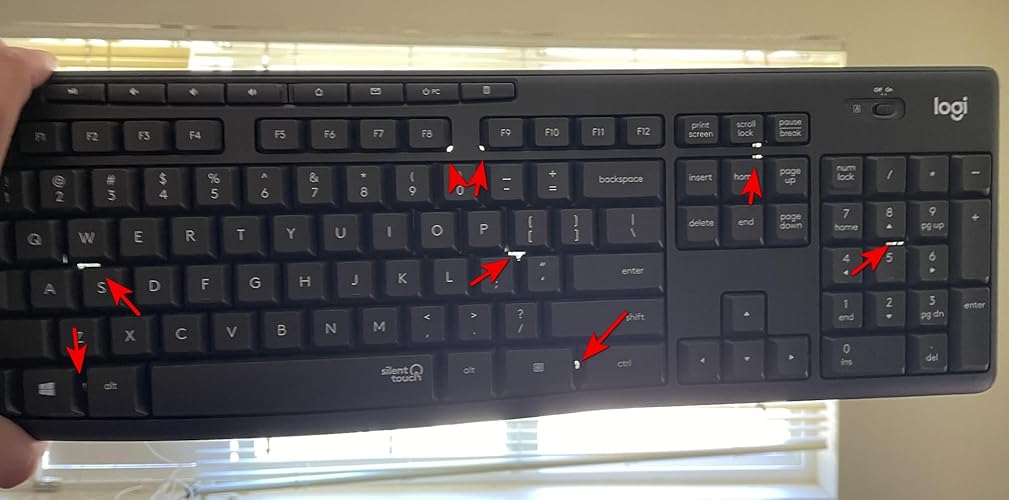
One of very last Logitech wireless keyboards that you can find in full-standard layout. Otherwise (with the new branding) “Logi” almost exclusively went to multi-device “flow” keyboards. What’s wrong with that? ; it tries to please every platform and you end up both with confusing labels on accustomed keys (like Start – Alt – Ctrl etc) and you have missing/sacrified keys (like print screen, scroll lock, pause/break) or usual functions are hidden under some combination keys – totally in different places. I’m a Windows PC user and has absolutely no multi/flow need with my keyboard. I’m coming from wonderful K800 wireless illuminated keyboard. It served me for about 10 years – quite respected life. But of course, Logitech killed its manufacturing – while there is still a loyal demand for it. I get the urge for coming up with multi-platform niche devices. But I don’t get why you have to kill your best seller and not offer both of them. Alas, corporations like hurting themselves sometimes, for absolute no reason. Illuminated wireless function was my first priority on new keyboard search. That brought me to new MX Keys S series and I was about to hit order button (although quite steep price). Then after reading many reviews my attention came to those non-standard/missing key issues (for Windows users) and some connection issues as well. So I had to drop that model and focused on unknown Chinese illuminated KBs (which there are quite a few). But reviews revealed; high failure rate, connection/battery issues etc. Then I dropped illumination function and focused on standard PC layout with “quiet” feature. This MK295 came up. Extremely reasonable priced KB, very good tactile feel (to my taste) and almost completely quiet typing. It even has those 8 media control/quick function keys on top that I always use. Its full standard PC layout – yet quite compact size. No palm-rest (which I didn’t need anyway) to keep it compact. Yet bundled mouse (M220) has very small toy-like size and rattling top plate. So I’ll never be using that mouse, as I already have two quiet Logitech mice (M330 and M350 “pebble”) and a trackball+mouse M570; all on “unifying” platform. Now we come to connection subject (USB dongle and its utility software), which is quite a mess in Logitech realm. All previous logitech KB and mice simply worked on one single USB dongle type; Unifying. But today all new logitech products are shifting to Bolt USB dongle (which is a modified version of bluetooth). And in between; there is 2.4 GHz USB dongle (which this MK209 uses). None of these 3 dongles work with products from other camp. This is the hardware side. Then we have utility software side; that small SW you load to pair & manage your devices. There is old unifying SW, current Options+ SW and in between Options SW. Options+ SW sees (and only sees) all 3 dongle types. It lists all my my existing paired mice and K800 KB under unifying dongle. But I can only manage the mice and NOT my K800 keyboard! Yet, it doesn’t even show my new K295 keyboard at all! When I do “add” under 2.4 GHz dongle; it says that the SW is not compatible with this new K295 KB. But keyboard itself works at all times – since its factory paired. I found logitech support pages for both Options+ and Options SW – which lists all “compatibe” products. And this K295 keyboard is not even listed under any software! I still uninstalled Options+ and installed Options SW; such a nightmare, as it constantly push you to “login to Logi Web Connect” (otherwise basically it doesn’t let you do anything). But it also does NOT see this new K295 KB! So yes; Logitech is essentially selling this K295 keyboard that NONE of its 3 connection software works with! Isn’t that wonderful? The bottom line is; its factory paired to that 2.4 GHz USB dongle and if your dongle dies; so does your keyboard! Good job Logi! Bottom line; I decided to keep this MK295 combo (and only use K295 keyboard). That means I’ll be having two USB dongles on my PC; old unifying dongle for rest of my existing mice and 2.4 GHz dongle only for MK295. So far I’m OK with that, as I couldn’t find any other keyboard (which satisfies my full PC layout and silent typing demand, as I had to drop illumination feature). Price is quite low on this “transitionary” combo, that I’ll probably buy one more as backup. Why backup? The standard answer is; as with all cheap keyboards, this is a membrane type keyboard (as opposed to individual mechanical switches). That design is inherently prone to early oxidation. But this KB even has an extra “feature” (whether intentional or not, I’m not sure). Check out my pics (against lighted background) to see “air-holes” between front or back. No, they are not intended for cooling down this high-performance keyboard (sarcasm intended). They might speed up that oxidation process, after all. Otherwise why do you put holes both on top and bottom? There is an earlier version of this KB (K270) which has unifying dongle, spill-proof feature and is even cheaper than this. So it should probably last longer than this K295. But it doesn’t have quiet typing feature. Unfortunately, there is no other trusted OEM (amongst HP, Lenovo etc) when it comes to wireless keyboards with full standard layout. Logitech is the only brand that mastered enough key mechanics, tactile feel, reliable wireless connection etc. I wish Apple made PC keyboards for even better quality and functionality! Till then; find your Logitech that is best suited for your current needs. ... show more
Reviewed in the United States on August 7, 2024 Reviewed in the United States on August 7, 2024 by Pacific coast

Can't find a product?

Find it on Amazon first, then paste the link below.
Checking for best price...