Search  for anything...

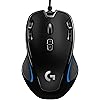
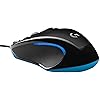
Logitech G300s Optical Ambidextrous Gaming Mouse – 9 Programmable Buttons, Onboard Memory

  • Based on 6,333 reviews
Condition: New
Checking for the best price...
$159.00 Why this price?

Buy Now, Pay Later


As low as $26.50 / mo
  • – 6-month term
  • – No impact on credit to apply
  • – Instant approval decision
  • – Secure and straightforward checkout

Ready to go? Add this product to your cart and select a plan during checkout.

Payment plans are offered through our trusted finance partners Klarna, Affirm, Afterpay, Zip, Apple Pay, and Google Pay. No-credit-needed leasing options through Acima may also be available at checkout.

Learn more about financing & leasing here.

Free shipping on this product

This item is eligible for return within 30 days of receipt

To qualify for a full refund, items must be returned in their original, unused condition. If an item is returned in a used, damaged, or materially different state, you may be granted a partial refund.

To initiate a return, please visit our Returns Center.

View our full returns policy here.


Availability: Only 5 left in stock, order soon!
Fulfilled by Acute Tek (We Record SN)

Arrives Saturday, Aug 15
Order within 17 hours and 21 minutes
Available payment plans shown during checkout

Protection Plan Protect Your Purchase
Checking for protection plans...

Features

  • Nine programmable controls: Move keyboard commands to mouse buttons that are in easy reach
  • Symmetrical compact shape: Feels comfortable in either hand and perfect for gamers who don't want a large mouse
  • Gaming-grade optical sensor: Tracks accurately on a wide variety of surfaces and is tunable to achieve the responsiveness you need
  • Easy configuration software: Simply drag and drop commands to the buttons to setup the mouse exactly the way you want

Description

The Logitech G300s Optical Gaming Mouse gives you more power and more control. Nine programmable controls let you move keyboard commands to buttons that are in easy reach

Wireless Type: ‎802.11abg


Brand: ‎Logitech G


Series: ‎Optical Gaming Mouse


Item model number: ‎910-004360


Hardware Platform: ‎Mac, PC


Operating System: ‎PC


Item Weight: ‎2.88 ounces


Product Dimensions: ‎4.5 x 2.8 x 1.4 inches


Item Dimensions LxWxH: ‎4.5 x 2.8 x 1.4 inches


Color: ‎Black; blue


Batteries: ‎1 A batteries required.


Manufacturer: ‎Logitech


Is Discontinued By Manufacturer: ‎No


Date First Available: ‎January 13, 2015


Frequently asked questions

If you place your order now, the estimated arrival date for this product is: Saturday, Aug 15

Yes, absolutely! You may return this product for a full refund within 30 days of receiving it.

To initiate a return, please visit our Returns Center.

View our full returns policy here.

  • Klarna Financing
  • Affirm Pay in 4
  • Affirm Financing
  • Afterpay Financing
  • Zip Pay in 4
  • Financing through Apple Pay
  • Financing through Google Pay
Leasing options through Acima may also be available during checkout.

Learn more about financing & leasing here.

Top Amazon Reviews


  • Great Product - Highly Recommended
I bought this to replace my Logitech G600 Logitech G600 MMO Gaming Mouse, Black. While I loved the versatility of that mouse, I found the shape to be an ergonomic nightmare. My thumb had become scared of the keypad and had become complacent with dragging itself across my mousepad, my pinky couldn't get comfortable so ended up curling up against my ring finger and, while useful, the sheer number of button configuration options led to their disuse due to not remembering how they were configured ; it was time for a new one. I never found myself using the extreme resolution of the G600 (8200 dpi); I always kept it set around 2250 with shifts of lesser values. And, as mentioned, I no longer needed 492 quadrillion buttons - just a few would do. The major pain points of the G600 were the lack of ergonomic design and the weight. I wanted my new mouse to be lighter and something I could actually rest my hand on without accommodating yet another button or odd angle. I got everything I wanted in the G300s. While I guess it's technically a downgrade from the G600, I don't feel that way in the slightest. The mouse is light, has great resolution, slides effortlessly and has the support of the same Logitech Gaming Software. It supports the same number of modes as the G600, three, and, while it doesn't allow for the same lighting "effects" (pulse and cycle), it does allow you to change the LED color for each mode. The buttons are in the perfect spots - out of the way of primary usage areas but within quick reach. An added bonus was that I found this mouse seemed to work better with the Logitech software than my G600 did. With the G600, I would often find that my onboard profile had reset or that I was unable to store particular settings (they would revert after leaving the configuration page). This could have been an issue with my particular G600, but, regardless, I've had none of these issues in configuring the G300S. If you've been using a heftier mouse and have been looking for something a little lighter, and you don't find yourself needing a DPI over 2,500, definitely give this one a shot. If you're just someone looking for an upgrade to your existing conventional mouse, then, by all means, look no further. This is a great mouse for the price point and gives you access to some high-end features without necessitating complexity. ... show more
Reviewed in the United States on April 18, 2016 by HAL 9000

  • This is a great mouse for creators on Mac OS
I love it. Well built, looks cool (you can change the LED colors to your liking, including turning them off), buttons work great, but what's a real standout is the software is EXCELLENT on MacOS and highly configurable on a per app basis. You can customize all 9 buttons and can toggle 3 configurations giving you 15-20 button options per app (you'll keep the L and R clicks and 1 button to act as the toggle, then the rest is left to you!). I'm a creator, and having custom buttons for common Photoshop and 3D app keys and menus is pretty awesome. Played a bit of OG Doom with it, I can see the usefulness in dynamically setting your DPI (sensitivity/response) while playing... could be useful for purposeful work too, we'll see. I rock a Wacom pen on my right hand, and this mouse on my left.. it's good for balance, offsets fatigue/carpal tunnel/tennis elbow like issues. The quality and experience surpasses the price, a must buy if you've got an ordinary mouse and want to go to the next level. ... show more
Reviewed in the United States on December 26, 2020 by Ja Heart's AMZN

  • Overall, a very functional and nice-looking budget gaming mouse. Overall, a very functional and nice-looking budget gaming mouse.
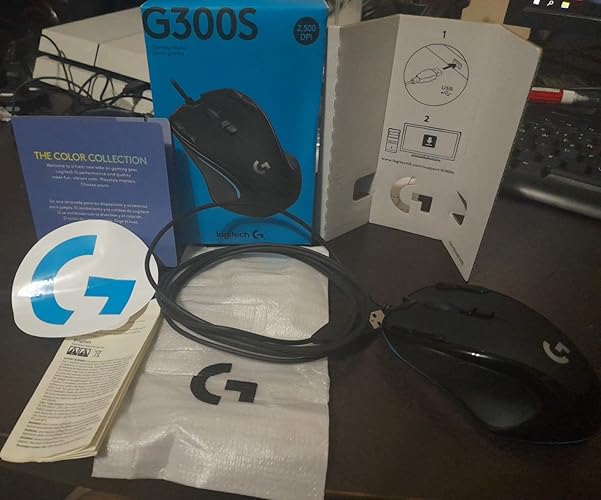
Well, if you are on a budget or you just dont want to waste +50$ on a mouse, this one is probably worth to consideration. At arrival, the box was misleadingly small, but this is actually alright because the mouse size is average; not to large, nor small. Factually, is around 12 cm large and 7.5 cm wide. It feels solid, the plastics and rubber materials feel decently crafted; the buttons also feel alright. Ergonomics is not the strong point, but as many things, is about getting used to it. My main problem with this mouse was actually not the hardware, rather the software. Upon testing in my PS4 console, the mouse was already key-binded with some weird random combinations. So after learning about the build-in memory i decided to look for Logitech software on this mouse. The research was a little disappointing due to broken links or poor guidance on the website or printed guides in the box. I am not sure if the links have been fix by now but i must thank some Reddit guys for sharing the latest functional version of the Logitech Gaming Software in a thread. This LGS is the application you'll need to install on your computer to modify the mouse keys as desired, perhaps not the only one you can use. Simply explained, there are 3 different profiles you can edit in the mouse (8 colors for them), this means that you dont actually have just 4 new buttons compared from a regular mouse, rather 12 possible buttons combinations if you tweak the settings correctly. I would recommend keeping the 2 buttons in the center for DPI swap and profile swap, but they are also moddable. Another small drawback was the fact the buttons did not had a function on their own (MB4+MB5+MB6...), they need to be bind with a logical key combination on your keyboard. - At least on my testing. In recap, the product is good and looks good but you might need to invest a little bit of time to make it to work just as you desire it to work on the games you want to play, but nothing too bad at all. The Logitech sticker was also a nice marketing little detail. ... show more
Reviewed in the United States on April 19, 2022 Reviewed in the United States on April 19, 2022 by John J.

  • I'm able to work/ game with one hand with that mouse.
The best purchase for my medical situation. I purchased four more because I only have one hand and couldn't use CTRL, ALT, or Shift when working in 2D and 3D applications. Additionally, gaming is much simpler. Since the mouse has numerous modes, I created three: one for coding, one for productivity, and one for gaming. ... show more
Reviewed in the United States on May 1, 2026 by Muhammad Attiya

  • Bought a replacement after 11 years of having bought my first one of these.
I got this gaming mouse back in Berlin, Germany in 2012. I just bought my second one as a replacement because the previous one was double clicking (probably grime got its way after 11 years of heavy use) It was such a good choice for me at the time, a well built, ergonomic, stylish, performance mouse. I use it for everything from gaming to editing software (Premiere, Photoshop, etc). I am a photographer which means half of my job is spent on the computer and the key features on this mouse are extremely useful. While mostly a "gaming" feature, the ability to switch the mouse speed/sensitivity on the fly with a button and being able to customize and save different speed settings, come quite handy in photography and post production. Whenever Im editing photography and need to focus on specific details or need precision for strokes, I can tune the speed of the mouse for better control. The material and build of the mouse its durable. My first one lasted 11 years and took many accidental falls. If you also happen to be a gamer, the 4 extra keys you get (2 on each side) gives you the option to essentially have a complete controller in your shooting hand. I would buy it again in another 11 years if they still make em! ... show more
Reviewed in the United States on August 25, 2023 by Gabriel Alemany

  • Pretty cool mouse for less than 25 clams
The G300s is my first gaming mouse. Until now I had been using a Logitech M510 wireless. I have large hands, so for me, the M510 was a more comfy fit, as it's a tad longer than the G300s. However, the G300s is still pretty comfortable and features a symmetrical build, so that it would also suit lefties. The software is easy to use. The LEDs are cool. The scroll wheel is a little on the small side, so it can take some getting used to for bigger handed folks. There's no squeak whatsoever to the wheel though, and its rubber coated and feels good. The USB cable is pretty thin and flimsy, however, it is nice and long, 6 ft or so I reckon. So I was happy that I didn't have to re-position my case from being on my left side. The gaming buttons are nice. I'm glad I can finally use my mouse for my mic button rather than half to stop and hit a keyboard key while in game. So far the response time does seem significantly quicker than with the wireless mouse I was using before. I recommend using this mouse with a mouse pad, which will be my next purchase. It does seem a bit friction-y on my bare wood desk. The left and right click buttons both feature that nice click feeling that I'm familiar with having used logitechs before. All-in-all, for under 30 bucks, this is a great budget gaming mouse. UPDATE: I've since purchased a Redragon mousepad, and must say, the mouse works and feels great on a mouse pad. And after a couple months of heavy use, everything is working wonderfully. No squeaking of the mouse wheel, and the click buttons and programmable buttons still work like new ... show more
Reviewed in the United States on March 1, 2017 by SM

  • Great mouse for gaming!
For the price I paid (around $26) this is a high quality gaming mouse! The photo makes it look dumb and gimmicky, but it works quite well in every aspect. Responsiveness: The high polling rate makes it very responsive, and I haven't yet had a problem with misinterpreted movement. Weight: It's about mid-level weight that feels good, though you can't change the weight. Size: It's not as big as the Zowie FK1, but it's still just big enough for my monster hands. Mousepad recognition: Has worked on all of my surfaces (shiny mousepad, soft cloth mousepad, arm of recliner that has been destroyed by a silly cat) with no problem. The Zowie FK1 didn't even perform as well as this one. Extra buttons: It took me several days to get accustomed to the buttons not being thumb buttons, but now that I have, it feels even better to me. Slide: Slides better than any mouse I've owned. Haven't had to use teflon tape like on other mice. Software: I find the software has too many options and can be confusing at first, but once you figure it out, you can make the mouse work exactly how you'd like. ... show more
Reviewed in the United States on August 21, 2017 by Ronnie

  • Best mouse I have ever owned, and one of the cheapest too!
Excellent mouse, especially for the price. That it has a 'pinched' body makes all of the buttons easy to use. I previously owned (well still own) a much more expensive logitech gaming mouse (g700s) and the layout of the mouse and placement of the buttons made almost all of them unusable. With the pinched design, you can freely move your index and middle fingers around to any of the top buttons very easily and intuitively. works extremely well with the g13 lefthand gamepad. The automatic game detecting settings work for both devices at the same time, and both devices share the set of per-game 'functions', so you can assign them to gamepad or mouse buttons very easily, and move them around at will. None of the buttons are dedicated to specific functions like switching profiles or DPI (or even mouse clicks/scrolling) so you can get really creative with how you configure this thing. The actuation force of all of the buttons (and the scroll wheel) are extremely low but also satisfyingly tactile, so you get an appropriate amount of feedback without requiring stressful contortions to get enough leverage to engage the buttons. I wear a 'large' sized glove (which is average/small for men) and the distance and spacing between buttons is perfect for my hand geometry. In my opinions, this sort of button configuration is optimal for both gaming and productivity. When you want it to be a regular mouse, all of the extra functionality is out of the way, when you want to take advantage of the extra buttons, they are within reach and actuating them accurately is not difficult. Best mouse I have ever owned, and one of the cheapest too! ... show more
Reviewed in the United States on April 15, 2017 by J. Rudolph

Can't find a product?

Find it on Amazon first, then paste the link below.
Checking for best price...