


Search  for anything...

Logitech Combo Touch, Detachable iPad Keyboard Case 10th gen - Oxford Gray

Based on 1,811 reviews
Condition: New
Checking for the best price...
$159.99

Buy Now, Pay Later


As low as $26.67 / mo
  • – 6-month term
  • – No impact on credit to apply
  • – Instant approval decision
  • – Secure and straightforward checkout

Ready to go? Add this product to your cart and select a plan during checkout.

Payment plans are offered through our trusted finance partners Klarna, Affirm, Afterpay, Zip, Apple Pay, and Google Pay. No-credit-needed leasing options through Acima may also be available at checkout.

Learn more about financing & leasing here.

Selected Option

Free shipping on this product
This item's return window has been extended for the holiday season: FREE refund/replacement until Jan 31, 2027

To qualify for a full refund, items must be returned in their original, unused condition. If an item is returned in a used, damaged, or materially different state, you may be granted a partial refund.

To initiate a return, please visit our Returns Center.

View our full returns policy here.


Availability: In Stock.
Fulfilled by Amazon

Arrives Friday, Nov 20
Order within 19 hours and 13 minutes

Available payment plans shown during checkout

Protect Your Purchase

Easy claims online, fast replacements, no fees

Checking for protection plans...

At a glance

Condition
New
Color
Oxford Gray
Model
920-011433
Dimensions
9.97"L x 7.52"W x 0.76"H
Weight
572 g
Keyboard Description
Membrane
Special Feature
Backlit, Trackpad
Warranty
Manufacturer’s warranty can be requested from customer service.
Works with
Tablet

Features 8

  • Compatibility: iPad (10th gen & A16). Models: A2696, A2757, A2777, A3162, A3354, A3355, A3356
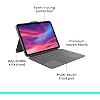
  • Precision Trackpad: Edit documents, navigate apps and build presentations with unparalleled precision using a familiar multi-gesture keyboard trackpad
  • Type Comfortably and Accurately: Well-spaced backlit keyboard with full row of iPadOS shortcut keys includes new Screenshot and Dictation keys to help you optimize productivity
  • No Charging: You'll never need batteries - your smart keyboard pairs and powers on using the Smart Connector; power is sourced directly from your iPad so you never have to charge

Description

Combo Touch Logitech iPad keyboard case featuring a detachable keyboard and trackpad for iPad 10th generation (A16), providing a versatile new way to use and navigate your mobile device. Ideal for enhancing workflow efficiency, it lets you interact with apps like Notes, Pages, Numbers, and more. The dimensions are Height: 7.51 in (190.9 mm), Width: 9.97 in (253.3 mm), Depth: 0.74 in (18.7mm), and Weight: 20.17 oz (572 g). This ipad 10 case with keyboard offers Platform Compatibility for iPad 10th gen models: A2696, A2757, A2777, A3162. It features 4 Modes: Type, View, Sketch, and Read. Enjoy the detachable keyboard with up to 16 levels of adjustable backlighting, providing convenience in various lighting conditions. The viewing angles include Type Mode 60° and Sketch Mode 20°. It powers and connects via the iPad's Smart Connector. This apple ipad 10th generation case with keyboard also provides space to store the Logitech Crayon or Apple Pencil, alongside front, back, and corner protection. Access all ports with ease: Camera/USB-C port. The 10.9 inch ipad case 10th generation design ensures durability and style. Whether for professional or personal use, the case for ipad 10th generation integrates seamlessly, meeting your ipad keyboard 10th generation needs.

Specs 34

Brand Logitech
Connectivity Technology Smart Connector
Keyboard Description Membrane
Recommended Uses For Product Gaming, Office
Special Feature Backlit, Trackpad
Color Oxford Gray
Keyboard backlighting color support Single Color
Style Combo Touch

Frequently asked questions

If you place your order now, the estimated arrival date for this product is: Friday, Nov 20

Yes, absolutely! This item's return window has been extended for the holiday season: FREE refund/replacement until Jan 31, 2027.

To initiate a return, please visit our Returns Center.

View our full returns policy here.

  • Klarna Financing
  • Affirm Pay in 4
  • Affirm Financing
  • Afterpay Financing
  • Zip Pay in 4
  • Financing through Apple Pay
  • Financing through Google Pay
Leasing options through Acima may also be available during checkout.

Learn more about financing & leasing here.

Top Amazon Reviews


The Best Keyboard Case on Amazon
Style: Combo Touch
I tried several cheaper cases for my new ipad and they were all just junk and clunky. The keyboards were terrible and they were heavy and ugly. I really didn’t want to spend a lot for a keyboard case but ordered this one to see if it was really that much better than the cheaper ones. Yes. Yes it is absolutely WORLDS BETTER than the cheap keyboard cases. This case is amazing! I love that I don’t have to charge the keyboard and it just magnetically connects to the ipad and uses its battery. No Bluetooth. It’s seamless. Just connect the magnet and it works. The keyboard is quiet and works perfectly. The trackpad is great too. No issues at all with any of it. I just wish it came in more color options. The grey is nice and handsome and I like the feel of it but more options would be nice. I highly recommend this case for your nice 10th gen ipad. Yes it’s expensive in comparison but really there is no comparison as far as quality and ease of use. Just buy it and forget about the cost if you want a reliable and high quality keyboard case for you ipad. It’s also versatile as you can just take the ipad off the keyboard and stand it up or lay it down on a table to use it. 100% recommend with confidence! ... show more
Reviewed in the United States on May 27, 2026 by Wilson

PROs and CONs- I would pick this over Apple’s version
Style: Combo Touch
This past holiday season, I received the best gift I didn’t even know I wanted. My wife surprised me with a brand-new iPad. Naturally, my first thought was: How do I protect this expensive slab of magic glass from myself? I immediately started looking for a case that checked a few boxes. I wanted full protection (because Apple’s own case politely ignores the edges), something lightweight, comfortable, stylish, compatible and with a keyboard that doesn’t feel like typing on soggy cardboard. I landed on the Logitech Combo Touch Keyboard Case for two main reasons: it met all my requirements, and it was significantly cheaper than Apple’s option—always a win. After using it for a few weeks, I’m honestly impressed. PROs: Despite offering full coverage, this case is still relatively lightweight. Yes, Apple’s version is lighter—but again, it leaves the iPad’s edges exposed like it’s daring gravity to do its worst. The Logitech case actually protects the entire device. The materials feel high quality, not “cheap.” It’s covered in a cloth like material so it’s soft to the touch vs a cold plastic feel. The kickstand is sturdy and doesn’t slide around or randomly detach when folded. The magnets are strong too—the lid stays closed, and the keyboard snaps into place securely, like it knows it belongs there. A very pleasant surprise was the backlit keyboard. Not only does it light up, but you can adjust the brightness with a single button. Apple’s version? No backlight. Apparently typing in the dark is a luxury feature. Every key press works flawlessly, the trackpad is smooth and responsive, and there’s zero lag. I press a button, the iPad listens. As it should. Another big win: the keyboard doesn’t need its own battery. It draws power directly from the iPad, and somehow doesn’t noticeably affect battery life—even with the backlighting on. I keep waiting for a downside here, but so far, nothing. CONs: There really aren’t many. If I’m being picky, the case is slightly heavier than Apple’s version—but that extra weight comes with full protection, so I’ll happily accept the tradeoff. I’d rather lift a few extra ounces than cry over a cracked screen. There’s also a weird little loop at the top meant to store an Apple Pencil. It works… but it feels like an afterthought. I think Logitech could’ve come up with a cleaner design there. It’s not a deal breaker—just mildly confusing. Overall: For the few minor issues, this case is absolutely worth the money. If you want a keyboard case that offers full protection, costs less than the Apple version, includes a backlit keyboard (which Apple somehow still doesn’t), and actually works as expected—go with the Logitech Combo Touch. Your iPad—and your wallet—will thank you. ... show more
Reviewed in the United States on January 12, 2026 by Jay Dub

A product that changed everything for me
Style: Combo Touch
I am not one to normally write reviews on anything simply because I couldn’t be bothered to do so. But this combo touch drastically changed the way I do work. As a college student I take a MacBook with me to school everyday but the fear of dropping it or getting it stolen has always left me a bit paranoid about taking it around everywhere. It’s also relatively bulky and takes up a majority of desk space. As a previous power user I never considered using an iPad for anything other than movies and light browsing, but at this point 90% of what I do is done easier and faster on iPad than the Mac equivalents. Listening to music, writing essays, doing research on the web is all done better for me since I got the combo touch. And as mentioned previously about the MacBook size, this thing sits nicely on my desks with enough room to write or do any full page assignments without feeling cluttered. I originally ordered a Magic Keyboard folio refurbished but had them cancel on me, out of spite I ordered this one because of next day delivery—I’m normally not a man who goes outside of the apple ecosystem often, but the build quality on this thing is exceptional, it has a premium fabric feel all around and feels nice and sturdy when carrying around, doesn’t feel like I’m going to cause any damage to the iPad if I drop it or hit it against anything. At half the price of the Magic Keyboard folio, why would you get anything over this? The backlit keyboard is a nice touch that the folio also doesn’t come with. If anything, I was wanting the folio for its simple magnetic 2-piece minimalist design, and while the combo touch does feel bulky at times, it doesn’t bother me as much as I’d thought. TLDR Great for university students; faster than MacBook for 90% of things I do; premium design for the money ... show more
Reviewed in the United States on April 30, 2025 by Brandon Miller

Love the Combo Touch!
Style: Combo Touch
Is it weird to say I adore Logitech’s Combo Touch? Sturdy yet the keyboard is light but firm. The fit is tight, so tight I thought I ordered the wrong size and actually started a return. But! I tried again later and got my ipad in perfectly. Highly recommend!
Reviewed in the United States on October 11, 2026 by Lexi

iPad A16 Version of the Combo Touch feels like the “Lite” Version
Style: Combo Touch
I have previous experience most of Logitech’s “Touch”-series cases, as well as other-brand cases. 2 features make give particular case the “lite” feel: (1) the trackpad isn’t “touch anywhere”and you cannot tap with the top-left or top-right of the trackpad (whereas the combo touch cases for iPad “Pro” and “Air” models are touch-anywhere); and (2) the keyboard, although detachable, cannot be turned around backwards to fold around the back of the iPad. With this being said, here are some pros and cons: Pros: - Build quality: the woven cloth material as well as the rubber feels WAY more durable and rugged than the typical vinyl or faux leather materials found on many cases, including the Apple and ESR cases. Those materials fray and are extremely prone to scratches, while Logitech’s material holds up its quality for years. - Detachable keyboard: this is what you pay extra money for vs. the Folio touch, and in my opinion, it’s a worthy upgrade. On the Folio Touch, you have to fold the keyboard behind the case to use the iPad as a plain tablet, and this gives it a bulky, heavy feel that tablet users tend to dislike. Detaching the keyboard allows you to use it much easier as a handheld device. - Keyboard travel: Logitech prioritized space for the letter and number keys on the keyboard, making typing on the keyboard extremely easy to get used to. - Direct connection to iPad: the Logitech Combo Touch keyboard connects directly to the keyboard using the three contact points on the side of the tablet. This means the keyboard uses the iPad’s battery to operate, but i haven’t noticed any reduction of battery life due to it (i don’t really use the backlighting feature though). In my opinion, the direct connection to the iPad is what sets this case apart from the ESR version, which uses Bluetooth (prone to connection issues) and requires the keyboard to be charged separately. - Touchpad: you’ll see the touchpad in the cons too, but the sheer existence of a touchpad is something you’ll find very convenient. It adds a whole extra layer of functionality to the iPad, and allows you to use a cursor and multi-finger gestures. Cons: - Apple Pencil Loop- whereas many cases have an open space where you can magnetize the Apple Pencil to the side of the tablet, this case has a loop. That isn’t as big of a deal since the iPad A16 cannot charge the pencil wirelessly, but it’s still a little big of a downgrade from having it attached right to the iPad. - Touchpad: as a user of a previous Logitech Combo Touch case on an iPad Pro, I was expecting this one to come with a touch-anywhere touchpad. I was really disappointed to figure out it didn’t have one. - Touchpad lacks no-press tapping: in order to “click” on something, you have to physically press down on the touchpad, and cannot simply “tap” anywhere (unless there’s a hidden setting somewhere that would allow that). - No fold-over latch securing the case closed: The ONLY advantage the Folio Touch has over the Combo Touch is a a magnetic latch that secures the case shut. The Combo Touch case is much easier to inadvertently open. Final remarks: the rugged build quality and the direct-connect keyboard are the two factors that I believe are worth paying $60+ over the ESR alternative (and an advantage over the apple Magic Keyboard case, which is more expensive than the Combo Touch). The Combo Touch gets the edge over the Folio Touch for having a detachable keyboard, which shows over time to be a major advantage. I’d recommend the Combo Touch as the #1 case for anyone who transports their iPad to more than one setting- work, school, home, etc. The durability ensures protection while it’s being transported, while the detachable keyboard allows you to use it as a laptop in some settings, and a tablet in other settings. ... show more
Reviewed in the United States on January 8, 2026 by Blake Bailey

me proof
Style: Combo Touch
i've only had it a few days and i can confirm it's a solid product. my dumba$$ tried to fold the keyboard back like a regular case so of course the keyboard fell off (it ain't designed to do that but that didn't stop me from doin' it anyway) and it hit the concrete floor. i did this twice in one day because i can be kinda dense sometimes. day 2 i had the keyboard laid out, using it, then picked up the tablet like i was gonna just swing it shut (not designed for that either) and the keyboard goes flying and hits the concrete floor. after all that the keyboard still works fine. then of course later that day I'm careless and knock the whole dang thing off the desk and onto the floor - ipad sustained no injuries. i have no idea how this'll hold up over time but it's survived its first week. is this better than the off brand models for half the price? i have no clue - but i will tell y'all i can't have nice things (apparently) and it is me proof enough to still work after all that abuse and the glass on my ipad is fine. magnet for the keyboard is strong (for intened use), keys are responsive, slight lag on the track pad but not bad, no tapping the track pad (gotta press to click) but no big deal - shell for ipad itself is snug and all holes and buttons line up as they should. no ipads were harmed during the course of this review. ... show more
Reviewed in the United States on August 23, 2024 by Walk slow

Almost perfect. No battery/charging. Tight fit. Doesn't fold backwards.
Style: Combo Touch
Tight fit for my new A16 ipad but should be fine if you don't plan to be taking it out often. Can light up when needed or turn off backlight when not needed. No battery to charge/wear out. Not a lot of click in the keyboard but reasonable. Only disadvantage is that it doesn't fold backward. Not an issue for me because the keyboard is so easy to remove. ... show more
Reviewed in the United States on July 3, 2026 by BigMontanaEd

Extremely Difficult to Remove the Keyboard
Style: Combo Touch
There are many good features about this Logitech Combo Touch Keyboard. I purchased it for my new iPad, (10th generation) tablet. It's nice looking and compact. It looks like it would do a good job protecting my iPad. I purchased this keyboard because of all the features, design and reviews. I wanted a backlit keyboard also, so I thought this would be an excellent choice, however, I was wrong. The backlight is pretty useless. It's not very bright and stays on for a very short time. I was constantly manually turning it on every few minutes, which is difficult in a dim lit room at night. The keys are the flat chicklet style keys. It would have been nice if they were a little more curved for typing, plus the keys aren't silent as advertised. There was only one piece of information or documentation in the box. It shows how to install the tablet to this keyboard case. There was a little information how to remove the Rugged Style keyboard, but not the Combo Touch keyboard. The Information seems to switch to the Rugged Folio instead of the Combo Touch, for some reason. There wasn't any information about the various function keys and how they work. This would be needed for someone new to Apple iPads. The documentation gave a website, however, again, it was for the Rugged Style keyboard. I also found the keyboard slippery on my desk. I decided to return the keyboard because there were too many things I didn't like about it. The good was cancelled out by the bad. It was a struggle to attach the iPad. It was even more difficult removing my iPad from the keyboard. This was absolutely the worst. I had to stop after a while because my hands were started to hurt. Also, I was fearful I'd break my tablet. I'm happy I bought the warranty for accidental breakage. I've purchased many keyboard cases over the years. This one was the ultimate WORSE. The price for this keyboard should include decent instructions for attaching and safely removing the tablet. Also better documentation for the function keys. Logitech ended up sending me a link to their support page. It showed only a section of questions and answers on their website, which was of little help. I'm extremely disappointed with this keyboard case. Since others had similar problems, I don't recommend. ... show more
Reviewed in the United States on November 13, 2024 by Gem
Checking for best price...