




LAMTTO 9.26" Wireless Carplay & Android Auto with 2.5K Dash Cam, 1080P Backup Camera, Portable Touchscreen GPS Navigation for Car, Car Stereo Receiver with Bluetooth, AirPlay, AUX/FM, Siri
Condition: New




$89.99
Save $50.00
was $139.99
Buy Now, Pay Later
As low as
$15.00
/ mo
Learn more
- – 6-month term
- – No impact on credit to apply
- – Instant approval decision
- – Secure and straightforward checkout
Ready to go? Add this product to your cart and select a plan during checkout.
Payment plans are offered through our trusted finance partners Klarna, Affirm, Afterpay, Zip, Apple Pay, and Google Pay. No-credit-needed leasing options through Acima may also be available at checkout.
Learn more about financing & leasing here.
Free shipping on this product
30-day returns
Learn more
FREE 30-day refund/replacement
To qualify for a full refund, items must be returned in their original, unused condition. If an item is returned in a used, damaged, or materially different state, you may be granted a partial refund.
To initiate a return, please visit our Returns Center.
View our full returns policy here.
Availability:
In Stock.
Arrives
Wednesday, Oct 28
At a glance
- Condition
- New
- Model
- 9.26 Drive Mate Screen
- Color
- Black
- Controller Type
- Android, Google Assistant, iOS
- Connector Type
- 3.5mm Jack
- Audio Output Mode
- AUX, Stereo
- Video encoding
- MP4
- Works with
- For iPhone with CarPlay or Android phone with Android Auto
Features 7
- Wireless Carplay & Android Auto:This portable car stereo is compatible with Apple Carplay and Android Auto functions .You can simply get into your car and your Smartphone will automatically connect to the car carplay screen; With CarPlay display, you can access your smartphone's apps, maps, music, videos, and other features, as well as use Siri or Google Assistant voice to control the Car play screen.
- 2.5K Front + Rear 1080P Dual Camera Dash Cam:The car screen equipped with front 2.5K front camera + 1080P waterproof backup camera, with dual-screen recording capabilities and 170viewing angle, support to night vision and loop recording, giving you a clear and accurate record of your journeys.(Tips: Included a 64G TF card , needn't to purchase separately)
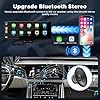
- Upgrade Bluetooth Stereo Output:The apple car play screen upgrade bluetooth connection method. You can use the Bluetooth wireless transmission of audio to car stereo speakers for playback,this way can achieve a lossless car audio experience. In addition, FM wireless transmission Audio and AUX output Audio are also supported.
- Upgrade Android/IOS Mirror Link:Use apple airplay & android case to connect your smartphone with carplay screen, then you can play youtube, Tiotok, etc. videos on carplay screen.This portable apple carplay screen features a resolution of 1600*600 and supports to 1080P videos. Even outdoors or on trips, you can enjoy the high-definition large-screen video experience(Tips:Doesnt support Netflix)
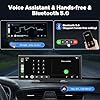
- Siri & Google Assistant Smart Voice Control: The wireless apple carplay screen built-in clear mic allows you to answer the phone while driving, without having to hold your phone all the time. You can send voice commands to access Siri/Google Assistant, such as "play music", "GPS Navigation", "send message" or "make phone calls" and more, very easy to use.
- Carplay Smart Live GPS Navigation :LAMTTO divemate screen through CarPlay or Android Auto to connect with your smartphone, offering an real-time smart car navigation system without the need for frequent map updates or additional fees.
- Universal for 99% of cars + Easy installation:LAMTTO apple car play display screen with the 360-degree rotatable suction cup mount and self-adhesive bracket secures your dashboard console or windshield and can be easily removed and stored. In addition, It is powered by a cigarette lighter with 12-36V voltage, Suitable for almost all kinds of cars, trucks, caravans, vans, trailers, campers, etc.
Specs 20
| Brand | LAMTTO |
|---|---|
| Connectivity Technology | Auxiliary, Bluetooth |
| Controller Type | Android, Google Assistant, iOS |
| Special Feature | Wireless Carplay & Android Auto with 2.5k +1080P Dashcam |
| Connector Type | 3.5mm Jack |
| Audio Output Mode | AUX, Stereo |
| Surround Sound Channel Configuration | 4 |
| Video encoding | MP4 |
| Color | Black |
| Other Special Features of the Product | Wireless Carplay & Android Auto with 2.5k +1080P Dashcam |
| Number of Channels | 4 |
| Supported Internet Services | YouTube |
| Audio Output Type | Speakers |
| Wireless Technology | AirPlay, Bluetooth |
| Model Number | 9.26 Drive Mate Screen |
| Manufacturer | LAMTTO |
| Unit Count | 1 Count |
| Number of Items | 1 |
| UPC | 712109669476 |
| Mfr Part Number | RC06 |
No specs match.
Frequently asked questions
If you place your order now, the estimated arrival date for this product is:
Wednesday, Oct 28
Yes, absolutely! You may return this product for a full refund within 30 days of receiving it.
To initiate a return, please visit our Returns Center.
View our full returns policy here.
To initiate a return, please visit our Returns Center.
View our full returns policy here.
- Klarna Financing
- Affirm Pay in 4
- Affirm Financing
- Afterpay Financing
- Zip Pay in 4
- Financing through Apple Pay
- Financing through Google Pay
Learn more about financing & leasing here.
Similar Products


Top Amazon Reviews
Not the cheapest Carplay Screen you can find, but it has a key function advantage - SEE SEPT UPDATE

SEPT 2023 UPDATE - After a couple months experience, I can report that I still like the device but here are a few tips that may help others. First, while the unit always connects fine during a multi-stop trip when the last wifi connection was also to the unit, if my phone has connected to another wifi source since I was last in my car, it does not always connect automatically. For example, my car is parked close enough to my house that my iPhone 12 is still connected to my house wifi when I get in the car and the unit does not always connect. This is despite my phone wifi settings showing that the unit's short-range wifi and bluetooth connections are connected. What I found solves this is for me to turn off the wifi on my iphone before I walk outside and get in the car. Then get in and start the car. Then turn my phone wifi back on. Then wait for a pop up on my phone asking to connect Carplay wifi and click yes. If it still hasn't connected, briefly unplug the power cord to power cycle the unit and it will connect. My second tip concerns using the Sirius XM iOS app. Not the fault of the Carplay unit, but the Sirius XM iOS app has a bug where unless it has been fully closed (not just stopped) on your phone before launching it in Carplay, it will be playing the last station used but when you hit the Favorites button, nothing happens and your list of Favorite stations won't come up. To solve this, first launch the Sirius XM app directly on your phone and then swipe up to stop it. Then press near the bottom of the home screen on your iPhone and slowly drag upward to the middle of the screen, pause, and let go. You should now see the "tiles" of all of the apps that are still running. Swipe upward on each app to fully close them including the Sirius XM app. Now launch the Sirius XM app on the Carplay unit and everything works including the Favorites button and the arrow that lists the current songs playing on your list of Favorite stations. Original review: My 2014 E63 Mercedes had a fairly small screen for the Sirius XM/Nav/Backup Camera, and Mercedes stopped supporting the internet connectivity for new owners, so I decided to bypass it with one of these. As you can see from the photo, it is a good size fit and good appearance (I don't use the forward dash camera and didn't want it on top of the dash). Installation is fairly straightforward. I had to take the inner trunk liner off to connect the reverse camera wire to the reverse light wire and needed a trim pry tool and used an electrical tap that doesn't fully cut the factory wire--important. The supplied cable was just long enough to reach the dash from the trunk. I needed another USB power port for my phone mount/charger so instead of using the supplied lighter socket power cord I used a dual USB-A lighter socket and bought a 6-ft USB-C to USB-A cable (note-a dual USB-C socket charger doesn't seem to work). Operation is great with my iPhone 12, I turned on the microphone and use no touch voice commands with Siri and Google. Apple maps and Google maps work great for navigation either full screen or half screen. I use SiriusXM IOS app fine, Flacbox App to play local FLAC music files, and even Amazon Music app. In my case, the key was to get audio output via Bluetooth to play all sound through my car speakers because my car did not have an aux port and I didn't want to use an FM connection. The way to do it is after you complete the Bluetooth setup, go to Airplay function and set up the secondary Wifi connection between the device and your phone. After that, go back and do a second Bluetooth on your phone that connects to your car. Boom, you have sound via your car's audio system! I think some cheaper versions of this device don't do this and only give you audio output via aux port or FM connection. If you get a weird device unsupported message the first time or it doesn't connect to your phone immediately upon starting the car, just drive a few miles and it should suddenly start working. Hopefully a future firmware update will eliminate any such connection delays. I guess my only long-term concern is that you hear stories that after a periodic IOS update (IOS 17 is coming), Apple has been known to render certain third-party devices inoperative. Maybe Bluetooth devices are an exception and I shouldn't worry but I hope the seller can give some assurance that if this were to ever happen, new device firmware could be downloaded online to an SD card so that this device doesn't ever become a brick that is adhered to our dashboards. Overall, I am satisfied and a firmware update that eliminates any connection delay on start-up would make it even better!
...
show more
Reviewed in the United States on August 20, 2023 by Lawrence T. White
Back to the future once again


So far I am BEYOND impressed with this little addition! My previous car had CarPlay and I quickly fell in love with its usability and interface. I sacrificed my love of CarPlay when I purchased an older RAV4 (in exchange for that hybrid gas mileage), but found myself constantly fiddling with my phone to edit maps or change a song. This device has so many positives in my opinion. PROS 1. Super easy install. May take some adjustments to fit your needs just right, but the different mounting options make it essentially universal. It even came with these micro clips for wire organization which made my heart so happy!!! No dangly wires. My only disappointment came from the design of my dash requiring me to partially cover an AC vent because you need a truly flat surface to make the suction mount work. No fault of the product. 2. Seamlessly connects to Bluetooth with pass through technology so the driver can use steering wheel controls to change songs or volume. 3. Plenty of personalization options when it comes to the screen views, brightness, etc. and let me tell you, the screen is crisper and brighter than my OEM dash screen by a mile! Haven’t tested out the night auto-dimmer, but it’s there. 4. Quick startup and super responsive touch screen. That said, having this means I don’t often need to fuss with a screen at all, because I can use Siri or my steering wheel! Safer driving for the win! 5. Dash cam is super crisp and there seems to be no lag whatsoever. This aspect wasn’t necessary, but I like that I could start using it and that it can record even if you don’t have it pulled up, or if you’re using split screen with your CarPlay. The lens itself is also adjustable which made the view angle perfect. One aspect I won’t be using is the backup cam, but that was a delightful little addition I didn’t realize was coming! My car has one already, but it’s an awesome option for people who don’t. Overall I think this is INCREDIBLE for the cost. So happy to have CarPlay back in my life!!!
...
show more
Reviewed in the United States on August 7, 2026 by Ariana Chavez
Review after purchasing and using since September 2024
I bought this unit for my 2016 Honda CRV. Very easy to install and works right out of the box. The dash cam was a welcome feature aft6er a traffic accident in which the the driver left the scene. The LAMTTO captured his license plate and he spent a few nights in the slammer. The unit sits on top of my dash and is easy to read but the monitor brightness needs to be manually adjusted from time to time. In order to utilize Android Auto and listen to my music/podcasts, etc., the unit has to be connected to my phone, obviously. I have to connect it via Bluetooth. My spouse takes my car at times and and connects her phone to the screen. The next time I drive the car, if her phone is connecting distance of the monitor, I have to ask her to turn off her Bluetooth before the car starts. My phone will not connect t after she has connected hers unless this is done. I have had the unit i my car now for about a year and a half. The monitor is beginning to get glitchy and may lose the connection while I am driving. It usually reconnects after a few seconds. The audio continues to play through the car speakers, so it's likely not the Bluetooth on my phone. I wonder if the constant exposure to sunlight causes excessive internal heating that leads to the issue...who knows. I have started to cover it with a towel when I arrive at work each day to minimize any issue related to direct sunlight. Anyway, I paid $99 for it and have been pleasantly surprised by it's effectiveness. I see that as of this writing, it is priced under $90 US. I would buy it again unless I found a unit that was bigger, enjoyed equally good reviews and was priced the same or better. I recommend this item.
...
show more
Reviewed in the United States on April 19, 2026 by Courtney H.
Very impressed, I was expecting this to be so bad that I would return it, I was wrong!
I bought an older Audi Q5 hybrid as a daily driver, and not having Carplay was driving me insane. There are a ton of units out there where I can change the screen in the car, which I will eventually do, but the research to pick the right one and the time to take the dash apart to do it isn't a priority. In steps this wonderfully cheap piece of tech, that gave me what I wanted. Let's start off with the dashcam. I won't drive without one anymore. We were hit once by someone on a scooter and they sued us. They didn't know we had dashcam footage of it happening, it saved us and our insurance from being held liable when under most instances they told us without it we would have been. One of the things I don't like about it is I wish there was just a hair more adjustability to the lens, but at this price point it isn't a deal breaker. The camera automatically turns on and records, and I didn't feel that it took away from the processor when using Carplay. On to Carplay. The screen is bright and has better resolution than I was expecting. I did have to buy a specialty cable to connect the Aux to the Audi MMI system, but I didn't even realize I never hooked it up and this little unit connected to the cars bluetooth on its own. What surprised me even more, I'll play videos when I'm driving quite often, not that I'm watching, but I did notice there was no lag. The wide screen is very nice in that it enables you to see more of the map while navigating. I haven't hooked up the rear camera, as this is only going to be a temporary solution for me, so I'll use the stock backup camera for now. Downsides, I was originally going to use the windshield mount as this is a temporary solution. You have to extend it so far it isn't really that stable. Also having to angle it to not block the dashcam was pretty tricky, so I pretty quickly gave up on that and just used the adhesive strip on the top of the dash. All of the connections are on the right side of the device, so routing of the wires away from the driver was easy, they even included a plastic trim tool for tucking the cables into crevices in the trim. Overall, great value for the money as I've spent more on just a dashcam for another vehicle. Carplay works as it should, and the device boots and connects very fast, actually faster than the wired factory Carplay in my Honda Ridgeline work truck. If you're on the fence, you can't beat this for the money.
...
show more
Reviewed in the United States on July 4, 2024 by Chris G
Item might catch fire - Think twice before buying - Take all 1 star reviews seriously
I have had this product for quite some time and now I feel I can give a good review of its functions. During the first month, the item worked great! After the first month, I experienced several issues with the device turning off and resetting its memory (not keeping time, dates, connected phone, etc). So, I reached out to the seller asking for any available updates but didn't' hear back until I sent several requests to him/her. After 3 to 4 months, I was directed to a site to update the device. After the update, the item worked well for a month, but then it started flickering all over again. The item continued to turn off and on during times of operation and even had issues with the screes holding it to the bracket that would loosen up (it didn't matter how hard I set them up). I continued using it because it was over the 30-day return period. Today, I went out for a drive with my family and, as usual, I tried to power up the device. The device turned on, stayed on for 5-10 min, and then turned off again. This time, there was no way to turn it back on. After several minutes of being off, smoke started coming from the top of the device; it was burning on the inside. I unplugged it and immediately placed it outside the car hoping it was not going to catch on fire. Luckily, no fire was viewed, but the smell of burned electrical pieces was intense. The point of this review is to inform you that the idea of this item is great but it does not work. You will be happy with it for a couple of months and then you will have issues. The seller has poor communication. If you continue to use it, you will need to keep monitoring every time because it could catch on fire, and if this happens while you're driving, or the car is unattended, well, you can imagine the worst-case scenario. I don't recommend this item, I wasted over $100 on this device thinking it was a great way to get an Android Auto screen in my car but I almost lost my car due to it.
...
show more
Reviewed in the United States on July 14, 2025 by rangerprato
So close, but not quite for me
The bluetooth in my 10 year old truck's audio system went kaput. Getting weary of people saying, "huh? I can't hear you!" when I use the speaker on my cell phone, I looked around and found this. I also wanted to replace a dash cam that croaked about the same time. Two for one, right? So, snagged this and installed. Summary follows. Pros: (1) Easy set up. No wait, that's not accurate. Incredibly easy set up. (Disclaimer, didn't install backup camera cuz the truck's still works fine.). (2) Fantastic screen. Responsive, clear, visible in direct sun. Touch controls are immediate. (3) Auto connection after setup is fast and works great. (4) All the apps connect flawlessly. (5) Speaker is clear and audible even in the noisiest circumstances. (6) Low and wide profile has great promise. (7) Multiple audio sources connect flawlessly. (8) Video resolution is fine on playback. Deal breakers: (1) The low profile does not allow the dash cam feature to clear the hood of my truck like a regular cam. (2) Includes a suction cup mount. Attached to get a higher profile. Weight of device gave it the shakes. When mounting on the windshield the mount blocks the camera. To get a clear view of the road for the dash cam, the device blocks the drivers view. (3) Camera displays as cattywampus image. Left side is much higher than the right. To straighten images and video, needed to install it with the one side much about 3/8" higher than the other. May not bug some people but drives me nuts. (4) Because truck bluetooth is dead, wanted this for calling to avoid cellphone speaker. Callers cannot understand me. Not sure if it is the speaker or the software. But have to answer a call on the device then change the audio back to the phone to be understood, then return to the device when ending the call. Total ugh. In the end, I really liked it. Electronics were instantly responsive and the video image was better than expected. Great value and may work well for other vehicles. Just not right for me. So am returning but impressed enough with the quality I will look for an another option from Lamtto.
...
show more
Reviewed in the United States on November 16, 2023 by Spike13
Works well with my Galaxy S25+!


My vehicle is over 20 years old, so I used this to retrofit it with Android auto and had the output 3.5mm cable going to an FM transmitter that plugs into the cigarette lighter adapter and then plays the audio over the car speakers! Works great and highly recommended for this situation.
Reviewed in the United States on August 20, 2026 by Griller
So far, the best car play screen I came across, totally worth it!


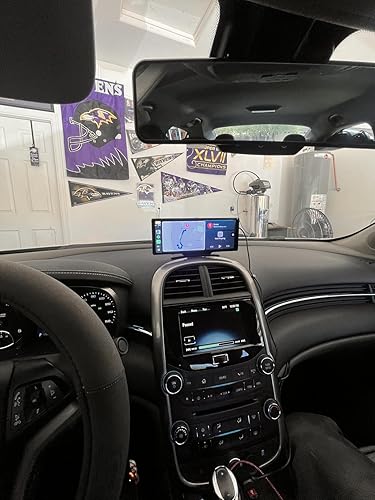

As someone who had to buy a 2nd car okay screen since my first one was too big and cause us too many problems, this one was perfect — I have a 2015 Chevy Malibu and it does have a touch screen already but does not have apple car play in which i use a lot in another car my family owns but this car i use the most. I wanted something that was small but still big enough so it does block the middle view of the windshield and i think this one was perfect. It comes with two different types of stands, one where it just a regular flexible stand that you stick on the dashboard which i love how flexible it was as my middle console/dashboard is not completely flat and another stand that is the arm extension with a suction, both stands you have to screw one, the flexible stand was already installed for us so we just had to stick where we wanted it and i think with it being screw ensures more protection and stability. The car play itself is perfect, very easy to understand and navigate, other both apple and android car play. The front camera is amazing, the quality is perfect. I did not install the rear camera as the car i use already has one so I cannot have a opinion on that. The cable the car play screen comes with, already has a car charge with the wire attached, which the wire is super long and comes with some sticky clips to hold the wire in place, and it has an extra USB plug in, in which i used to connect the phone charger and while charging my phone, it does not affect the car play screen at all so I can still use my phone perfectly fine without disrupting it. It automatically records for you when you start your vehicle, the only time it stops recording or from what i know is when i went to settings or manually stopped the recording, you also have the option to take pictures while looking at the front camera. I do live in AZ heat so I will be testing how well the adhesive works but I do have high hopes for it - It also comes with extra adhesive. Moral of the review, I am super happy with this purchase, i truly thought it was worth the money and i would recommend it to anyone who was interested getting an car play screen
...
show more
Reviewed in the United States on August 27, 2025 by Kenneth H.