


Search  for anything...

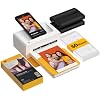
KODAK Dock Plus 4x6 Photo Printer, Smartphone Docking, 4PASS, 50 Sheets | Bluetooth, iPhone & Android Smartphone Compatible, Charge While Printing, Water, Fingerprint and Fade Resistant

  • Based on 19,389 reviews
Condition: New
Checking for the best price...
$109.99 Why this price?
Save $30.00 was $139.99

Buy Now, Pay Later


As low as $18.33 / mo
  • – 6-month term
  • – No impact on credit to apply
  • – Instant approval decision
  • – Secure and straightforward checkout

Ready to go? Add this product to your cart and select a plan during checkout.

Payment plans are offered through our trusted finance partners Klarna, Affirm, Afterpay, Zip, Apple Pay, and Google Pay. No-credit-needed leasing options through Acima may also be available at checkout.

Learn more about financing & leasing here.

Selected Option

Free shipping on this product

FREE 30-day refund/replacement

To qualify for a full refund, items must be returned in their original, unused condition. If an item is returned in a used, damaged, or materially different state, you may be granted a partial refund.

To initiate a return, please visit our Returns Center.

View our full returns policy here.


Availability: Only 3 left in stock, order soon!
Fulfilled by Amazon

Arrives Thursday, Jul 23
Order within 17 hours and 44 minutes
Available payment plans shown during checkout

Protection Plan Protect Your Purchase
Checking for protection plans...

Size: Printer + 50 Sheets


Features

  • Dock Photo Printer: The KODAK Dock Plus is a home photo printer that produces high-quality 4x6 prints directly from compatible smartphones. Featuring an integrated docking station, users can place their phone on the printer for better connection while simultaneously charging the device during printing.
  • Genuine 4PASS dye sublimation printing: Each photo is produced in three color layers and finished with a clear protective lamination layer. In approximately 55 seconds, you receive a smooth, detailed print designed to resist fingerprints, water, and fading for long-lasting quality.
  • Easy to Use: Print photos quickly without complicated setup or technical steps. Simply power on, connect wireless bluetooth, and start printing within seconds. The Dock Plus is built for straightforward operation, making it ideal for first time users and everyday photo printing.
  • Home Printing Station: Designed for stable desktop use, this dock photo printer connects to a power outlet for consistent performance and larger 4x6 prints. Ideal for home printing, photo albums, framing, family events, and everyday picture printing.
  • KODAK Photo Printer APP: Featuring integrated Bluetooth connectivity, this portable printer connects to compatible iOS and Android devices through the KODAK Photo Printer app. Edit, crop, and customize your photos before printing for creative results.

Description

Swipe to See More → KODAK Photo Printer carries forward Kodak’s iconic legacy by blending timeless analog charm with modern digital innovation. Powered by advanced 4PASS technology and our proprietary all-in-one cartridge system, our lineup features smartphone-connected photo printers that transform digital photos into tangible keepsakes, along with advanced instant cameras that combine classic instant shooting with built-in printing capabilities. What photo paper and cartridge should be used for the Kodak Dock Plus printer? Official Kodak photo paper and cartridge (PHC-80) must be used for the Kodak Dock Plus photo printer, which can be found on Amazon. What's included in the package? - All products come with a photo printer with user manual, power adapter, iPhone Lightning adaptor, initial cartridge and 10 photo papers. - All bundles come with additional 40 sheets of photo paper and cartridge. How do I download the Kodak Photo Printer App, and what can I do with it? Search for and download the free Kodak Photo Printer app from the Google Play Store or Apple App Store. With the free Kodak Photo Printer App, you can create frames and make many edits on your photos. What should I do if there is an issue with the product? Please do not hesitate to contact support regarding your product and we will do everything we can to help you solve the issue. Is the Kodak Dock Plus printer compatible with computers? No. The Kodak Dock Plus is designed for mobile devices, allowing you to print directly from your iPhone or Android using the Kodak Photo Printer App. Simply connect via Bluetooth to turn favorite moments into beautiful 4x6 prints—no computer needed. KODAK 4x6 Photo Printer Portable Instant Camera Photo Sticker Printer KODAK Label Maker Portable Photo Printer

Brand: KODAK


Connectivity Technology: Bluetooth, Docking


Printing Technology: 4PASS Dye Sublimation


Special Feature: Borderless Printing, Docking


Color: Yellow


Model Name: Dock Plus


Printer Output: Color


Maximum Print Speed (Color): 1 ppm


Max Printspeed Monochrome: 1 ppm


Product Dimensions: 4.5"D x 8.5"W x 2"H


Printer Type: 4PASS Dye Sublimation


Other Special Features of the Product: Borderless Printing, Docking


Printer Output Type: Color


Item Dimensions D x W x H: 4.5"D x 8.5"W x 2"H


Controller Type: Android, iOS


Print media: Glossy photo paper


Scanner Type: Photo, Portable


Maximum Copy Speed Black and White: 1 ppm


Compatible Devices: Smartphones, Tablets


Warranty Type: Limited Warranty


Maximum Copies Per Run: 1


Ink Color: Yellow, Magenta, Cyan, Black


Additional Printer Functions: Print Only


Control Method: App


Number of Trays: 1


Number of Drivers: 2


Resolution: 300


Maximum Media Size: 4 x 6 inches


Maximum Sheet Capacity: 20


Paper Size: 4 inch x 6 Inches


Output sheet capacity: 50


Printer Connectivity Type: Bluetooth, Docking


Hardware Interface: USB Type C


Total USB 2.0 Ports: 1


Total Usb Ports: 1


Maximum Copy Resolution Color: 300


Maximum Copy Resolution Black and White: 300 dpi


Brand: KODAK


Model Name: Dock Plus


Model Number: PD460


Built-In Media: Paper, Toner Cartridges


Model Series: Dock Plus


Specific Uses For Product: Home decoration, gifts, holiday presents, printing photos, sharing with friends and family, Office, School


UPC: 192143002628


Global Trade Identification Number: 28


Manufacturer: Prinics Co., Ltd.


Warranty Description: 1 year


Unit Count: 1.0 Count


Color Pages per Minute: 1 ppm


B&W Pages per Minute: 1 ppm


Color: Yellow


Color Depth: 24 bpp


Maximum print Resolution Color: 300


Maximum Print Resolution Black and White: 300 dpi


Dual-sided printing: Yes


Duplex: simplex


Frequently asked questions

If you place your order now, the estimated arrival date for this product is: Thursday, Jul 23

Yes, absolutely! You may return this product for a full refund within 30 days of receiving it.

To initiate a return, please visit our Returns Center.

View our full returns policy here.

  • Klarna Financing
  • Affirm Pay in 4
  • Affirm Financing
  • Afterpay Financing
  • Zip Pay in 4
  • Financing through Apple Pay
  • Financing through Google Pay
Leasing options through Acima may also be available during checkout.

Learn more about financing & leasing here.

Top Amazon Reviews


  • Amazing printer
Size: Printer + 50 Sheets
This thing is amazing for a quick photos to put on the fridge Photo quality is good Happy with my purchase
Reviewed in the United States on July 4, 2026 by Selina

  • Fantastic!
Size: Printer + 50 Sheets
My sister had been wanting one for awhile. I was not prepared to be impressed. I was visiting her when it was delivered, and I was so darn impressed that I had to buy one right then. Do not wait to buy this. I have so many vacation photos that I was “going” to get printed at Walgreens, but for 2 years have not made it. This dock made it so I could print all of them at home. I could take my time and edit each one to my liking SUPER easy to set up and use. The quality of the print is excellent. Go get you one! What are you waiting for?? ... show more
Reviewed in the United States on June 29, 2026 by Nancy F.

  • phone/printer
Size: Printer + 50 Sheets
Small in size but very good print quality and relatively ease of operation.4
Reviewed in the United States on July 6, 2026 by Kari T. Autio

  • Very poor instructions. For something so simple, instructions should have been easy.
Size: Printer + 50 Sheets
For something you might think should be simple... print a picture from my phone, Kodak made it incredibly difficult. First, the instructions are so TINY I had to scan them into my computer and enlarge them. Even then, at the largest I was able to clearly make them, they were so small they were difficult to read. I suggest buying a microscope with this product to read the instructions. Then again, the tiniest instructions were just the safety precautions, so I suppose you can get by without reading those. The instructions leave so much out. "Just launch the app, choose photo, select print number, select printer icon." Right. Very little in those steps matched what we experienced on our phone. In the instruction images, step 3 has a hand pointing to the lower right icon that says “copy.” The instructions call that “Select print number.” I can’t imagine how those relate. The instructions just leave it there. There is an extraneous asterisked note: "*Select SNS if you want to print the photo from it." Nothing else about SNS in the instructions, just a random phrase in the "Printing in the App" portion. Nothing in the text above that linked to the asterisk. First, don't download the app until you have the printer connected to your phone through your Bluetooth configuration. Otherwise, on Android, you'll repeatedly be taken to the system app settings page instead of the app. You'll have to uninstall the app, turn off the printer, turn on the printer, connect the phone to the printer through Bluetooth, and reinstall the app to get it to work. In the app, the Bluetooth icon starts red. When the App's Bluetooth icon is YELLOW, it's ready to print. Yellow doesn't indicate to me something is ready. Green or blue would have been more appropriate for "ready" or "go." For some reason, the phone's native photos received a warning about low resolution. So far, only photos received from another phone seem to be full resolution. We didn't notice a difference in print quality, however. If you get a "jam..." good luck. On the second photo we tried to print we received a paper jam. It didn't look crumpled or mutilated, it was just half-way through the printer. We followed the instructions on "Paper jam." The printer made a bunch of noises. The paper stayed in place. We had to remove the paper tray and the ink cartridge and pull very hard to get the paper out. It ruined the paper in the process. It appears we can only load one page into the printer at a time or it "jams." We don't want to waste the paper, so we're hesitant to load more than one sheet at a time. Finally, the printing process is slow and cumbersome. It prints the photo in four SLOW passes. Yellow forward and back, Magenta forward and back, Cyan forward and back, and a clear coat pass called "Protect" forward and back. I expected more advanced technology at this stage in the game. We're very disappointed in this printer. If I had known how poorly designed it is, we'd have paid a bit more money and chosen a better product. ... show more
Reviewed in the United States on May 8, 2023 by Timreh Revlis

  • Mostly positive
Size: Printer + 50 Sheets
My biggest dislike for this printer is that the docking connector is ONLY for charging your phone. All of the data is transferred via Bluetooth. I can't even begin to fathom why they put the cost of the connector into the product without using it for its most obvious functionality. It's completely asinine. My next dislike is the software. The Android version wants tons of permissions. I'm a software developer and have written apps for my phone, so I know that this is largely due to the way Google crafts the libraries that developers need to use to include functionality. The pairing process should be a lot smoother than it is. I feel like the software could have been better designed, and Kodak is being highly proprietary, forcing us to use their software to use the printer. I think that is shortsighted; they will be making the bulk of the profit by selling us refill kits, so allowing others to write better software for the hardware and consumables that they're profiting from is in their best interests. I bought two of these, one for me and one for my mother. She has an Apple phone, and as difficult as mine was to set up with my Android phone, getting hers set up was very nearly painful. The IOS software has several differences and I was a bit disappointed to see that it's even worse to use than the Android version, specifically the way you frame the shot for what will be printed. I like the printer itself. There are several negative reviews regarding print quality. I don't get it. I'm far from being a professional photographer - out of thousands of shots I've taken over the years, only one or two have been what I would consider 'stunning' - I just don't have the eye. As an average Joe I feel like I need all the help I can get, and the photos look quite nice to me. I think the dye sublimation process produces better photos than my ink jet printers, and should hold their colors for much longer. The printer prints faster than I thought it would. It does take several seconds since it's doing separate passes, but I actually expected it to take a lot more time. There have been a number of reviews that mention jams. I haven't had a jam yet. Before purchasing the printers, I ran across a reviewer who recommended cleaning the roller surfaces when switching to a new cartridge. He also recommended using a pencil or other similar tool to stick into the ends of the ink cartridge rollers to make sure they were wound tight. That seemed like good advice, and may very well be why my own experience has been problem free. Overall and considering the price of the printer, the cost per print, and the convenience of the printer's size, I believe this to be a reasonably good purchase. The software could stand a lot of improvement but it's usable. Nothing mechanical is absolutely maintenance free, so paying attention to the state of the moving parts that you can see and examining the ink cartridge before use seems reasonable to me. ... show more
Reviewed in the United States on July 23, 2023 by seeker

  • Love it!
Size: Printer + 50 Sheets
Great printer! Fun to watch it print, the photos come out with very high quality. I no longer need to go have my pictures at the store.
Reviewed in the United States on June 26, 2026 by Chelsea McKenzie

  • Easy to use, and very good quality photos.
Size: Printer + 50 Sheets
Printed photos are very good quality as I would expect from Kodak. User friendly, I wish it has come with more photo paper though.
Reviewed in the United States on July 3, 2026 by Hazel Woodland

  • Kodiak photo printer
Size: Printer + 50 Sheets
So far, I love it! Really easy to set up and the pictures I printed look very good!
Reviewed in the United States on July 5, 2026 by Toroda Thigpen

Can't find a product?

Find it on Amazon first, then paste the link below.
Checking for best price...