Search  for anything...

Keychron K10 Ultra 8K Wireless Mechanical Keyboard, Full-Size Layout 2.4 GHz & Bluetooth, ZMK & Launcher, 760-Hour Battery PBT Keycaps with Apex Red Switches for Mac Windows Linux (Hot-Swappable)

  • Based on 7 reviews
Condition: New
Checking for the best price...
$114.99 Why this price?
Save $125.00 was $239.99

Buy Now, Pay Later


As low as $19.17 / mo
  • – 6-month term
  • – No impact on credit to apply
  • – Instant approval decision
  • – Secure and straightforward checkout

Ready to go? Add this product to your cart and select a plan during checkout.

Payment plans are offered through our trusted finance partners Klarna, Affirm, Afterpay, Zip, Apple Pay, and Google Pay. No-credit-needed leasing options through Acima may also be available at checkout.

Learn more about financing & leasing here.

Selected Option

Free shipping on this product

FREE 30-day refund/replacement

To qualify for a full refund, items must be returned in their original, unused condition. If an item is returned in a used, damaged, or materially different state, you may be granted a partial refund.

To initiate a return, please visit our Returns Center.

View our full returns policy here.


Availability: 15 left in stock
Fulfilled by Amazon

Arrives Saturday, Aug 29
Order within 15 hours and 17 minutes
Available payment plans shown during checkout

Protection Plan Protect Your Purchase
Checking for protection plans...

Color: Keychron Apex Red Switch


Features

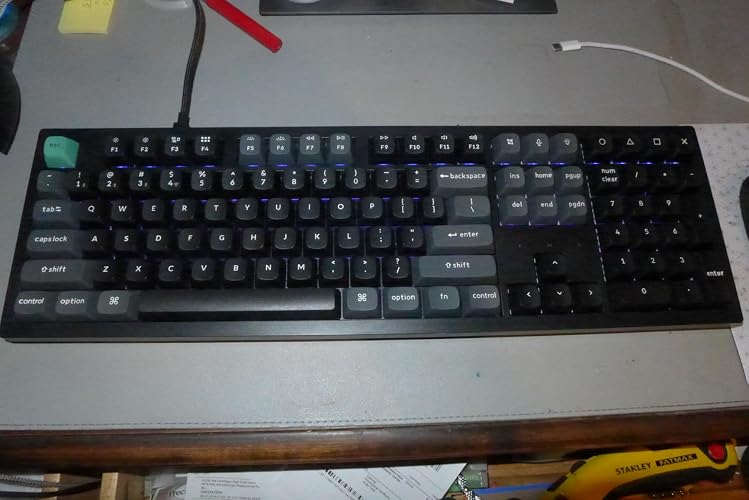
  • High-Performance 100% Layout Keyboard: The K10 Ultra 8K is a high-performance full-size wireless mechanical keyboard designed for both work and gaming. It supports Bluetooth, 2.4 GHz, and wired connections, delivering up to an 8000 Hz polling rate in both wired and wireless modes for ultra-fast responsiveness. Powered by open-source ZMK firmware, it enables advanced customization. With up to 760 hours of battery life (backlight off), it ensures long-lasting performance
  • Ultra-Fast 8000Hz Tri-Mode Connectivity: Experience an 8000 Hz polling rate in both wired and 2.4 GHz wireless modes, delivering ultra-responsive, pro-level performance for competitive gaming. With Bluetooth 5.2, easily switch between up to three devices for seamless multitasking. From ultra-fast responsiveness to versatile multi-device connectivity, the K10 Ultra 8K is built for both gaming and productivity
  • ZMK & Launcher Customization: With the Keychron Launcher web app and ZMK programmability, you can effortlessly remap keys, create custom macros, and personalize per-key RGB lighting to suit your gaming or workflow needs. Please use the latest version of Chrome, Opera, or Edge browser to open the Launcher and connect the keyboard to your device via a wired connection
  • Long-Lasting Battery: Powered by a 4000 mAh battery, along with optimized firmware and an enhanced circuit design, the K10 Ultra 8K delivers up to 760 hours of usage at an 8000 Hz polling rate ( backlit off ). Redefining what wireless performance can achieve
  • Mac & Windows Compatibility: Seamlessly compatible with both macOS and Windows, the K10 Ultra 8K allows you to switch effortlessly between them with the included Mac and Windows keycaps, ensuring a consistent typing experience across devices
  • Hot-Swappable Switch Compatibility: Designed for personalized typing preferences, the K10 Ultra 8K features a hot-swappable switch design, allowing you to easily replace switches in seconds and customize your experienceno soldering required. It is compatible with most 3-pin and 5-pin MX mechanical switches, including pre-lubed linear red switches, giving you broad flexibility to tailor your typing feel
  • Processor Compatibility: Intel i7 9th Gen, AMD Ryzen 7 2nd Gen or above. Polling rate is adjustable on Keychron Launcher

Brand: Keychron


Compatible Devices: Laptop, PC, Smartphone, Tablet


Connectivity Technology: 2.4 GHz Wireless, Bluetooth 5.2, USB-C


Keyboard Description: Office, Home


Recommended Uses For Product: Business, Gaming, Personal


Special Feature: 8K Polling Rate, 2.4 GHz & Bluetooth, Full-size Layout, Long-Lasting Battery, ZMK & Launcher, Mac & Windows Compatibility, PBT Keycaps, Hot-swappable See more


Color: Keychron Apex Red Switch


Keyboard backlighting color support: RGB


Material: Plastic


Included Components: Extension Adapter for Receiver x 1, Hex Key & Screwdriver x 1, Keycap Puller, Type-A 2.4 GHz Receiver x 1, Type-A to Type-C Adapter & Cable x 1 See more


Compatible Devices: Laptop, PC, Smartphone, Tablet


Connectivity Technology: 2.4 GHz Wireless, Bluetooth 5.2, USB-C


Additional Features: 8K Polling Rate, 2.4 GHz & Bluetooth, Full-size Layout, Long-Lasting Battery, ZMK & Launcher, Mac & Windows Compatibility, PBT Keycaps, Hot-swappable


Keyboard Backlighting Color Support: RGB


Power Source: Battery Powered


Switch Type: Linear


Keyboard Layout: QWERTY


Mechanical Keyboard Switch Model: Keychron Apex Red Switch


Compatible Operating System Family: Linux, Windows


Color: Keychron Apex Red Switch


Brand: Keychron


Keyboard Description: Office, Home


Antenna Location: Business, Gaming, Personal


Built-In Media: Extension Adapter for Receiver x 1, Hex Key & Screwdriver x 1, Keycap Puller, Type-A 2.4 GHz Receiver x 1, Type-A to Type-C Adapter & Cable x 1


Unit Count: 1 Count


Manufacturer: Keychron


Enclosure Material: Plastic


Frequently asked questions

If you place your order now, the estimated arrival date for this product is: Saturday, Aug 29

Yes, absolutely! You may return this product for a full refund within 30 days of receiving it.

To initiate a return, please visit our Returns Center.

View our full returns policy here.

  • Klarna Financing
  • Affirm Pay in 4
  • Affirm Financing
  • Afterpay Financing
  • Zip Pay in 4
  • Financing through Apple Pay
  • Financing through Google Pay
Leasing options through Acima may also be available during checkout.

Learn more about financing & leasing here.

Top Amazon Reviews


  • Excellent build quality. Comfortable typing experience.
I haven't bought a new keyboard in many years but took a plunge on this new one from Keychron. Previously, I was using a topre keyboard which gave my fingers over a decade of reliable, comfortable enjoyment, but I decided recently to make a change. I'm glad I did. This keyboard is built solid! The Apex Red switches make very little noise and feel wonderful to type on. It doesn't flex at all and the keys make a very pleasant, muted click sound when they bottom out. The red switches are actually quieter than my topre switches but still loud and tactile enough that my ears and fingers get keystroke feedback, even without clicky switches. I do tend to bottom out most of my keystrokes -- too many years learning to type on ancient keyboards and mechanical typewriters! A higher end gasket mounted board would have been even better, I suppose, but frankly this design is quiet and soft enough that I don't think it would justify nearly twice the price. In fact, gasket mounted might actually be too soft and quite, at least for me. As for the other features, the wireless connectivity is very convenient, though I probably wont use it much. I don't have much use for RGB either, but it looks very nice and can be configured in the keychron launcher webapp. No software to install, unless you want to use their launcher app; I use AutoHotKey instead. Bottom line: Excellent build quality. Comfortable typing experience. Great price. ... show more
Reviewed in the United States on July 13, 2026 by kfan

  • A smooth, whisper quiet 180 from the Q-Series keyboards. Phenomenal battery and responsiveness.
Admittedly, I am a bit of a Keychron fanboy. I’ve been typing on computers for 30 years and using their boards exclusively for the last 4, so they can do very little wrong in my eyes. However, this K10 Ultra 8K is a complete 180 from my main keyboard, a 5lb, all-metal Keychron Q-series tank loaded with the absolute clickiest of clicky switches. Moving to a plastic chassis with soft, silent linear switches was a massive shift, but after a week of testing on my custom-built home PC, I can safely say it’s another absolute home run. Windows Setup Tip (Read if your Numpad seems dead): Out of the box, everything worked flawlessly except for my numpad. If you experience this on Windows, check your OS settings before assuming the board is defective. Go to Settings > Accessibility > Mouse and make sure "Mouse Keys" (using the keyboard to control the pointer) is turned OFF. Windows accessibility can quietly hijack the layout, but toggling that off brings the numpad to life instantly. My Week-Long Findings: Lightweight but Anchored: While it doesn't have that massive "anvil" weight of a custom metal Q-board, it feels surprisingly substantial for a plastic chassis. It stays firmly planted on my desktop with zero scooting or shifting during heavy typing. Flawless connectivity, Smooth Responsiveness: After clearing up a minor initial setting hitch, the typing experience has been incredibly smooth. The keys are exceptionally comfortable, quiet, and highly sensitive with absolutely zero input lag. Insane Battery Life: I haven’t plugged this board in to charge a single time since it arrived, and it still doesn’t need it. The battery performance here easily outpaces my Q-series board (which needs a recharge about once a week). Classic Keychron Lighting: The RGB functionality is exactly what you expect from the brand. There are tons of built-in functions and patterns to choose from if you like a show, but it easily locks down to a clean, solid color for a more focused layout. The Missing Numpad LED Indicator (And a ZMK Fix): My biggest pet peeve with Keychron remains their refusal to include a tiny, low-power LED indicator for Num Lock. It takes up no space, why omit it? Fortunately, because this board uses ZMK firmware and the Keychron Launcher web app, I just bypassed the issue entirely. Since I don't use secondary functions on the numpad, I remapped the entire numpad for only single usage then I turned the "num lock" key into an "All Clear" button for my calculator app. ZMK makes macro remapping incredibly smooth, completely solving my need for an indicator light. Missing the Knob: My main daily driver has Keychron's volume knob, and I didn't realize how spoiled I was until it was gone. Having to relearn how to adjust system volume without it was a tragic adjustment—all keyboards should just come with a knob at this point! This is not a complaint as I knew what I was ordering, just saying I really like that feature! The Verdict: If you want a full-sized layout that flawlessly bridges high-performance wireless speeds with an ultra-quiet, buttery-smooth typing experience, the K10 Ultra 8K is stellar. Whether you prefer a heavy metal board or a lighter, quiet workspace powerhouse, Keychron continues to dominate the market. Highly recommended! ... show more
Reviewed in the United States on July 12, 2026 by Amazon Reviewer

  • A Full-Size Board That Actually Delivers on the Wireless Promise
I've been using the same wired mechanical keyboard at my desk for years, but between working from home more often and wanting something I could move between my desktop and laptop without a mess of cables, I started looking at wireless options. The full-size layout was non-negotiable for me since I still use the number pad constantly for spreadsheets, and the idea of an 8000 Hz polling rate over both 2.4 GHz and wired connections is what tipped me toward this one over a few other boards I was considering. Setting it up was painless. The receiver plugs into the included extension adapter, which I appreciated because my desktop tower sits on the floor and having the dongle up on a little riser gives a much cleaner signal than plugging directly into a rear USB port. Switching between my work laptop over Bluetooth and my desktop over 2.4 GHz takes about a second, and I haven't noticed any lag or dropped keystrokes even during long typing sessions. The Apex red switches are smooth and fairly quiet for a mechanical board, definitely quieter than the clicky blues I was using before, though there is still enough tactile feedback that I don't feel like I'm typing on a laptop keyboard. Battery life has genuinely impressed me. I went almost three weeks of daily use with the backlight off before I got a low battery notification, which lines up reasonably well with what they claim. The one area that took some getting used to was the Launcher software for remapping keys and setting up macros. It only works properly in Chrome or Edge, and the first time I tried to connect the keyboard for programming, it needed a wired connection rather than Bluetooth, which wasn't obvious to me at first. Once I figured that out, customizing a few keys for shortcuts I use constantly at work was straightforward enough. The PBT keycaps have also held up well so far, no shine developing on the most used keys the way I've seen happen with cheaper ABS caps on older boards. If I had to nitpick, the keyboard is a bit heavier and thicker than what I was used to, so it took a few days of typing before the height felt natural without a wrist rest. Overall, this has become my daily driver at this point, and I don't see myself going back to a wired setup. The connection has been rock solid, the battery life means I'm not thinking about charging it constantly, and having hot swappable switches means I can experiment with different switch feels down the road without buying a whole new board. Anyone who splits time between a Mac and a PC, or just wants a full-size keyboard that can move between multiple devices without fuss, should be happy with this one. It might be overkill if you're not into the polling rate and gaming performance side of things, but as a work and everyday typing keyboard it's been reliable and comfortable to live with. ... show more
Reviewed in the United States on July 12, 2026 by J. Scott

  • Great Product
I’ve gone through a lot of keyboards over the years, and this one immediately stood out. The full-size layout gives me everything I need without having to compromise on a number pad, and the build quality feels premium right out of the box. It has a solid, sturdy feel that doesn’t slide around on my desk, even during long work sessions. The wireless performance has been excellent. Switching between devices is quick and seamless, and I haven’t noticed any lag whether I'm typing reports, browsing, or gaming. The 2.4 GHz connection feels extremely responsive, and Bluetooth has been reliable when I need the convenience of connecting to multiple devices. What really impressed me is the typing experience. The keys feel smooth and consistent, with a satisfying mechanical feel that makes typing enjoyable. It’s comfortable enough for all-day use, and the sound is pleasant without being overly loud or distracting. Battery life has also been very good, and I appreciate not having to constantly think about charging it. Setup was straightforward, and everything worked as expected. Overall, this is easily one of the best wireless mechanical keyboards I’ve used. It combines excellent performance, a great typing experience, and premium build quality in a full-size package. I’m very happy with it and would definitely recommend it to anyone looking for a high-quality mechanical keyboard. ... show more
Reviewed in the United States on July 13, 2026 by Lawrence C

  • Almost perfect 100% board, just missing an aluminum top.
This Keychron K10 Ultra 8K is my sixth Keychron keyboard, with the latest before this being the K2 Ultra, a 75% keyboard. The K10 is a full size mechanical keyboard with Keychron’s latest features: an 8000Hz polling rate and a staggering 760 hours of battery life (with RGB off). Let’s go over some of its features and room for improvement below. Design: A full size, 100%, mechanical keyboard is not as popular as before since many enthusiasts found their sweet spot with 65% or 75% size boards. I found mine with the 40%. However, I have various 40%, 65%, 75%, and even 95% boards in my collection, and I’m excited to add the K10 into the mix. The board has a top and bottom ABS housing compared to an aluminum top on the K2. The keycaps are double shot PBT (OSA profile), which feels much nicer to type on compared to traditional profiles like Cherry. The Ultra series has black alphas and gray modifiers, with cyan Enter, Spacebar, and ESC keys. The font is a little iffy, the letter “e” is noticeably different from the rest of the letters. This is very typical of a lot of “copy” keycaps from China, e.g. GMK clones. That said, the font doesn’t bother me, and I love typing on the OSA caps. Firmware: The K10 Ultra uses ZMK/Keychron’s web launcher, which works with major web browsers. If you’re familiar with VIA or even VIAL, you’ll feel right at home. Despite having a powerful MCU, the launcher is still limited on features like tap dance, combos, and other complicated functions that you’d find on a VIAL flashed board. The launcher itself is still very powerful, and you can customize and change lighting settings or keys on the fly. Macros are also easy to set up, either by entering text or doing a recording. With each iteration, Keychron upgrades the MCU and RAM size, which impresses me more than anything. It does come with ZMK, so if you’re tech savvy, you can program the board to your liking instead of using the web launcher. For connections, the K10 Ultra is another tri-mode board from Keychron. Bluetooth connection works seamlessly, and I didn’t have any issues or hiccups when switching devices or turning on the board. I’ve read reviews about BT connection issues with other Keychron boards, and I want to believe the tech has gotten better over the years, but YMMV. Real world experience: The board is huge and somewhat heavy despite having a plastic ABS top and bottom. You’ll need the desk space to accommodate this board, if not, you can go with a TKL or a 65-75% size board. The board itself is also very tall, just like most Keychron MX-style mechanical keyboards. I never use the flip out feet on the bottom, as they can create a positive tilt that leads to wrist fatigue. I do, however, recommend getting a long enough wrist rest for this keyboard. Keychron sells them, or you can get a cheap one on Amazon. I’ve been using it for about a week, mostly for personal stuff and some gaming with my kids. I keep RGB turned off to conserve battery and use the BT connection since all of my USB A/C ports are occupied. The typing feels good and comfortable, just like with my K2 Ultra. So far I like typing on my two Ultras more than my other Keychron boards. Keychron did a great job packing the board with appropriate foam. The spacebar itself is also packed with foam, a job you’d usually have to do on the side as a mod. The launcher is easy to use when I need it, and all of the settings are easy to configure on the fly. I currently have a 95% wrist rest paired with it. My kids have been using it on and off for their typing practice and playing Roblox. The battery life is long, according to Keychron. I haven’t run into any issues with battery life, as I’ve only been using the board for a little more than a week. With only a few hours of usage here and there, I’ll probably only need to charge this board two or three times a year, which is incredible! Ultimately, this is a great mechanical keyboard if you’re looking for premium features like long battery life, a newer MCU with more RAM, and a great web launcher. I don't really care for polling rate, 1000 hz + is just a bonus. My only complaint is that I wish Keychron had included an aluminum top instead of matching plastic on the bottom. Compared to my k2 ultra, the k10 doesn't feel as premium but that's just my 2c. ... show more
Reviewed in the United States on July 14, 2026 by Andy Do

  • Another Quality Keychron Product Provides Top Notch Typing Experience
I'm the IT Coordinator in my office, and we let staff select keyboards they find to be productive. When someone says to me, "I'd like a mechanical keyboard", what they really mean is "I want a Keychron keyboard", they are very popular. This is an excellent model. The keyboard is very solid, and it is heavy. As such it is really good for a stationary office computer. These are red switches, which I found more that satisfactory, they are not loud and I like the tactile feel of them - they are a good typing experience. The keyboard is your typical high quality Keychron keyboard. Some items of note: - There are three methods of connectivity - 2.4 GHZ, Bluetooth, and USB-C cable (supplied) - Double shot PBT keycaps - Works on Mac and PC - Mac keycaps also provided - Full size 100$% keyboard - Customizable - Excellent value, many comparable keyboards are much higher priced - Looks professional sitting on your desk In summary a keyboard that many will find enjoyable and productive to type on. ... show more
Reviewed in the United States on July 14, 2026 by Donaldson Brown

  • Excellent full-sized rgb layout
This is another great full sized layout with red switches from Keychron. You get all of the customizable key mapping and RGB colors, along with the tools and extra keys to use as a Windows or Mac keyboard -- it also works on Linux. Connectivity happens via USB, Bluetooth, or a 2.4ghz dongle. Setup and configuration happens via website. Overall I've been very impressed with it's operation so far. Key travel and responsiveness are as advertised. ... show more
Reviewed in the United States on July 12, 2026 by James

Can't find a product?

Find it on Amazon first, then paste the link below.
Checking for best price...