Search  for anything...

Thunderbolt 3 Dock for MacBooks (OS 10.14 and Later) and Windows laptops Equipped with Thunderbolt 3 (Lenovo Dell HP Acer, Asus, MSI, Razer, and More)

  • Based on 343 reviews
Condition: Used - Very Good
Checking for the best price...
$137.00 Why this price?
Save $2.97 was $139.97

Buy Now, Pay Later


As low as $22.83 / mo
  • – 6-month term
  • – No impact on credit
  • – Instant approval decision
  • – Secure and straightforward checkout

Ready to go? Add this product to your cart and select a plan during checkout.

Payment plans are offered through our trusted finance partners Klarna, Affirm, Afterpay, Apple Pay, and PayTomorrow. No-credit-needed leasing options through Acima may also be available at checkout.

Learn more about financing & leasing here.

Selected Option

Free shipping on this product

This item is eligible for return within 30 days of receipt

To qualify for a full refund, items must be returned in their original, unused condition. If an item is returned in a used, damaged, or materially different state, you may be granted a partial refund.

To initiate a return, please visit our Returns Center.

View our full returns policy here.


Availability: Only 4 left in stock, order soon!
Fulfilled by Amazon

Arrives Tuesday, Feb 24
Order within 10 hours and 43 minutes
Available payment plans shown during checkout

Protection Plan Protect Your Purchase
Checking for protection plans...

Size: Thunderbolt 3


Style: HDMI


Features

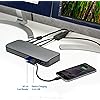
  • Thunderbolt 3 dock for MacBooks (OS 10.14 and later) and Windows laptops equipped with Thunderbolt 3 (Lenovo Dell HP Acer, Asus, MSI, Razer, and more)
  • Supports 4K Ultra HD (4096 x 2160 30-bit color @ 60 Hz) to dual monitors or 8K 60fps to a single monitor; note: Macbook Air and Macbook Pro 13 with the original M1 CPU will only display to a single monitor due to Apples chipset limitations, but Macbook Pros with M1 Pro and M1 Max CPUs will work with dual displays
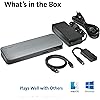
  • Connect your laptop to the Thunderbolt 3 port (.7 meter Intel Certified TB3 cable included); connect your dual displays by using the HDMI port and the 15W USB-C port which delivers video to a second monitor (using the included USB-C to HDMI adapter)
  • 135 Watt Power Supply delivers 60W power to charge your laptop via power delivery 3.0, including 61W MacBook Pro 13" models (Windows laptops must be designed to support power delivery); delivers additional power to run peripherals like hard drives, and for charging phones and tablets
  • SD card reader (3.0 UHS-I); five USB-A 3.1 Gen 1 ports @5Gbps for connecting accessories and charging devices (one is 5V/2.1A charging, can charge an iPad); Gigabit Ethernet port; 3.5mm headphone/speaker and microphone combo jack; Kensington lock slot; VESA mounting holes

Brand: Kensington


Color: Grey


Hardware Interface: Thunderbolt


Compatible Devices: Only compatible with laptops equipped with Thunderbolt 3 or Thunderbolt 4 ports; not backwards compatible with Thunderbolt 1 or Thunderbolt 2. For Windows based devices, ensure your laptop supports Power Delivery. See more


Total USB Ports: 5


Number of Ports: 3


Item Weight: 0.01 Ounces


Total HDMI Ports: 1


Wattage: 135 watts


Global Trade Identification Number: 54


Brand: ‎Kensington


Item model number: ‎K38625US


Item Weight: ‎0.01 ounces


Package Dimensions: ‎10 x 6.46 x 3.66 inches


Color: ‎Grey


Manufacturer: ‎Kensington


Date First Available: ‎July 23, 2019


Frequently asked questions

If you place your order now, the estimated arrival date for this product is: Tuesday, Feb 24

Yes, absolutely! You may return this product for a full refund within 30 days of receiving it.

To initiate a return, please visit our Returns Center.

View our full returns policy here.

  • Klarna Financing
  • Affirm Pay in 4
  • Affirm Financing
  • Afterpay Financing
  • PayTomorrow Financing
  • Financing through Apple Pay
Leasing options through Acima may also be available during checkout.

Learn more about financing & leasing here.
Top Amazon Reviews


  • It Simply Works!!!
Since buying a MacBook pro last year, I have had trouble finding a device that will let me add 2 continuous monitors, have USB ports, have an ethernet port, and charges my computer so all I have do do is plug one thing in and go. I tried many other items that cost around $100 like a j5. Nothing worked. My last device kept causing my computer to crash. I thought it was the computer and found out it was the device drivers. After updating to Catalina, the device didn't work and the company states it is working on drivers. This device just works. You pug it in and it works. No downloading and installing drivers. It comes with everything you need for two monitors via HDMI, has plenty of USB ports and has it's own charging system so you don't need to use the adapter that came with the device. (if your device supports thunderbolt). Yes it is on the expensive side but again, it works. It doesn't run hot like the other devices do . I was afraid to plug in my flash drive in fear it would damage the electronics because it was so hot. It even has audio ports and a SD card slot. It truly is a one shoe fits all device. Mac's are quirky with third party items but this functions as though it was made by apple. When you wake the computer form sleep, it takes a few seconds, sometimes 20 or more, for all the monitors to capture a signal so be patient. I wish I purchased this last year and didn't waste my money on the other useless products out there. ... show more
Reviewed in the United States on October 27, 2019 by Mark

  • Excellent. Displays on 2 monitors and charges, but not with included thunderbolt cable.
Works as described. Displays on 2 monitors and charges with both a MacBook Pro or 14" Dell, but not with the included thunderbolt cable. I had to buy this one to get it to charge my MacBook Pro https://www.amazon.com/dp/B0CM6C3SBV?ref=ppx_yo2ov_dt_b_product_details&th=1 I bought used for $60, which is a good deal. Definitely would not pay full price. Also, much better than my previous Dell dock. ... show more
Reviewed in the United States on January 21, 2024 by Berg&Lund

  • Good, but also expensive
I feel like this product did a really good job while I could use it. I ran into a problem that's entirely Apple's fault - my MacBook just so happens to be the one model out of that entire year that can't do Thunderbolt. If you don't have Thunderbolt explicitly stated on your MacBook specs, this will appear to work for a minute and then bomb out with a 'Thunderbolt is not supported on this Mac' message. That said, on a Thunderbolt connection it does exactly what it says it will do. It's easy to set up, you get tons of connectors and good instructions, and given Apple's recent tendency to cut back on available ports on a MacBook, it's extremely useful to have multiple USB and video out ports. It's just a lot more expensive than most solutions. I've used a QGeeM that does most of this and is a lot less, it just doesn't have its own power source but it's only got 7 ports. If you need a lot of ports and you'd like to hook up external monitors to your MacBook (and you absolutely have Thunderbolt and not 'pretend Thunderbolt over USB-C that doesn't actually work') then this is a really good product. ... show more
Reviewed in the United States on February 20, 2020 by Trenton Bennett

  • works great if you have thunderbolt 3 input, doesn't work with usb-c input
Turns out I didn't understand the difference between USB-C and thunderbolt 3 until I bought this and had problems. This works great with my 2020 macbook air (intel) with thunderbolt 3 inputs. But it does NOT work with my old dell laptop with USB-C input (no thunderbolt). Then when I was confused, I saw an answer from Kensington USA on this page: "...Thunderbolt 3 laptops will work with USB-C docks (at USB-C speeds), but USB-C laptops generally don't work with Thunderbolt 3 docks. We do have one TB3 dock which is indeed backwards compatible with USB-C, our SD5500T. We also have three USB-C docks which are compatible with Thunderbolt 3, our SD2000P (single display), SD4700P, dual display, and SD4900P (triple display). Thanks!" ... show more
Reviewed in the United States on December 5, 2020 by Nathan

  • Perfect for Macbook Pro 2020 (intel) and Macbook Pro 14" 2021 - zero issues
I now have 2 of these. I had a 2020 MBP (intel) and it worked great. I gave that to my spouse and now have a MBP 14 (m1 pro) and have had zero issues. Its a rock star. I would recommend this or the owc Thunderbolt 4 version. (as that has additional tb4 ports). Very impressed with the reliability of this. It just works. Overall it does what it says, i love the layout of it. Its a bit pricey at 280, but at 225 and under its a steal. update 11-24-21 - still going strong, no issues, no over heating, looking to get another one update 12-03-21 - purchase another unit Kensington, please make a tb4 model! ... show more
Reviewed in the United States on July 13, 2021 by Amazonian Connoisseur

  • HDMI does not work without adapter
my HDMI cable would only work if I used the included HDMA to USB C adapter. This results in a useless HDMI port and no port to connect a second monitor to because the 2nd Usb C /Thunderbolt cable is used to connect to my MacBook Pro. Update. After trying 3 HDMI cables one of which came with my brand new 4K monitor and the other clearly labeled as a 2.0 HDMI cable, I finally found a HDMI cable that worked. However the picture quality was noticeably poorer than the picture quality of the DisplayPort 1.4 cable I used for split screen. I am returning this for a dock with two DisplayPorts so I can have matching picture quality. ... show more
Reviewed in the United States on October 9, 2019 by Mike S.

  • Dual Monitor Setup for Macbook with laptop charging
After buying and returning couple of docking station, this one works best for my Macbook Pro with two 27" monitor where the display can extend to all 3 screens (2 monitors and laptop display). And the out of the box charging frees up your laptop charger completely, no need to connect the laptop charger to the docking station or the laptop. All you need everyday is to connect the usb-c cable to your laptop and you are ready to go. The only cons is it limits to 2 monitors as there is only 1 HDMI and 1 USB-C (to HDMI adapter) ports for connecting monitors, so if someone is looking to connect 3 or more external monitors, this is not suitable for them. ... show more
Reviewed in the United States on June 15, 2020 by POEN

Can't find a product?

Find it on Amazon first, then paste the link below.
Checking for best price...