Search  for anything...

Intel® Core™ i9-14900KS Desktop Processor 24 cores (8 P-cores + 16 E-cores)

  • Based on 144 reviews
Condition: New
Checking for the best price...
$730.09 Why this price?
New Year Deal · 3% off was $749.99

Buy Now, Pay Later


As low as / mo
  • – Up to 36-month term if approved
  • – No impact on credit
  • – Instant approval decision
  • – Secure and straightforward checkout

Ready to go? Add this product to your cart and select a plan during checkout.

Payment plans are offered through our trusted finance partners Klarna, Affirm, Afterpay, Apple Pay, and PayTomorrow. No-credit-needed leasing options through Acima may also be available at checkout.

Learn more about financing & leasing here.

Free shipping on this product

Returnable until Jan 31, 2026

To qualify for a full refund, items must be returned in their original, unused condition. If an item is returned in a used, damaged, or materially different state, you may be granted a partial refund.

To initiate a return, please visit our Returns Center.

View our full returns policy here.


Availability: In Stock.
Fulfilled by PCNation

Arrives Friday, Jan 30
Order within 21 hours and 8 minutes
Available payment plans shown during checkout

Protection Plan Protect Your Purchase
Checking for protection plans...

Features

  • Game without compromise. Play harder and work smarter with Intel Core 14th Gen processors
  • 24 cores (8 P-cores + 16 E-cores) and 32 threads. Integrated Intel UHD Graphics 770 included
  • Up to 5.9 GHz with Turbo Boost Max Technology 3.0 gives you smooth game play, high frame rates, and rapid responsiveness
  • Compatible with Intel 600-series (with potential BIOS update) or 700-series chipset-based motherboards
  • DDR4 and DDR5 platform support cuts your load times and gives you the space to run the most demanding games

Description

Intel® Core™ i9-14900KS desktop processor. Featuring Intel® Adaptive Boost Technology, Intel® Thermal Velocity Boost, Intel® Turbo Boost Max Technology 3.0, and PCIe 5.0 & 4.0 support, DDR5 and DDR4 support, unlocked Intel® Core™ i9 desktop processors (14th Gen) are optimized for enthusiast gamers and serious creators and help deliver high performance. Compatible with Intel® 700 Series and Intel® 600 Series Chipset based motherboards. 150W Processor Base Power.

Brand: Intel


CPU Manufacturer: Intel


CPU Model: Core i9


CPU Speed: 6.2 GHz


CPU Socket: LGA 1700


Processor: ‎6.2 GHz core_i9


Brand: ‎Intel


Item model number: ‎BX8071514900KS


Item Weight: ‎3.53 ounces


Product Dimensions: ‎7.4 x 7 x 3 inches


Item Dimensions LxWxH: ‎7.4 x 7 x 3 inches


Processor Brand: ‎Intel


Number of Processors: ‎1


Manufacturer: ‎Intel


Date First Available: ‎March 14, 2024


Frequently asked questions

If you place your order now, the estimated arrival date for this product is: Friday, Jan 30

Yes, absolutely! You may return this product for a full refund within 30 days of receiving it.

To initiate a return, please visit our Returns Center.

View our full returns policy here.

  • Klarna Financing
  • Affirm Pay in 4
  • Affirm Financing
  • Afterpay Financing
  • PayTomorrow Financing
  • Financing through Apple Pay
Leasing options through Acima may also be available during checkout.

Learn more about financing & leasing here.

Top Amazon Reviews


  • TUNING YOUR 14900KS
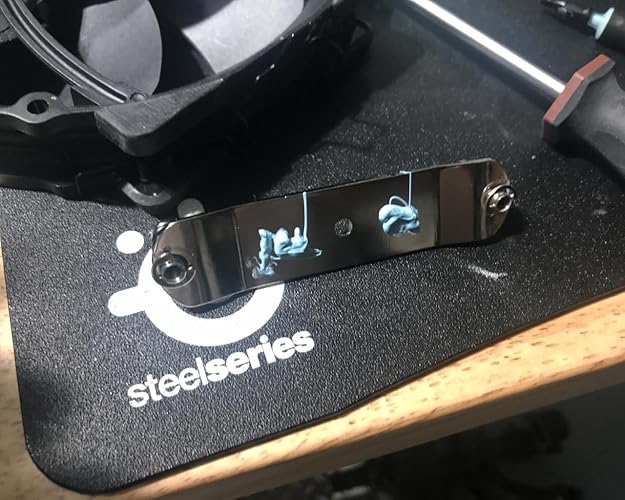
first off ignore the haters. Most of all the false info has come from AMD fan boys or fake expert You tube tech channels that just have a clear bias for intel; probably cause intel doesn't send them free stuff the real 14900KS problem was motherboard makers and intel overstating the overclock potential of this chip. the truth is this chip is already pushed beyond its limits right out of the box. its not the cores that are being degraded its the silicon fabric the chips are rested on that is being damaged by the excess speeds past 6 ghz. not even AMD can handle sustained 6 GHZ speeds hey at least all the bad publicity really lowered the price and this chip is a steal at $570 whats important is you have to TUNE this cpu to get best performance and prevent it from degrading over time and this is how you do it TUNING 1. lock your P cores and E cores. its extremely important you lock all cores to a same speed. 99% of the problem is intel has 2 P cores running at 6.2 ghz this is causing most of the damage. i locked mine at 5.9ghz P cores and 4.5 ghz E cores. remember locking cores does not mean your cores operate at that speed it simply limits the cores from going beyond that limits so my P cores run around 5.7-5.8 and spiking at 5.9. 2. cooler option and wattage MSI has a cooler to wattage options i set mine at 253 watts but if your feeling lucky 288 watts on "short duration power limit" just don't go above 315 watts 3. UNDERVOLT set CPU core voltage mode to "voltage off set" set AUTO to -by cpu and set core voltage somewhere to 0.050 to 0.100 for me my sweet spot was 0.090 4. install all BIOS Intel updates, this will give your bios new features to 5. disable all intel turbo options or asus remove or disable any "AUTO or AI" bios settings doing this not only gives you more frames in games but you 14900ks will not degrade over time especially locking those core and undervolting for more info check out ImWateringPSUs on you tube if you have an MSI board or Frame Chasers you tube channel frame chasers gives you real data you can use for your PC. Tech gurus like gamers nexus and linus tech tips are the worst; they are purely for entertainment purposes and really offer no help. Gamers nexus is the worst offender all they do is trash talk create a lot of drama playing the victim from the "evil companies that are out to get them" narrative, but offer no meaningful help. because of the mess INTEL is in the 14900KS is going to be a top performer for the next 5 years and heavily discounted. all testing shows the 14900KS when tuned correctly completely destroys the intel ULTRA series. the ULTRA series is simply a 15900k refresh using same architecture of the 12900k but with HT disabled, having a better memory controller and down clocked to 5.7 around the true performance of a 14900k but 14900k is still faster with HT. 14900ks is simple the lottery pick of the 14900k intel put a side to charge a little bit more money. one thing i noticed between the KS and K of the 14th is the KS will be a lot cooler matching the K performance so you can push it a little bit more on core limits. Newer games are designed and tuned to factor in E cores and an older architecture from the 10th to 14th gen like battlefield 6. so games coming out will use E cores so they are not useless you just have to tune the cpu and tune your game settings, and YES HYPERTHREADING matters!! intel shot themselves in the foot getting ride of hyperthreading. HT frees up resources to maximize performance, notice how AMD hasn't dropped HT. with all the speed of the ULTRA chips, it still under performs to the 13th and 14th gen chips cause of the HT even with faster memory; so speed isn't the only factor. recent tests shows if you turn off your E cores you loose around 30-40% of our FPS! COOLING from my photos you can see I'm using an air cooler and playing games the chip hovers around 55c for bench testing cinabench its 72c with 77c spike and running furmark cpu burner its 78c with 88c spike but that is a non real world brutal test. for cooling i use 1. ARCTIC MX-6 (grizzly and kingpin thermal paste is a huge rip off charging 4x the price and they were only 1c cooler or at the same temp as the mx-6) 2. Noctua NH-D15 G2 HBC, Dual Tower CPU Cooler, Specialised High Base Convexity Version for Intel LGA1700 3. Antec Nova 120, PWM PC Fans, 120mm Fan, Premium High-Performance Fan, PWM Case Fan, 3-Phase Speed Control, 3200 RPM, Industrial-Grade LCP Material, Nova Series 3 Packs 4. BITMAIN Antminer T9 S1 S3 S5 S7 S9 A3 D3 L3 V9 120mm High Temp Fan Duct 5 INCH USA Made (2 PCS) 5. Thermalright HR-09 2280 SSD Heatsink, 6. various NVME heatsinks and raspberry pie heatsinks 7. Thermal Adhesive Tape, 20mm x 25m (0.8in x 82ft) Double Sided Thermal Tape so with all that i built my air cooler and got water block cooling performance, with the thermalright nvme cooler i actually drilled a hole in the center of the base so it can fit over the Noctuas middle plate screw and pasted with heat taped that nvme cooler down the middle between the two tower heat fans of the main cooler and that helped reduce temps by 5-7c UPDATE forgot to mention i do lap my cpu, cpu cooler and gpu cooler to a mirror polish using 1. FLITZ Multi Purpose Metal Polish Liquid - 7.6oz USA-Made Tarnish Remover - For Aluminum this is a buffing compound liquid that's around 35k grit will buff almost any metal to a mirror polish i also use a dremel on low with a buff pad. this is very important always lap in 1 DIRECTION, you want to polish the nickle plating DO NOT OVER lap to the exposed copper there's no need for that you are only removing molecules to make a perfect flat surface. doing this can reduce temps by and extra 1-2c. i strongly recommend not using liquid metal, most computers are mounted upright and already we have reports of PS5 liquid metal leakage damage. Over time the liquid metal does migrate with the help of gravity so its an unnecessary risk i prefer to lap to get an edge also i believe the flitz is conductive having metal in the fluid so if you accidentally get flitz on the gold contact use 91% alcohol with a non fibrous micro cloth to clean the gold pins do not do what gamers nexus did on their lap video they polished in circles and used sandpaper to expose the copper core. never use sand paper that's way overboard and never polish in circular motions that just makes new scratches and air pockets. ... show more
Reviewed in the United States on November 26, 2025 by JZ the reviewer JZ the reviewer

  • Complete garbage and a true waste of money -- nothing but frustration
Firstly, THANK YOU AMAZON for being the best, and backing a sincere return policy with compassion. I upgraded my HTPC, I go high end, really high end, and it was time for it. I wanted a system that could run a number of threads, virtual and otherwise. So I splurged on this, paying nearly $700 on the CPU alone. When I bought it, I had read MANY articles about instability for overclockers, yet this was supposed to be the best for overclocking and the last of its kind. For me, I have NO INTEREST in overclocking, in fact, why bother? No matter how hard you try, you are stressing the hardware beyond manufacturer ratings, which, no matter what you tell yourself, you are shortening its lifespan. .... For a performance that you really rarely need. If ever..... The reason I stress this is that it turns out, Intel decided to blame the motherboard manufacturers for the issues with these EVEN AT "STOCK" performance, but I'm here to tell you that is utterly FALSE. This is the "KS" series. so this is literally the HIGH END version of this CPU. By the time I bought this, there had already been a number of BIOS related updates and Intel published profiles for setting this up at a an acceptable stock performance. I had problems! I had sufficient cooling, and bought high end memory - but I was running it at base clock speeds and voltages. And had constant blue screens, and even data corruption on the hard drive. Of course the blame was passed on to memory. and it even appeared to be memory. So I ended up testing 3 other modules, different brands and speeds, and continued to have issues. The only thing that ever helped was to "dumb down" the bios settings, to a point that I was running the unit below its stock performance. In this time, (easily a month) there were TWO new bios updates, but those updates were profile changes to the board that I was already operating BELOW. This CPU averaged 84C even IDLE IN THE BIOS SCREEN! I had even rechecked (and of course had to re-do) the heat sink compund, but I can confirm it was applied correctly and had good coverage, as evidenced upon removal). Over the course of one month, I had to actually change BIOS settings to the point I was only stable running it at 4 cores. At one point, I could run it at 8 cores, and at another point I had it initially running on all cores. What does this tell you???? It tells you it had NOTHING to do with the Motherboard or the memory. Despite the fingerpointing you get into while trying to debug, its clear this processor degraded over time. I mean, running at 80C while doing nothing is a huge red flag! Over the course of a month, I went from full performace (unstable) to reduced cores at reduced voltages, and cooling profiles at 100% fixed for the entire month, and this junk degraded daily to the point it was unusable. Amazon thankfully accepted a return. Since the 14th and 13th gen both had similar complaints about their performance and stability, I went with a 12th gen KS, and guess what?!?!?!??!!? NOT A SINGLE PROBLEM AT ALL, with all the same memory and Motherboard as before. The only thing different is this garbage is gone. Intel deserves a -star, if I could give them that, I would. ... show more
Reviewed in the United States on July 14, 2024 by noybman

  • Two words: The Beast.
This chip is the last of its kind — a high-octane, unapologetically overbuilt processor that feels more like a 700-horsepower muscle car than a piece of silicon. It’s the swan song of an era where performance mattered more than efficiency charts. With the right hands and the right BIOS tweaks, it will clock 6.2 GHz all-core without flinching. I’ve seen people dismiss it, but that usually comes from folks who don’t know how to tune a CPU properly. Hand a Dodge Viper to someone who doesn’t understand throttle control and they’ll spin it into a wall — doesn’t mean the car wasn’t built for greatness. Same story here. This isn’t a plug-and-play chip for the casual crowd. It’s for enthusiasts who want to unlock every ounce of potential and know what to do with it. Push it right and it rewards you with stability, insane speed, and that rare thrill of owning something truly elite. For me, it’s the crown jewel of Intel’s desktop line — a final flex of raw silicon muscle before the industry moves on to tamer things. If you got the money, get this bad boy and buckle up/strap in, because you're goin' for a ride! ... show more
Reviewed in the United States on October 12, 2025 by Isa

  • Get a Custom loop....
this thing is a beast I was nervous at first but everyone was wrong you just have to have a rock solid setup thats not made out of popsicle sticks its not made for average that's were the complaints come from....My temps are 28c to 33c 28c with new paste 54c playing all day some games put it at 58 to 61c but those game are poorly built and optimized like Path Of Exile 2 other then that get a k version unless u decide to get an adequate cooler ... show more
Reviewed in the United States on December 29, 2025 by MR HAPPY

Can't find a product?

Find it on Amazon first, then paste the link below.
Checking for best price...