Search  for anything...

Intel BX80677I77700K 7th Gen Pentium Desktop Processor

  • Based on 3,057 reviews
Condition: New
Checking for the best price...
$199.00 Why this price?
Save $151.00 was $350.00

Buy Now, Pay Later


As low as $33.17 / mo
  • – 6-month term
  • – No impact on credit to apply
  • – Instant approval decision
  • – Secure and straightforward checkout

Ready to go? Add this product to your cart and select a plan during checkout.

Payment plans are offered through our trusted finance partners Klarna, Affirm, Afterpay, Apple Pay, and PayTomorrow. No-credit-needed leasing options through Acima may also be available at checkout.

Learn more about financing & leasing here.

Free shipping on this product

FREE 30-day refund/replacement

To qualify for a full refund, items must be returned in their original, unused condition. If an item is returned in a used, damaged, or materially different state, you may be granted a partial refund.

To initiate a return, please visit our Returns Center.

View our full returns policy here.


Availability: In Stock.
Fulfilled by Amazon

Arrives Friday, Jun 5
Order within 17 hours and 20 minutes
Available payment plans shown during checkout

Protection Plan Protect Your Purchase
Checking for protection plans...

Features

  • 4 Cores / 8 Threads. Intel Optane Memory Supported. Intel UHD Graphics 630
  • 4.20 GHz up to 4.50 GHz Max Turbo Frequency / 8 MB Cache.
  • Compatible only with Motherboards based on Intel 100 or 200 Series Chipsets.
  • Intel Optane Memory Supported.
  • Instruction set is 64 bit and instruction set extensions is intel sse4.1, intel sse4.2, intel avx2. Features intel hyper threading technology
  • System Ram Type: Ddr4 Sdram

Description

Leading the pack is the Intel Core i7-7700K processor. Architected for performance, this processor packs 4 high performing cores with core base frequency of 4.2GHz and 8MB of cache memory. Kick up the performance even higher with Intel Turbo Boost 2.0 technology to bump the max turbo frequency to an amazing 4.5GHz. Add Intel Hyper-Threading Technology for 8-way multitasking to deliver the performance knockout punch. Not enough? For the enthusiast, this processor is unlocked, you can tweak the performance to its fullest potential.

Brand: Intel


CPU Manufacturer: Intel


CPU Model: Core i7


CPU Speed: 4.5 GHz


CPU Socket: LGA 1151


Processor Series: Core i7


Processor Speed: 4.5 GHz


Processor Socket: LGA 1151


Secondary Cache: 8 MB


Wattage: 91 watts


Cache Memory Installed Size: 8 MB


Processor Count: 4


Processor Core Count: 4


Platform: Windows 10


Item Dimensions L x W: 9.52"L x 5"W


Brand: Intel


Processor Brand: Intel


Model Number: BX80677I77700K


UPC: 735858325837 191687403922


Manufacturer: Intel


Mfr Part Number: BX80677I77700K


Warranty Description: Limited warranty; 3 years warranty


Item Type Name: Intel 7th Gen Intel Pentium Desktop Processor G4560 (BX80677G4560)


Global Trade Identification Number: 37


Built-In Media: CPU


Item Weight: 0.04 Kilograms


Frequently asked questions

If you place your order now, the estimated arrival date for this product is: Friday, Jun 5

Yes, absolutely! You may return this product for a full refund within 30 days of receiving it.

To initiate a return, please visit our Returns Center.

View our full returns policy here.

  • Klarna Financing
  • Affirm Pay in 4
  • Affirm Financing
  • Afterpay Financing
  • PayTomorrow Financing
  • Financing through Apple Pay
Leasing options through Acima may also be available during checkout.

Learn more about financing & leasing here.

Top Amazon Reviews


  • Great CPU for Introducing you into the 7th generation
Style: Processor Only
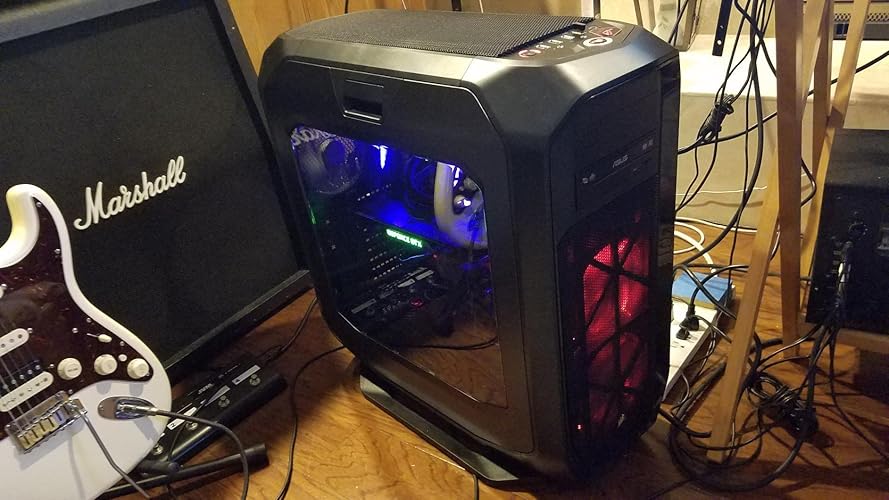
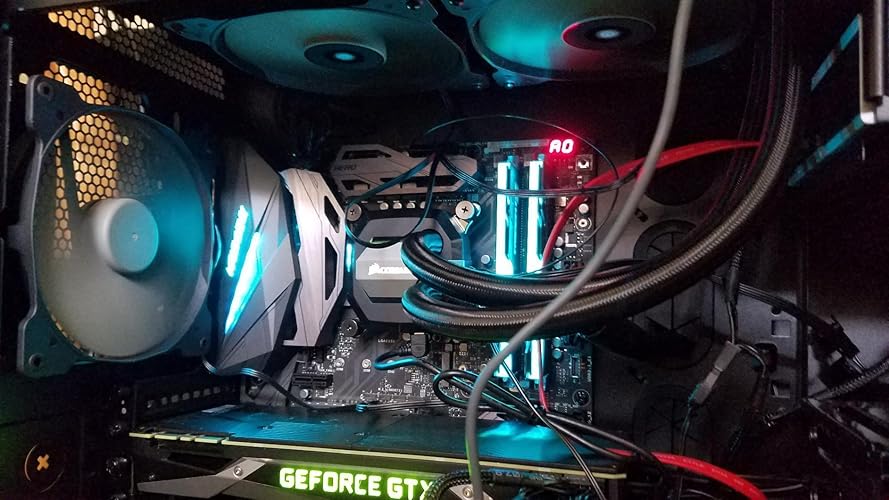
Hello, I love this CPU, as things are much faster and smoother with better frame rates, especially when paired with NVIDIA GeForce Titan X Pascal 12GB GDDR5X (900-1G611-2500-000). However, be warned that this processor does run warmer than some other CPU's I have had. I am saying this based on my setup alone having a water block on the CPU and using a very large case with 5 case fans and 4 additional fans on the radiators. I previously had the Intel Core i7-5930K Haswell-E 6-Core 3.5GHz LGA 2011-v3 140W Desktop Processor BX80648I75930K which ran around 30-35 degrees Celsius on average with no high heat spikes, as cores where being used at 25-50% load (May all be because of it having 6 cores instead of 4). My case and fan setup: --- Case: Corsair Obsidian 900D CC-9011022-WW System Cabinet Tower (Black) --- Fans: Corsair ML120 Pro LED, Blue, 120mm Premium Magnetic Levitation Cooling Fan CO-9050043-WW. This processor, however, has heat spikes up into the 50-53 degrees Celsius range, with an average of 60 degrees Celsius for the whole CPU package when being stressed tested. I currently have a two water loops for my system, with one dedicated for CPU and the other for GPU. I keep this CPU cool with XSPC Raystorm D5 EX240 Water Cooling Kit, which uses pretty large diameter hosing-at least compared to the hosing on my GPU that uses EKWB. Due to the fact that I bought this CPU because i upgraded my motherboard, as my other died after year, I probably be moving to a custom loop by EKWB (As they make great products and have an easy to use 'Configuration Tool' for assisting with ALL the parts you need for your water cooling loop). One of the biggest reasons being my new motherboard has an already built in EKWB for the CPU Regulators, which i want to add to my CPU loop (MB: ASUS MAXIMUS IX FORMULA LGA1151 DDR4 DP HDMI M.2 Z270 ATX Motherboard). I even may add one of their water blocks for the RAM as they make a very nice and easy way to do so. Once I add my new loop, which will use a three 120mm fan radiator, i will update my review about my new average temperatures. ... show more
Reviewed in the United States on April 24, 2017 by AltF4UnInstall

  • Highly recommend great CPU
Style: Processor Only
After 5 years I still have this processor and the value for money is great, the processor is still running strong. The power consumption is I guess normal compared to other cpus. As stated above the stability is great, no issues at all with this CPU. I can watch games have 2 games on and the CPU tackles this multitasking easily. ... show more
Reviewed in the United States on November 13, 2025 by Idkshsjdbejwhsb

  • Yes, it runs hot. But that's not a showstopper.
Style: Processor Only
There is a lot of drama surrounding the temperature range of this CPU, so I thought I would chime in here. I did NOT delid the CPU, and refuse to. I am using it with a Cooler Master Elite 130, ASUS Z270-I, and Corsair H60. Fixing it to a standard clock (4.2GHz with turbo mode turned off, etc.), 2 hours of Prime95 with an AVX load pushes it to an absolute max of 85 degrees. 85 degrees is outrageous for all the CPUs we're used to, but it's actually perfectly fine for this one. Bear in mind that my idle temperatures are in the 30's. With a stable DDR4-3000 overclock, the same test hits an absolute maximum of 95 degrees. That's 5 degrees away from TJMax. Scary but bear in mind that this is an unrealistic load. With turbo mode and other optimizations turned on, and RAM at standard clock, absolute maximum was again 95 degrees. With a small, conservative setup like mine this is actually impressive. 4.5GHz without DDR4-3000? I'll take it. With DDR4-3000 and all the built-in optimizations turned on, I finally hit the TJMax of 100 degrees and experienced light throttling, but no lock-ups or freezing. Many of the old systems I built would simply freeze or shut down in this situation, but this CPU gracefully steps back from the dangerous temperatures. That said, as well as the fact that this stress test is a hilariously unrealistic load, some users might consider this configuration to be perfectly fine. So my recommendation? If you are like me and just need a fast CPU in a small case, adjust your motherboard to fix this thing to a standard clock. Aggressive overclocking inside a small case like mine is simply not feasible with this CPU if you need rock solidity. I did keep the RAM overclock though since that passed 10-hour stress tests without a hitch. Alternately, if you have a big case, definitely get a liquid cooler with a big radiator. An extra fan and bigger radiator would easily knock off 10-20 degrees from all the aforementioned tests. You'll read all over google that people delidded the CPU to get the performance they're looking for. Unless you have a small case like mine, I can't see why it's better to spend money on the delid kit than for a bigger, better cooler. ... show more
Reviewed in the United States on January 15, 2018 by spitfirejunky

  • Need it? Maybe not...but for the price you can't NOT have it!
Style: Processor Only
Not the fastest I own, but very close. Clock speed is apparent, and this thing is brutal! For the price there's no reason at all not to own it, and it's waayyy more performance than most will ever need or use. Runs cool, but there's really not a lot more noticeable beyond what the 6700K can already do. You don't "need" to upgrade if you have a 4790K or 6700K already, but this CPU handles over clocking easier than either of those if that's your intent. I'm running a tame 14% OC, but have had it up to 22% with power tweaks and water cooling. EDIT: I'm building a new one for myself, and chose to go with a 6800K for just a little more money than this chip. Slower clock speed, but rated higher by every major player in the business. This is still a superb chip, but limited in some ways (single core speed NOT being one of them!). The 6800k out-benched the 7700k,7740k,7800x and 7900x. Also (which I also have all of) the 6850K, 5930K, and 5820K. If you need a dragster, this or the 7740K IS the CPU. If you need a Ferrari, shop around and do your homework. I just spent $33 more for a Ferrari. ... show more
Reviewed in the United States on February 27, 2017 by Kevin C

  • Great product, and I'm lucky to have one of the fastest cpu reported Great product, and I'm lucky to have one of the fastest cpu reported
Style: Processor Only
CPU: Intel i7 7700k: l have mixed feeling about this processor, first lets start with the positive side: Pro: Great speed, i was able to overclock it to 5.53 ghz without a problem, and reached benchmark number one on CMU-Z with speed of 577 beating any similar processor around. with clock speed 4.2 - 4.5 ghz this CPU speed is more then capable to handle any application no matter what, i'm running Lightroom, Photoshop, Bridge, Time Lapse application, plus other application and yet able to play COD in the background at full fps on Eco mode :) Cons: processor can overheat and have spikes in temp, this is what many reported and i have noticed till I was able to fix it by resting bios, i was able to solve this issue buy bios reset, and i'm not sure if it was a bio, but now i'm no longer overclocking the CPU, i'm leaving it on Eco mode or performance up to 4.5ghz. Temp works idle 30c maximum while playing games <45c Benchmark is beyond great, since i received fastest single thread result in july 2017 @ 557 Maybe when i'm going to receive my new liquid coolant i will give it another try, but it will be for benchmark purposes only, since there is no application which will require anything above 4.5ghz that i'm using. ... show more
Reviewed in the United States on July 31, 2017 Reviewed in the United States on July 31, 2017 by Victor M. Mitri

  • i7-7700K OC'd and Running at 5.1GHz (Water cooled) i7-7700K OC'd and Running at 5.1GHz (Water cooled)
Style: Processor Only
4 of 5 Stars - Value for the Money There is little headroom on increased speed and the price to get there is higher than previous generations. If you aren't planning using Windows 10 - Kaby Lake will not support previous versions of Windows natively (There may be work arounds but...) It's worth noting, this version does not come with a Stock Fan, so you will need to buy a 3rd party CPU Cooler for it. This System Build i7-7700K ASUS ROG Maximus IX Hero Corsair Hydro Series H115i Extreme Performance Liquid CPU Cooler nVidia GTX 1080Ti Founders Edition G.SKILL TridentZ RGB Series 16GB EVGA SuperNOVA 1000 G2 PSU Corsair Graphite Series 780T Full Tower Windows 10 Home Getting to 5.1Ghz I updated my ASUS BIOS to the newest version I used the ASUS Windows app AI Suite 3 to stress test the system to its Max stable performance. It actually did a very good job. I rebooted Windows, (hiit F1) entered the BIOS and saved the OC settings into the ASUS BIOS Profile. This saved a lot of time doing manual settings in the BIOS first, then running stress tests. Temps My Temps Idle speed 28-30C - Under Load 70c-73c Kaby Lake CPU's run warmer under load - but should Never exceed meet 80c Max temps. I never run my older Intel CPU's beyond 60c as stability couldn't be insured. All my OC'd PC's are still running 9 years later. With that said, Kaby Lake CPU's run warmer. I have not experienced instability under Max load with the i7-7700K. Pros The i7-7700K can be overclocked to a stable 5.1GHz with water cooling Cons You need to run Windows 10. Although some online forums offer work arounds to this limitation. Is it worth it to run into issues down the line. The speed performance premium may be too high for some. Other Thoughts Consider that I still run two i7 2600k systems I built in 2011 (running at 4.8Ghz) on Air Cooling, The stock speed of a i7 2600k is 3.4GHz - The i7-7700K runs at 4.2GHz and requires water cooling to get to 5.1GHz. The headroom for increased speed considerably less then it was six years ago. Conclusion If you've purchased or built a high end PC in the last two years for gaming, there may not be a lot on offer here. A GPU upgrade may deliver more tangible speed results. If you use applications that are CPU dependent 3D rendering or Video editing, this increase in speed is welcome. For gaming, nVidia/AMD GPU's play a bigger role on your gaming than CPU's once did. If you are buying this for gaming, there are cheaper alternatives. I've been running this for 3 days without issues. Games: Doom, Battlefield 1, Battlefield 4, Overwatch ran smoothly, without issues - The water cooling fans kicking in consistently. ... show more
Reviewed in the United States on March 21, 2017 Reviewed in the United States on March 21, 2017 by richcz3

  • I wasn't sure if this was going to perform better than the i7-6700k but I really think it was ...
Style: Processor Only
I upgraded from an FX-8320 to this CPU and it SCREAMS. For the cost, I wasn't sure if this was going to perform better than the i7-6700k but I really think it was worth it based on the increase in gaming quality I've seen. But even with the huge increase in performance, there have been some drawbacks, though somewhat minor in my opinion. I'm going to go ahead and mirror what about half the reviews I've seen here and on Newegg have said; it gets hot. Hotter than it really feels like it should. Some people haven't had issues and I think they've won the Silicon Lottery and I am very jealous of them. I, however, am a huge loser in the lottery I feel. With a Corsair H105 I'm seeing around 36-40C idle temps and at 100% load... Well I can't really tell how high up it can really go because when I fire up Prime95 with small FFT's the temps go straight up to 100C and I have to cancel the test within seconds. When running in-place FFT's I see around 77-80C. Now granted I HAVE had my H105 for around 3 years now so it's possible it's not having fun working with my motherboard or the pump is going bad and I do plan on replacing it soon, but in the mean time I really don't think these temps are normal at all. Part of the problem could be the mobo (GIGABYTE AORUS GA-Z270X-Gaming K7 Gaming Motherboard LGA1151 Intel Z270 2-Way SLI ATX DDR4 Motherboard for reference) delivering too much power to the CPU, and some people have said that driver updates fix this problem and I really should have done that before this review so I will update later if that DOES fix it. Because of this issue I've been unable, out of fear, to overclock at all though I'm sure outside of stress tests I wouldn't have to worry about it overheating much while gaming or day to day use. The other issue I've had is also related to temperature. While idling I periodically would see vastly different temperatures on each core. And when I say vastly, I mean the difference between Core 0 being 35C and Core 1 being 65C. This would happen randomly when running programs OR idling and would lead to a huge annoyance; my case fans turning up to compensate for just a few seconds then winding down. Not the biggest annoyance but I've heard others talking about this and I believe I've found a solution. After disabling the onboard graphics, the mobo option to deliver power to it was still set on. Using the Gigabyte App Center utility Easy Tune I turned it down and am no longer seeing this issue, so yay for that. Overall I'm very pleased with this product, despite it's temp issues. These issues may seem huge but in all honesty I never see temps higher than 65C while doing anything other than stress tests and my problems could stem from mobo issues but none of these have caused me to regret my purchase. I struggle whether or not to rate this at 4 or 5 stars due to my issues, but mine aren't as extreme as I may have portrayed them and most others don't seem to be experiencing this level of temperature and that leads me to a solid 5 star review. ... show more
Reviewed in the United States on March 3, 2017 by Lu Wingfield

  • Great performance with 2080ti
Style: Processor Only
Had just installed a EVGA RTX 2080ti in my PC but was getting bottlenecked in my gaming by my i5 6600K. Playing The Division 2 I would see 100% CPU usage and less than 20% GPU. I didn’t drop a grand on a new GPU to utilize only 20% of it! I also didn’t feel like replacing my MSI Z170A Gaming M7 motherboard right now. Fortunately the current BIOS version of this mobo supports Kaby Lake so I decided to go with the i7 7700k. Installation was very simple. I water cool my CPU with a Corsair h100i gtx and temps playing division 2, apex, and Black Desert Online all at max settings @1440p varies between upper 40s to low 60s while overclocked at 4.7Ghz. Pump at 3000 fans at 1800. As far as performance-wow what a difference from my i5 6600K. The division 2 runs silky smooth anywhere from 90s to 130 fps. Apex mostly runs at 144 with dips to low 100s depending on the area. BDO runs consistently between 110-120 with dips into the 90s when in heavily populated city areas. Overall extremely happy and should hold me for a year or so until I decide to upgrade my mobo for a ninth generation cpu. ... show more
Reviewed in the United States on March 31, 2019 by Amazon Customer

Can't find a product?

Find it on Amazon first, then paste the link below.
Checking for best price...