Search  for anything...

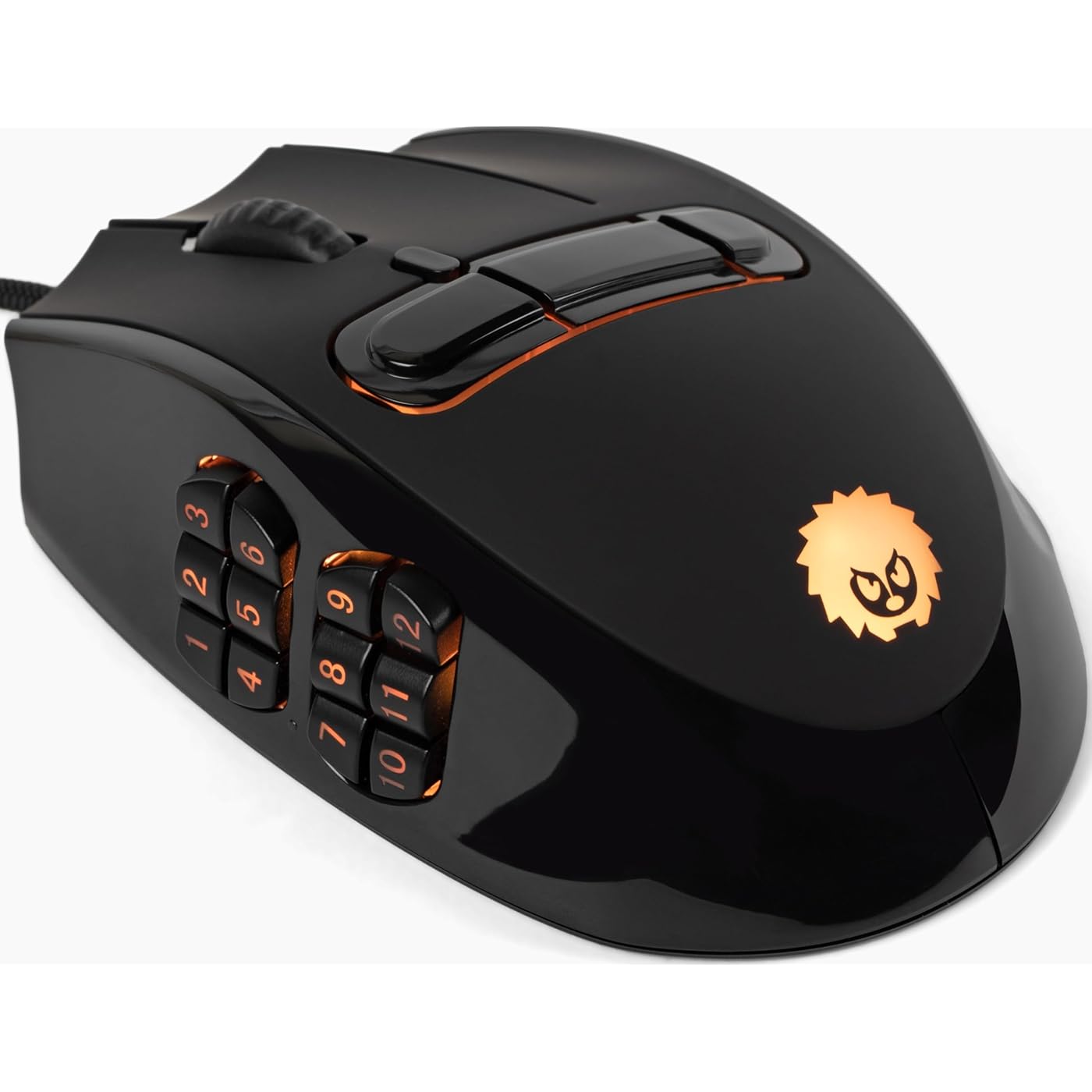
Hedgehog MMO Gaming Mouse - 16 000 DPI - 23 Programmable Buttons - Switch to Joystick Mode with Spring-Loaded Base - PC, Mac, Ubuntu Linux
  • Based on 0 reviews
Condition: New
Checking for the best price...

Buy Now, Pay Later


As low as $16.50 / mo
  • – 6-month term
  • – No impact on credit
  • – Instant approval decision
  • – Secure and straightforward checkout

Ready to go? Add this product to your cart and select a plan during checkout.

Payment plans are offered through our trusted finance partners Klarna, Affirm, Afterpay, Apple Pay, and PayTomorrow. No-credit-needed leasing options through Acima may also be available at checkout.

Learn more about financing & leasing here.

Free shipping on this product

FREE 30-day refund/replacement

To qualify for a full refund, items must be returned in their original, unused condition. If an item is returned in a used, damaged, or materially different state, you may be granted a partial refund.

To initiate a return, please visit our Returns Center.

View our full returns policy here.


Availability: In Stock.
Fulfilled by Amazon

Arrives Monday, Jan 26
Order within 17 hours and 58 minutes
Available payment plans shown during checkout

Protection Plan Protect Your Purchase
Checking for protection plans...

Features

  • Switch Modes Instantly: Unique spring-loaded base converts the mouse into a joystick zone for fluid movement.
  • 23 Programmable Buttons: Map macros, hot-keys, joystick axes or gamepad functions to tailor your gameplay.
  • Precision 16 000 DPI Sensor: Top-tier optical tracking for responsive gaming across genres.
  • Ergonomic Design for Long Sessions: Knuckle buttons reduce accidental clicks, interchangeable caps let you customize feel.
  • Plug-and-Play On-Board Memory: Save your profiles directly in the mouse; no software needed when switching computers.
  • Built for the Serious Gamer: Ideal for MMO, MOBA, flight simulator, streaming macro setups and joystick mode.

Description

Why Hedgehog Gaming: Break the limits of traditional mice. Dual-Mode Control: Mouse for precision, joystick for analog freedom. Customize to Win: 23 buttons, RGB, caps, and more. Built to Endure: Designed for marathon sessions; comfortable, durable, high-performance. No software needed after customizing profiles: With onboard memory, the software isn't needed even when you customze.

Brand: Hedgehog Gaming


Color: Black


Connectivity Technology: USB


Special Feature: 23 Programmable Buttons, Interchangeable Caps, LED Lights, Onboard Memory, Spring-loaded Base


Movement Detection Technology: Optical


Product Dimensions: 4.49 x 3.56 x 0.1 inches


Item Weight: 4.4 ounces


Item model number: HHG-01-0001-RH


Date First Available: October 2, 2025


Manufacturer: Hedgehog Gaming


Frequently asked questions

If you place your order now, the estimated arrival date for this product is: Monday, Jan 26

Yes, absolutely! You may return this product for a full refund within 30 days of receiving it.

To initiate a return, please visit our Returns Center.

View our full returns policy here.

  • Klarna Financing
  • Affirm Pay in 4
  • Affirm Financing
  • Afterpay Financing
  • PayTomorrow Financing
  • Financing through Apple Pay
Leasing options through Acima may also be available during checkout.

Learn more about financing & leasing here.

Top Amazon Reviews


  • Surprised me!
Where do I start. I was so unsure about this mouse, but overall, it's great for what it's shown as. The buttons are placed in good spots, and the knuckle buttons are pressable (Was afraid they'd never be used). The buttons feel good, and the mouse feels high quality. It's not too heavy, and it's easy to adjust the DPI. For price, You are getting your money's worth. 100$ at the time of this review, I felt like I got more than what I paid for which is a great feeling. The software works great. There is no sign-in required, so that's always a plus. It's quick to download, and runs fine. Only complaint is that I had to approve the installer to run, per Microsoft's unrecognized pop-up (Which could be "alarming" to some users but isn't an actual concern). The RGB on the mouse is very bright and can be set in terms of brightness and colors. You can even fully turn the brightness off if wanted. If anything, I wish there was more customization on the RGB front for interacting with other things on the computer (IE, Thermals, ETC). My hand is a little small (I wear gloves size S-M), so I can only click 1 of the 3 buttons on the right side of the mouse (Right Handed Mouse Version) The buttons on the left side are set to ACTION1, ACTION2, etc... however, they are not their own special buttons. This becomes a problem if you want to make them do specific things in MMO/Games and not press keys on the keyboard. For instance, my other mouse has the left side buttons to MOUSE5,MOUSE6, etc.. So that it doesn't interfere with keyboard buttons. ... show more
Reviewed in the United States on November 19, 2025 by Ashley

  • G600 or Naga v2 Successor?!
Gotta admit.. I was highly suspicious at first but it was worth. Still waiting for the true successor of the G600?!? Sadly this isn’t it.. but it shows promise. Software is meh but works. I would recommend downloading and configuring it inside of a VM. I configured mine there and and on board memory made it a breeze after that. I truly wish that more tlc went into the mouse shell. Feels mighty cheap; like the tradeoff between making the joystick pad work well vs build quality of the shell was won by the joystick pad. HOWEVER remember that this is/was a kickstarter product mainly headed by a single individual so don’t expect it to be perfect! The elephant in the room is definitely the joystick adapter for the bottom of the mouse. Sadly I haven’t given it enough testing..( stay tuned for a future edit) Fits my hand nicely and LOVE having so many buttons macro’’d up and configured at RESTING position making usage a dream. I AM surprised by the connectivity of the laser sensor. On higher dpi’s (Mine is set at 3200) it works even BETTER than my g600 but not as precise as my naga v2 pro Been having weird deadzones with lower dpi setting but that might be an old mousepad issue so your mileage may vary. PLEASE PLEASE PLEASE come out with a higher quality shell I can either print of purchase and id so so happy. Overall definitely a great product. I WILL be buying the left handed version once it’s available ... show more
Reviewed in the United States on November 8, 2025 by June Gonzalez

  • Neat mouse but it ain't the g600
I been following the mouse for a year praying they are available for purchase for non kickstarter backers and im glad its available. It isn't the logitech g600 but its the nearest best thing as a replacement since most mmo mouses lack that third ring finger button. It ain't perfect, but its nice enough. Hoping it picks popularity enough to get more versions of it. ... show more
Reviewed in the United States on December 13, 2025 by Zev.Exe

  • An admirable effort, but...
Where to begin? The shape or ergonomics of this device aren't great, but they're not quite awful. It feels extraordinarily wide for a mouse. My first three fingers rest naturally on the three main mouse-buttons thankfully, but that's where my luck ends. This can be seen as a low-tech, much less expensive alternative to the Swiftpoint Z design. You're better off spending the extra $80 though because the Z works a heck of a lot better than this one does. In 'mouse-mode' this device is reasonably functional. My thumb rests awkwardly but aligned right. I instinctually want to plant my thumb here for purchase in order to drive the mouse rather than to access functions. The "DPI" key (which can be reprogrammed, as can all of the others) is super easy for me to accidentally press with what would be the ball of my palm. I had to disable this key- bind completely to avoid accidentally hitting it. The three "knuckle" buttons are likewise, in an uncomfortable location. I don't accidentally hit them, but i have to completely change my grip to reach them. The three buttons located along the right-most edge of the mouse aren't much better: The one situated closest to the front of the mouse is nowhere near any of my fingertips. Another complete regrip situation. I decided to bind this as my DPI selector, to replace the unusable original choice. The button located closest to the rear of the mouse is also not accessible by any fingers without releasing my grip on the mouse. Only the middle right-side button is within reach. The tip of my pinky finger rests perfectly on the middle button. As with the thumb-cluster, my instincts tell me to drive the mouse from here, causing frequent accidental activations of yet another of the extra mouse-buttons. With 'joystick-mode,' this mouse clicks down onto a triangular-shaped plastic extrusion that is kept "on zero" by a radial configuration of springs. It feels very tactile and crunchy when you use this control. Whenever i push on the left side of the mouse toward the right, i consistently press several of the side button-cluster switches. Moving toward the right just doesn't work without hitting them. They dominate the whole area where your thumb needs to be to drive the mouse sideways. The other three cardinal directions didn't present the same difficulty in avoiding buttons, but pressing it leftward does sometimes cause accidental presses of the middle button on the right-most side. Another glaring problem with this supposed gaming mouse is that the only way to bind a combination of key inputs to a switch is using the macro function, which requires preemptively creating all of the shortcuts or modifiied inputs, then assigning the macro script to the key. Otherwise, your only method of combining key inputs is to bind one of the switches you can't reach to serve as your modifiers. So literally, you'll have to chord those multiple mouse buttons together physically in order to send a combined key-input. I looked and looked because i thought i must have just missed the feature somewhere in this janky UI, but i never found a normal way of doing this. To put that in perspective, that is the original feature of the very first gaming mouse that featured more than 3 total buttons. in 1984, i presume. If it weren't for this very sensitive DPI button, i don't know how they manage to call this thing a gaming product with a straight face. This thing is a disaster. I normally wouldn't return this, but i consider it to be so poorly designed that it's completely defective in regards to its stated purpose. Definitely refunding this very poorly executed decent idea. PRO - Tons of switches! - Cheaper imitation of Swiftpoint Z series - Grip Ergonomics better than expected - Three main mouse-buttons is nice! (Ring finger switch) - App Light on Resource demand CON - Awkward Button ergonomics - Slightly unweildy width - Side-button cluster so dense that it's hard to distinguish which keys you've hit - Knuckle buttons require grip-adjustment - DPI button incredibly easy to accidentally press - Right-side buttons out of reach or too easy to press by driving the mouse around the surface - Joystick mode does not have a smooth analog travel at all. Essentially just 4 switches in practice. - Pressing Joystick toward the right is very difficult or impossible without accidental presses - Complexity of design increases cost - Too expensive for what is ultimately just a mediocre standard 5-button mouse that includes an extra Ring-finger-button. - App UI is very unfriendly in regards to design standards. You might give this a try if you have very long fingers/hands. It's hard to reach all of the buttons.0- ... show more
Reviewed in the United States on December 2, 2025 by joseph cheney

  • Perfect mouse
This is a great mouse. I can't wait to follow the development of it.
Reviewed in the United States on December 28, 2025 by veronica brown

Can't find a product?

Find it on Amazon first, then paste the link below.
Checking for best price...