Search  for anything...
GPD

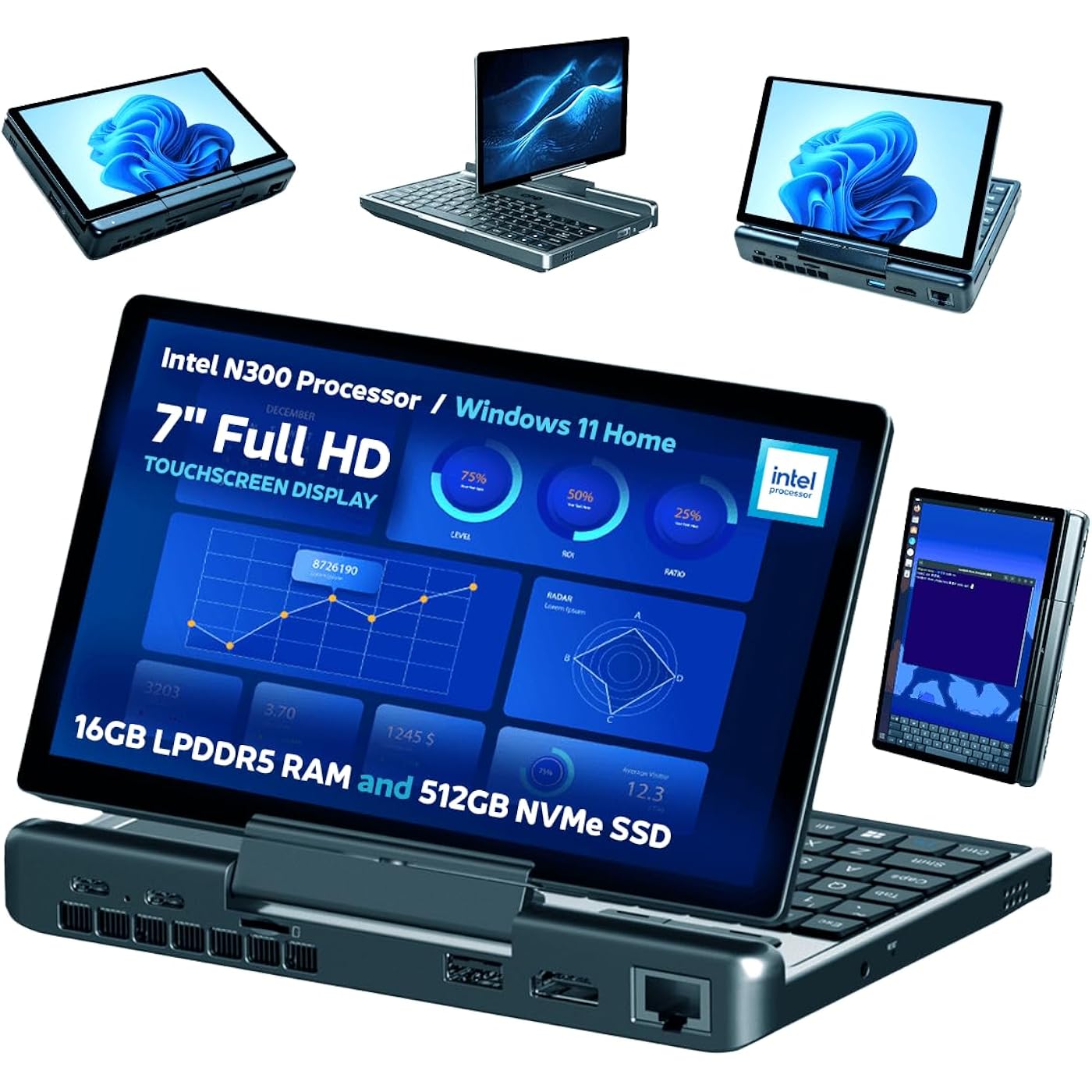
GPD MicroPC 2 | Portable Mini Laptop with 7" 1080P Display | with N300 Intel Processor, UHD Graphics; 16GB LPDDR5, 512GB NVMe SSD; 2.5G Ethernet, USB-C, HDMI 2.1, Wi-Fi 6, BT 5.2
  • Based on 0 reviews
Condition: New
Checking for the best price...
$747.95 Why this price?
New Year Deal · 50% off was $1,499.99

Buy Now, Pay Later


As low as / mo
  • – Up to 36-month term if approved
  • – No impact on credit
  • – Instant approval decision
  • – Secure and straightforward checkout

Ready to go? Add this product to your cart and select a plan during checkout.

Payment plans are offered through our trusted finance partners Klarna, Affirm, Afterpay, Apple Pay, and PayTomorrow. No-credit-needed leasing options through Acima may also be available at checkout.

Learn more about financing & leasing here.

Selected Option

Free shipping on this product

FREE refund/replacement until Jan 31, 2026

To qualify for a full refund, items must be returned in their original, unused condition. If an item is returned in a used, damaged, or materially different state, you may be granted a partial refund.

To initiate a return, please visit our Returns Center.

View our full returns policy here.


Availability: 17 left in stock
Fulfilled by Amazon

Arrives Friday, Jan 9
Order within 6 hours and 51 minutes
Available payment plans shown during checkout

Protection Plan Protect Your Purchase
Checking for protection plans...

Capacity: N300 - 512GB


Features

  • [PROCESSING POWER] The Intel Processor N300 delivers quad-core power with 4 Cores / 4 Threads and a Max Turbo Frequency of 3.8 GHz. Its Integrated Intel UHD Graphics (32 EUs, 1.25 GHz) ensures smooth visuals, all within a flexible 6W-15W TDP.
  • [DISPLAY & DESIGN] The GPD MicroPC 2 features a vibrant 7-inch 1080P LTPS "Retina" screen (314 PPI, 97% DCI-P3, 500 nits) protected by 6th Gen Gorilla Glass with AF coating. Its T-shaped hinge allows 180 rotation. Built from impact-resistant LG-DOW 121H Aviation ABS resin, it measures 171.2 x 110.8 x 23.5mm and weighs 490g.
  • [MEMORY & STORAGE] Equipped with 16GB LPDDR5 RAM at 4800 MT/s, the MicroPC 2 boasts a 512GB M.2 2280 NVMe SSD (PCIe Gen3 x4) delivering blazing speeds up to 3.94 GB/s. Expandable storage supports both single/double-sided M.2 2280 SSDs.
  • [CONNECTIVITY & PORTS] The GPD MicroPC 2 boasts 2x USB 3.2 Gen2 Type-C (PD, DP 1.4), 2x USB 3.2 Gen2 Type-A, and 2.5Gbps RJ45 Ethernet. It offers HDMI 2.1, UHS-I microSD, Wi-Fi 6, and Bluetooth 5.2, supporting three 4K external displays simultaneously.
  • [POWER & COOLING] 45W PD Protocol Fast Charging (9V-20V protocols) with Battery Threshold Management and Bypass Power Supply. It consumes approx. 20W under full load.

Brand: GPD


Model Name: Micro PC 2


Screen Size: 7 Inches


Color: Black


Hard Disk Size: 512 GB


CPU Model: Intel N


Ram Memory Installed Size: 16 GB


Operating System: Windows 11 Pro


Special Feature: Portable, Extensive Connectivity, 180° Rotatable Hinge


Graphics Card Description: Integrated


Standing screen display size: ‎7 Inches


Screen Resolution: ‎1920 x 1080 pixels


Max Screen Resolution: ‎1920x1080 Pixels


Processor: ‎3.8 GHz intel_n


RAM: ‎16 GB


Hard Drive: ‎512 GB 512GB NVMe M.2 SSD


Chipset Brand: ‎Intel


Card Description: ‎Integrated


Wireless Type: ‎802.11ax


Number of USB 2.0 Ports: ‎2


Average Battery Life (in hours): ‎8 Hours


Brand: ‎GPD


Series: ‎Micro PC 2


Item model number: ‎GPD


Operating System: ‎Windows 11 Pro


Item Weight: ‎15.5 ounces


Product Dimensions: ‎6.74 x 4.36 x 0.93 inches


Item Dimensions LxWxH: ‎6.74 x 4.36 x 0.93 inches


Color: ‎Black


Processor Brand: ‎Intel


Number of Processors: ‎8


Computer Memory Type: ‎DDR5 RAM


Flash Memory Size: ‎512 GB


Batteries: ‎1 Lithium Polymer batteries required. (included)


Date First Available: September 29, 2025


Frequently asked questions

If you place your order now, the estimated arrival date for this product is: Friday, Jan 9

Yes, absolutely! You may return this product for a full refund within 30 days of receiving it.

To initiate a return, please visit our Returns Center.

View our full returns policy here.

  • Klarna Financing
  • Affirm Pay in 4
  • Affirm Financing
  • Afterpay Financing
  • PayTomorrow Financing
  • Financing through Apple Pay
Leasing options through Acima may also be available during checkout.

Learn more about financing & leasing here.

Top Amazon Reviews


  • checks all the boxes
Capacity: N300 - 512GB
So, I'm totally blind and use these little computers pretty comfortably as a bit of a mainstream blindy-notetaker replacement. I've had a few at this point, the most notable being original Gpd Micro, which I bought from Lanruo (alternative seller on here) and which had to be replaced by Lanruo twice until I got one that didn't have a bad hinge. Very good experience with that seller, no complaints about that. Excellent computer, very good fit for me once we got over quality control issues. I have a really involved review on it somewhere here on Amazon. I have had the last Micro for years until the glass came unglued from the lid and I've currently got it taped on until I find somebody to glue it. The battery is on the way out, too. I just got one of these new Micro pc2 gadgets. This review cannot be verified because I didn't buy it myself, but if you have doubts, look at my definitely verified review on the original Micro for some idea of my legidness. In case anyone's reading this who can't see the pictures, I'll describe it now. Across the back, from left to right Ethernet, HDMI, USB A (upside down!), Micro SD, USB C, another USB C. On the right, from back to front Fingerprint/power, USB A (right way up!), speaker grill. on the left, from back to front headphone jack, speaker grill. Nothing on the front. The headphone jack is better quality than the original Micro. It actually works with everything. I have to use specific cables and depending on what's on the other end, the old Micro will output through both what I plugged in and its internal speaker, kinda like it's not all the way plugged in. Not a critical problem once you find something it'll put up with, but this new one has given that a reality check and it's fine now. The speakers on the new one are excellent. They're loud. Not terribly boxy sounding, not too tinny. There's no bass, but it's just good loud sound. It does have some compression, but it's not aggressive. They're also plural, two of them, versus just one on the bottom of the old one. The new ones are indeed stereo. The new one's keyboard is changed up a bit from the old one. Still the metal dome keys, extra heavy presses required, very short travel. The old one has buttons that are slightly easier to press actually, but it's similar. The new one doesn't seem to be double sending any keypresses yet like the old one does, but all 3 of the old ones I had took a while to start occasionally doing that. When the screen is open, across the back of the keyboard area (closest to the hinge) there's the 3 mouse buttons on the left, and a touch pad on the right. The first row on the keyboard is escape, then brightness down, brightness up, toggle mute, volume down, volume up, insert, print screen, delete. Delete is right next to the left edge of the touch pad. This keyboard is similar to the old Micro in the way the touch pad has buttons to the left of it like that, but the new one only has one row that is not below the touch pad. All of these buttons I just mentioned don't have an fn alternative. The old micro doubles up the number row keys here, and I actually prefer that. The new one has a very standard layout, just tiny. Second row, grave accent, 1 through 0, minus, equals, and backspace. Note that delete is to the left of the touch pad, so is jarringly in a nonstandard location. It's also difficult to access it without triggering the touch pad. I disable the touch pad on mine but being blind I don't need a mouse. Back on the subject of delete, fn+backspace was delete on the old Micro, that doesn't work on the new one you just use that delete key even if it's in an odd location. However, insert is handy for blind users as it's tied in with screen reading commands often, and the new Micro has it up there on the top row, the old one doesn't have one at all unless it's fn and some other key that would probably make it impossible to use with a screen reader that might require an fn combination in conjunction with yet some other key to create a shortcut combination. About the number row, fn and any of these numbers is how you get function keys. The most obvious bother this offers is alt+f4 requires alt, fn, and f4 and there's not an obvious workaround although you could map that print screen on the top row to f4 I guess, lol. On the next row, it's absolutely standard, this qwerty row is normal from the tab key all the way over to left and right bracket/brace, and back slash, for American layouts. Below that, the ASDF row is also absolutely standard, including the semi colon and apostrophe in their proper places between L and enter. Below that, the zxcv row has the comma, period and slash in their normal places, then up arrow, and right shift is on the far right. Note that some screen reader commands requiring shift in combination with caps lock did not work using left shift on original Micro, they work fine with either shift key on the new one. Bottom row, ctrl, fn, windows, alt, space, alt, ctrl, left, down and right. Yessiree we get a right alt and ctrl key here which can be super handy for screen readers. As usual, fn with the arrows gets the page up, page down, home and end keys. I find that typing words on the new micro is more complicated than on the old one, because the punctuation keys being on the right, where they should be, makes it slightly harder to keep track of where the l key or the p key is, if I can get that to make any sense. It works, it just is somehow not quite as convenient as original Micro, which Gpd did a great job of making practical in spite of the fact they really messed with the positions of punctuation keys. I get by just fine with either, but if I could choose either layout I'd be tempted for sure to pick the older one. Oh, the old Micro put the nub on the top edge of f and j, it's on the bottom of the new one and slightly harder to feel as it's nestled right against the row below, which is slightly elevated above the home row, thus making those nubs a bit less prominent. They are still pretty obvious though, it's still nice. The new Micro, although slightly wider, is basically the same general design as the old one, down to the t-shaped hinge although the new one lets you swivel the screen around backwards and close the lid with the screen now facing outward, making an extra fat, oddly comfortable tablet which I did find somewhat practical to use with a screen reader, although the keyboard is much better so this is not important to me. From what I can tell, fn and space toggles the backlight, and for blind users there's no way to tell what it's set at without getting help from a phone camera recognition app or asking for help etc. I have managed to get the configurable tdp down and up to function somewhat using Handheld Hardware Controls application that I downloaded from Github. It's not very screen reader friendly, but I got it to work well enough for that. It's not too bad, they just need to label everything. There's a bunch of buttons when you switch to the play screen all bunched together with no labels to them but you do find labels for them if you move around them a bit with object navigation. There's a button that sets the tdp, and it's a 3-way toggle. Using the sound card the way I do, relying on a screen reader to produce speech through the sound card, it is actually rather responsive. I do note there's no physical switch for the fan if you would want to turn it off. Unlike the original Micro who's fan was far too loud to let anyone you subjected to some kind of voice chat with you have any peace, the new one, while the fan is audible and handling noise is still there, they're much better than what we have with the original Micro. The fan exhaust is on the right end of the rear, just below the Micro sd and those 2 USB C ports. The fan on this thing is incredible. I stress tested it and I held it at arm's length with the back facing me and could feel the air on my face. It intakes through a large number of vent holes on the bottom similar to original Micro, but this one is miles better. With tdp up loading all 8 threads, I held 2.6ghz and a steady, comfortable 169 degrees f. If you tdp down it, 10 watts, 1.7ghz and about 140 degrees f. Mine seems to be 10, 15 and 20 watts where I thought people on Youtube were saying it's 5, 10 and 15. Not sure if I have a glitch or that is expected, but even if it was a glitch, it stays cool easily so not too concerned. You do get to see the 3.8ghz sometimes, but not much if you have a multi-core workload. Pretty cool to have what appears to be the first review posted on this. I was very happy to be able to get one. I so far have no real complaints. Most computers have one showstopper or another. It's a real issue with laptops for a heavy user like me with discerning requirements. It's one reason I just build my own desktops honestly. But I use a desktop most of the time, and one of these little things when I'm out and about. This one is as painless as a computer has ever been for me. For blind users too blind to use the screen, the small size is little issue other than maybe some challenges with the keyboard. You just run it with a bigger keyboard if you have the computer but need to do some fast typing on it. You're thrilled to have the little keyboard for navigation and some basic typing, but you accept that it's not the end all. For people trying to see the screen, the small size might be a problem, but you can drive big monitors with it via HDMI or USB C. While it's not an AMD APU system and it doesn't have any kind of discrete GPU, it'll do a fair bit. It's well outfitted for the target market GPD intends. It's extremely well outfitted for blind users, though low vision people who would be better off with a large screen for magnification perhaps not so much but once again, it does work with external monitors. It's powerful enough for basic needs if the primary use case might be a bit of a desktop replacement, like if you think you might end up just running it with a keyboard and having a standard monitor, it can pretend to be like an Intel Nuc or one of those little Beelink mini pc things until you unplug and stuff it in your pocket to take with you. It won't go in just any pocket, but I did easily slide it into one of my rear jeans pockets. You know what you want more than I do obviously. For me this thing checks many boxes. It is basically exactly what I wanted to see in an eventual refresh of the Micro that I hoped Gpd would some day bring about. I adore the original Micro, and this is good enough that I can move on. There are other offerrings from Gpd and others that are anywhere from this size up to netbook sizes, so look around a bit if you're not sure. Gpd's got a bunch of stuff with crazy powerful APU systems that can run AAA games, especially that crazy new GPD Win 5 thing. This Micro is no slouch compared to original Micro, but it will do the office or standard business work that GPD claims this thing is for rather nicely, for a pretty nice price. The storage capacity situation is pretty fair, too. You can get high capacity storage in these for surprisingly easy prices. Speaking of storage, seems like the bottom would be really easy to remove. It doesn't wrap around the back like original micro. Not even sure if you'd need a spudger at all to remove the bottom. 4 screws and I think it might just drop off. That would give access to that m.2 2280 ssd (PcIe3.0x4) whereas the original Micro needs a 2242. I reckon the battery is easily accessible and could be swapped fairly painlessly although if the screws that hold the plug on are as tiny as the ones on the Micro I would not be able to feel them enough, so sharp eyeballs would be a requirement. Battery life, meh. It can suck a lot, down to just over an hour if you're really going nuts. Best I've gotten so far is 9 hours with the screen shut and not using it. 6 hours is pretty normal, but it charges really fast if you get it all the power it wants. Way faster than original Micro. At this point, my original Micro is running down about as fast as it charges, and that's just super inconvenient. ... show more
Reviewed in the United States on November 16, 2025 by Aaron

Can't find a product?

Find it on Amazon first, then paste the link below.
Checking for best price...