Search  for anything...

Govee TV Backlight 3 Lite with Fish-Eye Correction Function Sync to 55-65 Inch TVs, 11.8ft RGBICW Wi-Fi LED Strip Lights with Camera, 4 Colors in 1 Lamp Bead, Voice and APP Control, Adapter

  • Based on 0 reviews
Condition: New
Checking for the best price...
$74.98 Why this price?
Save $15.01 was $89.99

Buy Now, Pay Later


As low as $12.50 / mo
  • – 6-month term
  • – No impact on credit to apply
  • – Instant approval decision
  • – Secure and straightforward checkout

Ready to go? Add this product to your cart and select a plan during checkout.

Payment plans are offered through our trusted finance partners Klarna, Affirm, Afterpay, Apple Pay, and PayTomorrow. No-credit-needed leasing options through Acima may also be available at checkout.

Learn more about financing & leasing here.

Selected Option

Free shipping on this product

This item is eligible for return within 30 days of receipt

To qualify for a full refund, items must be returned in their original, unused condition. If an item is returned in a used, damaged, or materially different state, you may be granted a partial refund.

To initiate a return, please visit our Returns Center.

View our full returns policy here.


Availability: Only 10 left in stock, order soon!
Fulfilled by Amazon

Arrives Wednesday, Jul 15
Order within 2 hours and 12 minutes
Available payment plans shown during checkout

Protection Plan Protect Your Purchase
Checking for protection plans...

Size: 11.8FT for 55''-65'' TV


Features

  • Upgraded Govee Envisual Technology: The upgraded chip provides stronger performance with a fish-eye correction function, expanding the effective range to provide more accurate color-matching along the edges.
  • 4-in-1 Lamp Bead: RGBICW TV lights add an extra warm white chip into the color mix, a purer white tone and the improved pixel density make the lighting effect more vivid and natural, which helps enhance immersive movie watching and gaming.
  • Gravitational Hanging Design for Camera: Simplify installation and adapt for ultra-thin TVs. You can use the adhesive to stabilize it without wobble, when installing the camera.
  • Govee DreamView Syncing: The function realized the linkage of Govee lights. Add up to 7 sub-devices to sync the lighting effects of the 3 Lite, create a 360° immersive view experience, and enrich the light mapping effects within the home environment.
  • Full Compatibility for Any TV Content: The 3 Lite can instantly capture the color of any TV screen for color matching without compatibility issues. Use the TV lights while streaming content, watching online videos, gaming, etc.
  • Smart Activation: Manage your TV LED strip lights via Govee Home APP or simple voice commands via Alexa and Google Assistant. Choose from black bar elimination, blank screen detection, 99+ preset light effects, and more with a simple tap on the App.

Description

The calibrated image still has slight distortion. Will it affect color capturing? It will not affect the color capture area and sync. It is typical for the corrected image to be slightly curved. Due to the differences in TV panels, color adjustment is required after completing the camera correction to get the closest color to TVs. Why can the camera be installed on the top of the TV only? The camera must be installed on top of the TV to prevent ceiling light from being reflected on the TV screen, affecting the color-picking results and obtaining a better viewing experience. How do I reinforce the LED strip light and camera? Press firmly when sticking the strip light and use the provided cable clips to reinforce. The extra 3M stickers can be attached to the counterweight's silicone grip for additional attachment strength. Do you have to have 2.4G Wi-Fi for the backlight to match and react with your TV screen? A 2.4 G Wi-Fi connection is required to connect the light and use with Video Mode. 5G is not supported. What TV thickness range is suitable for the 3 Lite TV light strip? The suitable TV thickness range is 4mm-35mm. TV Backlight 3 Lite TV Backlight 3 Pro Govee TV Backlight 3 TV Backlight 3 Lite TV Backlight 3 Lite TV Backlight T2 TV Backlight T2 Visit the Store Visit the Store Visit the Store Visit the Store Visit the Store Visit the Store

Indoor Outdoor Usage: Indoor


Additional Features: APP and Voice Control, Black Bars Elimination, Blank Screen Detection, Fish-eye Correction Function, RGBICW


Light Source Type: LED


Power Source: Corded Electric


Light Color: Multicolor


Controller Type: App Control, Voice Control


Voltage: 12 Volts (DC)


Wattage: 24 watts


Control Method: Voice


Smart Home Compatibility: Smart Home Compatible


Wireless Communication Technology: Bluetooth, Wi-Fi


Water Resistance Level: Not Water Resistant


Connectivity Technology: Bluetooth


Connectivity Protocol: Bluetooth, Wi-Fi


Material Type: Plastic


Color: Multicolor


Theme: TV


Occasion: Father's Day


Product Style: Modern


Seasons: Christmas


hanging_pattern_layout: Linear


Form Factor: Strip Lights


Number of Light Sources: 108


Number of Items: 1


Brand Name: Govee


Model Number: H6099


Included Components: 11.8ft LED strip lights for TVs *1, Adapter *1, Camera *1, Control box *1


UPC: 810088347177


Item Length: 11.8 Feet


Manufacturer Part Number: H60991D1


Manufacturer: Govee


Unit Count: 11.8 Feet


Best Sellers Rank: #113 in Tools & Home Improvement (See Top 100 in Tools & Home Improvement) #5 in LED Strip Lights


ASIN: B0CHS2BGHY


Frequently asked questions

If you place your order now, the estimated arrival date for this product is: Wednesday, Jul 15

Yes, absolutely! You may return this product for a full refund within 30 days of receiving it.

To initiate a return, please visit our Returns Center.

View our full returns policy here.

  • Klarna Financing
  • Affirm Pay in 4
  • Affirm Financing
  • Afterpay Financing
  • PayTomorrow Financing
  • Financing through Apple Pay
Leasing options through Acima may also be available during checkout.

Learn more about financing & leasing here.

Top Amazon Reviews


  • Magical TV Backlight With Amazingly Accurate and Vivid Colors Magical TV Backlight With Amazingly Accurate and Vivid Colors
Size: 7.8FT for 40''-50'' TV
I had very high expectations for this Govee 3 Lite backlight and it surpassed all of them by a mile. This Govee 3 Lite with proper set up, calibration and correct settings looks absolutely magnificent with beautiful and accurate colors (90% of the time) that it adds so much to my TV viewing experience. Most of the "bad" reviews on here is USER ERROR because the person can't bother to do even the most basic research therefore he/she doesn't know how to set it up, calibrate and adjust settings correctly. So here are some tips and settings that may help others: For accurate colors it's vital to set your white light accurately first since all other colors blend off of white. Also, ALL of your TV SETTINGS like BRIGHTNESS, COLOR TEMPERATURE, PICTURE MODE, COLOR, CONTRAST, etc. has an impact on the LED strip brightness, vividness, accuracy and density as well. So play around and pause a scene on your TV that's really colorful and then turn your individual TV settings all the way up and all the way down to see how it affects your Govee lights. Now I have an LG OLED and OLED's have perfect black levels and near perfect colors out of the box, so you may not get the exact results I did. But it doesn't hurt to give it a try and see if it helps your Govee set up if you are not satisfied with your colors. 1. Put the camera dead center of your TV and at 90 degrees (or as close as you can). 2. Install the light strip as close as you possibly can to the edge of your TV. I've seen youtube videos where people install them 2" to 3" inward from the edge (I get it if you have no choice because your back panel has a weird shape or is not completely flat along the edges) and that gives such a tiny light spread on the wall and also leads to dead spots in the corners because the light is set too far away and that causes the TV's corners to cast a shadow on the wall leaving a dead spot. 3. When you calibrate with the orange squares make sure the gray box ends up looking either like a rectangle or a bow tie. I added pictures of my actual calibrations of both shapes to my review to give you an idea of what I'm talking about. If your TV is wall mounted or on a TV stand where there's nothing underneath the camera that may interfere with it, I'd probably go with a rectangle shape which is the ideal shape according to Govee. But after playing around with the calibration I discovered that for my set up a bow tie shape gives me the most accurate and uniform colors because I have a semi-glossy TV stand and it helps to prevent the camera from seeing past the bottom edge of my TV and catching whatever colors that are reflecting back up off my TV stand so it doesn't interfere with the actual colors coming from my screen. 4. When you adjust the "color calibration, saturation, white balance, etc." in the app do it in a dark room. 4a. "Saturation" setting needs to be dropped way down to give you accurate colors. I keep mine between 1%-5%. If you're one of many people that's having problems with your white light looking green, dropping the saturation down a lot should fix that problem and give you a nice white light that will go a long way in giving you accurate colors across the board. 5. "White balance" default is 50% but it looks a little too blue on my LG OLED so I keep my white balance a little more on the red side at 70%-75% and I get a nice slightly warmer white that works wonders in getting accurate colors all around. Google "pure white" background and use that to adjust your white balance and saturation. 6. "Relative Brightness" default is 50%. I set mine all the way up to 100% on all four sides and then I control the brightness level with the main brightness slider which when it's a bright room I set it to 100% and when it's a dark room I set it to 47% because that's the percentage I found that when the screen or parts of the screen goes dark so do the corresponding lights which only adds to the immersive viewing experience. 7. If you want your lights to show all the different colors as you watch TV you need to choose "part" in the app. If you choose "whole" you will get only solid colors on all four sides. 8. You can choose either "movie" or "game" but personally I leave mine to "movie" 90% of the time even if I'm gaming. The difference between them is with "game" the colors switch a little faster but that leads to a lot more flickering which can be very distracting. With "movie" it's a softer and smoother transition. 9. I love that I can connect my Govee kit to my Alexa app by adding it in the "skills" section which allows me to control the backlight with voice commands for things like turning the LED strip on and off or the brightness up or down or setting a timer/routine to turn the LED strip on or off at a certain time of day I set. Thankfully I had a few weeks to do a lot of research and also check out youtube videos before Prime Day when I was able to purchase this kit for $46 for the 40"-50" size. And it was in doing this research that made my set up super easy with no problems at all when my kit arrived. All told it took me about two hours from start to finish to install and set up my backlight settings to get it perfect for my LG OLED TV. It took me longer than most people since I went all OCD when figuring out the exact placement, spacing, height and measurements of the lights to get the best possible light spread on my wall and it was all worth it since my LED's look fantastic because I have a full and wide light spread and the colors are so evenly dense with no dead spots in the corners like I've seen on so many other set ups. I was worried that the whole calibration thing would be a PITA since a lot of reviewers seem to struggle mightily with getting it right. For me, it was super simple because through my research I learned what not to do and avoided all the pitfalls that plague others. The proof is in the pudding. I've added screenshots of the settings I use and a sample video with those settings and my lights are mesmerizing and gorgeous. Check it out! ... show more
Reviewed in the United States on October 10, 2025 Reviewed in the United States on October 10, 2025 by Chee Hoo

  • Best lights out there
Size: 11.8FT for 55''-65'' TV
absolutely love it makes the colors stand out just so much more makes movies so much more immersing and the sound reaction makes you feel like your almost inside the movie if you have dolby atmos speakers (8d) and the app is so simple and easy all their products including this are just efficient and useful and one of my favorite parts about the app is the upload center you can use other people’s led light settings if they publish it and definitely the video capturing the camera does not have a adhesive by the way but it is definitely stable the led lights adhesive is very good re taped it after the first time because it was a little croooked and the adhesive was still really good i haven’t had any issues in the past 2 ish months the app is very smart the timer works just on point the brightness is amazing if it doesn’t feel like it just wait till the room is pitch black and lastly the apps control is great so simple and effective just not doing too much you know ... show more
Reviewed in the United States on May 30, 2026 by poshi

  • Probably the best available for the money Probably the best available for the money
Size: 11.8FT for 55''-65'' TV
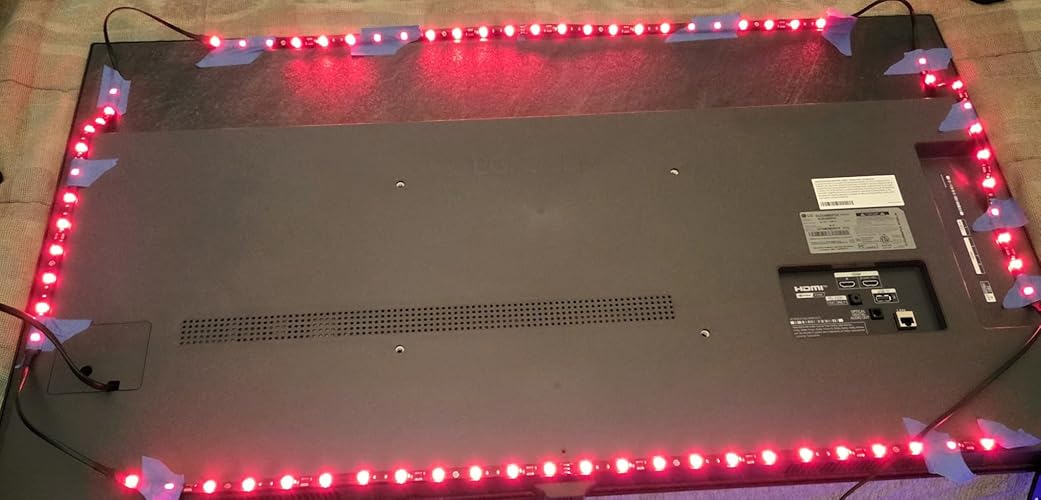
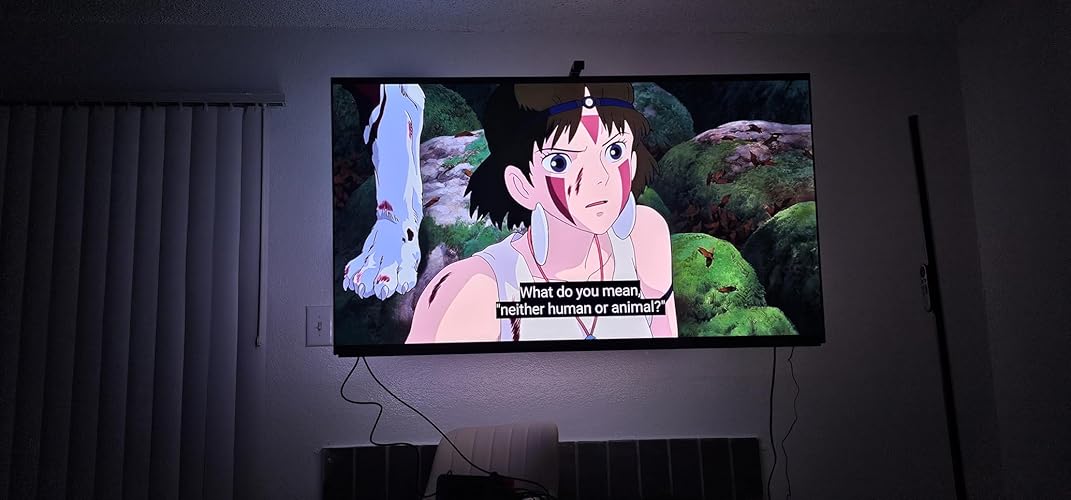
I love these lights. High-quality dynamic backlighting for your TV. With the calibration and settings dialed correctly, it moves and breathes smoothly with the picture as you use the screen. With this installed it really amps up the cozy and artsy vibes of the screen, adding further immersion. It's also easier on your eyes in a dark room to add backlighting. You can set the brightness level to the level you want, and you can fully control the colors and tone, whether you want to set it to something static, add a colored border, or use the dynamic lighting (which is what I'm currently using). These lights were made for 55 inch to 65 inch TVs. There are four strips rolled up, two for the short side and two for the long side. No matter which corner you start from, you will be able to set it up properly during calibration. The strips stuck well so far but were not so firm that I couldn't pull up one strip to reapply it. The TV I have here in the pictures is the Sony Bravia ii OLED 4K panel (~$2000 screen, excellent picture quality for the price point). I am using a Rocketfish omnidirectional wall mount behind it. TIPS I followed some other reviews here for the calibration. It was recommended to set the TV brightness to max for calibration, then adjust both TV and backlight brightness after setup. The physical setup only required me to have a TV pulled forward from the wall a foot or so, plus a 3-step ladder so I could easily reach the top of the TV. You could absolutely install this on a TV sitting a bit forward on a stand as well. App setup was a breeze once the lights and camera were attached properly. I will sort out my cable management eventually, once I have a TV shelf installed below my panel which is my next goal for this room. The kit comes with some additional adhesive to secure the lights that I didn't end up using, as the adhesive on the back of the light strips was sufficient for now. I'm saving the extra parts just in case. Overall I highly recommend it! The dynamic lighting adds so much immersion without being loud or flashy unless you want it to be. Kinda just blends into the background and subtly amps up the quality of your whole experience. Like the color on the picture just blends seamlessly into the wall and the room. ... show more
Reviewed in the United States on December 19, 2025 Reviewed in the United States on December 19, 2025 by Anah V.

  • An effective TV watching enhancement
Size: 7.8FT for 40''-50'' TV
The Govee TV Backlight 3 Lite transformed my TV-watching experience. Installation was quick, the adhesive holds well, and the calibration process is a little tricky and will take time to get right, from mapping out the TV size to setting the light quality up within the app. But the light quality is good and works best in rooms which are very dark with no external light sources to influence the color the camera picks up. The ambient lighting makes movies and gaming feel more immersive without being distracting. The app controls are intuitive, and the customization options let you fine‑tune everything from brightness to color modes. If you want an easy, affordable way to elevate your TV experience, this backlight delivers as promised. ... show more
Reviewed in the United States on January 7, 2026 by Ryan M

  • The Best The Best
Size: 11.8FT for 55''-65'' TV
These lights are literally worth every penny plus more. Easy Installation , the quality is gives luxury. I love that I doesn't comes with a remote and I can literally control it right from the app on my phone. My favorite feature so far has been the AI mode where it literally displays the colors that are shown on the tv and the lights actually lights sync up to the sound. ... show more
Reviewed in the United States on June 12, 2026 Reviewed in the United States on June 12, 2026 by Ashley D.

  • Movie lighting must have. Movie lighting must have.
Size: 11.8FT for 55''-65'' TV
This is exactly what it was in the listing. It was very easy to install they stick to the back of the tv very well. The lights strip is good quality and they wont fall off the tv even from the heat.. The app is easy to use. Will say there are a lot of options to control it from the app. Once the control box is behind the tv your not going to be reaching back there to turn it off and on. I have mine connected to Alexa and Google so i can control them with my voice. They look great for watching movies even in a somewhat lit room. Be mindful of the camera on the top of the tv I did have to calibrate it 7 times cause it wasn't picking up all the corners and i accidentally hit the camera while walking around if your tv is on the wall you have nothing to worry about unless you have my first issue of it not catching the corners properly. The little orange squares don't stick too well especially since i had to do this several times. Even tried it without the squares and still had problems. The video was recorded after the second time of calibrating it. The problem comes when you try to get the hue right. Everything white makes the lights turn red so i had to mess with the saturation and the white balance on color calibration feature on the app to get it as close as possible to the white on the tv and its still something i have to adjust ever time i watch something.(Shown in the second picture) ... show more
Reviewed in the United States on October 20, 2025 Reviewed in the United States on October 20, 2025 by Roni Coach

  • Perfect Viewing Product
Size: 7.8FT for 40''-50'' TV
Super easy to set up and works fluidly. Awesome way to step up your viewing/gaming experience
Reviewed in the United States on June 9, 2026 by Vincent Cerasuolo

  • Great unit at a better price!
Size: 11.8FT for 55''-65'' TV
Great way to add immersion to your viewing experience, whether it be watching cable TV or a 4K movie. I went with the 55"-65" version to use on my 55" Hisense U8N. The set up instructions aren't clear on a few points, so be sure to take your time. This isn't a 5 minute install. Between installation and calibration, expect to take 30+ minutes. A few things I want to point out. 1.) The orientation of the light strip matters. The picture on the installation guide shows the led strip installed so that the power plug end is at the bottom right corner coming from the top right corner (when looking at the tv from behind, and at least on the 55"-65" version I have). Failure to install the led strip in the correct orientation shown in the drawing will result in the lights showing the colors in incorrect positions. 2.) Take your time with the calibration process. Do not think you have it wrong when setting the area of the screen, you can move forward and backward through the steps freely in the app on your phone during the process. 3.) You will likely need to adjust various settings in the app to get the light colors to closely match the colors on your screen. Most important settings for this are Saturation (turn way down)l usually) and White Balance (this will be dependent on your TV). 4.) There is an option for Part or All. Part makes the lights more reactive to color variations in the scene and All makes the colors match the scene as a whole more. There is also an option for Game or Movie. Game has faster, more abrupt lighting changes, while Movie has smoother, less rapid lighting transitions. ... show more
Reviewed in the United States on December 15, 2025 by Amazon Customer

Can't find a product?

Find it on Amazon first, then paste the link below.
Checking for best price...