Search  for anything...

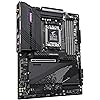
GIGABYTE B650 AORUS PRO AX AMD AM5 ATX Motherboard, Support Ryzen 9000/8000/7000 Series, DDR5, 16+2+1 Power Phase, PCIe 5.0 M.2, USB-C, WIFI6E, 2.5GbE, EZ-Latch, Q-Flash, RGB Fusion

  • Based on 91 reviews
Condition: New
Checking for the best price...
$519.00 Why this price?

Buy Now, Pay Later


As low as / mo
  • – Up to 36-month term if approved
  • – No impact on credit to apply
  • – Instant approval decision
  • – Secure and straightforward checkout

Ready to go? Add this product to your cart and select a plan during checkout.

Payment plans are offered through our trusted finance partners Klarna, Affirm, Afterpay, Apple Pay, and PayTomorrow. No-credit-needed leasing options through Acima may also be available at checkout.

Learn more about financing & leasing here.

Selected Option

Free shipping on this product

This item is eligible for return within 30 days of receipt

To qualify for a full refund, items must be returned in their original, unused condition. If an item is returned in a used, damaged, or materially different state, you may be granted a partial refund.

To initiate a return, please visit our Returns Center.

View our full returns policy here.


Availability: Only 1 left in stock, order soon!
Fulfilled by Amazon

Arrives Friday, Mar 27
Order within 16 hours and 53 minutes
Available payment plans shown during checkout

Protection Plan Protect Your Purchase
Checking for protection plans...

Style: B650 AORUS PRO AX


Features

  • AMD Socket AM5: Supports AMD Ryzen 9000/Ryzen 8000/Ryzen 7000 Series Processors
  • DDR5 Compatible: 4* SMD DIMMs with AMD EXPO & Intel XMP Memory Module Support
  • Commanding Power Design: Twin 16+2+1 Phases Digital VRM Solution with 90A Power Stage, 8-Layer 2X Copper PCB
  • Cutting-Edge Thermal Design: 8mm Mega-Heatpipe, M.2 Thermal Guard III, Fully Coveres MOSFET Heatsinks, PCIe Ultra Durable Armor
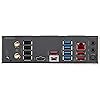
  • Next Gen Connectivity: PCIe 5.0, 1* PCIe 5.0 M.2, Quad NVMe x4 M.2, USB-C, BT 5

Description

A new era is here. The B650 AORUS PRO AX supports AM5 Processors and features unparalleled performance. GIGABYTE B650 motherboards come with upgraded power design, high grade storage standards, and outstanding connectivity that enables you to optimize your performance.

Brand: GIGABYTE


CPU Socket: Socket AM5


Compatible Devices: Personal Computer


RAM Memory Technology: DDR5


Compatible Processors: AMD Ryzen 7000 Series, AMD Ryzen 8000 Series, AMD Ryzen 9000 Series


Chipset Type: AMD B650


Memory Clock Speed: 4400 MHz


Platform: Windows 11


Model Name: B650 AORUS PRO AX


CPU Model: Ryzen 7


Processor: ‎ryzen_7


RAM: ‎DDR5


Memory Speed: ‎4400 MHz


Wireless Type: ‎802.11ax


Number of USB 2.0 Ports: ‎2


Brand: ‎GIGABYTE


Series: ‎B650 AORUS PRO AX


Item model number: ‎B650


Item Weight: ‎4.85 pounds


Product Dimensions: ‎13.18 x 10.62 x 3.14 inches


Item Dimensions LxWxH: ‎13.18 x 10.62 x 3.14 inches


Manufacturer: ‎GIGABYTE


Date First Available: ‎October 10, 2022


Frequently asked questions

If you place your order now, the estimated arrival date for this product is: Friday, Mar 27

Yes, absolutely! You may return this product for a full refund within 30 days of receiving it.

To initiate a return, please visit our Returns Center.

View our full returns policy here.

  • Klarna Financing
  • Affirm Pay in 4
  • Affirm Financing
  • Afterpay Financing
  • PayTomorrow Financing
  • Financing through Apple Pay
Leasing options through Acima may also be available during checkout.

Learn more about financing & leasing here.

Top Amazon Reviews


  • Phenominal Motherboard!
Phenomenal Bang for the buck and worth the extra cost over the B650 Aorus Elite Ax. No issues at all, Shipped with an older F4 Bios but the Voltages were within the AMD 1.3v tolerance even for an older bios. Flashed Bios to the latest 8c Revision. Everything works on the 8c Revision just can no longer save custom fan curves to the bios itself but you can save them to a Flash drive or use the Gigabyte Software and save them in windows itself. VRM Temps are amazing, As are the M.2 SSD temps, I didn't opt to put in a PCie Gen 5 SSD in the top slot because the price to performance isn't worth it for what I do at the moment So I opted for a Samsung 980 Pro 2 TB drive and it runs at a cool 38c under load in that Beefy Heatsink that comes with Thermal pads for both sides of the M.2 drive. "Ez latch" system works great but there's no mention on HOW to use it at all I had to YouTube it. For those wondering you push down the end of the Plastic "Ez Latch" retainer and it'll slightly pop up allowing you to insert the M.2 Then push down the popped up end lock it in place. The board also comes with Traditional M.2 Retention screw and posts for those that want to remove the "Ez Latch" system. The Highlight of my experience was the Front Panel Connector adapter "G Connector" that came in the package so much easier just slot the cables in the adapter and slide it into the front Panel connector pins on the board. Memory Training was Quick and Easy only waited about ~20 ish seconds for the first boot on the Older F4 Bios for the board to Memory Train on a G.Skill 64 MB Flare X5 6000 M/T CL30-40-40-96 Kit. After the 8c Bios Update Training times reduced, for those Ram Overclockers out there. Onboard sound, sounds great only wish it had the Traditional 5 ports on the back instead of the Optical input or Like some other boards 5 ports + Optical Input. Apparently the Gigabyte B650 Aorus Elite AX boards had issues with Coil whine, I can confirm that is NOT an issue at all with the Gigabyte Aorus Pro Ax board. Also too Apparently the Intel 2.5 G Ethernet chip had problems or people are warning about that too, In my research the issues were on Intel Chipset Motherboards and not the AMD Chipset boards, and from personal experience Windows 11 already had a perfectly good working driver but I wanted the latest driver so I Just went to the Offical Gigabyte website downloaded and installed the latest Drivers No issues at all with the 2.5 G Ethernet port under the Intel Controller on this model. The board does weigh a good Bit given all the Heatsink and metal armor heat dissipation it comes with. Also For those that Don't read the Motherboard Manual online - The Bottom PCIe 4 x 4 Slot Gets DISABLED if you Populate the 3rd M.2 Drive Slot on the board. Personally this isn't an issue for me but for those of you running a Capture Card or a Thunderbolt Card in the slot Just know you CAN'T use the 3rd M.2 Slot. So given this make sure you get Big Enough Drives for your first 2 M.2 Slots! The Aorus Logo on the I/o Shield / VRM Heatsink Does Light up and is addressable RGB just have to install the GIgabyte Control Center to adjust it. The board does come with 4 Basic Troubleshooting LED's about Mid board and has a nice manual power button on the board itself for testing and Troubleshooting. I only wish it had a 8 Segment Display like its more Expensive B650E and X670E Brethren. Working with this Motherboard was a lot easier then others I've worked with in the Past. Also too the Gigabyte Control Center Software does come with a lot of the other Drivers and Patches you'll need so for those looking to do less and want to use the Gigabyte Control Center anyway just download that first and download the other drivers as needed afterwards. Full System Build: B650 Aorus Pro AX Noctua NH-U12A Chromax Black Noctua NA-STPG1 - Thermal Paste Guard Noctua NM-AMB15 - AMD AM5 7mm Offset Mounting Brackets Ryzen 7 7700X Corsair RM1000e PSU G.Skill Flare X5 64 GB 6000 M/T CL 30-40-40-96 Ram Kit Samsung 980 Pro 2TB M.2 SSD 3x Corsair ML140 Fans (Front Case) 2x Corsair ML120 Fans (Blowing Air Into GPU) Re-positioned 2x Lian Li 140mm Fans to Top of the Case MSI RTX 2070 TRI FROZR (Already had from Previous build) Gigabyte M27Q-P 1440p 27" 165 Hz Gaming Monitor. Motherboard Box Includes: Motherboard nicely packaged in Anti Static plastic bag Wifi Antenna 2 Pin Pickup that can be used to adjust your fans based off of Internal case Noise DBA. (I'm not using this since i adjust fan curves based off of Temperatures and could care less about case noise) "G Connector" - For Front panel connectors to plug into and you plug it more easily into the front panel headers on the motherboard. 2x SATA Cables 1x M.2 Stand & 1x M.2 Screw (for those who don't want to use the "Ez Latch" system 1x Aorus Reflective Sticker - looks nice, thick for those who like stickers on or in their cases. Cons: No Included Driver USB or Disc even (USB CD/DVD/Blueray drives Exist so) Lower Fan Headers are Sandwiched next to the Front Panel Connectors which was Awkward for me, But good for Cable management in my chosen case. Not an "E" Variant Motherboard, Even though its 8 Layer PCB and Overbuilt Robust VRM's and Cooling can more then handle it, I will say this though The 8c Bios Revision does let you configure the First PCIe Slot to Gen 5 x16 so? "Sleeper" In Disguise maybe? Must Keep the Gigabyte Control Center Software installed in order to keep the RGB Configuration for the Aorus Lighting and other case lighting no brainer I know but worth mentioning. Final Thoughts: Definitely would hands down buy this board again Comes packed with Features that some boards which cost way more or are "E" Variant boards come with. Thermal Temps are great and has an insanely Robust and overkill 16+2+1 90A Power Stages with 8mm Heatpipe vs Others at 75A or lower stages and 6mm Heatpipes. Picked this because I got Tired of Waiting for the B650E Aorus Master to come back in stock and I don't believe in paying Scalpers their $100 - $200 dollar inflated prices. I know it was Long but I hope it helps someone make a better decision and pick up an amazing motherboard. ... show more
Reviewed in the United States on September 7, 2023 by Mike

  • Awesome B650 Motherboard w/ Premium Build
The Pro AX is the perfect balance between price, features, and build quality. If it didn't say B650 on it, I would easily believe that its an X670. As a matter of fact I actually think its better built than GIGABYTE's own base model X670 Elite AX. My ONLY gripe being the 8+4 pin CPU configuration, which is still WAY more than enough power. But cheaper, worse motherboards have an 8+8 config. But, if youre an extreme OC'er just get an X670. There seems to be absolutely NO hands on reviews of this motherboard anywhere on YT. Reviews for this board are scarce on here and on the egg. All I have to say is just buy this!!! Dont cheap out on the B650 Aorus Elite AX, ive seen way too many quality control issues with that one (mainly coil whine and a bad audio codec) Trust me, you're better off spending the extra 30 dollars on the much better built Aorus Pro AX. The Pro AX is better than the MSI B650 Tomahawk, and better than ASRocks B650 PG whatever its called. We wont even mention ASUS for obvious reasons. Installation and setup was simple enough. I highly recommend you manually update the BIOS via USB, its really simple just watch a video. DO NOT use the GCC! I pretty much uninstalled GCC after I installed the WiFi/BT drivers the rest is bloatware. All of the latest mobo drivers can be found on GIGABYTES support page. GIGABYTE also has a newer chipset driver for the B650 on their site, the official AMD page has an older chipset driver. AMD EXPO works like a charm with G.Skill Trident Z5 Neo 32GB 6000mhz CL30 kit. PBO seems to be doing its job with the R5 7600 installed, all I did was change it to enabled. I will soon be upgrading to the 7800x3d. Which the latest BIOS now fully supports. Resizeable BAR was enabled by default with my RX 6800 XT. The R5 7600 has no problems with the 6800 XT btw. Its a great CPU/GPU combo if you just want to game 6c/12t are plenty enough for it. This motherboard will more than likely be enough to support 2 generations worth of CPU upgrades, that is if AMD sticks with the same strategy as they did with AM4. PS: IGNORE all the bent pin reviews. Theyre fake accounts made by one upset person. My motherboard was brand new sealed in the packaging with a cover over the socket. ... show more
Reviewed in the United States on April 18, 2023 by Bryce Bryce

  • WARNING FOR BIG GPU’s
This had an easy clip for the gpu so you can easily take the gpu out if you wanted too, but the clip is kinda big and if you have a big gpu (I have a 7900 xtx) it makes it way harder than it needs to be to put the gpu in. The part of the east clip blocks the gpu and it don’t want to close. In my case it fit but I had to use a scary amount of force and when it finally clipped in, I thought I snapped it. Luckily I didn’t but I haven’t seen any reviews that address this issue. Hope it helps ... show more
Reviewed in the United States on November 17, 2023 by Tony Tony

  • It's works
Used it for about six months so far no issue everything is running smoothly can't complain.
Reviewed in the United States on March 3, 2024 by CrossX

  • Terrible
Ethernet port doesn't work, drivers from the support page don't install properly. Updated the bios to the newest version. Enabling AMD EXPO won't even allow me to post after restart. Have to clear cmos to boot Returned it and got an ASRock motherboard. The internet works and with AMD EXPO enabled it booted in just a few seconds. ... show more
Reviewed in the United States on August 10, 2023 by Truthful Reviewer

  • Une belleza de board
Acabo de comprarlo y hasta el momento, muy contento con la compra, el board funciona muy bien, es fácil de instalar los componentes (fue mi primera vez armando un computador y fue bastante sencillo todo). Se ve de calidad, partes sólidas y buen diseño. Me gusta mucho que el compartimiento para el disco duro M.2 tenga la protección termal, y que la forma de sujetarlo no sea con tornillo sino con un sistema sencillo y fácil de usar. Hasta el momento no tengo mucho por decir porque lo instalé hace muy poco, pero todo se ve de buena calidad. ... show more
Reviewed in the United States on August 25, 2023 by Juan Pablo Forero

Can't find a product?

Find it on Amazon first, then paste the link below.
Checking for best price...