Search  for anything...

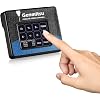
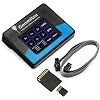
Genmitsu CNC Router Offline Control Module with LCD Touchscreen for PROVerXL 4030, PROVerXL 4030 V2 CNC Machine

  • Based on 404 reviews
Condition: New
Checking for the best price...
$46.74 Why this price?
4th of July Sale · 15% off was $54.99

Buy Now, Pay Later


As low as $11 / mo
  • – 4-month term
  • – No impact on credit to apply
  • – Instant approval decision
  • – Secure and straightforward checkout

Ready to go? Add this product to your cart and select a plan during checkout.

Payment plans are offered through our trusted finance partners Klarna, Affirm, Afterpay, Apple Pay, and PayTomorrow. No-credit-needed leasing options through Acima may also be available at checkout.

Learn more about financing & leasing here.

Selected Option

Free shipping on this product

FREE 30-day refund/replacement

To qualify for a full refund, items must be returned in their original, unused condition. If an item is returned in a used, damaged, or materially different state, you may be granted a partial refund.

To initiate a return, please visit our Returns Center.

View our full returns policy here.


Availability: In Stock.
Fulfilled by Amazon

Arrives Tuesday, Jul 7
Order within 17 hours and 22 minutes
Available payment plans shown during checkout

Protection Plan Protect Your Purchase
Checking for protection plans...

Style: For PROVerXL 4030


Features

  • This offline module is only compatible with Genmitsu CNC Router PROVerXL 4030 and PROVerXL 4030 V2.
  • Easy to Use: This offline controller features an easy to read 2.4 Touchscreen display.
  • Manual Control: Take control of your PROVerXL with a controller. Its easier to manually jog your machine on the fly and toggle your spindle on/off.
  • Easy File Access and Transferring: Your generated G CODE projects will be recognized simply by adding them to the SD Card.
  • No PC Offline Control: With the Genmitsu offline controller module, you can control the CNC router without connecting to a computer. Easily load your projects onto the included SD card and have them ready to go without the need of a dedicated laptop or computer.

Description

With the Genmitsu Offline Controller module you can free yourself from having to dedicate a laptop or desktop running your PROVerXL 4030 or PROVerXL 4030 V2. Easily Jog your XYZ Axis making it easy to set up jobs on the fly with easy access to toggling your spindle ON/OFF. Comes with a 2.4" Touchscreen LCD Display that's easy to read and use. Your projects can be directly saved and recognized by copying them to the included SD card making it easy to store your finished projects for future use. Please note that Computer Control and Offline Control can’t be used at the same time. Please disconnect the computer when using the controller. Visit the Store Visit the Store Visit the Store Visit the Store Visit the Store Visit the Store Visit the Store Visit the Store Here at SainSmart we have been serving the maker community for years, starting in the early days with high-quality electronic parts and into today with our Genmitsu line of CNC mills for every experience level. We love making, we are just a bit different than the people we make our products for. Our passion is making the best, most affordable tools available and getting them out to the maker community at large to do their thing!

Color: Black


Brand: Genmitsu


Voltage: 36 Volts


Product Dimensions: 3.5"L x 2.8"W x 0.7"H


Material: For PROVerXL 4030


Brand Name: Genmitsu


UPC: 816550024133


Global Trade Identification Number: 33


Manufacturer: Genmitsu


Part Number: RC4030


Model: Offline Controller


Included Components: Offline Controller


Unit Count: 1.0 Count


Item Type Name: Offline Controller


Voltage: 36 Volts


Display Type: Touchscreen


Operating Temperature: 22 Degrees Celsius


Color: Black


Material Type: For PROVerXL 4030


Item Dimensions L x W x H: 3.5"L x 2.8"W x 0.7"H


Item Weight: 0.12 Kilograms


Frequently asked questions

If you place your order now, the estimated arrival date for this product is: Tuesday, Jul 7

Yes, absolutely! You may return this product for a full refund within 30 days of receiving it.

To initiate a return, please visit our Returns Center.

View our full returns policy here.

  • Klarna Financing
  • Affirm Pay in 4
  • Affirm Financing
  • Afterpay Financing
  • PayTomorrow Financing
  • Financing through Apple Pay
Leasing options through Acima may also be available during checkout.

Learn more about financing & leasing here.

Top Amazon Reviews


  • Terrific Control Module For My CNC Router
Style: For PROVerXL 4030
This Genmitsu off-line controller is far better an addition to my ProverXL 4030 CNC router than I could have hoped for. Extremely easy to set up and use. The connector cable is plenty long enough to let me maneuver about my work area. I was expecting it to cost much more and am happy with this wonderful price point. Between the manual and online videos, it took mere minutes to master the controller. it is really nice to not have to have the router tethered to a computer. The card reader works perfectly, and I have not experienced any issues with transferring program files. The display is clear and easy to view. ... show more
Reviewed in the United States on February 28, 2024 by The Dirty Gringo

  • No computer to muck up!!!
Style: For 4040-PRO/4040 Reno
if you do not know CNC generates lots of dust, if you are running with a computer with a cooling fan dust will clog and eventually kill it.. The offline controller lets you run CNC jobs without a connected computer.. It may be an additional cost up front, but you do not need to risk your PC or laptop which is much more expensive ... show more
Reviewed in the United States on November 25, 2024 by Robert C. Nemeth

  • No SD Card nor USB Drive
Style: For 3018-PROVer V2/ LC-50 Plus
Bought the "Cheaper" Version that was at a lower price to work in tandem with the Control Module. All looked good, except NO SD CARD nor USB drive with supported files to work with Offline Controller. Only received the Offline Controller and Cord to go with it, (That's it). You could possibly use the Files that came with " A " CNC machine you've bought and or previously bought, that comes with an Offline controller, but good luck it's probably a 50/50 chance it'll work. Good Luck trying to find supported files. The Actual Company don't have the files for download; a heads up justttttttttttt incase you didn't get a SD & or USB drive. Would be a 5 start, but selling for a cheaper price and not providing all what's shown to be delivered it quite heart breaking. ... show more
Reviewed in the United States on September 18, 2023 by Ray

  • Came with German instructions only!
Style: For PROVerXL 4030
So the seller was very nice and reached out to me and offered a full refund (You don;t see that everyday!) However, I decided to look on Youtube to see if anyone had instructions on how to get this unit working on the Genmitsu Prover XL 4030 (which is what I recently bought) and I found a video YAY! So in liue of this, I changed my rating to 5 stars and well deserved because the vendoe was offering me a full refund. I decided to keep it and now it runs GREAT! Thank you! :D ... show more
Reviewed in the United States on April 28, 2024 by National Sportswear

  • Not User Friendly and Little Support
Style: For PROVerXL 4030
I hate this thing! My first run seemed to go well but I broke a bit and had to stop everything. My bad but since then I can get the spindle to operate properly. At times I can't get the spindle to jog, then I can't get the spindle to spin. I've revised my cut plans several times using Easel and downloading them to the SD card. By the way I'm using a Mac which you should know isn't supported by the Candle software. Thanks for letting me know about that. No problem however since I have the offline controller - riiiiiggght. I've spent over 16 hours trying to get this piece of "@&@%" to work and nothing. Yesterday afternoon I got the spindle to move to the first cutting position but the spindle wasn't turning. This morning, after unplugging everything in hopes for a reset, I tried a new file and only the spindle would turn, nothing else. Yesterday I ordered a new laptop in hopes of getting my CNC up and running. Fingers crossed. ... show more
Reviewed in the United States on November 10, 2021 by Mike

  • The menus are not convient to use and it has a lower step resolution than Candle.
Style: For PROVerXL 4030
First, I'll tell you what software and CNC I am using for anyone that might have the same stuff. Machine: Genmitsu PROVerXL 4030 Design software: Carveco GRBL controller: Candle First, the good. I love that I don't have to have my laptop connected to my CNC machine all the time in order to make a part! The bad: The menu buttons are all wrong. If you hit the return button from any menu, you go to the main screen, not the previous menu you were in which means when you are jogging your machine to move it to the 0 point of the work piece, when you set 0 for one of the axis and then want to move the machine to set 0 on the next one, you have to go back to the main menu and get back to the jog screen instead of just going "back" to where you just were 1 screen ago. Next, and this is the big one for me, with my laptop connected, I can move my machine 1/100 of a mm at a time to get the most accurate 0 point setup I can achieve. With this offline controller, I can only move 1/20 of a mm. The Candle software has a 5 times greater resolution than this controller. For the parts I am making, that matters although I know not everyone that is machining things are going to have this problem. Next, when you add a file to the SD card, there is no button to refresh which means you have to turn the machine off and then on again to load a change to your file. You can't pull out the SD card, make a change and then re-insert the SD card all with power on or the controller doesn't recognize the card. My 3D printer has a button to re-initialize a card if you do need to make a change. Seems like an easy button to add to the menus. If you think I'm being petty about it, you haven't thought through the ramifications. That means re-zeroing your machine each time you make an adjustment to the program because it loses its position each time you power off the machine...VERY INCONVENIENT! Next, when you first power on the machine, you have to press the reset and then the unlock buttons before you can jog any motors. You can go through an entire program load and once you press the button to start the cut, you get an error message because the stepper motors are not unlocked. Why not just add that bit of code to the startup process? It's an easy thing to forget to do each time you power up and if it's something that needs done each time, why is it a manual process? Next, it took me a couple of nights to get it to work at all. I kept getting an error message when a file was loaded and start to cut. I did read the online manual for this controller and I did insert the G90 code at the beginning of the program just like the manual said. But, the manual also said not to delete any other lines of code when doing this. That is a lie! This controller cannot handle a T code (tool change command) it will throw an "unsupported command" error instead of just skipping over an unknown command. A tool change command happens to be inserted at the beginning of every code my software makes. I needed to replace the T1M6 code with the G90 code to get it to work. This offline controller will show you the Gcode but it will not tell you what line throws the error message so I had to find that trick out by trial and error. It will also not tell you which line of code it is currently executing. There is a list of error codes online for this GRBL but they are very nondescript. Finally, there is no way to get to the feed rate controls until you have started the program. That means the CNC is already moving before you can even reach the menu to make adjustments. I have broken countless bits because I didn't get the machine slowed down until after the cut had already started. Why can't that be one of the menus that can be reached before a program starts to cut? With some minor adjustments to the menus, this could be the best darn offline controller a guy could hope for but as it is, I'm better off just lugging my laptop back out the shop and using decent software to do the same job. It's kind of like the most inconvenient piece of convenience you can spend your money on. ... show more
Reviewed in the United States on April 17, 2024 by Andy Krejci

  • Improves System Stability
Style: For PROVerXL 4030
I purchased the offline control module after experiencing repeated stability issues while using UGS on a laptop computer via USB cable. Some carves would complete successfully while others would stop randomly for no apparent reason. The offline module seems to have resolved these issues. The process of loading the Gcode files onto the SD card is an extra step but is easily accomplished on a Chromebook with an SD slot if you use Easel. User interface is an intuitive menu driven touch screen. ... show more
Reviewed in the United States on May 1, 2024 by NCResident

  • Must unlock before using for Manual traverse.
Style: For 4040-PRO/4040 Reno
Worked wonderfully for my machine, the only issue is that you have to scroll the the picture of a lock and click on it, otherwise you can’t manually Traverse the X,Y, and Z. It doesn’t specifically point this out in the instructions.
Reviewed in the United States on December 1, 2024 by Sean

Can't find a product?

Find it on Amazon first, then paste the link below.
Checking for best price...